
As Amazon Associates, we earn from qualifying purchases. This means we may receive a small commission at no extra cost to you if you click through and make a purchase.
If you want to turn your smartphone into a dedicated handheld rig for mobile titles, cloud streaming, and social capture, the Backbone One (USB-C) provides a hardware-first bridge between modern phones and full-scale gaming setups. Engineered specifically for contemporary USB-C smartphones—including the iPhone 15, iPhone 16, and iPhone 17 families alongside compatible Android devices—this second-generation mobile controller docks directly into the base of your handset to eliminate the pairing steps and wireless latency common to Bluetooth gamepads. For creators, mobile vloggers, and hobbyists who treat their phone as a primary multimedia workstation, the direct interface guarantees instant control response across App Store action titles, retro emulators, and high-bitrate remote console sessions.
Opting for the USB-C configuration gives multi-platform flexibility between current Apple handsets and modern Android hardware, replacing earlier single-ecosystem limitations, though older iPhone models equipped with Lightning connectors still require their dedicated hardware edition. In this detailed review, we explore how the controller integrates into on-the-go gameplay capture, evaluate the native iOS emulation hub, analyze remote play streaming stability from home consoles, and examine real-world case compatibility for everyday carry.

What You Get With the Backbone One (USB-C)
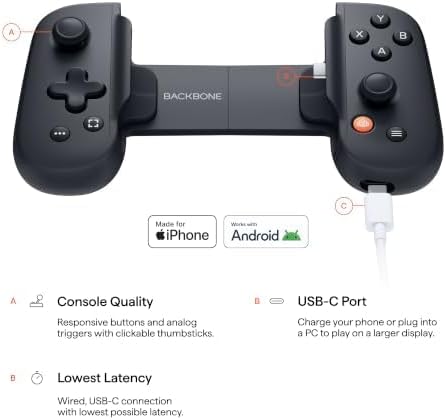
The retail package is intentionally streamlined, supplying the core expandable gamepad alongside modular hardware inserts that address fitment across bare and protected smartphones.
- Backbone One (USB-C) 2nd Gen mobile gaming controller in black
- Magnetic case adapter set engineered for broader smartphone and case compatibility
- Direct USB-C male connection pin for low-latency physical docking
- Integrated pass-through USB-C port for simultaneous device charging
- Integrated 3.5mm stereo headset jack for zero-latency audio monitoring
- Access to the Backbone+ application trial membership featuring capture, friends lists, and launcher services
- In-app emulator capability on supported iOS platforms
Key Specifications
| Specification | Detail |
|---|---|
| Brand | Backbone |
| Model Name | One |
| Hardware Generation | 2nd Gen |
| Connector Type | USB-C |
| Button Quantity | 8 physical action and navigation inputs |
| Compatible Devices | iPhone 15/16/17 series, modern Android phones |
| Hardware Platform Support | iOS, Android, PC/Mac, PlayStation, Xbox |
| Product Dimensions | 6.9 x 1.28 x 3.5 inches |
| Item Color | Black |
| Package Quantity | 1 unit with case adapters |
Gameplay Recording and Content Capture Workflows
For creators who share gameplay clips to YouTube Shorts, TikTok, or streaming platforms, the physical design and companion ecosystem of the controller solve several persistent workflow bottlenecks. On-screen touch interfaces force mobile gamers to cover vital display real estate with their thumbs, creating cluttered video captures full of visual interference. Docking the phone into the controller uncovers the full display panel, ensuring that any clean screen recording captures pure gameplay without artificial UI overlays or thumb smudges ruining the shot composition.
Capturing video natively on a phone can often become complicated when juggling operating system control panels while mid-match. Through the companion app unlocked via the included Backbone+ trial membership, the controller features integrated game recording tools designed to archive highlight moments without interrupting active play sessions. When you finish recording your clips on mobile, moving footage over to a dedicated desktop workspace such as an hp pavilion 4k editing setup allows you to cut highlights, adjust color profiles, and master audio tracks with full desktop precision.
Audio synchronization is equally critical during recording sessions, where Bluetooth earbuds often introduce distracting delays between visual button presses and game sound effects. The controller features an onboard 3.5mm headphone jack, allowing you to run direct wired audio monitoring directly into studio headphones or an external microphone interface. This zero-lag analog path ensures that weapon fire, dialogue cues, and ambient sound line up frame-for-frame against recorded screen footage, significantly cutting down post-production sync adjustments.
In-App Emulation and Retro Hub Support on iOS
The addition of an integrated retro gaming hub elevates the controller beyond traditional cloud and App Store titles for vintage gaming enthusiasts. Apple mobile devices running iOS version 18.4 or higher can take advantage of Backbone’s built-in emulator platform, transforming the connected iPhone into an offline vintage gaming rig. The software environment lets users import their personally owned ROM files directly, giving retro enthusiasts a unified launcher interface complete with physical control mappings out of the box.
Hardware inputs are where vintage emulation on mobile typically stumbles, because older platform games demand precise D-pad accuracy and tactile button responses that touchscreens cannot replicate. The precision thumbsticks and responsive directional pad on this unit provide the tactile feedback required for classic platformers, fighting games, and vintage role-playing adventures. Running these retro titles locally means you do not need an active cellular or Wi-Fi connection, making it an ideal entertainment solution during flights or off-grid travel.
There are software requirements that buyers must keep in mind before planning an emulation-heavy setup. The in-app emulator is tied to the Backbone+ subscription ecosystem, meaning ongoing access requires maintaining an active membership beyond the included trial period. Furthermore, while the iOS feature set is live for users on iOS 18.4 and above, the manufacturer notes that the equivalent Android version of the in-app emulator remains in active software development.
Remote Play Streaming and Cloud Gaming Reliability
Mobile cloud streaming has expanded rapidly, and this hardware acts as a physical terminal for services like Xbox Game Pass, NVIDIA GeForce NOW, PlayStation Remote Play, and Steam Link. Connecting over high-speed home wireless allows you to launch your console or PC catalog from bed, the patio, or a hotel room. If you want to fire up a remote session of a high-speed driving title like a forza xbox one campaign directly from your home hardware, the analog triggers provide continuous graduation rather than basic on-off digital activation.
The controller’s ultra-wide analog triggers and responsive thumbsticks give you the precision necessary to compete in fast-twitch shooters and complex driving simulations. Because the controller docks via a physical USB-C port rather than a wireless radio, control latency is kept to the absolute bare minimum that the hardware allows. In cloud and remote play environments, eliminating input latency at the local gamepad level is essential because network transmission already introduces unavoidable variable ping.
When using your phone as a portable console terminal around the house, audio immersion can also be augmented by routing device audio to external speakers such as a klipsch the one plus sound system via Bluetooth while your hands remain anchored to the physical controls. Pass-through USB-C charging on the bottom edge of the controller ensures your phone does not drain its battery completely during extended remote play sessions, letting you tether an external power bank or wall charger directly to the controller chassis.
Case Compatibility and Everyday Portability
The original generation of mobile snap-on controllers frequently forced users to strip protective cases off their phones every time they wanted to jump into a game. The 2nd Gen revision of this controller addresses that friction by shipping with interchangeable magnetic adapters designed to expand clearance around the USB-C plug. These adapters seat around the connector bridge, accommodating a wide range of slim and standard protective everyday phone cases without demanding that you expose your device to accidental drops.
Portability is defined by the spring-loaded telescoping bridge mechanism, which collapses down to a compact footprint measuring 6.9 x 1.28 x 3.5 inches when detached from a handset. This collapsed profile slips into a camera bag divider, daypack pocket, or tech pouch without adding significant weight or bulky protrusion. The ergonomic contours on the hand grips provide enough purchase to stabilize heavier modern flagship smartphones without placing excessive strain on the user’s wrists during prolonged sessions.
For creators and vloggers who travel light, the controller acts as an all-in-one companion that replaces the need to pack a separate standalone console or full-size wireless gamepad clip. Because the controller draws minimal power directly from the host phone via the USB-C connection, there are no internal controller batteries to monitor, charge, or replace before heading out the door. You simply snap the phone into the bridge, verify the USB-C seating, and begin playing or recording instantly.
Check Backbone One (USB-C) on Amazon
Is the Backbone One (USB-C) Worth It
The Backbone One (USB-C) is an exceptionally strong investment for iPhone 15, 16, and 17 owners who actively stream console games via Remote Play, play competitive App Store titles, or want an organized mobile emulation hub. Creators who record mobile gameplay directly to their handsets will appreciate the uncluttered screen capture and the low-latency wired audio jack, both of which streamline production workflows. The hardware bridge turns an everyday smartphone into a capable handheld rig without requiring extra Bluetooth pairing menus or dedicated gamepad clips.
However, the value calculation shifts if your smartphone inventory still relies on legacy connectors. Owners of the iPhone 14 or older generations cannot use this USB-C unit directly and must purchase the dedicated Lightning variant instead. Furthermore, users who primarily want the in-app retro emulator on Android should note that the software feature is still under development for that operating system, whereas iOS users must run version 18.4 or higher alongside a Backbone+ subscription to access that specific functionality.
If you already own a compatible USB-C device and want a compact, travel-ready controller that fits over most everyday cases and minimizes input latency, this second-generation unit hits the sweet spot between physical build quality and functional mobile convenience. It effectively eliminates the compromises of virtual touchscreens while delivering full console-style ergonomics in your pocket.
FAQ
Does the Backbone One (USB-C) work with protective phone cases?
Yes, the 2nd Gen model includes interchangeable magnetic adapters designed to provide extra physical clearance around the USB-C connector, allowing it to fit many standard and slim protective phone cases without requiring case removal.
Do you need a paid Backbone+ subscription to use the controller?
No, the physical controller functions as a standard hardware gamepad for native App Store games, cloud streaming apps, and remote play services without an active subscription. However, advanced software features such as the in-app ROM emulator, native gameplay recording tools, friends lists, and the unified app launcher require a Backbone+ membership following the included trial period.
Can you use the in-app emulator on Android devices?
The listing states that the in-app emulator is currently available to iOS users running operating system version 18.4 or higher, while the Android version of the in-app emulator remains in development.
Will this USB-C model work on older iPhones with Lightning ports?
No, this model features a fixed physical USB-C male connector intended for iPhone 15, 16, and 17 models alongside USB-C Android phones. If you have an iPhone 14 or older Apple handset, you must use the Lightning-specific edition of the controller.
Does the controller have an internal battery that requires charging?
No, the controller does not contain a built-in battery. It draws minimal operating power directly from your smartphone through the physical USB-C connection and includes a pass-through USB-C port so you can charge your phone while actively gaming.


