As Amazon Associates, we earn from qualifying purchases. This means we may receive a small commission at no extra cost to you if you click through and make a purchase.
Finding an editing display that bridges the divide between digital capture and physical output is one of the most frustrating challenges in commercial photography and print production. The BenQ SW272U is engineered directly for photographers, retouchers, and digital media specialists who need reliable color consistency across color spaces like Adobe RGB and DCI-P3. If your daily work involves soft-proofing fine art prints, grading high-resolution commercial imagery, or delivering color-accurate assets for digital publications, this 27-inch 4K UHD display is positioned as a purpose-built workstation centerpiece that minimizes color discrepancies between your screen and your final deliverables.
In this detailed BenQ PhotoVue SW272U review, we examine the practical realities of integrating this monitor into an active studio environment. We evaluate how the 4K resolution, 16-bit 3D look-up table, and integrated hardware calibration handle precise image manipulation. We also analyze the real-world advantages of its anti-reflective coating, examine its single-cable connectivity capabilities, break down its core technical specifications, and answer the critical workflow questions you should consider before making an upgrade.
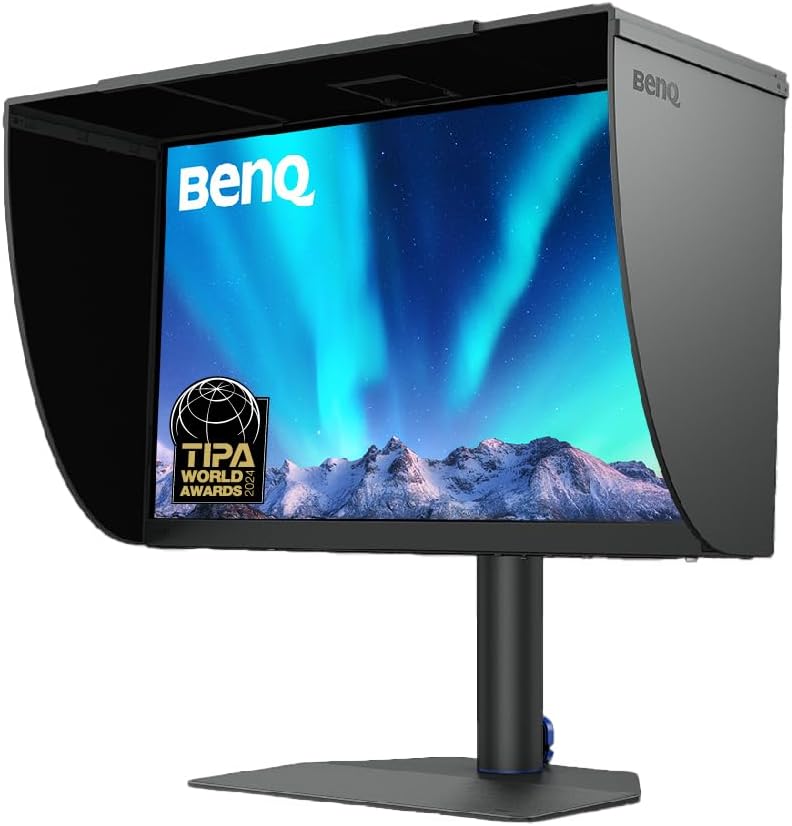
What You Get With the BenQ SW272U

The BenQ SW272U is tailored around photographic consistency and precision studio workflows. While the listing does not specify the full breakdown of packed cables or bundled physical accessories in the retail carton, the monitor incorporates an extensive array of factory-integrated hardware features and workflow utilities directly into its core design.
- 27-inch 4K UHD IPS display featuring a native resolution of 3840 x 2160 pixels at a 16:9 aspect ratio
- Nano Matte Panel engineering paired with TUV anti-reflection certification to minimize screen reflections and simulate paper texture
- Extensive color space coverage reaching 99% of Adobe RGB, DCI-P3, and Display P3 gamuts
- 10-bit color depth capable of rendering 1.07 billion colors for seamless tonal gradients
- Internal 16-bit 3D Look-Up Table (LUT) for precise internal color blending and balance
- Direct hardware calibration support using BenQ Palette Master Ultimate software, running 40 percent faster than previous iterations
- BenQ Paper Color Sync technology designed for screen-to-print color and contrast simulation based on specific paper types and printer models
- High dynamic range (HDR) decoding support alongside a static contrast ratio of 1000:1 and 400 nits peak brightness
- Modern interface connectivity consisting of USB Type-C with 90W power delivery, DisplayPort, and HDMI
Key Specifications
| Attribute | Detail |
|---|---|
| Screen Size | 27 inches |
| Native Resolution | 4K UHD (3840 x 2160 pixels) |
| Panel Technology | IPS (In-Plane Switching) LCD |
| Color Gamut Support | 99% Adobe RGB, DCI-P3, Display P3 |
| Color Depth | 10-bit (1.07 billion colors) with 16-bit 3D LUT |
| Peak Brightness | 400 nits |
| Static Contrast Ratio | 1000:1 |
| Refresh Rate & Response Time | 60 Hz refresh rate, 5 ms response time |
| Viewing Angles | 170 degrees horizontal and vertical |
| Input Ports | USB Type-C (90W Power Delivery), DisplayPort, HDMI |
| Physical Dimensions | 10.78 inches D x 24.17 inches W x 17.78 inches H |
| Total Weight | 19 pounds |
Color Accuracy and Calibration Precision for Visual Artists
Achieving uncompromising color fidelity is the foundational objective of the BenQ SW272U color accuracy architecture. Visual creators working in commercial print or landscape photography frequently struggle with the narrower sRGB gamut clipping vibrant cyans, greens, and saturated reds. By delivering 99% coverage of the Adobe RGB space alongside 99% DCI-P3 and Display P3, this monitor reproduces the wide spectral bands required for museum-grade printmaking and high-end digital publishing. The 10-bit panel renders up to 1.07 billion colors, which prevents the posterization and banding across delicate skies and subtle skin tones that often compromise standard 8-bit consumer monitors.
The core engine behind this precision is its internal 16-bit 3D look-up table. Unlike standard graphics card calibration, which modifies the output signal leaving your computer and often reduces dynamic dynamic range, BenQ SW272U hardware calibration adjusts the internal image processing chip of the monitor directly. Using BenQ Palette Master Ultimate software, which the manufacturer states operates 40 percent faster than previous utility builds, calibration profiles are written straight to the display hardware. This ensures that regardless of whether you swap host workstations, the underlying color rendering remains strictly standardized and repeatable across long-term production cycles.
For fine art photographers who sell physical prints, BenQ Paper Color Sync technology bridges the physical and digital divide. By selecting your target color gamut, specific printer model, and intended paper stock, the software adjusts on-screen contrast and white point to emulate physical paper texture and ink absorption. While rapid-action competitive monitors such as the benq zowie xl2586x+ deliberately strip out color depth in pursuit of ultra-high frame rates, the SW272U focuses entirely on static color integrity, rendering every tonal transition with clinical fidelity.
The Nano Matte Panel and Ambient Glare Management
Ambient lighting has always been the primary adversary of accurate digital proofing. Uncontrolled overhead studio lights, side-window glare, and even the color of the clothing you wear can bounce off traditional screen coatings, skewing perceived shadow density and local contrast. The BenQ SW272U nano matte panel addresses this with specialized optical engineering that holds official TUV anti-reflection certification. Although standard specification databases sometimes categorize untreated glass substrates generically as glossy, the active viewing surface of this unit features an advanced micro-texture coating that diffuses incident light across its face without creating the harsh sparkling artifacts that plague older matte screens.
This anti-reflective surface treatment is specifically designed to simulate the non-reflective visual feel of fine art paper. By scattering incoming ambient beams, the panel maintains its 1000:1 contrast ratio and deep black floor even in brightly lit retouching bays. When working under controlled studio lighting or positioning auxiliary illumination such as a balanced benq screen bar overhead, the display suppresses hot spots and mirror-like distractions, allowing you to evaluate delicate shadow gradations accurately across the full 400 nits brightness range.
The IPS panel design preserves consistent chromatic balance across a 170-degree viewing angle. In a collaborative studio environment where art directors, clients, or retouching assistants view the display off-axis, color shifts and luminance drop-offs are kept to a strict minimum. This optical stability ensures that critical editing evaluations remain objective from edge to edge across the entire 27-inch canvas.
Studio Ergonomics and USB-C Single-Cable Connectivity
Modern production workflows require seamless integration between mobile workstations, secondary grading machines, and central studio displays. The BenQ SW272U USB-C workflow simplifies physical desktop cable management by routing 4K video signals, peripheral data streams, and up to 90 watts of system power delivery through a single connection. Photographers returning from location shoots can plug a modern editing laptop directly into the monitor, driving the native 3840 x 2160 resolution while charging the machine at high speed without pulling an external power brick out of their gear bag.
In addition to USB Type-C, the monitor includes dedicated DisplayPort and HDMI video inputs, allowing you to connect multiple editing workstations, dedicated studio towers, or auxiliary capture units simultaneously. Whether you are running a fully loaded desktop tower or docking a compact portable workstation like a refurbished microsoft surface pro for client proofing sessions, switching between sources is straightforward and responsive.
The physical footprint of the display measures 10.78 inches deep, 24.17 inches wide, and 17.78 inches tall, weighing in at a substantial 19 pounds. This heft provides a stable, vibration-resistant anchor on heavy wooden studio desks, keeping the screen steady when adjusting viewing heights or working adjacent to heavy printing and scanning machinery. The robust stand construction ensures that precision color evaluation is never disrupted by mechanical wobble or insecure mounting hardware.
Comparing Professional Production Displays Against Entertainment Panels
When selecting a primary 4K monitor, creators often wonder whether a multi-purpose display or an ultra-fast gaming panel could serve double duty for professional color work. Entertainment and gaming panels, such as the alienware 32 aw3225qf oled qd-oled 240hz gaming monitor, prioritize refresh speeds of 240Hz, instantaneous pixel response, and deep organic black levels. However, those screens lack internal 16-bit 3D LUT hardware access, custom paper-sync emulation modes, and the standardized wide-gamut Adobe RGB coverage essential for professional commercial offset and inkjet printing.
The BenQ SW272U operates at a conservative 60 Hz refresh rate with a 5-millisecond response time. For fast-twitch competitive gaming, these figures are standard rather than cutting edge. But in an imaging studio, higher refresh rates provide zero benefit when retouching 60-megapixel raw files, creating vector illustrations, or editing commercial print assets. The resources of the SW272U are directed entirely toward color uniformity, absolute grayscale linearity, hardware-level calibration storage, and eliminating specular glare.
Additionally, while high-contrast entertainment panels often feature glossy reflective glass that exaggerates saturation and creates artificial contrast punch, the SW272U favors tonal neutrality. Its HDR capabilities and 400 nits brightness are tuned to show true shadow detail and highlight roll-off rather than blinding consumer spectacle. For visual artists, choosing between an entertainment monitor and a dedicated graphic arts display comes down to whether your priority is consuming high-framerate media or producing dependable, color-accurate commercial work.
Is the BenQ SW272U Worth It
Determining whether the BenQ SW272U represents the right investment depends strictly on how heavily your daily output relies on color accuracy and physical print translation. For commercial photographers, fine art printers, visual retouchers, and packaging designers, this monitor pays for itself by eliminating costly test prints, wasted media stock, and client revisions caused by uncalibrated screen drift. The combination of 99% Adobe RGB coverage, internal 16-bit 3D LUT hardware calibration, Paper Color Sync, and the Nano Matte anti-reflection panel gives working creatives a dependable reference standard that consumer monitors simply cannot match.
Conversely, general office workers, web developers who work strictly within the standard sRGB web space, and dedicated PC gamers should look elsewhere. If you do not own a hardware colorimeter, never print on wide-gamut media, or prioritize frame rates above 60 Hz for gaming, the specialized hardware engineering of the SW272U will remain largely unutilized. Its price point reflects dedicated photographic tooling rather than general productivity conveniences.
For the serious image-maker seeking studio-grade stability without stepping into prohibitive five-figure broadcast reference monitors, the SW272U hits an exceptional sweet spot. It delivers uncompromising panel uniformity, robust 90W single-cable USB-C integration, and direct hardware-level precision that streamlines professional creative operations from capture to print.
FAQ
What makes the BenQ SW272U hardware calibration different from standard software profiling?
Standard software calibration alters the video signal via your computer graphics card, which can introduce color banding, compress dynamic range, and lose calibration settings when switching host computers. The BenQ SW272U uses BenQ Palette Master Ultimate software to write calibration profiles directly to the monitor internal 16-bit 3D LUT hardware. This preserves maximum tonal gradation, eliminates host system discrepancies, and ensures identical color reproduction across any connected machine.
How does the Nano Matte Panel assist with print proofing?
Glossy and untreated screens produce specular reflections from room lighting and viewer clothing, artificially exaggerating perceived contrast and saturation. The Nano Matte Panel on the SW272U features TUV-certified anti-reflective micro-texturing that diffuses incoming ambient light. This creates a soft, non-glare surface that closely mimics the tactile, non-reflective appearance of fine art paper, making screen-to-print soft-proofing significantly more predictable.
Can the USB-C port power a demanding laptop while transferring 4K video?
Yes. The integrated USB Type-C port supports up to 90 watts of Power Delivery alongside high-resolution DisplayPort alternate-mode video and data transmission. This provides sufficient wattage to charge and run most modern high-performance creative laptops through a single cable, eliminating the need for an external laptop charger on your desk.
Is the BenQ SW272U suitable for video editing and HDR production?
The SW272U includes native HDR decoding support, 99% DCI-P3 color gamut coverage, and a crisp 3840 x 2160 4K UHD resolution, making it highly capable for digital video color grading and commercial broadcast editing. However, with a peak brightness of 400 nits and a 1000:1 static contrast ratio, it is tuned for standard dynamic range mastering and print work rather than high-nit HDR mastering that demands thousands of nits.
Does the BenQ SW272U support high refresh rate gaming?
No. The BenQ SW272U has a native refresh rate of 60 Hz and a response time of 5 milliseconds. While perfectly responsive for creative desktop tasks, photo retouching, and standard video playback, it is not engineered for high-framerate competitive gaming that requires 120 Hz, 144 Hz, or higher performance.