
As Amazon Associates, we earn from qualifying purchases. This means we may receive a small commission at no extra cost to you if you click through and make a purchase.
As an Amazon Associate we earn from qualifying purchases. Links on this page are affiliate links.
Finding the best embroidery machines for beginners requires looking at hard specs rather than marketing claims. We compared 9 models based on the specifications published on their listings. The Brother Wireless Sewing and Embroidery Machine leads because it features a 7-inch touchscreen and Wi-Fi connectivity for easy design transfer. This guide helps you decide which machine fits your workspace and project needs.
Choose Your Embroidery Area Size
The most critical spec is embroidery area. Machines range from 4×4 inches to 7.9×7.9 inches. A 4×4 hoop suits small home projects and fits easily on a desk. Larger areas like 5×7 or 7.9×7.9 allow bigger designs but require more table space. Check the listed dimensions to ensure the machine fits your workspace before buying.
| # | Product | Best for | Price |
|---|---|---|---|
| 1 | Brother Wireless Sewing and Embroidery Machine Best overall | Beginners wanting wireless connectivity and a touchscreen | |
| 2 | Brother SE2000 5×7 Sewing & Embroidery Best premium | beginners needing a complete starter kit | |
| 3 | Poolin WiFi Embroidery Machine Best budget | Beginners wanting simple, dedicated embroidery projects | |
| 4 | Poolin EOC05 Embroidery Machine Also great | Beginners wanting a dedicated home embroidery setup | |
| 5 | Janome MC400E 7.9" Embroidery Machine Also great | Large area home embroidery projects | |
| 6 | A-1 Multifunctional Embroidery Machine Also great | portable beginner sewing and embroidery | |
| 7 | Janome MB7 Seven-Needle Quilting Machine Best quilting | Large area multi-color home embroidery | |
| 8 | FLEURDENZ D492 4.5 x 7 Embroidery Machine Also great | Beginners wanting a large touchscreen and auto-threading | |
| 9 | Janome 4-Needle Embroidery and Quilting Machine Also great | Large multi-color embroidery projects |
The best fit for you
- You want wireless connectivity and a touchscreen – Brother Wireless Sewing and Embroidery Machine – It features Wi-Fi and a 7-inch touchscreen for easy control.
- You need a complete starter kit with hoops – Brother SE2000 5×7 Sewing & Embroidery – It includes an ultimate embroidery package with multiple hoops and Wi-Fi.
- You want a simple dedicated embroidery tool – Poolin WiFi Embroidery Machine – It offers WiFi connectivity and a starter kit for small projects.
- You prioritize a large stitching area – Janome MC400E 7.9" Embroidery Machine – It provides a 7.9 x 7.9 inch embroidery area for home use.
- You value portability and heavy-duty performance – A-1 Multifunctional Embroidery Machine – It is a lightweight multifunctional machine suitable for DIY projects.

Brother Wireless Sewing and Embroidery Machine
Best for: Beginners wanting wireless connectivity and a touchscreen
- Intended Use
- Embroidery, Beginners
- Embroidery Area
- 4" x 4"
- Display Size
- 3.7"
- Connectivity
- Wi-Fi, USB
- Built-In Designs
- 135
- Display Type
- Touchscreen
The Brother SE700 combines sewing and embroidery in one compact unit. It features a 4 x 4 inch embroidery field and 135 built-in designs. A 3.7-inch touchscreen allows you to edit patterns on-screen. Wi-Fi connectivity lets you transfer files wirelessly. This machine suits beginners who want a straightforward interface and moderate design variety for home projects.
- 135 built-in embroidery designs and 10 fonts
- 3.7-inch color touchscreen for on-screen editing
- Wi-Fi and USB connectivity for file transfer
- Automatic needle threader for ease of use
- 4 x 4 inch embroidery area limits large projects
- 15.6 pounds weight makes it less portable
- Fewer built-in designs than larger Brother models
- You want a single machine for sewing and embroidery
- You prefer wireless file transfer over manual USB use
- You need a compact unit for small home projects
- You require embroidery areas larger than 4 x 4 inches
- You need heavy-duty industrial stitching capabilities
- You want more than 135 built-in designs
Verdict: The Brother SE700 4×4 Embroidery Machine fits beginners who value a clear touchscreen and wireless connectivity for small to medium home embroidery projects.

Brother SE2000 5×7 Sewing & Embroidery
Best for: beginners needing a complete starter kit
- Intended Use
- Embroidery, Beginners
- Embroidery Area
- 5" x 7"
- Connectivity
- Wireless
- Built-In Designs
- 193
- Sewing Function
- 2-in-1 combo
- Dimensions
- 17.6 × 9.49 × 11.8 inches
The Brother SE2000 is a 2-in-1 sewing and embroidery machine designed for beginners. It features a 5 by 7 inch embroidery area and includes four hoops in the kit. You get 193 built-in designs and 241 sewing stitches. The unit weighs 20.5 pounds and connects via Wi-Fi. This package includes premium threads and stabilizers to help you start stitching immediately.
- Includes four hoops and a 5×12 inch multi-position hoop
- 193 built-in embroidery designs and 13 lettering fonts
- 241 built-in sewing stitches with sideways sewing capability
- Connects via Wi-Fi for design transfer
- Heavier build at 20.5 pounds compared to lighter competitors
- Smaller 5×7 inch embroidery area than the 4×9.25 inch options on the list
- Fewer built-in embroidery designs than the 50,000+ USB designs available on other models
- You want a complete starter kit with multiple hoops and threads
- You need a 5×7 inch embroidery field for medium-sized projects
- You prefer a machine with Wi-Fi connectivity for design management
- You require a larger 4×9.25 inch or bigger embroidery area
- You are looking for a lightweight machine for frequent travel
- You want a dedicated embroidery machine without sewing functions
Verdict: The Brother SE2000 5×7 Embroidery Kit suits beginners who want a comprehensive package with multiple hoops and a moderate embroidery field. It is ideal for those who value included accessories and Wi-Fi connectivity over maximum design count.

Poolin WiFi Embroidery Machine
Best for: Beginners wanting simple, dedicated embroidery projects
- Intended Use
- Embroidery, Beginners, DIY
- Embroidery Area
- 4" x 9.25"
- Connectivity
- WiFi
- Built-In Designs
- 130
- Sewing Function
- Embroidery Only
- Suitable For
- DIY Projects
The Poolin EOC03 is an embroidery-only machine designed for beginners. It features a 4×4 inch and 4×9.25 inch embroidery area with 130 built-in designs and 8 fonts. WiFi connectivity allows direct design transfer. The unit weighs 15 pounds and includes a starter kit. It suits users seeking simple operation and immediate project readiness without complex sewing functions.
- Includes 130 built-in designs and 8 fonts for immediate use.
- Offers two embroidery areas: 4×4 and 4×9.25 inches.
- Features WiFi connectivity for direct design transfer.
- Institch system provides clear navigation for beginners.
- Embroidery-only function limits versatility compared to combination machines.
- 130 built-in designs are fewer than some competitors offering 800+.
- 4×9.25 inch maximum area is smaller than 5×7 inch options.
- You want a dedicated embroidery machine for home DIY projects.
- You prefer simple controls and a beginner-friendly interface.
- You need WiFi transfer for custom pattern creation.
- You require sewing functions alongside embroidery.
- You need a large 5×7 inch or bigger embroidery area.
- You want a machine with over 800 built-in designs.
Verdict: Poolin EOC03 4×9.25 Embroidery Machine fits beginners who want a simple, dedicated embroidery tool with WiFi connectivity and a starter kit. It is ideal for small to medium home projects rather than large-scale commercial work.

Poolin EOC05 Embroidery Machine
Best for: Beginners wanting a dedicated home embroidery setup
- Intended Use
- Embroidery, Beginners
- Embroidery Area
- 4" x 9.25"
- Display Size
- 7"
- Connectivity
- Wi-Fi, USB
- Sewing Function
- Embroidery only
- Display Type
- Touchscreen
The Poolin EOC05 is an embroidery-only machine designed for beginners. It features a 4 x 9.25 inch area and a 7-inch touchscreen. Wi-Fi and USB connectivity help you manage designs easily. The Institch OS2 system simplifies operation for home users. This model weighs 22 pounds and measures 22.4 inches wide. It suits those who want focused embroidery without sewing functions.
- 7-inch color touchscreen for clear navigation
- 4 x 9.25 inch embroidery area
- Wi-Fi and USB connectivity
- Institch OS2 control system
- Embroidery-only function without sewing capability
- 22 pound weight for home portability
- 4 x 9.25 inch area smaller than 5 x 7 inch options
- You want a dedicated embroidery machine for home use
- You prefer a large 7-inch touchscreen interface
- You need Wi-Fi design transfer capabilities
- You require a machine that also sews
- You need a larger 5 x 7 inch embroidery area
- You want a lighter portable unit under 15 pounds
Verdict: Poolin EOC05 4 x 9.25 Embroidery Machine fits beginners who want a simple, screen-driven embroidery experience at home. It is ideal for personal projects like shirts and gifts, provided you do not need sewing functions.

Janome MC400E 7.9" Embroidery Machine
Best for: Large area home embroidery projects
- Intended Use
- Embroidery, Beginners
- Embroidery Area
- 7.9"x7.9"
- Connectivity
- USB
- Built-In Designs
- 160
- Operation
- Computerized
- Dimensions
- 22 × 26 × 21.8 inches
The Janome Memory Craft C400E is a computerized embroidery machine designed for beginners. It features a large 7.9 by 7.9 inch embroidery area and includes 160 built-in designs. The unit has an LCD color touchscreen for intuitive navigation and auto thread break recovery. It weighs 25 pounds and connects via USB. This model suits users who need a spacious work area and reliable automated features for consistent stitching.
- Large 7.9 by 7.9 inch embroidery area
- 160 built-in designs and 6 monogram fonts
- LCD color touchscreen for on-screen editing
- Auto return after thread break functionality
- USB connectivity for custom design import
- Heavier 25 pound build compared to lighter portable models
- Fewer built-in designs than the 5×7 inch Brother SE2000
- Smaller embroidery area than the 5×7 inch Brother SE2000
- You want a large 7.9 by 7.9 inch embroidery area
- You prefer an LCD color touchscreen for design editing
- You need auto thread break recovery for consistent stitching
- You need a multi-needle machine for faster production
- You require wireless LAN connectivity for design transfer
- You want a machine with more than 160 built-in designs
Verdict: Janome MC400E 7.9×7.9 Embroidery Machine fits beginners who prioritize a large stitching area and touchscreen control over portability or wireless features. Its heavy build and limited design count make it less ideal for those seeking lightweight or high-volume options.

A-1 Multifunctional Embroidery Machine
Best for: portable beginner sewing and embroidery
- Intended Use
- Embroidery, Beginners, DIY
- Suitable For
- DIY Projects
The A-1 is a portable embroidery machine designed for beginners and DIY enthusiasts. It features 38 built-in stitches, including decorative and utility options, allowing you to customize garments and home decor. Its heavy-duty construction handles challenging fabrics with confidence. The compact, lightweight design makes it easy to move and store, fitting well in limited workspaces. The intuitive control panel simplifies setup and operation for users of any skill level.
- 38 built-in stitches for versatile projects
- Heavy-duty construction for challenging fabrics
- Compact and portable design for easy storage
- Intuitive control panel for simple operation
- Limited to 38 stitch patterns compared to higher-end models
- Single needle configuration restricts complex multi-color embroidery
- You need a portable machine for limited workspace
- You are a beginner looking for an intuitive interface
- You want to sew heavy-duty materials
- You require multi-needle embroidery capabilities
- You need wireless connectivity features
- You prefer a larger embroidery area
Verdict: A-1 Multifunctional Embroidery Machine suits beginners who value portability and heavy-duty performance over advanced multi-needle features. It is a practical option for DIYers with limited space who need reliable stitch variety for garments and home decor.
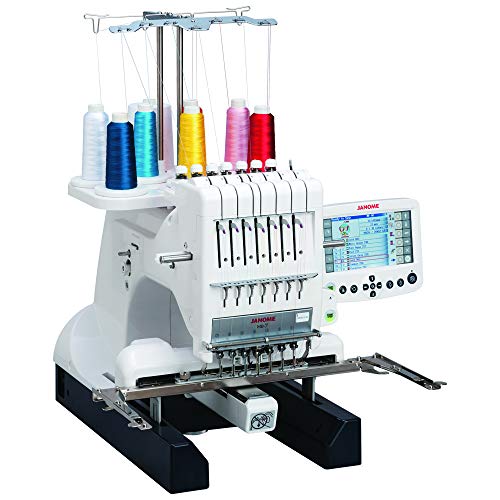
Janome MB7 Seven-Needle Quilting Machine
Best for: Large area multi-color home embroidery
- Intended Use
- Embroidery, Quilting, Beginners
- Needle Count
- 7
- Embroidery Area
- 9.4×7.9"
- Display Size
- 5.7"
- Connectivity
- USB
- Operation
- Computerized
The Janome MB7 is a heavy-duty computerized embroidery machine designed for beginners who want professional results. It features seven needles and a large 9.4×7.9-inch embroidery area. The 5.7-inch remote computer screen lets you edit designs without a computer. It supports industry-standard hoops and file formats. This machine suits users who need high-volume stitching efficiency and automated thread trimming.
- Seven needles for continuous multi-color embroidery
- Large 9.4×7.9 inch embroidery field
- 5.7 inch remote computer screen for editing
- Automatic jump-thread trimming and break recovery
- Supports industry-standard Tajima hoops and .jef+ files
- Heavy 65 pound build requires stable surface
- Larger 18.5 inch width needs more workspace
- Single needle head limits simultaneous stitching width
- You want to embroider large designs efficiently
- You need to switch thread colors automatically
- You prefer editing designs on a large screen
- You need a portable machine for travel
- You have limited workspace for large equipment
- You prefer a lightweight machine for easy storage
Verdict: Janome MB7 7-Needle Embroidery Machine fits beginners who want commercial-grade efficiency and large embroidery areas. It is ideal for users who value automated features and screen editing over portability.

FLEURDENZ D492 4.5 x 7 Embroidery Machine
Best for: Beginners wanting a large touchscreen and auto-threading
- Intended Use
- Embroidery, Beginners, DIY
- Needle Count
- 1
- Embroidery Area
- 4.5" x 7"
- Display Size
- 7"
- Connectivity
- USB
- Built-In Designs
- 180
The FLEURDENZ D492 is a single-needle embroidery machine designed for beginners. It features a 4.5 by 7 inch embroidery area and 180 built-in designs. A 7 inch touchscreen displays patterns clearly. You can connect via USB for design transfer. This machine suits home users who want to personalize gifts and DIY projects without complex setup.
- 180 built-in designs for immediate use
- 7 inch color touchscreen for clear preview
- 4.5 by 7 inch embroidery area
- Automatic needle threading and thread cutting
- Single needle limits multi-color stitching speed
- 4.5 by 7 inch area is smaller than 5 by 7 inch competitors
- You want a large 7 inch touchscreen for easy navigation
- You need automatic needle threading to reduce setup time
- You prefer a 4.5 by 7 inch hoop for small projects
- You require multi-needle capability for complex color changes
- You need an embroidery area larger than 4.5 by 7 inches
- You prioritize wireless LAN connectivity over USB transfer
Verdict: The FLEURDENZ D492 4.5×7 Embroidery Machine fits beginners who value a large 7 inch touchscreen and automatic threading features for straightforward home crafting.

Janome 4-Needle Embroidery and Quilting Machine
Best for: Large multi-color embroidery projects
- Intended Use
- Embroidery, Beginners
- Needle Count
- 4
- Embroidery Area
- 9.4×7.9"
- Display Size
- 5.7"
- Connectivity
- USB
- Operation
- Computerized
The Janome MB4S is a four-needle computerized embroidery machine built for heavy use. It features a large 9.4 by 7.9 inch embroidery area and a 5.7 inch remote computer screen for editing designs. The jumbo bobbin holds 40% more thread than standard sizes. This machine suits beginners to experts who need multi-color efficiency without constant rethreading. Its 45.2 pound weight indicates a sturdy, commercial-grade build for home use.
- Four-needle multi-color setup reduces rethreading
- 9.4 by 7.9 inch embroidery field
- 5.7 inch remote computer screen for editing
- Jumbo bobbin holds 40% more thread
- Automatic jump-thread trimming and auto-return
- 45.2 pound weight makes it heavy to move
- 26 inch width requires significant workspace
- USB connectivity only, no wireless LAN
- You want to stitch multi-color designs quickly
- You need a large embroidery area for bigger projects
- You prefer editing designs directly on the machine screen
- You need a portable machine for travel
- You require wireless connectivity for design transfers
- You have limited workspace for a 26 inch wide unit
Verdict: Janome MB4S Heavy Duty Embroidery Machine is a robust choice for users who prioritize large embroidery areas and multi-needle efficiency over portability. It fits beginners and experts who want to run continuous multi-color designs without frequent interruptions.
Specifications side by side
| Spec | Brother Wireless Sewing and Embroidery Machine | Brother SE2000 5×7 Sewing & Embroidery | Poolin WiFi Embroidery Machine | Poolin EOC05 Embroidery Machine | Janome MC400E 7.9" Embroidery Machine | A-1 Multifunctional Embroidery Machine | Janome MB7 Seven-Needle Quilting Machine | FLEURDENZ D492 4.5 x 7 Embroidery Machine | Janome 4-Needle Embroidery and Quilting Machine |
|---|---|---|---|---|---|---|---|---|---|
| Needle Count | – | – | – | – | – | – | 7 | 1 | 4 |
| Embroidery Area | 4" x 4" | 5" x 7" | 4" x 9.25" | 4" x 9.25" | 7.9"x7.9" | – | 9.4×7.9" | 4.5" x 7" | 9.4×7.9" |
| Display Size | 3.7" | – | – | 7" | – | – | 5.7" | 7" | 5.7" |
| Connectivity | Wi-Fi, USB | Wireless | WiFi | Wi-Fi, USB | USB | – | USB | USB | USB |
| Built-In Designs | 135 | 193 | 130 | – | 160 | – | – | 180 | – |
| Sewing Function | – | 2-in-1 combo | Embroidery Only | Embroidery only | – | – | – | – | – |
| Intended Use | Embroidery, Beginners | Embroidery, Beginners | Embroidery, Beginners, DIY | Embroidery, Beginners | Embroidery, Beginners | Embroidery, Beginners, DIY | Embroidery, Quilting, Beginners | Embroidery, Beginners, DIY | Embroidery, Beginners |
| Operation | – | – | – | – | Computerized | – | Computerized | – | Computerized |
| Display Type | Touchscreen | – | – | Touchscreen | – | – | – | Touchscreen | – |
| Suitable For | – | – | DIY Projects | – | – | DIY Projects | – | DIY Projects | – |
| Dimensions | 16.5 × 7.76 × 12.1 inches | 17.6 × 9.49 × 11.8 inches | 15.4 × 18.1 × 16.5 inches | 8.27 × 22.4 × 12.2 inches | 22 × 26 × 21.8 inches | – | 9 × 18.5 × 12.8 inches | 21 × 10 × 11 inches | 17 × 26 × 25.5 inches |
| Weight | 15.6 pounds | 20.5 pounds | 15 pounds | 22 pounds | 25 pounds | – | 65 pounds | – | 45.2 pounds |
| Size | SE700 – Machine Only | SE2000 + Ultimate Embroidery Package | Embroidery Only | Embroidery machine | W 23" x H 12.9" x D 17.7" | – | One Size | 4.5"x7" Embroidery Area | Standard |
| Color | White | White / Black | white | EOC05 | White | 1 | White | white | White |
| Model | SE700 | SE2000 | EOC03 | EOC05V2TSTAND-FBA | MC400E | A-1 | 001MB7 | 1 needle | MB-4S |
For different workspace sizes or stitch options, you can evaluate poolin eoc05 embroidery machine beginners alternatives before choosing a model.
Key Specs for Beginner Embroidery Machines
Check Embroidery Area Size
The embroidery area determines the maximum size of your designs. Most entry-level machines offer a 4×4 inch hoop, which is sufficient for logos, names, and small decorative elements. If you plan to create larger centerpieces or full-shirt graphics, look for models with a 5×7 inch or larger field. The Brother SE2000 provides a 5×7 inch area, while the Janome MC400E offers a spacious 7.9×7.9 inch zone. A larger hoop allows for more creative flexibility but may require a sturdier table to support the machine's increased footprint.
Prioritize Touchscreen Displays
A clear display simplifies navigation and design selection. Touchscreen interfaces allow you to scroll through patterns and adjust settings without complex button combinations. The Brother SE700 and Poolin EOC05 both feature 7-inch touchscreens, making them intuitive for beginners who want straightforward control. The FLEURDENZ D492 also includes a 7-inch touchscreen for easy operation. Machines without a display, or those with smaller screens, may require more time to learn basic functions. A larger screen reduces eye strain and helps you preview designs accurately before stitching begins.
Evaluate Connectivity Options
Modern machines often include Wi-Fi or USB ports for loading designs. Wi-Fi allows you to send patterns directly from your computer or mobile device without cables. The Brother SE700, SE2000, and Poolin EOC03 all support Wi-Fi connectivity for seamless workflow. The Poolin EOC05 and FLEURDENZ D492 offer USB connections as an alternative. Consider your workspace setup; if you prefer cable-free operation, Wi-Fi is essential. If you already have a computer nearby, USB may be sufficient. Check the specific connectivity specs to ensure compatibility with your current devices.
Review Included Accessories
Beginners benefit from machines that come with essential accessories. The Brother SE2000 is sold with an ultimate embroidery package, including multiple hoops and starter threads. This reduces the need for immediate additional purchases. Other models may require you to buy hoops and bobbins separately. Verify the contents of the box before purchasing. A complete kit ensures you can start stitching immediately. Check the product description for details on included items like thread spools, needles, and screwdrivers. Having these tools on hand simplifies the setup process and helps you understand the machine's capabilities faster.
Consider Machine Weight and Size
Embroidery machines vary significantly in weight and dimensions. Heavier machines, like the Janome MB7 at 65 pounds, offer stability during high-speed stitching but are difficult to move. Lighter models, such as the Poolin EOC03 at 15 pounds, are easier to store but may vibrate more. The Brother SE700 weighs 15.6 pounds, balancing portability and stability. Ensure your workspace can support the machine's dimensions. Measure your table to confirm it fits comfortably. A stable surface prevents misalignment and ensures consistent stitch quality. Consider whether you need to move the machine frequently or if it will remain in a fixed location.
Frequently asked questions
Which embroidery machine is best for beginners with a small workspace?
The Brother SE700 is a strong choice for limited spaces. It measures 7.76 by 16.5 inches and weighs 15.6 pounds. Its 4 by 4 inch embroidery area fits standard desk setups. The 7-inch touchscreen simplifies navigation for new users. Wi-Fi connectivity allows you to send designs without cables. This compact size makes storage easy when not in use.
Do beginner embroidery machines need Wi-Fi connectivity?
Wi-Fi is not strictly required but offers significant convenience. Several top models, including the Brother SE700 and SE2000, feature built-in Wi-Fi. This lets you transfer designs wirelessly from a computer or phone. The Poolin EOC05 also supports Wi-Fi and USB for flexible file loading. Wireless options reduce clutter and simplify the workflow for home crafters.
What is the largest embroidery area available for beginners?
The Janome MC400E offers the largest area at 7.9 by 7.9 inches. It is ideal for large home projects like table runners or wall art. The machine is heavier, weighing 25 pounds, and measures 26 inches wide. Larger hoops allow for more detailed and expansive designs. However, this size requires more table space and may limit portability.
Can I use a dedicated embroidery machine for sewing?
Most dedicated embroidery machines focus only on stitching patterns. The Brother SE700 and SE2000 are sewing and embroidery combos, offering versatility. The Poolin EOC03 and EOC05 are embroidery-only tools. They lack sewing functions, so you cannot use them for garment construction. If you need both capabilities, choose a combo model like the Brother SE2000.
Which machine is best for multi-color embroidery projects?
For multi-color work, consider the Janome MB7 or MB4S. The MB7 is a seven-needle machine designed for commercial efficiency. The MB4S is a four-needle model that handles continuous multi-color designs. Both allow you to switch threads automatically without manual changes. These machines are heavier and larger, prioritizing production speed over compactness.
Is a touchscreen display necessary for beginner embroidery machines?
A touchscreen is highly recommended for ease of use. The Brother SE700, Poolin EOC05, and FLEURDENZ D492 all feature 7-inch touchscreens. These displays simplify menu navigation and design selection. You can edit patterns and adjust settings directly on the screen. While some models use buttons, touch interfaces reduce the learning curve for new users.
How heavy are portable embroidery machines for beginners?
Portable options typically weigh between 15 and 22 pounds. The Poolin EOC03 weighs 15 pounds, making it easy to move. The Brother SE700 is slightly heavier at 15.6 pounds. The FLEURDENZ D492 does not list a weight but is compact. Heavier machines like the Janome MB7 weigh 65 pounds and are not portable. Choose lighter models if you plan to store or transport your machine frequently.
What connectivity options do beginner embroidery machines offer?
Most modern machines offer USB and Wi-Fi. The Brother SE700 and SE2000 provide Wi-Fi for wireless transfers. The Poolin EOC05 supports both Wi-Fi and USB. The FLEURDENZ D492 includes USB connectivity. Some models, like the Janome MC400E, do not list wireless features in their specs. USB drives remain a reliable backup for loading design files on any machine.


