
As Amazon Associates, we earn from qualifying purchases. This means we may receive a small commission at no extra cost to you if you click through and make a purchase.
As an Amazon Associate we earn from qualifying purchases. Links on this page are affiliate links.
This brother 5×7 wireless embroidery machine review looks at the Brother PE900, an embroidery-only device built for larger projects. Its defining specs are a 5 x 7 inch embroidery field and a 3.7 inch touchscreen display. The machine connects via Wi-Fi and USB, allowing you to transfer designs from your PC or mobile app. It includes 193 built-in designs and supports color sorting to reduce thread changes. This model is designed specifically for stitching, not traditional sewing. It offers a wide needle-to-arm space for handling bigger hoops and complex patterns with ease.
- 5 x 7 inch embroidery field with 7.4 inch needle-to-arm clearance
- 3.7 inch LCD touchscreen for on-screen editing and resizing
- 193 built-in designs including 13 lettering fonts
- Wi-Fi connectivity for wireless file transfer from Artspira app
- Advanced Color Sort and Jump Stitch Trimming features
Good fit for
This machine suits hobbyists and small business owners who need a dedicated embroidery device for larger projects. The 5 x 7 inch field allows for bigger designs than standard 4 x 4 inch machines. If you want to edit patterns directly on the 3.7 inch screen or wirelessly transfer files from your phone, this setup fits your workflow. It is ideal for those who prioritize embroidery over sewing and want built-in fonts and color sorting to streamline production.
Who can skip it
You should look elsewhere if you need a combination sewing and embroidery machine. The PE900 is an embroidery-only unit and cannot perform traditional stitching tasks. If you require a 4 x 4 inch hoop size for small items, this 5 x 7 inch field may be too large. Additionally, if you do not have access to a computer or mobile device for the Artspira app, you may find the wireless features less useful than a basic USB-only model.
Verdict
The Brother PE900 is a solid choice for users who need a dedicated, large-area embroidery machine with wireless connectivity. It excels in stitching efficiency and design flexibility but is not suitable for those needing general sewing capabilities.
Key specs explained for PE900
Embroidery Area: 5" x 7"
This specification defines the maximum size of the hoop area where the machine can stitch. A 5 by 7 inch field allows you to create larger designs than standard 4 by 4 inch models. You can stitch bigger logos, table runners, or decorative panels in a single setup. This size suits users who frequently work on home decor or larger apparel projects. When shopping, compare this to smaller hoops if you mostly make patches or small monograms.
Display Size: 3.7"
The machine features a 3.7-inch LCD touchscreen that serves as your primary control interface. This screen lets you preview designs, adjust settings, and edit patterns without needing an external computer. You can zoom, rotate, resize, and reposition graphics directly on the display. A screen of this size offers clear visibility for detailed work. When comparing models, consider that larger displays often provide better precision for complex editing tasks.
Connectivity: Wi-Fi, USB
This machine supports both wireless and wired data transfer methods. You can send embroidery files from your PC to the machine using the built-in Wi-Fi connection or by inserting a USB drive. This flexibility ensures you can use various workflows depending on your setup. Wireless transfer is convenient for moving designs from mobile apps or cloud storage. When evaluating options, check if your preferred software supports the specific wireless protocols listed here.
Built-In Designs: 193
The PE900 includes 193 pre-loaded embroidery patterns, covering various styles like florals, scrollwork, and quilt designs. It also provides 13 lettering fonts in multiple languages. This library gives you immediate access to common motifs without needing to download additional files. You can start projects right out of the box. When comparing machines, note that some models offer fewer built-in options, requiring you to purchase separate design packs to expand your creative range.
Design and build specs
According to the listing, the Brother PE900 is a white machine weighing 21 pounds. Its physical dimensions are 17.5 inches long, 9.49 inches wide, and 11.8 inches high. This footprint requires a stable surface. The weight suggests it stays put during operation, reducing vibration when stitching larger designs. You do not need to secure it to a table, but you do need ample counter space.
The control layout centers on a 3.7-inch LCD touchscreen. This display allows you to edit patterns directly on the machine. You can resize, rotate, and reposition designs without using a computer. The screen is sharp enough to see small details in the 193 built-in patterns. This interface simplifies the workflow for custom projects. You can also connect via Wi-Fi or USB. This flexibility lets you transfer files from your PC or use the mobile app.
The build is dedicated solely to embroidery. It does not function as a traditional sewing machine. This specialization means the internal mechanism is optimized for stitching rather than straight or zigzag sewing. The 7.4-inch space from needle to arm provides clearance for bulky items. This design choice supports the 5 by 7-inch field. You can embroider larger projects like towels or jackets. The white finish is easy to clean, but it may show dust faster than darker models. Keep the surface clear to maintain the aesthetic.
Setup and daily operation guide
You begin by connecting the Brother PE900 to your network. The listing confirms it features built-in Wireless LAN. You can transmit embroidery files from your PC to the machine via the free Design Database Transfer software. Alternatively, you may connect using the built-in USB port. This connectivity allows you to update your design library without physical media.
Daily use centers on the 3.7-inch LCD display. The screen provides a sharp view of your patterns. You can edit designs directly on the device. The interface allows letter editing, enhanced zoom, resizing, rotating, repositioning, and combining multiple designs. This on-screen control reduces the need for external devices during stitching.
The machine includes 193 built-in embroidery designs. These include scrollwork, florals, and quilt patterns. You also have access to 13 lettering fonts in English, Japanese, and Cyrillic. For additional content, the ARTSPIRA mobile app offers 50 free designs. You can create custom patterns by drawing on your mobile device and transfer them wirelessly.
Efficiency features manage thread usage. Advanced Color Sort adjusts the stitching order to reduce color changes. Jump Stitch Trimming automatically cuts excess thread jumps within colors. Remember this is an embroidery-only machine. It does not function as a traditional sewing machine. You must prepare your fabric and hoop it manually before starting the stitch cycle.
Before You Buy This Embroidery Machine
Since the Brother PE900 is an embroidery-only machine, it does not function as a traditional sewing device. You must pair it with a separate sewing machine if your workflow involves constructing garments or quilts from scratch. Verify that your workspace can support its 21-pound weight and 17.5-inch length to ensure stability during operation. Check your computer’s operating system compatibility before installing the Design Database Transfer software for wireless file transmission. The machine requires standard embroidery threads and bobbins, which are not included in the base unit. Consider purchasing the Ultimate Embroidery Package or Thread, Bobbins, and Needles bundle if you lack these essential consumables. This model suits users who prioritize large 5 by 7 inch designs and digital connectivity over all-in-one versatility. It fits best in a studio dedicated to embellishment rather than general textile construction.
Check before you buy
- Confirm you have a separate sewing machine for construction tasks.
- Ensure your desk supports the 21-pound weight and 17.5-inch footprint.
- Verify computer compatibility for the Design Database Transfer software.
- Purchase separate embroidery threads, bobbins, and needles for operation.
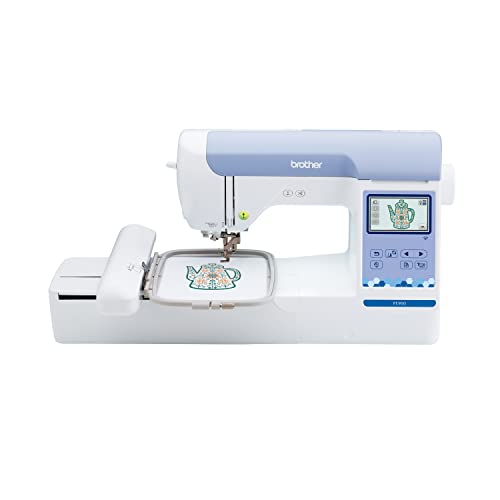
Brother 5×7 Wireless Embroidery Machine
Best for: large embroidery projects with wireless control
- Embroidery Area
- 5" x 7"
- Display Size
- 3.7"
- Connectivity
- Wi-Fi, USB
- Built-In Designs
- 193
- Sewing Function
- Embroidery only
- Dimensions
- 17.5 × 9.49 × 11.8 inches
The Brother PE900 is a dedicated embroidery machine with a 5 x 7 inch field. It includes 193 built-in designs and 13 fonts. Wireless LAN and USB connectivity let you transfer files easily. The 3.7 inch touchscreen allows on-screen editing. This model weighs 21 pounds and measures 17.5 inches long. It suits users who want large designs and digital control.
- 5 x 7 inch embroidery field for larger designs
- 193 built-in designs and 13 lettering fonts
- Wireless LAN and USB file transfer options
- 3.7 inch LCD touchscreen for on-screen editing
- Advanced Color Sort reduces thread changes
- Embroidery-only function does not sew
- 21 pound weight makes it heavy to move
- 5 x 7 inch area limits very large projects
- You need a large 5 x 7 inch embroidery area
- You want wireless file transfer from your PC
- You prefer editing designs on a touchscreen
- You need a machine that also sews
- You prefer a lighter, portable unit
- You only need small 4 x 4 inch projects
Verdict: Brother PE900 5×7 Wireless Embroidery Machine fits hobbyists who need a dedicated machine for large designs and wireless connectivity. It is ideal for users who prioritize a generous embroidery field and digital editing tools over versatility.
Specifications side by side
| Spec | Brother 5×7 Wireless Embroidery Machine |
|---|---|
| Embroidery Area | 5" x 7" |
| Display Size | 3.7" |
| Connectivity | Wi-Fi, USB |
| Built-In Designs | 193 |
| Sewing Function | Embroidery only |
| Intended Use | Embroidery |
| Dimensions | 17.5 × 9.49 × 11.8 inches |
| Weight | 21 pounds |
| Size | PE900 – Machine Only |
| Color | White |
| Model | PE900 |
Frequently asked questions
Can the Brother PE900 sew fabric like a standard sewing machine?
No, it is an embroidery-only device. The listing specifies its intended use is embroidery. You cannot use it for traditional sewing tasks like constructing garments or quilts. You must pair it with a separate sewing machine if your workflow involves building items from scratch.
What is the largest design size this machine can stitch?
The maximum embroidery field is 5 x 7 inches. This specification defines the hoop area where the machine stitches. This size allows you to create larger designs than standard 4 x 4 inch models. It fits hobbyists who need a dedicated machine for large projects.
How do I send embroidery files to the machine wirelessly?
You can use built-in Wi-Fi to connect the machine to your network. The listing confirms it features Wireless LAN. You can transmit files from your PC using the free Design Database Transfer software. This allows digital editing tools and wireless connectivity without cables.
Does the Brother PE900 come with a USB port for file transfer?
Yes, the machine supports USB connectivity in addition to Wi-Fi. This provides an alternative method for transmitting embroidery files. You can connect via USB if wireless transmission is not suitable for your setup. Both options are listed in the connectivity specifications.
How much space does the Brother PE900 require on my desk?
The machine measures 17.5 inches long, 9.49 inches wide, and 11.8 inches high. This footprint requires a stable surface. The white model weighs 21 pounds, suggesting it stays put during operation. Ensure your workspace can support this weight and size.
Is the Brother PE900 suitable for beginners or just experts?
It fits hobbyists who need a dedicated machine for large designs. The device includes a 3.7 inch touchscreen display and digital editing tools. It is ideal for users who prioritize a generous embroidery field and wireless connectivity over versatility. It is not a multi-function device.


