As Amazon Associates, we earn from qualifying purchases. This means we may receive a small commission at no extra cost to you if you click through and make a purchase.
As an Amazon Associate we earn from qualifying purchases. Links on this page are affiliate links.
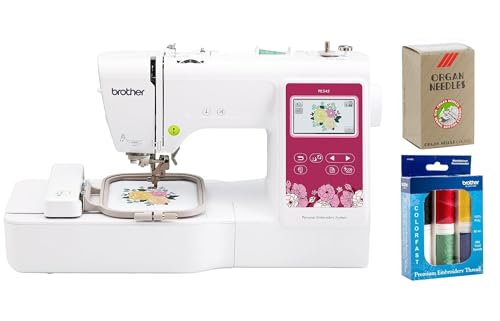
This brother pe545 embroidery machine review focuses on the Brother PE545, a dedicated embroidery unit designed for home crafters. It features a 4" x 4" embroidery field, which defines the maximum size of your projects. The machine also includes 135 built-in designs to start your work immediately. You can connect via Wireless LAN or a USB port to transfer files. A 3.7-inch color touchscreen lets you edit patterns before stitching. This model offers a straightforward path into digitized embroidery without complex multi-needle setups.
- Wireless LAN and USB connectivity for easy file transfer
- 135 built-in designs for immediate use
- 3.7-inch LCD color touchscreen for pattern editing
- 4" x 4" embroidery hoop area included
- ArtsPira mobile app support for custom patterns
Good fit for
You should choose this machine if you want to embroider small to medium-sized designs like logos, monograms, or patches. The 4" x 4" hoop is ideal for items such as hats, cuffs, and small bags. If you prefer using your computer or mobile device to send designs directly to the machine, the wireless and USB options are convenient. It suits beginners who want a single-needle machine with a clear touchscreen interface and a large library of built-in patterns to learn from.
Who can skip it
Skip this model if you need to embroider large items like full-size jackets or table runners. The 4" x 4" field is too small for those projects. You will need a machine with a larger hoop area, such as 5" x 7" or bigger. Also, avoid this if you require multiple needle colors in a single pass. This is a single-needle machine, so you must stop to change thread colors manually. It is not suitable for high-volume commercial production.
Verdict
The Brother PE545 is a capable single-needle embroidery machine for small-area projects. Its wireless features and touchscreen make it user-friendly for hobbyists.
Brother PE545 Key Specs Explained
Connectivity: Wireless LAN, USB
You can send embroidery files to the machine using Wi-Fi or a USB cable. The wireless feature allows you to use the ArtsPira mobile app to draw patterns on your phone and transfer them directly. This saves time compared to manual file management. USB remains a reliable backup if your network is unstable. This dual connection option ensures you can work with various computer setups without needing extra adapters.
Display Size: 3.7"
The 3.7-inch LCD color touchscreen lets you see your designs clearly before stitching. You can drag and drop patterns to position them accurately on the hoop. The screen also hosts tutorial videos to help you learn new techniques. A larger display reduces eye strain and makes editing easier than smaller monochrome panels. This interface simplifies the user experience for beginners and experts alike.
Built-In Designs: 135
The machine comes with 135 pre-loaded embroidery designs to start your projects immediately. This variety includes letters, flowers, and decorative motifs suitable for home decor or apparel. You do not need to purchase additional files to begin. This count is standard for entry-level home machines. It provides enough variety for casual crafters who want quick results without complex digitizing skills.
Embroidery Area: 4" x 4"
The 4 by 4 inch field defines the maximum size of your embroidery projects. This size is ideal for small items like hats, bags, and t-shirt logos. It is not suitable for large table runners or full-size blankets. When shopping, compare this to larger 6 by 10 inch hoops if you need bigger canvas space. This compact area keeps the machine footprint small for home storage.
Brother PE545 Design and Build
The Brother PE545 is built as a dedicated embroidery unit for home crafters. According to the listing, the machine measures 16.5 inches wide, 12.1 inches tall, and 7.76 inches long. This compact footprint allows it to fit comfortably on most standard worktables or craft desks. The white finish keeps the unit looking clean and professional in any sewing room. It weighs enough to stay stable during high-speed stitching, reducing vibration on the surface below.
Control is handled through a 3.7-inch LCD color touchscreen. This display allows you to drag and drop patterns to position them accurately. You can make edits and preview designs before stitching begins. The interface also hosts built-in tutorial videos for quick reference. This layout simplifies the setup process, letting you focus on your project rather than navigating complex menus. The touchscreen replaces physical buttons, creating a sleeker front panel.
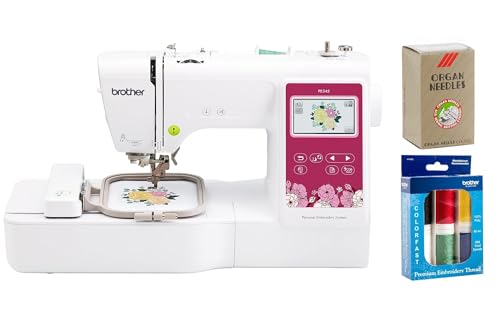
The machine includes a 4" x 4" embroidery field and a hoop. This size defines the maximum area for your designs. It is ideal for personal items like t-shirts, hats, and small home decor pieces. The listed bundle includes premium embroidery thread and a set of 100 embroidery needles. These accessories ensure you have the right tools for various fabric types. The wireless LAN and USB connectivity options allow you to transfer files easily from your PC or mobile device using the ArtsPira app.
Setup and Everyday Use Guide
Setting up the Brother PE545 begins with unpacking the included accessories. The bundle provides SAEMB6 6-color premium embroidery thread and a 100-piece set of Organ brand SAEMB7511 75/11 embroidery needles. You install the needle and load the thread into the machine. The unit comes with a hoop that fits the 4" x 4" embroidery field. This defines the maximum size for your stitched projects.
Daily operation relies on the 3.7-inch LCD color touchscreen. You use this display to drag and drop patterns into position. The interface allows you to edit designs and preview stitches before starting. You can also view built-in tutorial videos directly on the screen. This simplifies the learning process for new users.
For file management, the machine supports Wireless LAN and USB connections. You can transmit embroidery files from your PC using the free Design Database Transfer software. Alternatively, you connect via the built-in USB port. The ArtsPira mobile app lets you draw custom patterns on your device. You then transfer these designs wirelessly to the PE545.
The 135 built-in designs offer immediate options. You select from these patterns or upload your own. The machine handles the stitching based on your digital selections. The compact dimensions of 16.5 inches wide and 12.1 inches tall keep it stable on your workspace. You manage all settings through the touchscreen interface. The wireless capability removes the need for physical cables during design transfer.
Before You Buy The PE545
Before you buy the Brother PE545, verify your workspace dimensions. The machine measures 16.5 inches wide, 12.1 inches tall, and 7.76 inches long. Ensure your table has enough depth for the hoop and thread spool. Check your computer’s operating system compatibility with the Design Database Transfer software for wireless file transmission. If you prefer mobile design, confirm your smartphone supports the ArtsPira app. Consider your typical project sizes. The 4" x 4" field limits large pieces. You may need additional hoops for bigger areas, though these are not included in the standard bundle. Plan for needle maintenance. The included 100-piece Organ 75/11 set is a good start, but embroidery needles wear out. Keep spares handy. This unit fits well among 1 options if you prioritize wireless convenience and a large touchscreen. It suits crafters who want digital design integration without complex setup. It may not suit those needing larger stitching areas or heavy-duty industrial use. Review the included accessories carefully. Some variations offer magnetic frames or extra bobbins, which might save future purchases. Read the listing details for your specific bundle.
Check before you buy
- Verify your table has enough space for the 16.5-inch width and 12.1-inch height.
- Check computer compatibility with the Design Database Transfer software for wireless uploads.
- Confirm your smartphone supports the ArtsPira app for mobile pattern design.
- Ensure you have spare 75/11 needles, as embroidery needles wear out quickly.
Brother PE545 Wireless Embroidery Machine
Best for: small projects with wireless design transfer
- Embroidery Area
- 4" x 4"
- Display Size
- 3.7"
- Connectivity
- Wireless LAN, USB
- Built-In Designs
- 135
- Intended Use
- Embroidery
- Dimensions
- 7.76 × 16.5 × 12.1 inches
The Brother PE545 is a dedicated embroidery machine featuring a 4 by 4 inch field and 135 built-in designs. It connects via Wireless LAN and USB, allowing file transfers from your PC or mobile app. The 3.7 inch color touchscreen lets you edit patterns and preview stitches. This model suits hobbyists who want wireless convenience and a straightforward interface for standard-sized projects.
- Wireless LAN connectivity for PC and mobile transfers
- 135 built-in embroidery designs
- 3.7 inch LCD color touchscreen
- 4 by 4 inch embroidery area
- 4 by 4 inch embroidery field limits large projects
- 135 built-in designs restricts variety without custom uploads
- You want wireless file transfer from your phone or computer
- You primarily work on small to medium sized embroidery pieces
- You prefer a color touchscreen for editing patterns
- You need a larger than 4 by 4 inch stitching area
- You require more than 135 built-in designs without custom files
- You prefer manual operation without digital connectivity
Verdict: Brother PE545 Wireless Embroidery Machine fits users who need wireless design transfer and a clear touchscreen for small to medium projects. It is ideal for hobbyists who value digital convenience over large format capabilities.
Specifications side by side
| Spec | Brother PE545 Wireless Embroidery Machine |
|---|---|
| Embroidery Area | 4" x 4" |
| Display Size | 3.7" |
| Connectivity | Wireless LAN, USB |
| Built-In Designs | 135 |
| Intended Use | Embroidery |
| Dimensions | 7.76 × 16.5 × 12.1 inches |
| Size | PE545 + Thread & Needles |
| Color | White |
| Model | PE545 |
Frequently asked questions
What is the maximum embroidery size for the Brother PE545?
The Brother PE545 has a 4" x 4" embroidery field. This limit defines the largest single design you can stitch without rehooping. It is suitable for small to medium projects like logos or monograms. Larger patterns require multiple hooping steps or a machine with a bigger area.
Does the Brother PE545 support wireless design transfer?
Yes, this model features Wi-Fi connectivity. You can send embroidery files directly to the machine without a USB cable. The listing notes it works with the ArtsPira mobile app, allowing you to draw patterns on your phone and transfer them wirelessly for digital convenience.
How many built-in designs does the Brother PE545 include?
The machine comes with 135 built-in embroidery designs. These pre-loaded patterns allow you to start stitching immediately after setup. This library provides a variety of options for hobbyists who want to begin projects without needing to purchase additional digital files or create new designs from scratch.
What accessories are included with the Brother PE545 bundle?
The bundle includes SAEMB6 6-color premium embroidery thread and a 100-piece set of Organ brand SAEMB7511 75/11 embroidery needles. These items are provided to help you begin sewing right away. You install the needle and load the thread into the machine as part of the initial setup process.
Is the Brother PE545 suitable for large format projects?
No, the PE545 is not ideal for large formats. Its 4" x 4" field limits the size of individual designs. The verdict states it fits users who value digital convenience over large format capabilities. It is best for hobbyists working on small projects rather than those needing expansive stitching areas.
What are the physical dimensions of the Brother PE545?
The machine measures 16.5 inches wide, 12.1 inches tall, and 7.76 inches long. This compact footprint allows it to fit comfortably on most worktables. You should verify your workspace dimensions before purchase to ensure there is enough depth for the hoop and thread spool operation.


