As Amazon Associates, we earn from qualifying purchases. This means we may receive a small commission at no extra cost to you if you click through and make a purchase.
As an Amazon Associate we earn from qualifying purchases. Links on this page are affiliate links.
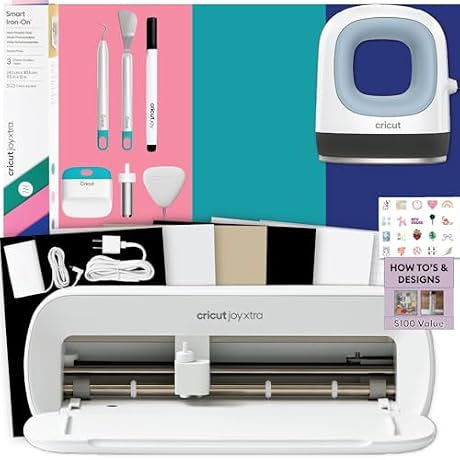
This cricut maker 4 cutting machine review focuses on the Ultimate Sticker Making Kit bundle. It is a complete solution for creating custom stickers and labels. The kit includes printable sticker paper, adhesive vinyl, and necessary tools. It measures 25.7 inches in width and 10.3 inches in height. This model works with Cricut Design Space software. The bundle allows you to print then cut designs for professional results. It is designed for small business owners and crafters who need durable, water-resistant materials for projects like water bottle decorations or phone cases.
- Print then cut functionality for precise custom stickers
- Includes printable sticker paper and adhesive vinyl
- Compatible with Cricut Design Space software
- Dimensions of 25.7 x 10.3 x 10.2 inches
- Suitable for small business and Etsy sellers
Good fit for
This bundle suits small business owners and Etsy sellers who need to produce custom stickers and labels efficiently. If you want to create durable, water-resistant decals for water bottles or phone cases, this kit provides the necessary materials. The print then cut feature allows you to use your inkjet printer for professional-quality results. It is ideal for those who want an all-in-one package to start creating and selling immediately without sourcing separate components.
Who can skip it
Look elsewhere if you need a machine that supports multiple tool types beyond cutting. This listing focuses on sticker making and does not mention rotary blades, knife blades, or other specialized tools. It also lacks information about built-in cameras or advanced sensors. If you require a more versatile machine for diverse materials like thick cardstock or fabric without additional purchases, this specific bundle may not meet your needs. The software compatibility is limited to Cricut Design Space.
Verdict
This bundle is a practical choice for sticker-focused creators who need an all-in-one kit. It delivers the materials and software compatibility required for professional-looking custom decals.
Key specs explained for Maker 4
Software Compatibility: Cricut Design Space
You use the Cricut Design Space app to create and send designs to the machine. This software handles cut, write, and score commands. It connects via USB or Wi-Fi depending on your setup. Sewing machine users often prefer standalone controls. This bundle relies entirely on the app interface for all operations and project management.
Width: 25.7 inches
The machine requires a workspace of at least 25.7 inches in width. You need a flat surface that accommodates this footprint plus room for mat handling. Sewing machines are often more compact. Ensure your craft table or desk has sufficient depth and width to prevent the unit from overhanging or becoming unstable during use.
Height: 10.3 inches
The vertical profile stands at 10.3 inches for this specific bundle variation. This height allows it to fit under standard shelves or in cabinets for storage. Some variations reach 13 inches. Check your available vertical space before purchasing. This dimension affects how easily you can store the unit when not actively cutting materials for your projects.
Length: 10.2 inches
The unit extends 10.2 inches from front to back. This depth is relatively narrow compared to larger industrial sewing tables. It fits well on smaller desks or dedicated crafting corners. You should measure your intended location to ensure this depth does not conflict with other items. This compact footprint helps maximize your available crafting area.
Design and Build Details
The listing describes the Cricut Maker 4 as a Seashell colored die-cutting machine. It comes in the Ultimate Sticker Making Kit configuration. This specific model, identified by the code z20-11084-N4, is part of a bundle designed for sticker creation. The machine itself is finished in a solid color, which gives it a clean look for your workspace. According to the listing, the unit measures 25.7 inches in width, 10.3 inches in height, and 10.2 inches in length. These dimensions indicate a substantial footprint. You will need a flat surface that can accommodate this width. The height allows for vertical storage if you have limited counter space, but the width requires a dedicated area for operation.
The bundle includes printable sticker paper and adhesive vinyl. These materials are selected for creating durable, water-resistant decals. The listing notes that the kit is suitable for long-lasting stickers for water bottles and packaging. This material choice defines the machine's primary use case. It is built for precision cutting of thin, flexible media rather than heavy fabrics or thick wood. The included tools support the print-then-cut workflow. You use your inkjet printer for the design layer, then the machine cuts the outline. This setup requires a specific layout where you print first, then load the sheet into the Maker 4. The design prioritizes sticker and label production over general crafting versatility.
Setup and Daily Workflow
Setting up the Cricut Maker 4 bundle begins with unpacking the Seashell colored die-cutting machine. You place the unit on a flat surface. The listing notes the width is 25.7 inches, so you need adequate desk space. Height is 10.3 inches, keeping it compact. Length is 10.2 inches. You connect the machine to your computer or mobile device. The key spec confirms software compatibility with Cricut Design Space. You use this platform to create your sticker designs. The software handles all cut, write, and score commands. You send the design files to the machine via USB or Wi-Fi. Daily use involves loading the included materials. You start with printable sticker paper for your inkjet printer. You print your designs first, then load the sheets into the Maker 4. The machine cuts the precise shapes. You can also use the adhesive vinyl for decals. This workflow supports creating custom stickers for water bottles or phone cases. The bundle includes tools and project guidance to help you start. You can produce durable, water-resistant stickers for everyday use. Small business owners use this setup for Etsy listings. The process allows you to create professional-quality labels and packaging designs. You manage everything through the Design Space interface. The machine handles the cutting while you focus on design and assembly.
Before You Buy Maker 4
You should verify your computer or mobile device meets the system requirements for Cricut Design Space before purchasing. The bundle includes printable sticker paper and adhesive vinyl, but you must have an inkjet printer to utilize the print-then-cut feature. Without a compatible printer, the core sticker functionality remains unused. This machine is a die-cutter, not a sewing or embroidery device. It sits alongside other crafting tools in the 1 Sewing & Embroidery Machines category, serving a distinct niche for vinyl and paper projects. You do not need separate cutting blades for basic sticker tasks as they are included. However, you may want to purchase additional vinyl rolls for larger decals or specialized materials like heat transfer vinyl if you expand your project types. Keep the workspace clean to prevent dust from affecting the cutting mat. The unit requires a stable surface due to its 25.7-inch width. Ensure you have adequate storage for the included tools and remaining materials to maintain an organized workflow.
Check before you buy
- Confirm your printer supports print-then-cut functionality for sticker creation
- Verify your device runs the latest Cricut Design Space version
- Ensure your desk has space for the 25.7 inch width
- Check if you need additional vinyl for larger decals
- Confirm you have storage for included tools and paper

Cricut Maker 4 Sticker Bundle
Best for: small businesses making custom stickers
- Software Compatibility
- Cricut Design Space
- Dimensions
- 10.2 × 25.7 × 10.3 inches
This bundle includes the Cricut Maker 4 machine with printable sticker paper and adhesive vinyl. It supports print-then-cut functionality via Cricut Design Space for custom decals. The unit measures 25.7 inches wide and 10.3 inches tall. It suits small business owners creating water-resistant stickers for bottles or packaging. The included materials allow you to start making projects immediately.
- Print-then-cut functionality for professional-quality custom stickers
- Includes printable sticker paper and adhesive vinyl materials
- Compatible with Cricut Design Space software
- Creates durable, water-resistant stickers and decals
- Requires a separate inkjet printer for print-then-cut designs
- Large footprint at 25.7 inches wide and 10.3 inches tall
- You need a complete starter kit for sticker making
- You sell custom labels or decals online
- You want durable, water-resistant project materials
- You do not own an inkjet printer
- You have limited workspace for a 25.7-inch wide machine
- You only need basic cutting without print-then-cut features
Verdict: Cricut Maker 4 Sticker Bundle fits small business owners who need a ready-to-use kit for creating water-resistant stickers and decals. It is ideal for those with an inkjet printer and ample desk space.
Specifications side by side
| Spec | Cricut Maker 4 Sticker Bundle |
|---|---|
| Software Compatibility | Cricut Design Space |
| Dimensions | 10.2 × 25.7 × 10.3 inches |
| Color | Ultimate Sticker Making |
| Model | z20-11084-N4 |
Frequently asked questions
Who is the Cricut Maker 4 Sticker Bundle best suited for?
This bundle is ideal for small business owners who need a ready-to-use kit for creating water-resistant stickers and decals. It specifically fits those who already own an inkjet printer and have ample desk space for the machine's footprint. The kit provides a complete solution for label creation.
What dimensions should I expect for the Cricut Maker 4 machine?
The machine measures 25.7 inches in width, 10.3 inches in height, and 10.2 inches in length. You must ensure your workspace can accommodate this width. The listing identifies this specific model as the Ultimate Sticker Making configuration, designed for sticker creation workflows.
Does the Cricut Maker 4 bundle include materials for printing?
Yes, the bundle includes printable sticker paper and adhesive vinyl. These materials are essential for the print-then-cut feature. You must have a compatible inkjet printer to utilize these included supplies effectively for creating custom stickers and labels.
What is the model number for the Cricut Maker 4 sticker kit?
The specific model identified in the listing is z20-11084-N4. This code corresponds to the Ultimate Sticker Making configuration. It is part of a bundle designed specifically for sticker creation, distinguishing it from standard machine-only listings.
Can I use the Cricut Maker 4 for water-resistant projects?
The bundle is described as fitting users who need to create water-resistant stickers and decals. The included adhesive vinyl and printable sticker paper support this application. This makes it suitable for durable label projects that require resistance to moisture.
What color is the Cricut Maker 4 machine in this bundle?
The listing describes the die-cutting machine as Seashell colored. This aesthetic detail applies to the unit included in the Ultimate Sticker Making Kit. The color is part of the standard appearance for this specific model configuration.