
As Amazon Associates, we earn from qualifying purchases. This means we may receive a small commission at no extra cost to you if you click through and make a purchase.
If you are configuring a modern creative desk setup, the Dell P3225QE is engineered to eliminate two persistent workflow bottlenecks: cramped timeline space and messy peripheral wiring. As a 31.5-inch 4K UHD display pairing a fluid 100Hz refresh rate with integrated 90W USB-C docking, this monitor targets content creators, vloggers, and digital hobbyists who demand expansive visual real estate without sacrificing desktop simplicity. Rather than forcing you to settle for a standard 60Hz office screen or an overly aggressive gaming display, this model establishes a functional workstation baseline tailored for productivity. Whether you are assembling multicam edits, managing audio tracks, or grading web content, the dell pro 32 plus p3225qe provides sharp 3840 x 2160 visual precision while unifying your daily workstation connections.
Selecting the right production monitor requires weighing real-world interface options, color coverage, and ergonomic flexibility. In this review, we examine the practical strengths and design choices of the Dell P3225QE, exploring its 99% sRGB color accuracy, 1500:1 contrast ratio, high-bandwidth USB-C architecture, and eye-comfort certifications. We also analyze how its 100Hz motion clarity impacts scrubbing across video timelines and whether its generous screen size can replace cumbersome multi-display arrangements.

What You Get With the Dell P3225QE
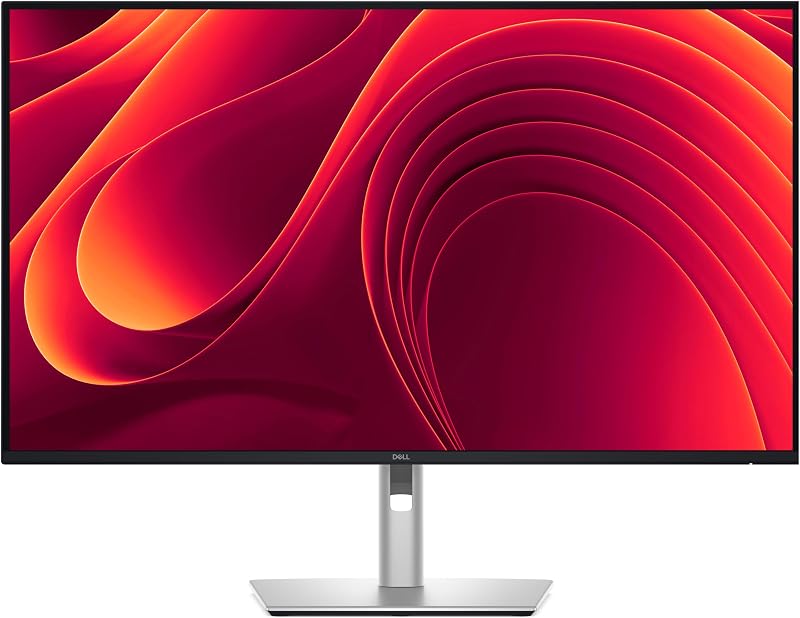
Dell positions this display as an all-in-one productivity hub that unifies high-resolution visual output, network connectivity, and peripheral management through a single desktop centerpiece.
- 31.5-inch 4K Ultra HD IPS LED display with 3840 x 2160 native resolution
- Smooth 100Hz refresh rate paired with a 5ms gray-to-gray fast response time
- Factory-tuned 99% sRGB color gamut coverage supporting up to 1.07 billion colors
- Enhanced 1500:1 static contrast ratio with 178-degree wide viewing angles
- Non-glare matte screen finish designed to diffuse ambient office and studio reflections
- All-in-one USB-C upstream port carrying video, data, RJ45 Ethernet, and up to 90W Power Delivery
- Downstream hub featuring five USB 3.0 ports for external accessories and storage drives
- DisplayPort 1.4 and HDMI 2.1 video inputs with built-in daisy-chain support
- Full-motion mechanical stand offering tilt, swivel, pivot, and height adjustments
Key Specifications
| Feature | Specification Detail |
|---|---|
| Screen Size and Aspect Ratio | 31.5 Inches, 16:9 Widescreen |
| Native Resolution | 4K UHD 3840 x 2160 |
| Panel Type and Surface | IPS LED, Anti-Glare Matte Finish |
| Refresh Rate | 100Hz |
| Pixel Response Time | 5ms (Fast Gray-to-Gray) |
| Static Contrast Ratio | 1500:1 |
| Color Gamut and Depth | 99% sRGB (CIE 1931), 1.07 Billion Colors |
| Power Delivery and Docking | USB-C with up to 90W PD, RJ45 Ethernet, 5x USB 3.0 |
| Display Inputs | 1x HDMI 2.1, 1x DisplayPort 1.4, 1x USB-C |
| Stand Adjustments | Height, Tilt, Swivel, Pivot (90-Degree Rotation) |
| Physical Dimensions and Weight | 13.78″D x 13.78″W x 9.84″H, 9.55 kg |
Color Accuracy and Visual Performance for Video Editing
For independent video editors, vloggers, and digital creators whose primary delivery target is the internet, color consistency across standard viewing environments is critical. The dell p3225qe color accuracy is anchored by 99% sRGB coverage under the CIE 1931 standard, capable of displaying up to 1.07 billion colors. Because platforms like YouTube, Vimeo, and modern web browsers operate natively within the sRGB space, this panel provides a dependable reference environment for cutting footage, balancing skin tones, and finalizing social assets. If your editing pipeline requires advanced wide gamuts such as 100% Adobe RGB or DCI-P3 for theatrical cinema mastering, the listing does not specify those broader profiles, meaning dedicated print specialists and broadcast colorists may require specialized reference hardware.
Contrast and black-level reproduction are notable highlights of the updated IPS panel architecture. The dell p3225qe specs include a static contrast ratio of 1500:1, representing a meaningful step up from standard 1000:1 IPS screens. In daily editing workflows, this elevated contrast produces deeper black levels in shadows, clearer gradation in low-light scenes, and better separation between dark interface panels and timeline media. Broad 178-degree viewing angles ensure that colors and luminance remain uniform whether you sit centered in front of the 31.5-inch canvas or shift sideways during client reviews.
Studio lighting conditions can quickly cause eye strain and obscure subtle visual details when editing on glossy panels. Dell equips this monitor with a matte anti-glare screen finish that diffuses harsh overhead studio fixtures and window glare. Whether paired with a custom edit rig or a compact office tower like the dell pro slim, the anti-glare layer maintains clean text rendering and sharp UI elements, allowing you to focus on detailed pixel-level tasks without distraction.
Single-Cable USB-C Hub and MacBook Workflow Integration
Cable management and port scarcity often complicate creator desks, especially when working from modern portable machines. The dell p3225qe macbook workflow capitalizes on an integrated single-cable docking station powered by USB-C. Dell specifically notes that this display has been tested with macOS devices, ensuring straightforward plug-and-play operation for MacBook Pro and MacBook Air setups. By plugging a single cable into your laptop, the monitor receives your high-resolution 4K video signal, establishes a two-way data link, and feeds up to 90W of continuous power directly into your computer battery.
Power delivery is a core factor when running demanding creative software such as Premiere Pro, DaVinci Resolve, or Final Cut Pro. With dell p3225qe usb-c 90w power delivery, the monitor supplies sufficient juice to keep most thin-and-light and mid-range creative laptops fully charged during intensive render passes and continuous playback. In addition to delivering power and video, the built-in docking hub incorporates an RJ45 Ethernet port, providing stable gigabit-class wired internet for rapid asset uploads and local NAS video editing. Those seeking dedicated standalone docking hardware can compare this built-in hub against options like the dell pro dock – wd25, but having the hub built directly into the screen chassis drastically reduces desk clutter.
Peripheral expansion on the monitor is thoroughly equipped for creator workflows. It features five total USB 3.0 downstream ports, allowing you to leave external hard drives, editing control consoles, card readers, and wireless dongles connected to the screen at all times. When you sit down at your workstation, connecting your laptop immediately gives you access to every desktop tool without the friction of plugging in multiple individual cables. For multi-display setups, the monitor also supports DisplayPort daisy-chaining, letting you route video signals downstream to a second screen without occupying multiple ports on your computer.
Timeline Ergonomics and the 100Hz Refresh Rate Advantage
High refresh rates have historically been marketed toward competitive gaming, but the dell p3225qe 100hz refresh rate brings tangible ergonomic benefits to professional desktop software. When working across an expansive non-linear editing timeline, scrubbing playheads, trimming clips, dragging keyframes, and scrolling through dense media bins feel substantially smoother than on traditional 60Hz panels. With a 5ms gray-to-gray fast response time and G-Sync compatibility, motion blur and ghosting are effectively suppressed, reducing the micro-stutter that can cause visual fatigue during long cutting sessions.
Visual comfort is further prioritized through certified optical engineering. This hardware-based solution actively reduces harmful blue light emissions to 35 percent or lower without shifting the overall color temperature into an unnatural yellow hue. Video editors can work long hours grading content and organizing projects knowing that the display maintains true color fidelity while minimizing eye fatigue. Working creators operating in dual-screen configurations alongside portable workstations like the dell pro 16 plus pb16250 will appreciate how clean and uniform this display remains throughout marathon workdays.
Physical adjustability is equally vital for maintaining a healthy posture during all-day editing sessions. The monitor ships with a fully articulated stand that supports smooth height adjustments, forward and backward tilt, lateral swivel, and full 90-degree pivot orientation. Switching the 31.5-inch panel into portrait mode makes it an exceptional tool for developers inspecting code, audio producers monitoring vertical channel strips, or content creators reviewing vertical video layouts for TikTok and Instagram Reels. The stand mechanics remain sturdy across all positions, supporting the monitor without excessive wobble when typing or adjusting desk settings.
Single 31.5-Inch Screen Productivity Versus Dual Monitor Setups
Deciding between a large single 4K panel and a multi-monitor arrangement is a classic desktop dilemma. When evaluating the dell p3225qe vs dual monitor configurations, the 31.5-inch 4K UHD form factor provides compelling workflow advantages. Spanning 3840 x 2160 pixels, this screen offers four times the resolution of Full HD displays. It grants editors enough desktop real estate to display a full-resolution 1080p preview window, extensive timeline tracks, multiple inspector panels, and audio meters simultaneously within a single uninterrupted field of view.
Dual-monitor setups inherently suffer from a thick bezel seam running down the center of your primary line of sight, which often forces you to twist your neck or sit off-center. With the Dell P3225QE, you gain seamless visual continuity without split bezels. While the outer bezels on the monitor are ultra-narrow to support multi-monitor arrays if desired, a single 31.5-inch screen significantly simplifies your physical workspace. It eliminates the need for duplicate video cables, dual power bricks, and complex secondary mountings, especially when combined with a clean workflow hub like the dell pro smart dock sd25 for enterprise desktop routing.
Desktop footprint and desk stability should also be factored into your workstation planning. The monitor base and stand occupy an area measuring 13.78 inches deep by 13.78 inches wide, with a total weight of 9.55 kg. This substantial base ensures the panel remains anchored during height and pivot adjustments, but creators with shallow desks should verify that their workspace depth comfortably accommodates the stand while maintaining an optimal ergonomic viewing distance.
Is the Dell P3225QE Worth It
Determining whether this display fits your creative setup comes down to your primary software applications, connectivity preferences, and color workflow requirements. So, is dell p3225qe worth it for your desk? If you are a video editor, vlogger, animator, or digital designer who primarily publishes content to digital platforms, this monitor represents a remarkably balanced workstation package. The combination of a sharp 31.5-inch 4K panel, 99% sRGB color fidelity, and a smooth 100Hz refresh rate delivers exceptional clarity and fluid timeline navigation that outperforms conventional 60Hz business monitors.
The single-cable docking capability provides major value for laptop-based creatives. Getting 90W of charging power, five USB 3.0 downstream ports, and gigabit RJ45 Ethernet over a single USB-C cable frees you from peripheral clutter and standalone docking bricks. Mac users in particular will appreciate the certified macOS compatibility and the crisp scaling offered by a 31.5-inch 4K panel, making it a natural desk companion for creative portables.
Conversely, this monitor may not satisfy users with highly specialized technical requirements. Pure colorists working in high-end television or cinema workflows that demand dedicated DCI-P3, Rec. 2020, or hardware calibration LUTs will need to look toward specialized graphic displays. Similarly, competitive gamers seeking 144Hz to 240Hz refresh rates or sub-1ms response times will find gaming-centric alternatives better suited for esports. However, for digital productivity, hybrid remote work, and online video creation, the Dell P3225QE hits a sweet spot of comfort, performance, and interface utility.
FAQ
Does the Dell P3225QE support its full 100Hz refresh rate over USB-C?
Yes, the Dell P3225QE supports its native 3840 x 2160 resolution at 100Hz over its USB-C connection, provided your host laptop or desktop supports DisplayPort 1.4 alternate mode over USB-C. You can also achieve the full 100Hz refresh rate using the onboard DisplayPort 1.4 and HDMI 2.1 inputs.
Can the Dell P3225QE supply enough power to charge a 16-inch laptop?
The USB-C port provides up to 90W Power Delivery. This is plenty of power to charge thin-and-light laptops and standard 14-inch creative laptops under full load. For larger 16-inch workstation laptops with power-hungry dedicated GPUs, 90W will easily keep the machine powered and charging during standard productivity and moderate editing, though sustained heavy exports may draw slightly more power than 90W.
How does the 1500:1 contrast ratio compare to standard IPS monitors?
Traditional IPS panels typically deliver a 1000:1 static contrast ratio, which can result in dark gray-looking shadow areas in dimly lit editing bays. The 1500:1 contrast ratio on this display offers roughly 50 percent deeper black levels, providing richer shadow detail, punchier overall contrast, and cleaner delineation between dark gray UI panels and deep black video frames.
What accessories and video cables are included in the box?
The product listing confirms the monitor, stand components, and integrated hardware features, but the listing does not specify the exact video cables or accessories packed inside the retail box. It is advisable to have a high-speed HDMI 2.1, DisplayPort 1.4, or full-featured USB-C cable available when setting up your workstation.
Can you daisy chain a second monitor through the Dell P3225QE?
Yes, the monitor includes daisy-chain capability via DisplayPort 1.4. By connecting your primary computer to the Dell P3225QE via USB-C or DisplayPort, you can route a secondary video signal out of the monitor to another compatible display, enabling a multi-screen workspace without running multiple video cables back to your computer.


