
As Amazon Associates, we earn from qualifying purchases. This means we may receive a small commission at no extra cost to you if you click through and make a purchase.
As an Amazon Associate we earn from qualifying purchases. Links on this page are affiliate links.
This die cutting machine buying guide helps you select the right tool for your craft. We compare eight models based strictly on their published specifications. You will learn how dimensions, weight, and included accessories affect your workflow. The list ranks options from compact cutters to large-format professional units.
After reading, you will decide which machine fits your workspace and material needs. We explain what each spec means in practice. For example, width determines your maximum cut size, while weight affects portability. You can choose a small device for limited areas or a robust unit for high-volume production. The recommended products were chosen from their published specifications to ensure accurate comparisons. Use this information to match your project requirements with the correct hardware.
Key Factors for Choosing a Die Cutter
Intended use and scale
Your primary projects determine the machine class you need. Hobbyists making cards and small decals benefit from compact, entry-level models. Small business owners producing high volumes or large-format items require robust, wide-cutting machines. The Siser Romeo 24 is designed for high-volume large-format cutting, offering speed and mat-free efficiency. In contrast, the Cricut Joy Xtra is built for small space crafters needing portability. Choosing the right scale ensures you do not outgrow your tool quickly or waste money on power you never use. Match the machine to your daily output volume.
Look for
- Daily project volume needs
- Business vs hobby status
- Output size requirements
Cutting width and workspace
The maximum cutting width defines the largest material you can process in one pass. Compact machines like the Cricut Joy Xtra offer a 6-inch width, ideal for stickers and labels. Standard desktop cutters, such as the Silhouette Cameo 5a series, provide around 9 to 12 inches. The Brother ScanNCut SDX125EGY supports up to 12 inches. Large-format machines like the Siser Romeo 24 handle widths up to 24 inches. You must also account for the machine's physical footprint. The Brother ScanNCut is 24.6 inches wide, while the Cricut Maker 4 is 25.7 inches. Ensure your workspace can accommodate the largest machine you are considering.
Look for
- Maximum material width
- Machine physical footprint
- Available desk space
Included accessories and software
Many models ship with starter bundles that include essential tools. The Silhouette Cameo 5a bundles typically include software and vinyl, reducing your initial setup time. The Cricut Maker 4 Sticker Bundle provides specific materials for sticker production. The Silhouette Portrait 4 includes business software and a heat pen for HTV projects. Checking the included accessories helps you understand the true value of the package. You may not need to buy a cutting blade or mat immediately if they are included. However, specialized tools like the ScanNCut scanner are unique features that justify their inclusion.
Look for
- Included software license
- Basic cutting tools
- Specialty attachments
Portability and weight
Weight and dimensions dictate how easily you can move or store the machine. The Silhouette Portrait 4 is lightweight at 3.53 pounds, making it easy to store in a closet. The Cricut Joy Xtra weighs 6 pounds and has a small footprint. Heavier machines like the Siser Romeo 24 weigh 22 pounds and are designed for stationary use. If you plan to travel to craft fairs or take your machine to classes, prioritize low weight and compact dimensions. The Cricut Joy Xtra is explicitly best for users who value portability. Check the weight and dimensions to ensure it fits your storage constraints.
Look for
- Total machine weight
- Compact storage dimensions
- Travel frequency needs
Specialized features and connectivity
Unique features can streamline specific workflows. The Brother ScanNCut SDX125EGY includes a scanner for digitizing original drawings and automatic blade adjustments. The Silhouette Portrait 4 supports heat transfer vinyl (HTV) and includes a heat pen. The Siser Romeo 24 offers Wi-Fi connectivity for wireless operation. These features add convenience but may increase complexity. You do not need every feature, only the ones that match your craft. If you sketch your own designs, a scanner is vital. If you work with heat transfer materials, verify HTV compatibility. Choose based on your specific technical requirements.
Look for
- Built-in scanner capability
- Wireless connectivity options
- HTV or heat tools
Material compatibility and precision
Different machines handle various materials with varying degrees of precision. The Silhouette Cameo 5a is noted for precise print and cut projects and intricate designs. The Cricut Maker 4 handles a wide range of materials for sticker production. The Silhouette Portrait 4 is suitable for small business vinyl and HTV projects. Consider the thickness and type of materials you plan to cut. Some machines excel at delicate vinyl, while others handle thicker cardstock or leather. Precision matters most for detailed decals and intricate patterns. Verify that the machine supports your primary material types for clean cuts.
Look for
- Supported material thickness
- Cutting precision level
- Vinyl and cardstock support
Compact, Mid-Size, and Large Cutters
Compact Portable Cutters
These machines prioritize small footprints and light weight for easy storage or travel. The Cricut Joy Xtra measures 12.5 inches long and weighs 6 pounds, making it ideal for small spaces. The Silhouette Portrait 4 is even lighter at 3.53 pounds and offers an 8-inch width. You gain portability and desk-friendly dimensions. The trade-off is limited cutting width, restricting you to smaller projects like decals or small vinyl pieces rather than large banners or full sheets of material.
Mid-Size Versatile Machines
Mid-size models balance workspace requirements with broader cutting capabilities. The Silhouette Cameo 5a series provides precise cutting for intricate designs and includes software for print-and-cut workflows. These units fit well on standard desks but require more room than compact models. They suit DIY crafters and small business owners who need accuracy for detailed vinyl or cardstock work. You get robust feature sets without the bulk of industrial equipment. The main compromise is that they still have width limits compared to professional wide-format cutters, capping the size of your largest single cuts.
Large Format High-Volume Cutters
Large format machines are built for speed and wide material handling. The Siser Romeo 24 measures 36.5 inches wide and weighs 22 pounds, designed for high-volume production. It supports mat-free efficiency and includes Wi-Fi connectivity for streamlined workflows. The Cricut Maker 4 also offers a wide 25.7-inch cutting area. These units suit businesses producing stickers or large decals in quantity. You trade significant desk space and higher weight for professional-grade output and speed. They are not suitable for small craft tables or portable use due to their substantial physical footprint.
Common Mistakes When Buying Die Cutters
Ignoring maximum cutting width limits
Check the maximum material width before buying. A narrow bed restricts you to small cards and labels. If you plan to cut large quilting blocks or wide vinyl sheets, you need a machine with a wider cutting area. Verify this spec to ensure the tool fits your project scale.
Overlooking machine weight and stability
Heavier machines resist vibration during operation. Light models may shift or slide while cutting thick materials like chipboard or multiple layers of fabric. Look for a higher weight rating if you handle dense substrates. Stability ensures clean cuts and prevents misalignment on delicate or heavy materials.
Assuming all materials cut equally
Specs list compatible materials, but thickness varies. A machine rated for paper may struggle with felt or leather. Check the maximum thickness tolerance in the specifications. Ensure the pressure settings or motor power can handle your specific sewing fabrics and embroidery stabilizers without damaging the blade or mechanism.
Neglecting included accessory kits
Some models include essential cutting mats and blades, while others sell them separately. Verify the package contents to avoid unexpected costs. Essential items like the cutting mat and blade holder are required for operation. Confirm these are included so you can start using the machine immediately without additional purchases.
| # | Product | Best for | Price |
|---|---|---|---|
| 1 | Cricut Joy Xtra Compact Cutter | Small space crafters needing portability | |
| 2 | Cricut Maker 4 Sticker Bundle | small business sticker sellers | |
| 3 | Silhouette Cameo 5a Smart Cutter | precise print and cut projects | |
| 4 | Silhouette Cameo 5a Pink Starter Bundle | small-scale DIY crafters needing precision | |
| 5 | Silhouette Cameo 5a Classic White | DIY sticker and vinyl crafting kits | |
| 6 | Silhouette Portrait 4 9" Cutting Machine | small business vinyl and HTV projects | |
| 7 | Brother ScanNCut SDX125EGY with Scanner | scanning original drawings and automatic blade adjustments | |
| 8 | Siser Romeo 24" Die Cutting Machine | High-volume large-format cutting |

Cricut Joy Xtra Compact Cutter
Best for: Small space crafters needing portability
- Supported Functions
- draw, foil
- Software Compatibility
- Design Space
- Dimensions
- 12.5 × 6 × 5.5 inches
- Weight
- 6 pounds
The Cricut Joy Xtra is a compact cutting machine measuring 12.5 inches long, 6 inches wide, and 5.5 inches high. It weighs 6 pounds. This device supports drawing and foiling functions. It works with over 50 materials, including vinyl and cardstock. The machine connects to Design Space software for easy project creation. It is ideal for users with limited workspace who need a portable, versatile cutting tool for small to medium projects.
- Compact dimensions of 12.5 x 6 x 5.5 inches
- Supports drawing and foiling functions
- Works with over 50 material types
- Compatible with US Letter and A4 sizes
- Smaller cutting width compared to standard machines
- Heavier at 6 pounds than some portable alternatives
- Limited to single-tool operation without tool library
- You have limited counter space
- You need a portable machine for travel
- You primarily cut small to medium projects
- You require large format cutting
- You need multi-tool capability
- You prefer hardware-only operation
Verdict: Cricut Joy Xtra Compact Cutter fits users who value portability and versatility in a small footprint. It is best for crafters who prioritize space-saving design over large cutting areas.

Cricut Maker 4 Sticker Bundle
Best for: small business sticker sellers
- Software Compatibility
- Cricut Design Space
- Dimensions
- 10.2 × 25.7 × 10.3 inches
The Cricut Maker 4 Ultimate Sticker Making Kit is a die-cutting machine bundle designed for creating custom stickers and labels. It features print-then-cut functionality compatible with Cricut Design Space and an inkjet printer. The unit measures 25.7 inches wide, 10.2 inches long, and 10.3 inches high. This bundle includes printable sticker paper and adhesive vinyl, making it suitable for small business owners and crafters who need durable, water-resistant decals.
- Print-then-cut capability for professional-quality custom stickers
- Includes printable sticker paper and adhesive vinyl materials
- Compatible with Cricut Design Space software
- Creates durable, water-resistant stickers and decals
- Width of 25.7 inches requires significant workspace
- Height of 10.3 inches limits vertical clearance
- Bundle focuses exclusively on sticker making materials
- You need a complete starter kit for sticker production
- You sell custom stickers on platforms like Etsy
- You want to create water-resistant decals for packaging
- You prefer to buy the machine and materials separately
- You have limited counter space for a 25.7-inch device
- You are looking for a machine focused on fabric cutting
Verdict: Cricut Maker 4 Sticker Bundle is a practical choice for sellers who want an all-in-one solution for sticker production. It fits buyers who need specific materials included and have the workspace for its 25.7-inch width.

Silhouette Cameo 5a Smart Cutter
Best for: precise print and cut projects
- Supported Functions
- sketch, emboss
- Built-In Designs
- 25
- Software Compatibility
- Silhouette Designer Edition
- Blade Type
- AutoBlade
- Included Accessories
- Software
The Silhouette Cameo 5a is a smart cutting machine designed for print and cut projects. It features an AutoBlade and supports sketching and embossing. The 4-point registration system ensures precision for intricate designs. It handles materials up to 3mm thick. The bundle includes Oracle 651 vinyl and Designer Edition software. It suits users who need versatile cutting power for vinyl, cardstock, and fabric.
- AutoBlade for automatic material thickness adjustment
- 4-point registration system for precise print and cut
- Supports sketching and embossing functions
- Handles materials up to 3mm thick
- Includes Silhouette Designer Edition software
- Limited to 25 built-in exclusive designs
- Requires Silhouette Designer Edition software for operation
- Maximum material thickness capped at 3mm
- You need precise registration for custom stickers and heat transfers
- You want to sketch and emboss materials up to 3mm thick
- You prefer an all-inclusive bundle with vinyl and tools
- You require more than 25 built-in designs
- You need to cut materials thicker than 3mm
- You prefer a machine with a different software ecosystem
Verdict: Silhouette Cameo 5a Smart Cutter is a precise tool for users who value registration accuracy and versatile material handling. It fits crafters who want to sketch, emboss, and cut intricate designs with included software and vinyl.

Silhouette Cameo 5a Pink Starter Bundle
Best for: small-scale DIY crafters needing precision
- Supported Functions
- sketch, emboss
- Built-In Designs
- 25
- Software Compatibility
- Silhouette Designer Edition
- Intended Use
- DIY
- Included Accessories
- Software
- Suitable For
- DIY Projects
The Silhouette Cameo 5a is a DIY cutting machine in matte pink. It supports sketching and embossing with 25 built-in designs. The 4-point registration system ensures precise cuts for stickers and transfers. It handles materials up to 3mm thick. This bundle includes Designer Edition software and starter supplies. It suits crafters who need an all-in-one tool for vinyl and cardstock projects.
- Handles materials up to 3mm thick
- 4-point registration system for precision
- Includes 25 built-in designs
- Supports sketch and emboss functions
- Limited to 25 built-in designs
- Max material thickness is 3mm
- You want a machine that handles vinyl and cardstock
- You need precision for custom stickers
- You prefer a compact 4.89-inch height
- You require professional-grade 24-inch cutting width
- You need advanced print-and-cut registration beyond 4-point
- You want to cut materials thicker than 3mm
Verdict: Silhouette Cameo 5a Pink Starter Bundle offers solid precision for small-scale DIY projects. It fits crafters who prioritize compact size and bundled starter supplies over professional cutting width.

Silhouette Cameo 5a Classic White
Best for: DIY sticker and vinyl crafting kits
- Supported Functions
- sketch, emboss
- Built-In Designs
- 25
- Software Compatibility
- Silhouette Designer Edition
- Intended Use
- DIY
- Included Accessories
- Software
- Suitable For
- DIY Projects
The Silhouette Cameo 5a is a DIY cutting machine designed for versatile crafting. It supports sketching and embossing functions and handles materials up to 3mm thick. The unit includes Silhouette Designer Edition software and 25 built-in designs. This bundle provides a complete starting kit for vinyl and cardstock projects. It suits users who want an all-inclusive tool for intricate designs and custom stickers.
- Handles materials up to 3mm thick
- Includes 25 built-in designs
- Supports sketch and emboss functions
- Comes with Silhouette Designer Edition software
- 3mm cutting thickness is lower than the 24" professional cutters on this list
- Limited to Silhouette Designer Edition software compatibility
- White color option may show dirt more easily than darker models
- You need a machine that can emboss materials
- You want a bundle that includes starter vinyl and tools
- You prefer an intuitive workflow for custom stickers
- You require professional-grade cutting capacity beyond 3mm
- You need compatibility with third-party design software
- You want a larger cutting area for wide projects
Verdict: Silhouette Cameo 5a Classic White fits beginners who want a complete kit with software and materials. It is ideal for those focused on detailed vinyl and cardstock projects rather than heavy industrial use.
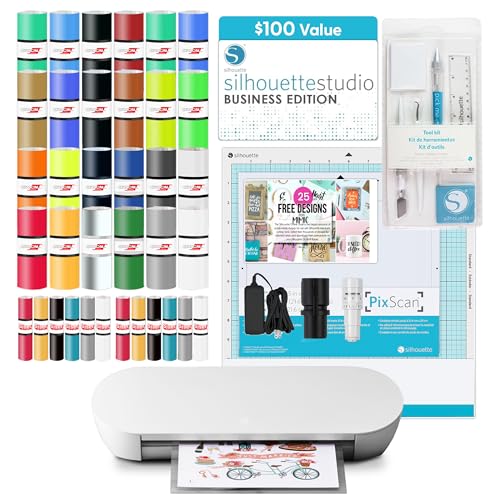
Silhouette Portrait 4 9" Cutting Machine
Best for: small business vinyl and HTV projects
- Cutting Width
- 9 in
- Supported Functions
- heat pen
- Built-In Designs
- 25
- Software Compatibility
- Studio Business Edition
- Included Accessories
- Software
- Suitable For
- Small Business
The Silhouette Portrait 4 is a 9-inch cutting machine designed for small business and craft projects. It features Intelligent Path Technology for sharp, multi-layered cuts and supports heat pen tools for added versatility. The unit operates at 50 dB and handles materials from 5.5 to 9 inches wide, up to 16 feet long. It includes Studio Business Edition software and comes in a deluxe bundle with vinyl and HTV sheets.
- 9-inch cutting width for standard material rolls
- Intelligent Path Technology ensures clean edges
- Supports heat pen for diverse material options
- Quiet operation at 50 dB
- Includes Studio Business Edition software
- 9-inch cutting width is narrower than the 24-inch Siser Romeo
- 3.53-pound weight is heavier than the Cricut Joy Xtra
- 9-inch width is smaller than the 12-inch Brother ScanNCut
- You need a machine for small business vinyl projects
- You want to use heat transfer vinyl (HTV) tools
- You require a quiet cutting experience under 50 dB
- You need to cut materials wider than 9 inches
- You require a professional-grade 24-inch cutting area
- You want a lighter machine under 3 pounds
Verdict: Silhouette Portrait 4 9" Cutting Machine suits crafters needing precise 9-inch cuts and heat pen compatibility. It is ideal for small business owners who value quiet operation and included business software.

Brother ScanNCut SDX125EGY with Scanner
Best for: scanning original drawings and automatic blade adjustments
- Built-In Designs
- 682
- Connectivity
- USB, Wi-Fi
- Intended Use
- DIY
- Suitable For
- DIY Projects
- Dimensions
- 11.8 × 24.6 × 11.6 inches
The Brother ScanNCut SDX125EGY is a DIY cutting machine featuring a built-in scanner and 5-inch touchscreen. It cuts materials up to 3mm thick, including fabric and chipboard. With 682 built-in designs and Wi-Fi connectivity, it supports wireless project uploads. The auto blade sensor removes manual material selection. This unit suits crafters who want to scan drawings directly into cut files.
- Built-in scanner converts drawings to cut files
- Auto blade sensor detects material thickness automatically
- Cuts materials up to 3mm thick
- 682 built-in designs and 9 fonts included
- Wi-Fi and USB connectivity for wireless uploads
- 682 built-in designs is fewer than the 1000+ found on the Cameo 5
- 3mm cutting thickness is lower than the 24-inch Romeo which handles heavier materials
- 5-inch touchscreen is smaller than the displays on the Maker 4
- You want to scan hand-drawn sketches directly into the machine
- You need automatic material thickness detection without manual adjustment
- You prefer wireless connectivity for uploading custom designs
- You require cutting materials thicker than 3mm
- You need a larger cutting width than 12 inches
- You prefer a machine with over 1000 built-in designs
Verdict: Brother ScanNCut SDX125EGY with Scanner fits crafters who value the convenience of scanning original drawings and automatic blade adjustments over raw cutting power or massive design libraries.

Siser Romeo 24" Die Cutting Machine
Best for: High-volume large-format cutting
- Cutting Width
- 24 in
- Software Compatibility
- Leonardo Design Studio, Windows, Mac
- Connectivity
- WiFi
- Included Accessories
- Software
- Dimensions
- 7.25 × 36.5 × 7.75 inches
- Weight
- 22 pounds
The Siser Romeo is a 24-inch professional cutting machine with Wi-Fi connectivity. It features an open workspace for mat-free cutting and cuts up to 60% faster than traditional desktop cutters. The intuitive touch screen and preinstalled settings make it accessible for beginners while offering commercial-level blades for pros. It weighs 22 pounds and fits Windows or Mac systems via Leonardo Design Studio.
- 24-inch cutting width doubles the size of smaller models
- Cuts up to 60% faster with an advanced motor
- Mat-free cutting capability uses the full workspace
- Intuitive touch-screen interface for easy setup
- Compatible with Leonardo Design Studio on Windows and Mac
- Heavier build at 22 pounds compared to lighter desktop units
- Requires Wi-Fi connectivity for full functionality
- Limited to Siser materials via preinstalled settings
- You need a 24-inch cutting area for large projects
- You want to cut materials without a cutting mat
- You prefer a faster cutting speed for high volume
- You require a machine under 20 pounds for portability
- You need compatibility with third-party proprietary software
- You only work with materials smaller than 12 inches
Verdict: Siser Romeo 24" Die Cutting Machine suits businesses needing large-format cutting and speed. It fits users who value mat-free efficiency and professional build quality over compact portability.
Specifications side by side
| Spec | Cricut Joy Xtra Compact Cutter | Cricut Maker 4 Sticker Bundle | Silhouette Cameo 5a Smart Cutter | Silhouette Cameo 5a Pink Starter Bundle | Silhouette Cameo 5a Classic White | Silhouette Portrait 4 9" Cutting Machine | Brother ScanNCut SDX125EGY with Scanner | Siser Romeo 24" Die Cutting Machine |
|---|---|---|---|---|---|---|---|---|
| Cutting Width | – | – | – | – | – | 9 in | – | 24 in |
| Supported Functions | draw, foil | – | sketch, emboss | sketch, emboss | sketch, emboss | heat pen | – | – |
| Built-In Designs | – | – | 25 | 25 | 25 | 25 | 682 | – |
| Software Compatibility | Design Space | Cricut Design Space | Silhouette Designer Edition | Silhouette Designer Edition | Silhouette Designer Edition | Studio Business Edition | – | Leonardo Design Studio, Windows, Mac |
| Connectivity | – | – | – | – | – | – | USB, Wi-Fi | WiFi |
| Blade Type | – | – | AutoBlade | – | – | – | – | – |
| Intended Use | – | – | – | DIY | DIY | – | DIY | – |
| Included Accessories | – | – | Software | Software | Software | Software | – | Software |
| Suitable For | – | – | – | DIY Projects | DIY Projects | Small Business | DIY Projects | – |
| Transfer Method | – | – | – | – | – | HTV | – | – |
| Dimensions | 12.5 × 6 × 5.5 inches | 10.2 × 25.7 × 10.3 inches | – | – | – | 18 × 8 × 9 inches | 11.8 × 24.6 × 11.6 inches | 7.25 × 36.5 × 7.75 inches |
| Weight | 6 pounds | – | – | – | – | 3.53 pounds | – | 22 pounds |
| Color | White | Ultimate Sticker Making | Black | Pink | White | Deluxe | Grey/Titanium | White |
| Model | 2010313 | z20-11084-N4 | CAM5a-BUNDLE-64-BLUSH | CAMEO4-CC-B1-PNK | CAMEO 4 Bundles | Silhouette Portrait 4 | BND04200 | SNAHDCR24 |
| Size | – | – | – | – | – | 8 3/8 – 11'' | – | – |
When you review laundry appliance hardware, the washing machine buying guide outlines capacity ratings and cycle specifications.
Frequently asked questions
Which die cutting machine is best for small spaces?
The Cricut Joy Xtra Compact Cutter is ideal for crafters with limited room. It measures 12.5 inches long, 6 inches wide, and 5.5 inches high. At 6 pounds, it is easy to store or move. This compact footprint allows you to cut materials without taking up valuable desk space.
How wide can these machines cut?
Cutting width varies significantly by model. The Siser Romeo 24" handles large formats, while the Cricut Maker 4 Sticker Bundle offers a 25.7-inch width. The Silhouette Portrait 4 cuts up to 9 inches wide. Check the maximum width to ensure the machine fits your largest project materials.
Do I need to buy software separately?
Many models include design software to help you start immediately. The Silhouette Cameo 5a bundles, including the Pink and Classic White versions, come with included software. The Silhouette Portrait 4 also provides business software. Verify the specific bundle contents, as some kits may require additional purchases for advanced features.
Which machine is best for scanning original drawings?
The Brother ScanNCut SDX125EGY with Scanner is designed for this task. It features automatic blade adjustments and a built-in scanner to digitize your artwork. This model suits users who want to convert hand-drawn sketches into cut files without manual tracing, streamlining your creative workflow.
What is the weight of a portable cutter?
Portability often depends on weight. The Silhouette Portrait 4 weighs 3.53 pounds, making it one of the lighter options. The Cricut Joy Xtra weighs 6 pounds. Heavier machines like the Siser Romeo 24" weigh 22 pounds and are less suitable for frequent travel.
Can I use these machines for heat transfer vinyl?
Yes, several models support heat transfer vinyl (HTV) projects. The Silhouette Portrait 4 is suitable for small business HTV projects and features heat pen compatibility. The Cricut Maker 4 Sticker Bundle is also practical for production. Ensure your machine supports the specific thickness of your HTV material.
Is Wi-Fi connectivity standard on all models?
Connectivity options differ by brand and model. The Siser Romeo 24" includes Wi-Fi connectivity for wireless operation. Other models may rely on USB or proprietary software connections. Check the specific attributes for each machine to determine how it connects to your computer or mobile device for design transfers.