As Amazon Associates, we earn from qualifying purchases. This means we may receive a small commission at no extra cost to you if you click through and make a purchase.
As an Amazon Associate we earn from qualifying purchases. Links on this page are affiliate links.
Display Size Explained for Embroidery Machines
The display size on an embroidery machine refers to the physical dimensions of the screen used to navigate menus and view designs. This spec is critical because it determines how easily you can see stitch patterns, adjust settings, and manage complex files. Manufacturers typically label this measurement in inches, focusing on the diagonal length of the screen. You will commonly encounter two main categories: a 7-inch touchscreen and a 10-inch touchscreen.
A 7-inch touchscreen offers a compact interface. It is sufficient for basic navigation and viewing standard design files. The screen is large enough to read text clearly without straining your eyes. However, detailed embroidery designs with many colors may appear smaller. You might need to zoom in frequently to check specific stitch details. This size is practical for users who prioritize space-saving on their worktable.
The 10-inch touchscreen provides a significantly larger viewing area. This extra space allows you to see more of the design at once. You can navigate complex menus with fewer taps. Large text and icons are easier to read, which reduces eye fatigue during long sessions. The increased surface area also makes it easier to use the touchscreen with gloves or if you have larger hands. For intricate projects, the 10-inch option offers better clarity and control.
When shopping, check the specifications list for the exact diagonal measurement. Do not assume all touchscreens are equal. The difference between 7 and 10 inches impacts your daily workflow. A larger screen generally improves usability for detailed work. It allows for faster adjustments and clearer visual feedback. Consider how you plan to use the machine. If you work with large, complex files, the larger display is worth the consideration. If you stick to simple designs, the smaller screen may suffice. This spec helps you choose a machine that fits your visual needs and workspace constraints.
7 Inch vs 10 Inch Displays
7" Touchscreen
A 7-inch display offers a compact interface that fits smaller workspaces. The Brother SE700 uses this size, which works well for beginners managing 4-inch by 4-inch embroidery areas. You can navigate menus and preview designs without taking up much room. However, the smaller screen limits your view when working with complex stitch patterns. You may need to zoom in more often to check details. This setup suits hobbyists who prioritize ease of use and wireless connectivity over large-scale production. It is a practical choice for small home projects where space is at a premium. The trade-off is reduced visibility for intricate designs compared to larger screens.
10" Touchscreen
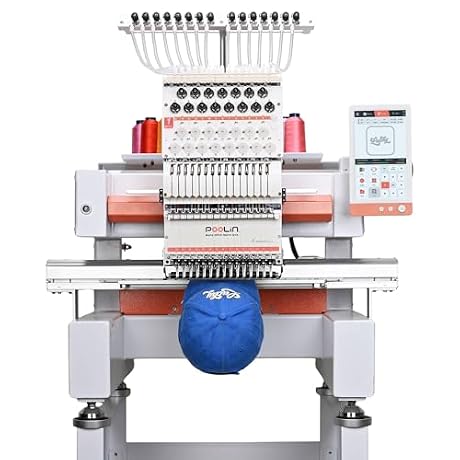
A 10-inch display provides a larger canvas for viewing designs and adjusting settings. The Smartstitch S-1201 Plus and Poolin PEM150101 feature this size, supporting larger embroidery areas like 12-inch by 16-inch or 14-inch by 20-inch workspaces. You get better visibility for complex patterns and multi-needle operations. This screen size helps you manage hat embroidery and commercial garment projects with greater precision. The Poolin model also includes USB connectivity alongside Wi-Fi for file transfers. While the larger screen improves usability for detailed work, it often accompanies bulkier machines. You should ensure you have adequate desk space. This option suits users who need clarity and control for larger, high-volume embroidery tasks.
Is a Larger Screen Worth It
Who needs it
You should prioritize a larger display if you frequently work with complex designs or detailed lettering. A 10-inch touchscreen provides significantly more screen real estate, allowing you to see entire patterns without constant zooming or panning. This clarity helps you spot potential stitching errors before they happen, saving time and thread. If your workspace allows for a larger machine footprint, the extra visual comfort reduces eye strain during long editing sessions. You will also benefit from easier navigation of dense menus and better visibility of color changes in multi-color projects. The larger interface makes precise adjustments to placement and scaling more intuitive, which is essential for professional-level work or large-scale embroidery projects where accuracy is paramount. The improved view directly impacts your workflow efficiency and final output quality.
Who can skip it
You can safely ignore display size if you primarily stitch simple logos, monograms, or small decorative elements. A 7-inch screen is sufficient for managing standard 4-inch by 4-inch embroidery areas and basic design edits. Beginners often find smaller displays less overwhelming and easier to learn. If your workspace is tight, a compact machine with a smaller screen fits better on limited counters. You should prioritize reliable stitching performance, hoop size variety, and software compatibility over screen dimensions. Many users navigate smaller menus quickly once they learn the layout. Focusing on thread quality, needle stability, and ease of use yields better results than chasing larger displays. Your time spent adjusting settings on a small screen is negligible compared to the actual stitching time. Prioritize features that directly impact stitch quality and versatility rather than visual comfort.
Display Glossary Terms
Screen Real Estate
The total visible area of the display. Larger screens show more of a design at once, reducing the need to zoom or scroll during editing tasks.
Touchscreen Interface
A display controlled by finger taps or swipes. This allows direct interaction with menus and design previews without needing a separate mouse or keyboard device.
Resolution
The number of pixels on the screen. Higher resolution provides sharper text and clearer stitch lines, making fine details easier to distinguish on the display.
Embroidery Area
The maximum physical space where the machine can stitch a design. Common sizes include 4×4 inches or 5×7 inches, dictating the size of your projects.
Stitch Count
The total number of individual stitches in a pattern. Complex designs have higher counts, which may require more processing power and a larger screen to view clearly.
Design Preview
The on-screen representation of your embroidery file. A larger display allows you to inspect the layout and colors before sending the pattern to the machine.
Intended Use
The primary purpose of the machine, such as home crafting or commercial production. This determines the necessary features, including screen size and available stitch types.
Included Accessories
Items provided with the machine, such as hoops, bobbins, or software. These components support the embroidery process and may interact with the machine's display interface.
| # | Product | Best for | Price |
|---|---|---|---|
| 1 | Brother Wireless Sewing and Embroidery Machine | Beginners needing small area embroidery | |
| 2 | Smartstitch 12-Needle Embroidery Machine | Large hat and cap embroidery projects | |
| 3 | Brother PE545 3.7" Touchscreen Embroiderer | Small personal embroidery projects for beginners | |
| 4 | Poolin PEM150101 15-Needle Embroidery Machine | Large-area commercial embroidery on hats and garments | |
| 5 | Smartstitch 10-Needle Commercial Embroidery Machine | Cap embroidery with a 7-inch screen | |
| 6 | FUJA FJ-1501 15-Needle Hat Embroidery Machine | Small businesses making caps and large logos |

Brother Wireless Sewing and Embroidery Machine
Best for: Beginners needing small area embroidery
- Display Size
- 7" Touchscreen
- Embroidery Area
- 4" x 4"
- Connectivity
- Wi-Fi, USB
- Built-In Designs
- 135
- Intended Use
- Embroidery, Beginners
- Dimensions
- 16.5 × 7.76 × 12.1 inches
The Brother SE700 is a home sewing and embroidery machine featuring a 3.7-inch color touchscreen. It offers a 4 x 4 inch embroidery field and includes 135 built-in designs. Wireless LAN and USB connectivity allow you to transfer files easily. This model suits beginners who want an all-in-one device for basic projects without needing a large workspace.
- 3.7-inch LCD color touchscreen for on-screen editing
- 135 built-in designs and 10 embroidery lettering fonts
- Wireless LAN and USB connectivity for file transfer
- Automatic needle threader and drop-in top bobbin
- 4 x 4 inch embroidery field is smaller than commercial options
- 15.6 pounds weight is heavier than lighter home models
- 3.7-inch display is smaller than the 7-inch or 10-inch screens on other list items
- You are a beginner starting your embroidery journey
- You need a compact machine for small projects
- You want wireless file transfer without complex setup
- You require large scale commercial production
- You need a display larger than 3.7 inches
- You frequently embroider items larger than 4 x 4 inches
Verdict: Brother SE700 3.7" Touchscreen Embroidery Machine fits beginners who value ease of use and wireless connectivity for small home projects. It is not suitable for those needing large embroidery areas or larger screens.

Smartstitch 12-Needle Embroidery Machine
Best for: Large hat and cap embroidery projects
- Display Size
- 10" Touchscreen
- Needle Count
- 12
- Embroidery Area
- 12 x 16 in
- Maximum Speed
- 1200 SPM
- Connectivity
- Wi-Fi, USB
- Intended Use
- Embroidery
The Smartstitch S-1201 Plus features a 10-inch touchscreen and 12 needles. It offers a 12 x 16 inch embroidery area and runs at 1200 SPM. Wi-Fi and USB connectivity allow file transfers. This machine suits hat and cap makers needing large workspace. The direct vertical guiding system aims for stability and lower noise. It includes auto thread trimming and color changing.
- 10-inch touchscreen display
- 12-needle configuration
- 1200 SPM maximum speed
- 12 x 16 inch embroidery area
- Wi-Fi and USB connectivity
- Fewer needles than 15-needle competitors
- Smaller embroidery area than 20 x 14 inch models
- Lower speed than commercial 15-needle machines
- You need a large 12 x 16 inch hoop for hats and caps
- You want a 10-inch touchscreen for easier navigation
- You prefer 12 needles for detailed multi-color designs
- You require 15 or more needles for high-volume production
- You need a larger 20 x 14 inch embroidery area
- You want a machine with higher than 1200 SPM speed
Verdict: Smartstitch S-1201 Plus 12-Needle Embroidery Machine fits hat makers who need a large 12 x 16 inch area and a 10-inch screen. It offers a stable 12-needle setup without the bulk of 15-needle industrial units.

Brother PE545 3.7" Touchscreen Embroiderer
Best for: Small personal embroidery projects for beginners
- Display Size
- 7" Touchscreen
- Embroidery Area
- 4" x 4"
- Connectivity
- Wireless LAN, USB
- Intended Use
- Embroidery
- Dimensions
- 9.49 × 17.5 × 11.8 inches
The Brother PE545 features a 3.7-inch LCD color touchscreen and a 4" x 4" embroidery field. You can position patterns and preview designs directly on the display. Wireless LAN and USB connectivity allow you to transfer files from your PC or mobile device. This compact machine suits beginners who need a straightforward interface and built-in tutorials for learning embroidery basics.
- 3.7-inch LCD color touchscreen for pattern positioning
- 4" x 4" embroidery field for small to medium designs
- Wireless LAN and USB connectivity for file transfer
- ARTSPIRA mobile app support for custom patterns
- Smaller 3.7-inch display compared to 7-inch or 10-inch options
- Limited 4" x 4" embroidery area restricts large projects
- Single-needle configuration limits color changes without manual intervention
- You are new to embroidery and want a guided learning experience
- You primarily create small designs that fit within a 4" x 4" area
- You prefer wireless file transfer over manual USB management
- You need to embroider large logos or banners exceeding 4 inches
- You require multi-needle efficiency for complex color designs
- You prefer a larger 7-inch or 10-inch screen for detailed editing
Verdict: Brother PE545 3.7" Touchscreen Embroidery Machine fits hobbyists focused on small, personal projects who value ease of use over large-scale production capabilities. It is ideal for those starting out who do not yet need commercial-grade speed or capacity.

Poolin PEM150101 15-Needle Embroidery Machine
Best for: Large-area commercial embroidery on hats and garments
- Display Size
- 10" Touchscreen
- Needle Count
- 15
- Embroidery Area
- 20" x 14"
- Maximum Speed
- 1,200 SPM
- Connectivity
- Wi-Fi, USB
- Cap Support
- 270°
This Poolin commercial embroidery machine features a 10-inch HD touchscreen and a 15-needle configuration. It offers a large 20 by 14 inch embroidery area and reaches speeds up to 1,200 stitches per minute. The unit connects via Wi-Fi and USB for file transfers. Its heavy-duty cast aluminum frame supports structured caps and finished garments. This machine suits businesses needing high output and large design fields.
- 10-inch HD touchscreen for intuitive operation
- 15 needles for multi-color efficiency
- 20 by 14 inch large embroidery area
- Speeds up to 1,200 stitches per minute
- Wi-Fi and USB connectivity for file transfer
- Weighs 400 pounds, requiring significant floor space
- Dimensions of 29.5 by 27.6 inches are bulky
- 1,200 SPM speed is lower than the 1,200 SPM listed for the Smartstitch S-1201 Plus
- You need a large 20 by 14 inch embroidery field
- You require a 15-needle system for complex designs
- You want a 10-inch touchscreen interface
- You have limited workspace for a 400-pound unit
- You prefer a smaller 4 by 4 inch embroidery area
- You need fewer than 15 needles
Verdict: The Poolin PEM150101 15-Needle 10" Touchscreen fits businesses that need a massive 20 by 14 inch embroidery area and a 15-needle setup. It is best for high-volume production of large designs on hats and garments.

Smartstitch 10-Needle Commercial Embroidery Machine
Best for: Cap embroidery with a 7-inch screen
- Display Size
- 7" Touchscreen
- Needle Count
- 10
- Embroidery Area
- 9.5" x 14.2"
- Maximum Speed
- 1200 SPM
- Connectivity
- Wi-Fi, USB
- Intended Use
- Embroidery
The Smartstitch S-1001 is a commercial embroidery machine featuring a 7-inch touchscreen display and 10 needles. It operates at a maximum speed of 1200 SPM with a 9.5 by 14.2-inch embroidery area. The unit weighs 93 pounds and measures 34 by 25 by 33 inches. This setup suits users who need a compact footprint for hat and cap projects while maintaining high-speed production capabilities.
- 7-inch touchscreen display for intuitive control
- 10 needles allow for multi-color designs without manual thread changes
- 1200 SPM maximum speed supports efficient production
- 9.5 by 14.2-inch embroidery area accommodates medium-sized projects
- Smaller 7-inch display compared to 10-inch options on this list
- Fewer needles than the 12 or 15-needle machines available
- 93-pound weight requires a sturdy surface for stability
- You need a balance between speed and a smaller physical footprint
- You primarily embroider on hats and caps
- You want a 7-inch interface rather than a larger screen
- You require a 10-inch touchscreen for larger visual menus
- You need more than 10 needles for complex multi-color work
- You are looking for a lighter machine under 90 pounds
Verdict: Smartstitch S-1001 10-Needle Embroidery Machine fits small businesses focused on hats and caps who prefer a 7-inch screen over larger displays. It offers solid speed and capacity without the bulk of 15-needle commercial units.

FUJA FJ-1501 15-Needle Hat Embroidery Machine
Best for: Small businesses making caps and large logos
- Display Size
- 10" Touchscreen
- Needle Count
- 15
- Embroidery Area
- 14" x 20"
- Maximum Speed
- 1,200 SPM
- Connectivity
- USB, Wi-Fi
- Cap Support
- 270°
The FUJA FJ-1501 is a heavy-duty 15-needle embroidery machine designed for small businesses and hat makers. It features a large 20 by 14 inch working area and a 10-inch touchscreen display. With a maximum speed of 1,200 SPM and Wi-Fi connectivity, it supports high-volume production of caps, t-shirts, and patches. This unit is built for commercial environments requiring consistent, automated stitching across large projects.
- 15-needle head for multi-color designs
- 20 by 14 inch embroidery area
- 10-inch touchscreen display
- 1,200 SPM maximum speed
- Wi-Fi and USB connectivity
- Weighs 430 pounds, requiring significant floor space
- Dimensions of 32 by 43 by 58 inches are bulky for small shops
- 1,200 SPM speed is lower than the 1,200 SPM of the Smartstitch S-1201 Plus and S-1001
- You need a 20 by 14 inch area for large logos or multiple hats
- You run a small business focused on caps and apparel
- You require a 15-needle configuration for complex multi-color work
- You have limited floor space for a 430-pound machine
- You only need a 4 by 4 inch hoop area
- You prefer a lighter, more portable unit
Verdict: The FUJA 15-Needle Commercial Embroidery Machine fits hat makers and small apparel businesses needing a large 20 by 14 inch work area and 15 needles. It suits users who can accommodate its 430-pound weight and 32 by 43 by 58 inch footprint in a dedicated shop space.
Specifications side by side
| Spec | Brother Wireless Sewing and Embroidery Machine | Smartstitch 12-Needle Embroidery Machine | Brother PE545 3.7" Touchscreen Embroiderer | Poolin PEM150101 15-Needle Embroidery Machine | Smartstitch 10-Needle Commercial Embroidery Machine | FUJA FJ-1501 15-Needle Hat Embroidery Machine |
|---|---|---|---|---|---|---|
| Needle Count | – | 12 | – | 15 | 10 | 15 |
| Embroidery Area | 4" x 4" | 12 x 16 in | 4" x 4" | 20" x 14" | 9.5" x 14.2" | 14" x 20" |
| Maximum Speed | – | 1200 SPM | – | 1,200 SPM | 1200 SPM | 1,200 SPM |
| Display Size | 3.7" | 10" | 3.7" | 10" | 7" | 10" |
| Connectivity | Wi-Fi, USB | Wi-Fi, USB | Wireless LAN, USB | Wi-Fi, USB | Wi-Fi, USB | USB, Wi-Fi |
| Built-In Designs | 135 | – | – | – | – | – |
| Cap Support | – | – | – | 270° | – | 270° |
| Intended Use | Embroidery, Beginners | Embroidery | Embroidery | Embroidery | Embroidery | Embroidery |
| Display Type | Touchscreen | Touchscreen | Touchscreen | Touchscreen | Touchscreen | Touchscreen |
| Suitable For | – | T-Shirts, Hats & Caps | – | T-Shirts, Hats & Caps | T-Shirts, Hats & Caps | T-Shirts, Hats & Caps, Small Business |
| Application | – | Hats | – | Hats | Hats | Hats |
| Dimensions | 16.5 × 7.76 × 12.1 inches | 22 × 17 × 29 inches | 9.49 × 17.5 × 11.8 inches | 27.6 × 29.5 × 33.2 inches | 25 × 34 × 33 inches | 43 × 32 × 58 inches |
| Weight | 15.6 pounds | – | – | 400 pounds | 93 pounds | 430 pounds |
| Size | SE700 – Machine Only | plus | PE545 + Thread, Bobbins & Needles | 13.8 x 19.7 inch Embroidery Are | – | Big |
| Color | White | White | White | PEM150101 | White | Green |
| Model | SE700 | S-1201Plus | PE545 | PEM150101 | S-1001 | FJ-1501 |
Frequently asked questions
Does a larger display improve embroidery accuracy?
Yes. A larger screen provides better visibility of stitch details and design boundaries. This clarity helps you position hooping accurately and adjust settings without zooming. Models like the Smartstitch S-1201 Plus use a 10-inch screen to support large 12 by 16 inch areas, ensuring you see the full pattern during setup.
Can I use a 7-inch screen for commercial work?
You can, but it limits your workflow. The Smartstitch S-1001 offers a 7-inch touchscreen for hat embroidery, which is suitable for small businesses. However, you must manage designs on a smaller interface. This setup works if you prioritize speed and capacity over the ease of viewing complex graphics on a larger display.
Is a touchscreen necessary for embroidery machines?
It is highly recommended for modern machines. All listed models feature touchscreens, allowing direct control without external devices. You can tap to start, pause, or select designs. This interface simplifies navigation for beginners and pros alike, making it easier to manage file uploads via Wi-Fi or USB connectivity directly from the screen.
Which display size suits large hat embroidery best?
A 10-inch display is better for large projects. The Poolin PEM150101 and FUJA FJ-1501 both feature 10-inch touchscreens paired with 14 by 20 inch work areas. This combination lets you view large logos and cap designs fully without scrolling. The extra screen space helps manage the complexity of 15-needle setups efficiently.
Do smaller screens limit the embroidery area?
Not directly, but they affect usability. The Brother SE700 has a 7-inch screen and a 4 by 4 inch area. The screen size matches the smaller workspace, making it compact for home use. Larger machines with bigger areas, like the 14 by 20 inch Poolin, require larger screens to display the full work zone effectively.
How does display size affect design preview?
It determines how much of the design you see at once. A 10-inch screen shows entire patterns, reducing the need to zoom. This is crucial for detailed lettering or complex graphics. On a 7-inch screen, you may need to pan or zoom more often, which can slow down your workflow during design selection and editing.