
As Amazon Associates, we earn from qualifying purchases. This means we may receive a small commission at no extra cost to you if you click through and make a purchase.
As an Amazon Associate we earn from qualifying purchases. Links on this page are affiliate links.
Display Type Explained for Sewing
The display type explained helps you choose the right interface for your sewing and embroidery workflow. This specification defines how the machine communicates visual information to you. It determines whether you interact with the device through touch or manual buttons. The two common options are touchscreen and LCD display.
A touchscreen allows direct interaction with the screen. You tap icons, scroll through menus, and select settings without pressing physical buttons. This interface is common in modern computerized machines. It often supports zooming and panning for detailed embroidery designs. You need to keep your fingers clean to ensure accurate input. Some screens resist scratches better than others. Check the product data for screen size and resolution if available.
An LCD display shows information on a liquid crystal screen. You typically navigate menus using dedicated physical buttons or a dial. This setup is found in many mechanical and basic computerized models. The screen provides clear text and simple graphics. It does not require touch input. This can be easier for users who prefer tactile feedback. It also avoids smudges on the screen surface. The visibility of the LCD depends on its backlight and contrast settings.
Why does this matter to you? The interface affects how quickly you can change settings. A touchscreen may speed up complex embroidery programming. An LCD with buttons might offer more reliability in dusty environments. Consider your comfort level with touch interfaces. If you work with detailed designs, a larger touchscreen could help. If you prefer simplicity, a standard LCD might suit you better. Always verify the specific display type in the product specifications before buying. This small detail impacts your daily sewing experience significantly.
Touchscreen vs LCD Displays
Touchscreen
A touchscreen interface allows you to navigate menus and select stitches by tapping the screen directly. This method offers intuitive visual control, which is helpful for editing designs or choosing complex stitch patterns. You get immediate feedback without needing to locate small buttons. The Brother NQ1700E and Janome Skyline 8 use this type of display. These machines often feature larger screens to accommodate detailed embroidery work. The trade-off is that screens can be more fragile and may require cleaning to maintain sensitivity. This setup suits users who prioritize visual design editing and modern interaction over simple mechanical operation.
LCD Display
An LCD display shows stitch information and settings on a standard screen, but you control the machine using physical buttons or a dial. This interface is durable and less prone to accidental touches while you sew. It provides clear text for stitch selection and settings without the complexity of a full graphical interface. The Brother CS7000X and SINGER 6800C feature this display type. This setup is ideal for sewers who prefer tactile feedback and a straightforward workflow. It is often found on machines focused on heavy-duty tasks or basic quilting. The trade-off is that navigating through many options can be slower compared to direct touch selection.
Is A Touchscreen Worth The Upgrade
Who needs it
You should prioritize a touchscreen if you frequently edit complex embroidery designs or manage extensive stitch libraries. The direct touch interface provides intuitive visual control, allowing you to navigate menus and select patterns without hunting for physical buttons. This immediate feedback is crucial when adjusting parameters like stitch length, width, or tension on the fly. If your workflow involves detailed customization or working with intricate digital files, the touchscreen reduces the steps needed to make changes. It streamlines the process of choosing from large datasets of built-in stitches. For users who value speed and precision in design selection, this interface minimizes errors and keeps you focused on the creative aspect of your project rather than the mechanics of the machine.
Who can skip it
You can skip the touchscreen if you primarily use basic utility stitches or simple embroidery patterns. An LCD display with physical buttons offers reliable, tactile feedback that many sewers prefer for consistent operation. This setup is less prone to accidental inputs from fabric or hands during heavy use. If you are a beginner, the straightforward nature of button controls can help you learn the machine’s functions without the complexity of menu layers. Prioritize stitch count, presser foot options, and bobbin system type instead. These specs directly impact your ability to handle different fabrics and projects. A standard LCD ensures clear visibility of settings without the potential distractions of a touch interface. For straightforward sewing tasks, the extra cost or complexity of a touchscreen offers little practical benefit over a traditional, durable button-based panel.
Display Type Glossary
LCD Display
Liquid Crystal Display screens show text and icons using backlighting. They provide clear visibility in various lighting conditions without requiring touch input for navigation.
Touchscreen Interface
A screen that responds directly to finger taps. This allows intuitive menu navigation and stitch selection without needing physical buttons or knobs for control.
Stitch Library
The internal storage of pre-programmed stitch patterns. A larger library offers more decorative options, often managed through the machine's visual display interface.
Embroidery Design
Digital patterns loaded into the machine for decorative stitching. Touchscreens often simplify editing these designs by allowing direct manipulation on the screen.
Button Operation
Using physical keys to select stitches or adjust settings. This method provides tactile feedback and is often preferred for quick adjustments without looking at the screen.
Visual Feedback
Information shown on the screen regarding current settings. This includes stitch length, width, and type, helping you verify adjustments before sewing begins.
Menu Navigation
The process of moving through settings options on the display. Touchscreens allow direct selection, while button-based systems require scrolling through lists using directional keys.
| # | Product | Best for | Price |
|---|---|---|---|
| 1 | Brother 6 x 10 Wireless Embroidery Machine | Large embroidery projects with visual editing | |
| 2 | Brother LCD Sewing and Quilting Machine | Quilting with a wide table and metal frame | |
| 3 | Janome Skyline 8 Quilting Machine | Quilters needing a large touchscreen and many stitches | |
| 4 | Brother Computerized Sewing and Quilting Machine | Sewers needing 165 stitches and an LCD screen | |
| 5 | SINGER Quantum Stylist Color Touch Screen Sewing Machine | Users prioritizing visual stitch previews and variety | |
| 6 | SINGER Heavy Duty Computerized Sewing Machine | Heavy fabric sewing with clear LCD feedback |

Brother 6 x 10 Wireless Embroidery Machine
Best for: Large embroidery projects with visual editing
- Display Type
- Touchscreen
- Intended Use
- Embroidery, Beginners
- Included Accessories
- Software
- Connectivity
- Wi-Fi
- Dimensions
- 17.6 × 29.3 × 13.9 inches
- Weight
- 27 pounds
The Brother NQ1700E is an embroidery machine featuring a 4.85-inch full-color LCD touchscreen. This display lets you view, position, rotate, and reflect designs directly on screen. It includes 258 built-in embroidery designs and supports wireless connectivity for updates. The machine offers a 6 x 10 inch embroidery field, making it suitable for larger projects like jacket backs. It weighs 27 pounds and measures 29.3 inches wide.
- 4.85-inch full-color LCD touchscreen for on-screen editing
- 6 x 10 inch embroidery field for large projects
- 258 built-in embroidery designs included
- Wireless connectivity for official licensed designs
- 258 built-in designs are fewer than the 350 stitches on the Janome Skyline 8
- 27 pound weight is heavier than typical portable units
- 6 x 10 inch field is smaller than the 10 x 10 inch fields often found in high-end models
- You need a large 6 x 10 inch embroidery field
- You prefer visual editing on a full-color touchscreen
- You want wireless connectivity for design updates
- You require more than 258 built-in designs
- You need a 10 x 10 inch embroidery area
- You prefer a lighter machine under 20 pounds
Verdict: Brother NQ1700E 6×10 Embroidery Touchscreen suits users who prioritize a large embroidery area and visual design control. It is a solid choice for those who want wireless updates and a color screen for editing.
Brother LCD Sewing and Quilting Machine
Best for: Quilting with a wide table and metal frame
- Display Type
- LCD Display
- Built-In Stitches
- 70
- Bobbin System
- Drop-in top
- Needle Threader
- Automatic
- Included Presser Feet
- 10
- Extension Table
- Included
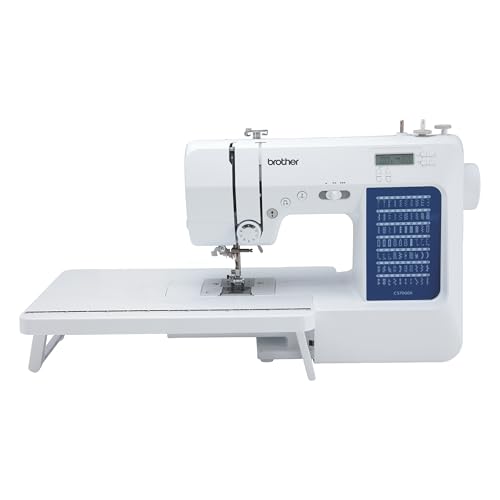
The Brother CS7000X features an LCD display for clear stitch selection and includes 70 built-in stitches. It has a metal frame, automatic needle threader, and a drop-in top bobbin. The wide table supports large quilting projects. This machine suits quilters who need a durable, straightforward computerized sewing machine with a fixed needle bar for even stitching.
- LCD display for clear stitch information
- 70 built-in stitches including decorative and quilting options
- Metal frame and fixed needle bar for stability
- Wide table included for large projects
- Automatic needle threader and drop-in bobbin
- 70 built-in stitches is fewer than the 350 stitches on the Janome Skyline 8
- 14-pound weight is heavier than many portable competitors
- LCD display lacks the touch interface found on higher-end models
- You need a durable metal frame for heavy quilting
- You want a wide table for large projects
- You prefer a fixed needle bar for even stitching
- You require over 350 built-in stitches
- You prefer a touchscreen interface
- You need a lightweight portable machine under 10 pounds
Verdict: The Brother CS7000X LCD Sewing Machine fits quilters who value a sturdy metal frame and a wide workspace over a high stitch count or touch interface.

Janome Skyline 8 Quilting Machine
Best for: Quilters needing a large touchscreen and many stitches
- Display Type
- Touchscreen
- Built-In Stitches
- 350
- Max Sewing Speed
- 1,060 SPM
- Needle Threader
- Superior Needle Threader 2
- Intended Use
- Quilting
- Dimensions
- 9.6 × 19.1 × 12.1 inches
The Janome Skyline 8 is a quilting-focused machine with a 5-inch LCD color touchscreen. It offers 350 built-in stitches and sews at speeds up to 1,060 SPM. The AcuFeed Flex system and 7-piece feed ensure precise fabric control. You will appreciate the intuitive interface and extensive stitch library for complex projects.
- 5-inch LCD color touchscreen for intuitive navigation
- 350 built-in stitches for versatile creative options
- Sews at speeds up to 1,060 SPM
- AcuFeed Flex layered fabric feeding system
- Weighs 46 pounds, making it heavier than many competitors
- 1,060 SPM max speed is slower than the 1,100 SPM found in the SINGER Quantum Stylist 9985
- You need a high stitch count for detailed quilting
- You prefer a large touchscreen interface for settings
- You require advanced fabric feeding systems
- You need a lightweight machine for travel
- You prefer a smaller footprint for limited space
- You want the fastest possible sewing speed
Verdict: The Janome Skyline 8 Touchscreen Sewing Machine is a robust option for quilters who value a large display and extensive stitch library. It suits those who prioritize precise fabric handling over portability.

Brother Computerized Sewing and Quilting Machine
Best for: Sewers needing 165 stitches and an LCD screen
- Display Type
- LCD Display
- Built-In Stitches
- 165
- Operation Type
- Computerized
- Bobbin System
- Drop-in top
- Needle Threader
- Automatic
- Included Presser Feet
- 8
The Brother XR9550 is a computerized sewing and quilting machine featuring an LCD display for stitch selection. It offers 165 built-in stitches, including utility, decorative, and alphanumeric options. The unit includes an automatic needle threader and a drop-in top bobbin for easier operation. It comes with an extension table and eight presser feet. This model suits users who want a straightforward interface with a moderate stitch count for general sewing and quilting projects.
- 165 built-in stitches including utility and decorative options
- Intuitive LCD display for easy stitch selection
- Automatic needle threader speeds up setup
- Includes extension table for larger quilting work
- Drop-in top bobbin system for quick reloading
- Fewer built-in stitches than the Janome Skyline 8 which offers 350
- Heavier build at 10.1 pounds compared to lighter portable models
- Standard LCD screen rather than a touchscreen interface
- You need a reliable LCD interface for clear stitch visibility
- You want a moderate stitch count for general sewing tasks
- You require an extension table for quilting projects
- You prefer a touchscreen display for navigation
- You need a high stitch count exceeding 165 options
- You require a lightweight machine under 10 pounds
Verdict: Brother XR9550 LCD Sewing Machine fits beginners and intermediate sewers who value a clear LCD screen and a solid 165-stitch selection without the bulk of a touchscreen system. It is ideal for those prioritizing stitch variety and included accessories like an extension table over advanced digital interfaces.

SINGER Quantum Stylist Color Touch Screen Sewing Machine
Best for: Users prioritizing visual stitch previews and variety
- Display Type
- Touchscreen
- Operation Type
- Computerized
- Needle Threader
- Built-in
- Included Presser Feet
- 15
- Features
- Metal Frame, Automatic Needle Threader
- Dimensions
- 17.3 × 8.5 × 12.5 inches
The Singer Quantum Stylist 9985 features a large color LCD touch screen for intuitive navigation. It offers 1,000+ stitch applications and 60 memory slots for custom sequences. The machine includes 13 one-step buttonhole styles and 15 presser feet. You can adjust stitch width up to 7mm and control speed for various projects. This computerized model suits those seeking extensive creative options and clear visual guidance.
- Large color LCD touch screen with stitch previews
- 1,000+ stitch applications for diverse creative projects
- 60 memory slots to save custom stitch sequences
- 13 one-step buttonhole styles for consistent results
- Adjustable presser foot pressure for techniques like applique
- 15 included presser feet is fewer than the 165-stitch capacity of the Brother XR9550
- 24-pound weight is heavier than the 14-pound Brother CS7000X
- Single LCD touch screen lacks the physical button controls found on the Janome Skyline 8
- You want a visual interface to preview stitches before sewing
- You need a wide variety of decorative and functional stitch options
- You prefer adjusting settings through a direct touch interface
- You require a lighter machine for easy portability
- You prefer physical buttons over a touchscreen for operation
- You need a higher stitch count than 1,000 applications
Verdict: The Singer Quantum Stylist 9985 Touchscreen is a solid choice for sewers who value visual clarity and extensive stitch variety. It fits users who prioritize a large touch interface and do not mind the added weight for a robust build.

SINGER Heavy Duty Computerized Sewing Machine
Best for: Heavy fabric sewing with clear LCD feedback
- Display Type
- LCD Display
- Built-In Stitches
- 586
- Max Sewing Speed
- 1,100 SPM
- Operation Type
- Computerized
- Bobbin System
- Top drop-in
- Needle Threader
- Built-in
The Singer 6800C is a computerized sewing machine featuring an LCD display that shows stitch images and settings. It offers 586 stitch applications and reaches speeds of 1,100 stitches per minute. The metal frame and powerful motor handle thick fabrics like denim. This model suits users who need a clear interface and heavy-duty performance for varied projects.
- LCD screen displays stitch images and settings
- 586 built-in stitch applications
- 1,100 SPM maximum sewing speed
- Metal frame construction
- 10 included presser feet
- 16.6 pounds weight is heavier than many standard models
- 1,100 SPM speed is lower than the 1,100+ SPM found in some competitors
- LCD display lacks the interactive touch capability of touchscreen models
- You want an LCD screen to view stitch diagrams clearly
- You sew heavy fabrics like denim or canvas regularly
- You prefer a metal frame for stability
- You require a touchscreen interface for navigation
- You need embroidery capabilities in your machine
- You prefer a lightweight machine for easy transport
Verdict: Singer 6800C LCD Heavy Duty Sewing Machine fits sewers who need a clear LCD display and robust power for thick materials. It is a solid choice for heavy-duty tasks rather than decorative embroidery.
Specifications side by side
| Spec | Brother 6 x 10 Wireless Embroidery Machine | Brother LCD Sewing and Quilting Machine | Janome Skyline 8 Quilting Machine | Brother Computerized Sewing and Quilting Machine | SINGER Quantum Stylist Color Touch Screen Sewing Machine | SINGER Heavy Duty Computerized Sewing Machine |
|---|---|---|---|---|---|---|
| Built-In Stitches | – | 70 | 350 | 165 | – | 586 |
| Max Sewing Speed | – | – | 1,060 SPM | – | – | 1,100 SPM |
| Operation Type | – | – | – | Computerized | Computerized | Computerized |
| Bobbin System | – | Drop-in top | – | Drop-in top | – | Top drop-in |
| Needle Threader | – | Automatic | Superior Needle Threader 2 | Automatic | Built-in | Built-in |
| Included Presser Feet | – | 10 | – | 8 | 15 | 10 |
| Display Type | 4.85" Full Color LCD Touch Screen | LCD | 5" LCD color touchscreen | LCD | LCD touch screen | LCD |
| Extension Table | – | Included | – | Included | – | – |
| Intended Use | Embroidery, Beginners | Quilting | Quilting | Quilting | – | – |
| Operation | – | – | – | Computerized | Computerized | Computerized |
| Features | – | – | – | – | Metal Frame, Automatic Needle Threader | Metal Frame, LED Light, 1-Step Buttonhole |
| Included Accessories | Software | Extension Table | – | Extension Table | – | – |
| Connectivity | Wi-Fi | – | – | – | – | – |
| Dimensions | 17.6 × 29.3 × 13.9 inches | 7 × 17 × 12 inches | 9.6 × 19.1 × 12.1 inches | 20 × 13.5 × 17.9 inches | 17.3 × 8.5 × 12.5 inches | 17.5 × 7.5 × 10.9 inches |
| Weight | 27 pounds | 14 pounds | 46 pounds | 10.1 pounds | 14 pounds | 16.6 pounds |
| Color | Blue | White | White | White | White | Grey |
| Model | NQ1700E | CS7000X | SKS8 | XR9550 | 9985 | HD6800C |
| Size | – | CS7000X | 9.6"D x 19.1"W x 12.1"H | XR9550 (Standard) | 24 pounds | Large |
Frequently asked questions
Does a touchscreen sewing machine require software to be useful?
Yes, for full functionality. The Brother NQ1700E includes software to support its wireless embroidery features. This allows you to update designs and manage large projects directly. Without the software, the touchscreen’s potential for visual editing remains limited. It is essential for users who prioritize design control.
Which display type is better for quilting with a wide table?
An LCD display is often sufficient. The Brother CS7000X uses an LCD screen and pairs it with a wide extension table. This setup suits quilters who need a sturdy metal frame and ample workspace. You do not need a touch interface to manage these large-scale quilting tasks effectively.
How does display type affect machine weight?
Touchscreen models tend to be heavier. The Janome Skyline 8 weighs 46 pounds due to its robust build and large display. In contrast, the Brother XR9550 with an LCD screen weighs only 10.1 pounds. If you prioritize portability, an LCD model offers a lighter, more manageable option.
Can you see stitch previews on an LCD display?
Some LCD models offer clear visual feedback. The Brother XR9550 provides a clear LCD screen for beginners and intermediate sewers. It displays stitch information without the complexity of a touch interface. This ensures you can verify your selections easily while focusing on the 165 available stitches.
Is a touchscreen necessary for heavy-duty sewing?
No, an LCD display is adequate. The Singer HD6800C uses an LCD screen for clear feedback during heavy fabric sewing. It prioritizes robust power and a metal frame over advanced digital interfaces. You get the necessary control for thick materials without the added bulk of a touchscreen system.
What connectivity options come with touchscreen embroidery machines?
Wireless connectivity is common in high-end touchscreen models. The Brother NQ1700E features Wi-Fi for wireless updates. This allows you to transfer designs and keep the machine current. Touchscreen interfaces often pair with connectivity to enhance the visual editing experience for large embroidery projects.


