As Amazon Associates, we earn from qualifying purchases. This means we may receive a small commission at no extra cost to you if you click through and make a purchase.
As an Amazon Associate we earn from qualifying purchases. Links on this page are affiliate links.
Understanding Embroidery Area Sizes
The embroidery area explained defines the maximum size of a design your machine can stitch in a single hooping. This specification is critical because it determines the physical limits of your creative output. You cannot stitch an image larger than the machine’s working field without stopping to reposition the fabric.
Manufacturers list this dimension as width by height in inches. A common entry-level size is 4 inches by 4 inches. This square format suits small logos, initials, or simple patches. It is compact and affordable, making it ideal for beginners who need to learn basic operations without managing large fabric loads.
A slightly larger standard is 5 inches by 7 inches. This rectangular space offers more versatility for names, small quotes, or decorative borders. The extra length allows for more complex designs that do not fit in a square hoop. Many mid-range machines use this size as their primary offering.
Professional and heavy-duty units often provide a 14 inches by 20 inches area. This large canvas supports full-sized monograms, table runners, and extensive floral patterns. You can stitch large designs in one pass, which reduces visible seams and saves time. However, these machines require more floor space and often cost more.
When you shop, check the exact dimensions on the product listing. Do not assume all machines can handle large projects. If you plan to make baby blankets or wall hangings, a small 4×4 hoop will limit you significantly. You will need to split the design into multiple sections, which increases the risk of misalignment.
Consider your typical projects before buying. Small items fit easily in compact hoops. Large home decor items require a wide working area. Matching your needs to the correct embroidery area explained ensures you buy a machine that can actually complete your desired tasks.
Compare Embroidery Area Sizes
4" x 4"
A 4" x 4" embroidery area offers a compact workspace ideal for small personal items. This size fits standard patches, logos on hats, and monograms on small garments. The Brother SE700 and Brother Skitch PP1 utilize this hoop size. These machines are lighter and take up less desk space. You benefit from easier handling and lower physical weight. However, you cannot stitch large designs in one go. Complex patterns may require re-hooping, which adds time. This area suits hobbyists with limited room or those making small accessories. It is not suitable for large centerpieces or wide garment panels. The trade-off is portability and cost versus design scale.
5" x 7"
A 5" x 7" embroidery area provides a versatile middle ground for most home users. This size accommodates standard shirt logos, medium-sized patches, and decorative borders. The Brother SE2000 and Brother PE900 machines feature this workspace. It allows for more detailed designs than smaller hoops without requiring a massive footprint. You gain flexibility for various project types, from apparel to home decor. The Brother SE2000 includes a comprehensive kit for beginners. While larger than 4×4 options, it remains manageable for most workspaces. You avoid the complexity of industrial equipment. This area is practical for regular hobbyists who want to expand their project range without committing to commercial-grade machinery.
14" x 20"
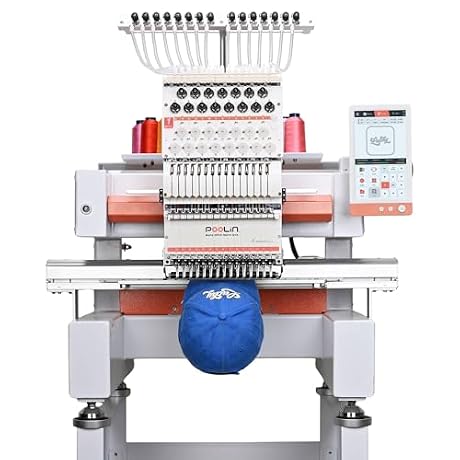
A 14" x 20" embroidery area is designed for high-volume and large-format production. This massive workspace handles entire garment fronts, large banners, and complex multi-color designs in a single hooping. The Smartstitch S-1501 machines with 15 needles utilize this area. This size eliminates the need for re-hooping large designs, saving significant time. It is built for commercial cap and hat production or professional shops. The trade-off is substantial size and weight. These machines require dedicated floor space and robust tables. They are not suitable for small home studios. You gain efficiency and scale but sacrifice portability and ease of setup. This option is strictly for users needing maximum output capacity.
Who Needs Large Embroidery Space
Who needs it
You should prioritize machines with a 14" x 20" embroidery area if you plan to create large-scale projects. This generous workspace allows you to stitch full-size logos, decorative table runners, or large wall art without breaking the design into multiple sections. It is ideal for small business owners who need to produce consistent, high-volume items like branded uniforms or large promotional banners. If you want to minimize hoop repositioning and avoid visible seams in your final product, a larger area is essential. It saves time and ensures professional results for complex, expansive designs that smaller hoops simply cannot accommodate in a single run.
Who can skip it
You can ignore large embroidery areas if your projects are mostly small accessories. A 4" x 4" or 5" x 7" area is sufficient for monograms, small patches, and hat logos. These compact machines are often lighter and take up less desk space, which is practical for hobbyists with limited room. If you mainly embroider on caps, cuffs, or small gift items, a smaller hoop is more than enough. Prioritize ease of use and portability over massive workspace. Large machines add bulk and may require more maintenance. Stick to smaller specs if your creative output stays within the bounds of standard personal items rather than large home decor or commercial apparel.
Embroidery Area Glossary
Embroidery Area
The maximum rectangular space where the machine needle can reach. It defines the largest single design you can stitch without re-hooping the fabric.
Hoop Size
The physical frame that holds your fabric taut. The hoop size must match or exceed the embroidery area to secure the material during stitching.
Single Hooping
Stitching a design in one continuous setup. Larger areas allow bigger projects in one go, while smaller areas may require breaking designs into sections.
Re-hooping
Moving the fabric to stitch a new section of a large design. This process adds time and risk of misalignment compared to single-hoop stitching.
Design Dimensions
The width and height of your digital file. These measurements must fit within your machine's maximum embroidery area to stitch successfully.
Compact Workspace
A smaller embroidery area, typically 4×4 inches. It suits small items like patches and caps but limits the size of single-piece projects.
Large Workspace
A wider embroidery area, such as 14×20 inches. It accommodates full-size logos and large decorative items without needing to split the design.
Stitch Limit
The physical boundary of the machine's movement. Designs exceeding this limit cannot be stitched and must be resized or split for production.
| # | Product | Best for | Price |
|---|---|---|---|
| 1 | Brother SE2000 5×7 Sewing & Embroidery | Beginners needing a complete 5×7 embroidery starter kit | |
| 2 | Brother Wireless Sewing and Embroidery Machine | Small home embroidery projects with wireless setup | |
| 3 | Smartstitch S-1501 15-Needle Embroidery Machine | High-volume cap and hat embroidery businesses | |
| 4 | Brother PE900 5" x 7" Embroidery Machine | Standard 5" x 7" home embroidery projects | |
| 5 | Brother Skitch Single-Needle Embroidery Machine | small personal embroidery projects | |
| 6 | Smartstitch S-1501 15-Needle Embroidery Machine | commercial cap and garment production |

Brother SE2000 5×7 Sewing & Embroidery
Best for: Beginners needing a complete 5×7 embroidery starter kit
- Embroidery Area
- 5" x 7"
- Connectivity
- Wireless
- Built-In Designs
- 193
- Sewing Function
- 2-in-1 combo
- Intended Use
- Embroidery, Beginners
- Dimensions
- 17.6 × 9.49 × 11.8 inches
The Brother SE2000 is a 2-in-1 sewing and embroidery machine with a 5" x 7" field. It includes 193 built-in designs and 241 sewing stitches. This package adds four hoops and thread supplies. It suits beginners needing a complete starter kit. The Wi-Fi connectivity allows for easy design transfers. You get a solid foundation for basic embroidery projects.
- Includes 193 built-in embroidery designs and 13 lettering fonts
- Features a 5" x 7" embroidery area for larger projects
- Comes with four hoops and 20 premium threads in the kit
- Offers Wi-Fi connectivity for wireless design transfers
- 5" x 7" embroidery area is smaller than the 14" x 20" option
- 193 built-in designs are fewer than the 15-needle commercial machines
- 20.5-pound weight makes it bulkier than single-needle portable units
- You need a complete starter kit with hoops and thread
- You want a 5" x 7" embroidery field for medium designs
- You prefer Wi-Fi connectivity for transferring designs
- You require a large 14" x 20" embroidery area
- You need high-speed commercial production with 15 needles
- You want a lightweight machine for frequent travel
Verdict: Brother SE2000 5" x 7" Embroidery Kit fits beginners who want a comprehensive package with standard hoop sizes and wireless features. It is not suitable for those needing large format embroidery or high-volume commercial output.

Brother Wireless Sewing and Embroidery Machine
Best for: Small home embroidery projects with wireless setup
- Embroidery Area
- 4" x 4"
- Display Size
- 3.7"
- Connectivity
- Wi-Fi, USB
- Built-In Designs
- 135
- Intended Use
- Embroidery, Beginners
- Display Type
- Touchscreen
The Brother SE700 is a computerized sewing and embroidery machine with a 4" x 4" embroidery field. It features a 3.7-inch color touchscreen for on-screen editing and 135 built-in designs. You can connect via Wi-Fi or USB to transfer files. This model weighs 15.6 pounds and includes an automatic needle threader. It suits beginners looking for wireless connectivity and a compact footprint.
- 4" x 4" embroidery field with included hoop and arm
- 3.7-inch LCD color touchscreen for design preview and editing
- 135 built-in designs and 10 embroidery lettering fonts
- Wireless LAN and USB connectivity for file transfer
- Automatic needle threader and drop-in top bobbin
- 4" x 4" embroidery area is smaller than the 5" x 7" options on this list
- 15.6 pounds weight is heavier than single-needle home machines
- 135 built-in designs are fewer than multi-needle commercial systems
- You need wireless file transfer for custom patterns
- You prefer a compact machine for small projects
- You want a touchscreen interface for easy editing
- You require embroidery areas larger than 4" x 4"
- You need multi-needle capability for production work
- You want to avoid wireless setup steps
Verdict: Brother SE700 4×4 Embroidery Machine fits beginners who value wireless connectivity and a color touchscreen for small, personal projects. It is not suitable for large-scale or commercial embroidery tasks.

Smartstitch S-1501 15-Needle Embroidery Machine
Best for: High-volume cap and hat embroidery businesses
- Embroidery Area
- 14" x 20"
- Needle Count
- 15
- Maximum Speed
- 1,200 SPM
- Display Size
- 12"
- Connectivity
- Wi-Fi, USB
- Cap Support
- 270°
The Smartstitch S-1501 is a heavy-duty embroidery machine designed for high-volume production. It features a large 14 x 20 inch embroidery area and 15 needles for automatic color changes. With a maximum speed of 1,200 SPM and a 12-inch touchscreen, it handles complex projects efficiently. The machine includes Wi-Fi connectivity and specialized support for caps and hats, making it suitable for serious embroidery businesses.
- 14 x 20 inch embroidery area for large designs
- 15 needles for multi-color embroidery without manual changes
- 1,200 SPM maximum speed for fast production
- 12-inch touchscreen display for easy navigation
- Dedicated 270-degree cap driver for hat embroidery
- 176 pounds weight requires significant floor space
- 44 inches width is bulkier than single-needle models
- 1200 SPM speed is lower than some high-end competitors
- You need a large 14 x 20 inch embroidery area
- You require 15 needles for automated color changes
- You frequently embroider on caps and hats
- You have limited floor space for a 44-inch wide machine
- You prefer a lightweight machine under 100 pounds
- You only need a small 5 x 7 inch embroidery area
Verdict: Smartstitch S-1501 15-Needle Embroidery Machine fits users who need a large 14 x 20 inch work area and 15 needles for high-volume cap and hat production. It is not ideal for those with small workspaces or those who do not need multi-color automation.

Brother PE900 5" x 7" Embroidery Machine
Best for: Standard 5" x 7" home embroidery projects
- Embroidery Area
- 5" x 7"
- Display Size
- 3.7"
- Connectivity
- Wireless
- Built-In Designs
- 190
- Intended Use
- Embroidery
- Dimensions
- 7 × 17 × 7 inches
The Brother PE900 offers a 5" x 7" embroidery area with 190 built-in designs. It features a 3.7-inch touch screen and wireless connectivity for transferring patterns. The bundle includes multiple hoops and 40 thread spools. This machine suits hobbyists who want a straightforward setup with decent design variety and basic wireless transfer capabilities for smaller projects.
- 5" x 7" embroidery area
- 190 built-in embroidery designs
- 3.7-inch touch screen LCD
- Wireless connectivity for design transfer
- Includes 40 polyester thread spools
- Limited to 190 built-in designs
- Smaller 5" x 7" embroidery area
- Heavier at 20 pounds
- You need a 5" x 7" embroidery area
- You want wireless design transfer
- You prefer a touchscreen interface
- You require a larger than 5" x 7" embroidery area
- You need more than 190 built-in designs
- You prefer a lighter machine under 20 pounds
Verdict: Brother PE900 5" x 7" Embroidery Machine fits users who need a compact 5" x 7" workspace and wireless design transfer. It is a practical option for those who value a touchscreen and a moderate number of built-in patterns for standard projects.

Brother Skitch Single-Needle Embroidery Machine
Best for: small personal embroidery projects
- Embroidery Area
- 4" x 4"
- Needle Count
- 1
- Maximum Speed
- 400 SPM
- Connectivity
- Bluetooth
- Sewing Function
- Embroidery only
- Dimensions
- 17.2 × 9.02 × 12.5 inches
The Brother Skitch PP1 is a single-needle embroidery machine with a 4" x 4" area. It reaches speeds up to 400 SPM and connects via Bluetooth. You use the required Artspira app to draw or import designs. It weighs 16.6 pounds and measures 17.2 inches long. This model suits beginners who want a small footprint for personal projects on items like towels.
- 4" x 4" embroidery area for small designs
- Bluetooth connectivity for app control
- 400 SPM maximum speed
- Compact 16.6 lb build
- 400 SPM speed is slower than faster models
- Embroidery-only function without sewing capability
- 4" x 4" area limits design size
- You need a compact machine for small projects
- You want to use your smartphone for design control
- You are starting with simple embroidery tasks
- You require sewing functions alongside embroidery
- You need to stitch large designs beyond 4 inches
- You prefer a machine with a built-in display
Verdict: Brother Skitch PP1 4×4 Embroidery fits hobbyists who prioritize portability and app-based design for small, personal items. It is not suitable for those needing larger workspaces or combined sewing capabilities.

Smartstitch S-1501 15-Needle Embroidery Machine
Best for: commercial cap and garment production
- Embroidery Area
- 14" x 20"
- Needle Count
- 15
- Maximum Speed
- 1200 SPM
- Display Size
- 12"
- Connectivity
- Wi-Fi, USB
- Cap Support
- 270°
The Smartstitch S-1501 is a commercial embroidery machine designed for high-volume production. It features a 14" x 20" embroidery area and 15 needles for multi-color work without thread changes. The 1200 SPM max speed and 12" touchscreen support efficient operation. This 209-pound unit suits businesses needing large format stitching on caps and garments.
- 14" x 20" large embroidery area
- 15 needles for multi-color designs
- 1200 SPM maximum stitching speed
- 12" touchscreen display
- 209 pounds weight requires sturdy support
- 36.6 inches width limits small workspaces
- You run a commercial embroidery business
- You need large format stitching on caps
- You want multi-color capability without rethreading
- You have limited floor space
- You cannot support heavy machinery
- You only need small hoop sizes
Verdict: Smartstitch S-1501 15-Needle Commercial Machine fits professional shops requiring large area stitching and high speed. It is not suitable for hobbyists with small workspaces.
Specifications side by side
| Spec | Brother SE2000 5×7 Sewing & Embroidery | Brother Wireless Sewing and Embroidery Machine | Smartstitch S-1501 15-Needle Embroidery Machine | Brother PE900 5" x 7" Embroidery Machine | Brother Skitch Single-Needle Embroidery Machine | Smartstitch S-1501 15-Needle Embroidery Machine |
|---|---|---|---|---|---|---|
| Needle Count | – | – | 15 | – | 1 | 15 |
| Embroidery Area | 5" x 7" | 4" x 4" | 20" x 14" | 5" x 7" | 4" x 4" | 14" x 20" |
| Maximum Speed | – | – | 1,200 SPM | – | 400 SPM | 1200 SPM |
| Display Size | – | 3.7" | 12" | 3.7" | – | 12" |
| Connectivity | Wireless | Wi-Fi, USB | Wi-Fi, USB | Wireless | Bluetooth | Wi-Fi, USB |
| Built-In Designs | 193 | 135 | – | 190 | – | – |
| Cap Support | – | – | 270° | – | – | 270° |
| Sewing Function | 2-in-1 combo | – | – | – | Embroidery only | – |
| Intended Use | Embroidery, Beginners | Embroidery, Beginners | Embroidery | Embroidery | Embroidery | Embroidery |
| Display Type | – | Touchscreen | Touchscreen | – | – | Touchscreen |
| Suitable For | – | – | Hats & Caps | – | – | T-Shirts, Hats & Caps |
| Application | – | – | Hats | – | – | Hats |
| Dimensions | 17.6 × 9.49 × 11.8 inches | 16.5 × 7.76 × 12.1 inches | 33 × 44 × 35 inches | 7 × 17 × 7 inches | 17.2 × 9.02 × 12.5 inches | 28.7 × 36.6 × 35 inches |
| Weight | 20.5 pounds | 15.6 pounds | 176 pounds | 20 pounds | 16.6 pounds | 209 pounds |
| Size | SE2000 + Ultimate Embroidery Package | SE700 – Machine Only | S-1501 Ultra | 5" x 7" | 20.01×11.89×17.95 | s1501 |
| Color | White / Black | White | Champagne | White | Grey/Black | Blue Base |
| Model | SE2000 | SE700 | SS-EM-1501-UL01 | BRTHR-PE900-BUNDLE-6 | PP1 | SS-EM-15N-BU |
Frequently asked questions
Can I stitch large designs on a 4×4 embroidery machine?
No, you cannot stitch designs larger than 4 inches by 4 inches in a single hoop. Machines like the Brother SE700 and Brother Skitch PP1 are limited to this compact workspace. You must split large images into smaller sections and re-hoop the fabric multiple times to complete the project.
What is the largest embroidery area available in this guide?
The largest embroidery area listed is 14 inches by 20 inches. The Smartstitch S-1501 models feature this expansive workspace. This size allows you to stitch full-size logos, table runners, or large wall art in one continuous operation without needing to move the fabric or re-hope.
Is a 5×7 embroidery area good for beginners?
Yes, a 5×7 inch area is an excellent standard for beginners. The Brother SE2000 and Brother PE900 offer this size. It provides enough room for most personal projects like monograms and patches, while remaining compact enough for home use. It balances versatility with manageable workspace requirements.
Do I need a 15-needle machine for a large embroidery area?
Not necessarily, but it is common in high-volume setups. The Smartstitch S-1501 combines a 14×20 inch area with 15 needles for efficiency. Single-needle machines can also offer large areas, though they may require manual thread changes. The needle count affects automation speed, not just the physical stitch size.
How does embroidery area affect machine weight and size?
Larger embroidery areas generally require heavier and bulkier machines. The Brother SE700 with a 4×4 area weighs 15.6 pounds, while the Smartstitch S-1501 with a 14×20 area weighs 176 to 209 pounds. You need more structural support and a larger frame to maintain stability over a wider stitching field.
Can I use wireless features with any embroidery area size?
Yes, wireless connectivity is available across different area sizes. The Brother SE2000 (5×7), SE700 (4×4), and Smartstitch S-1501 (14×20) all include Wi-Fi. This feature allows you to transfer designs directly from a computer or mobile device, regardless of the physical dimensions of the embroidery workspace.
What determines if a machine fits my workspace?
The physical dimensions and weight of the machine determine if it fits your space. The Brother SE700 measures 7.76 by 16.5 inches, fitting easily on a desk. In contrast, the Smartstitch S-1501 measures 44 by 33 inches and requires a dedicated floor space. Check the length, width, and height specs before buying.