As Amazon Associates, we earn from qualifying purchases. This means we may receive a small commission at no extra cost to you if you click through and make a purchase.
If you edit video, record podcasts, or manage digital content on an enterprise-grade HP notebook, converting your portable machine into an organized desktop workstation is essential for an efficient workflow. The HP 2013 UltraSlim Dock provides a dedicated mechanical docking solution engineered to expand the physical capabilities of supported EliteBook, ProBook, and ZBook computers. Rather than relying on modern universal dongles or cable-tethered hubs such as the anker prime docking station, this specialized base utilizes HP’s proprietary side docking port to link power, external displays, wired internet, and USB peripherals in a single movement. Creators evaluating the hp 2013 ultra slim docking station typically need to verify whether its legacy architecture can comfortably power a modern dual-screen desk setup without data bottlenecks or hardware instability.
This comprehensive review examines everything this classic docking station brings to a creative environment, from video output bandwidth to physical device compatibility. We will analyze the dual DisplayPort configurations, review the four high-speed USB 3.0 ports, inspect the mechanical latching system, and review the exact list of supported HP laptops. Furthermore, we assess how the 65-watt power specification and integrated audio connections hold up during intensive audio and video editing sessions. By breaking down the real-world workflow trade-offs, setup requirements, and mechanical nuances, this guide will help you determine whether this dedicated dock is the missing piece for your home studio or editing bay.

What You Get With the HP 2013 UltraSlim Dock
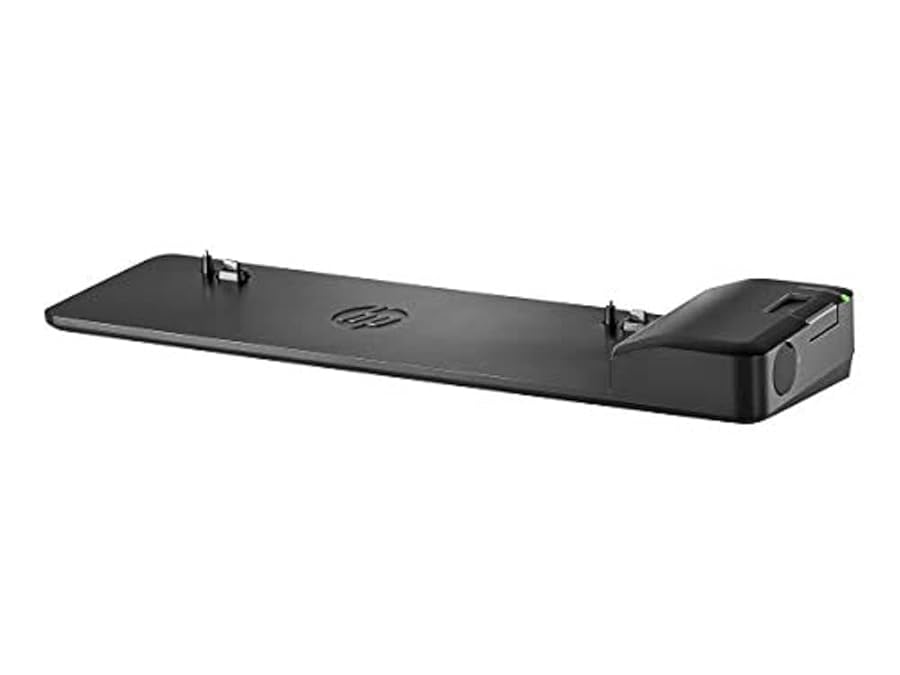
The HP 2013 UltraSlim Dock is built as a rigid desktop docking cradle designed to remain stationary while your laptop snaps directly into its side connector. The physical unit provides a comprehensive array of legacy and modern ports to handle desktop expansion:
- 4x USB 3.0 data ports for external storage drives, audio interfaces, and peripherals
- 2x DisplayPort video outputs for digital monitor setups
- 1x VGA port for legacy analog monitors or presentation projectors
- 1x RJ-45 LAN / Ethernet port for high-speed wired networking
- 1x 3.5 mm line-in audio jack for external recording gear or audio sources
- 1x 3.5 mm line-out audio jack for desktop speakers or studio reference monitors
- 1x integrated Kensington-style cable lock slot (lock mechanism not included)
- 65-watt rated power capacity to charge and run compatible notebooks
Key Specifications
The core specifications of the docking station highlight its focus on business-grade connectivity and dedicated desk integration:
| Attribute | Detail |
|---|---|
| Brand | HP |
| Model Number | D9Y32AA#ABA |
| Part Numbers | D9Y32AAABB / D9Y32AA#ABA |
| Hardware Interface | USB 3.0 |
| Total USB Ports | 4 USB 3.0 Ports |
| Display Outputs | 2x DisplayPort, 1x VGA |
| Audio Interfaces | 1x 3.5 mm Line In, 1x 3.5 mm Line Out |
| Networking | 1x RJ-45 Ethernet Port |
| Power Capacity | 65 Watts |
| Dimensions (L x W x H) | 14.49 x 4.21 x 1.73 inches |
| Unit Weight | 0.76 kg (1.68 lbs) |
Display Capabilities and Dual Monitor Performance
For video editors, photo retouchers, and graphic designers, multi-monitor support is often the primary reason to purchase an external docking station. The hp d9y32aa specs feature two DisplayPort connections alongside a legacy VGA connector, offering direct digital transmission without the software compression typical of entry-level USB display adapters. Creators configuring an hp ultraslim dock dual monitor setup can run dual digital displays through the two DisplayPort outputs, spreading an editing timeline across one screen while reserving the second for color grading or previewing bins. Unlike general-purpose hubs like the ugreen 9 in 1 dock, which may rely on DisplayLink drivers or shared USB bandwidth, this dock ties directly into your laptop’s internal graphics bus through the dedicated proprietary side port.
Regarding video resolution, the listing does not specify the maximum native hp d9y32aa displayport resolution. However, standard DisplayPort interfaces from this hardware generation reliably support high-definition creative monitors at standard desktop refresh rates. Video creators working with dual 1080p or single high-resolution displays will appreciate the flicker-free digital output and direct hardware communication provided by the dual DisplayPort paths. The native video pipeline bypasses the latency, dropped frames, and cursor stutter that often plague software-driven USB video dongles during heavy timeline scrub sessions.
The inclusion of a legacy VGA port offers added versatility if your studio environment utilizes older secondary displays, studio reference monitors, or dedicated client preview screens. While VGA does not match the crisp digital fidelity of DisplayPort, having an analog port ensures backward compatibility with legacy studio gear and older office displays without requiring active digital-to-analog conversion cables. It is important to note that the total number of simultaneous active displays is dictated by the graphics processing unit inside your specific EliteBook notebook rather than the physical ports on the dock alone.
Port Layout and Peripheral Connectivity
A tidy studio desk requires thoughtful cable management, and the arrangement of the hp 2013 ultraslim dock ports keeps clutter away from your primary working area. The docking station places the majority of its connection points along the rear spine, allowing bulky monitor cables, Ethernet cords, and power supplies to stay tucked neatly behind the desk surface. With four USB 3.0 ports distributed across the housing, you have enough high-speed bandwidth to connect external SSD scratch disks, a dedicated keyboard, a high-precision editing mouse, and an external backup drive simultaneously.
Data transmission across the four USB 3.0 ports reaches standard 5 Gbps theoretical speeds, which is fully adequate for offloading camera footage from high-speed card readers or backing up completed project files to external storage arrays. While modern workstation creators using laptops like the asus zenbook 16 rely on Thunderbolt protocols for multi-gigabyte video dumps, the 5 Gbps bus on this dock easily handles audio interface throughput, MIDI controllers, and multi-terabyte mechanical storage drives without peripheral dropouts. Having four dedicated SuperSpeed ports eliminates the need for daisy-chaining secondary USB splitters across your workspace.
The dedicated 3.5 mm line-in and line-out audio connections are another strong advantage for audio producers, vloggers, and streamers. Instead of wearing down the single combo audio port on your laptop, you can route your desktop studio monitors to the dock’s line-out jack and connect a mixer or analog microphone preamp to the line-in jack. When combined with the integrated RJ-45 Gigabit Ethernet port, the dock provides stable low-latency network connections, ensuring that live streams, cloud backups, and multi-gigabyte video uploads proceed smoothly without the speed drops or interference common to studio Wi-Fi networks.
Laptop Compatibility and the Mechanical Slide Mechanism
Unlike flexible USB-C docks that can connect to almost any brand, hp 2013 ultraslim dock compatibility is strictly tied to select HP commercial business laptops equipped with the side docking connector. The dock is compatible with an extensive list of enterprise machines, including the EliteBook 720 G1-G2, 725 G2-G4, 740 G1-G2, 745 G2-G4, 750 G1-G2, and 755 G2-G4. It also supports the popular EliteBook 820 G1-G4, 840 G1-G4, and 850 G1-G4, as well as the EliteBook 1020 G1 and 1040 G1-G3. In addition to standard clamshells, the dock connects to the EliteBook Folio 9480m and 9470m, the EliteBook Revolve 810 G1 and G3, the Pro x2 612 G1, the ProBook 640 G2-G3, and portable workstation models including the ZBook 14, ZBook 14u G4, and ZBook 15U G3-G4 Mobile Workstations.
The physical process of the hp 2013 ultra slim docking station setup is straightforward, relying on a robust mechanical latch rather than fragile cables. To dock your laptop, you rest the machine onto the recessed mounting bed, align the chassis against the side guide pins, and push the sliding side latch inward until it firmly engages with the proprietary side connector. This mechanical connection eliminates port wear on your laptop’s standard USB ports and ensures a rigid, rattle-free connection that will not disconnect if your desk is bumped or adjusted.
Because the hp ultraslim dock for elitebook relies entirely on this specific side interface, it cannot be used with newer HP laptops that have transitioned exclusively to USB-C ports, nor will it work with laptops from Dell, Lenovo, or Apple. Buyers must inspect their laptop chassis to confirm the presence of the long, recessed side docking slot next to the power and display ports. For owners of compatible EliteBook and ZBook models, however, the slide-in mechanism offers a seamless tactile docking experience that modern universal docks struggle to match.
Power Management and Workstation Ergonomics
The dock is rated at a 65-watt power capacity, which provides sufficient wattage to charge the internal battery of most compatible EliteBook notebooks while powering connected USB peripherals, audio channels, and internal dock circuitry. Having a single power connection anchor your desk means you can leave your travel charger packed in your laptop bag, eliminating the daily routine of untangling power cords when returning to your home studio. However, creators running hardware-intensive workloads on mobile workstations like the ZBook 15U should note that heavy rendering loads may draw substantial power, so matching your machine’s power requirements to the dock’s 65-watt ceiling is important.
Measuring 14.49 inches long, 4.21 inches wide, and 1.73 inches high, the dock acts as a stable platform that elevates the rear of your laptop slightly when docked. This subtle incline provides improved ergonomic keyboard positioning for long writing or editing sessions while allowing better airflow beneath the notebook chassis to assist with cooling. Unlike compact universal blocks like the anker 14 in 1 usb c docking station, this unit stays firmly planted on your desk thanks to its 0.76 kg weight and broad footprint, preventing connected display cables from dragging the hub off your work surface.
Security is also integrated directly into the chassis by way of an industry-standard security cable lock slot. While the lock itself is not included with the dock, this feature allows hobbyists, creators, and freelancers working in shared coworking spaces, university studios, or open production offices to lock down the docking station. When paired with a compatible cable lock, the docking station helps protect both the dock and the docked laptop from opportunistic theft in busy production environments.
Check HP 2013 UltraSlim Dock on Amazon
Is the HP 2013 UltraSlim Dock Worth It
Deciding if the hp 2013 ultraslim dock worth it comes down to the exact laptop hardware you rely on for your creative projects. If you own a supported HP EliteBook, ProBook, or entry-level ZBook mobile workstation, this docking station delivers outstanding workstation utility, rock-solid physical stability, and seamless one-click docking. It consolidates your dual monitors, wired network, audio hardware, and USB peripherals into an organized command center, bypassing the cable clutter and driver headaches associated with cheap third-party USB hubs.
On the other hand, if you plan to upgrade to a modern laptop lacking HP’s legacy side docking slot in the near future, investing in a proprietary docking station makes little sense. Because the connector is completely non-standard outside of supported HP business lines, the unit cannot be adapted to USB-C or Thunderbolt systems. Content creators with multi-brand computer setups or modern ultrabooks will find universal docking stations far more versatile over the long term.
For budget-conscious creators who rely on dependable, refurbished, or company-issued EliteBook computers, the HP 2013 UltraSlim Dock remains a highly practical and durable workspace upgrade. It reliably fulfills the core requirements of a creative desk setup: dual digital video outputs, multiple high-speed USB ports, low-latency audio connections, and zero-effort laptop docking.
FAQ
Which laptops work with the HP 2013 UltraSlim Dock?
The dock supports select HP enterprise laptops equipped with the side docking port. Specifically, it works with EliteBook 720 G1-G2, 725 G2-G4, 740 G1-G2, 745 G2-G4, 750 G1-G2, 755 G2-G4, 820 G1-G4, 840 G1-G4, 850 G1-G4, 1020 G1, and 1040 G1-G3. It also supports EliteBook Folio 9480m and 9470m, EliteBook Revolve 810 G1 and G3, Pro x2 612 G1, ProBook 640 G2-G3, and ZBook 14, ZBook 14u G4, and ZBook 15U G3-G4 Mobile Workstations.
Can I run a dual-monitor setup using this docking station?
Yes, the docking station includes two DisplayPort outputs and one VGA port. Most compatible laptops can drive two digital external displays simultaneously via the dual DisplayPort connections, provided the host laptop’s internal graphics processor supports multiple active displays.
Does the HP 2013 UltraSlim Dock include a power adapter?
The product listing specifies a 65-watt power capacity, but the listing does not specify whether the external AC power adapter cord is bundled in the package. Many standalone units require you to use your existing compatible HP 65W smart AC adapter or purchase one separately.
What is the maximum resolution of the DisplayPort outputs?
The listing does not specify the exact maximum display resolution supported by the DisplayPort connections. However, the standard DisplayPort interface on this dock generation reliably drives standard digital computer monitors at standard refresh rates for creative and productivity tasks.
How does the slide-in docking mechanism work?
The dock uses a mechanical slide latch rather than an external cable. You place the laptop flat onto the dock’s guide pins and push the right-side latch inward until it clicks, directly engaging the side docking connector on your EliteBook.


