As Amazon Associates, we earn from qualifying purchases. This means we may receive a small commission at no extra cost to you if you click through and make a purchase.
For digital content creators, livestreamers, and creative hobbyists handling heavy media transfers, network reliability is fundamental to daily productivity. The MSI RadiX AXE6600 addresses demanding production setups by deploying a tri-band Wi-Fi 6E configuration that offloads bandwidth-intensive tasks to an uncrowded 6GHz frequency band. Instead of forcing streaming broadcasts and large video uploads to compete across congested legacy channels, this hardware isolates intensive tasks onto dedicated spectrum lanes. If you are deciding whether this unit fits your studio workflow, it serves as a focused hub engineered to maintain low latency and stabilize packet delivery across multiple devices simultaneously.
Achieving consistent network stability requires intelligent data balancing, solid onboard compute power, and fast physical connectivity to feed local storage devices or rendering systems. In this review, we examine the practical capabilities of the MSI RadiX AXE6600, evaluating its 8-stream throughput, AI QoS packet management, 2.5Gbps port, and setup experience. The following sections provide an objective technical breakdown of its operational strengths and trade-offs.

What You Get With the MSI RadiX AXE6600
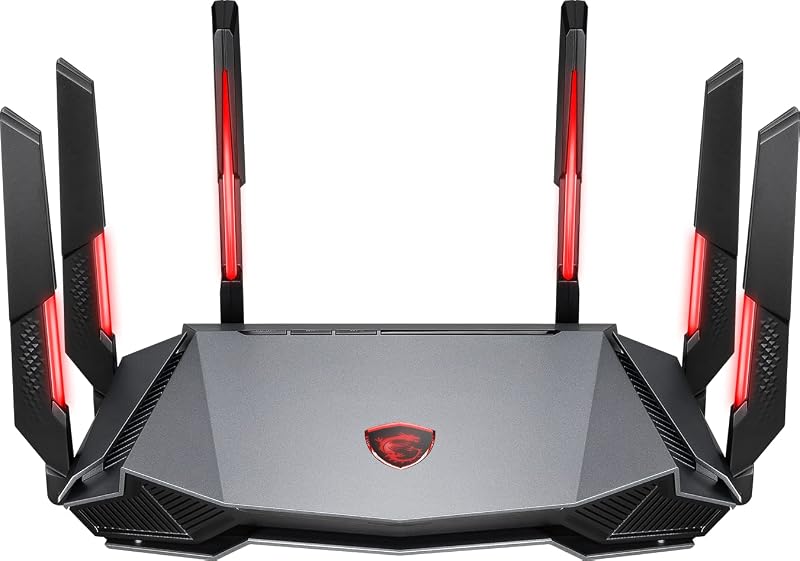
The MSI RadiX AXE6600 hardware architecture provides a networking foundation built specifically around high-speed wireless routing and intelligent client handling. Out of the box, the system integrates the core routing hardware along with specialized onboard firmware features designed for high-density environments:
- Tri-band wireless support across 2.4GHz, 5GHz, and 6GHz channels delivering up to 6.6Gbps aggregate transfer rates
- Eight concurrent spatial streams powered by an onboard 1.8 GHz quad-core processor and 512 MB of RAM
- Specialized AI QoS engine capable of dynamically prioritizing traffic for gaming, streaming, work-from-home, and AI auto profiles
- Multi-gigabit wired connectivity through a dedicated 2500 Mbps LAN port with 2500 Mbps upstream transfer rate capability
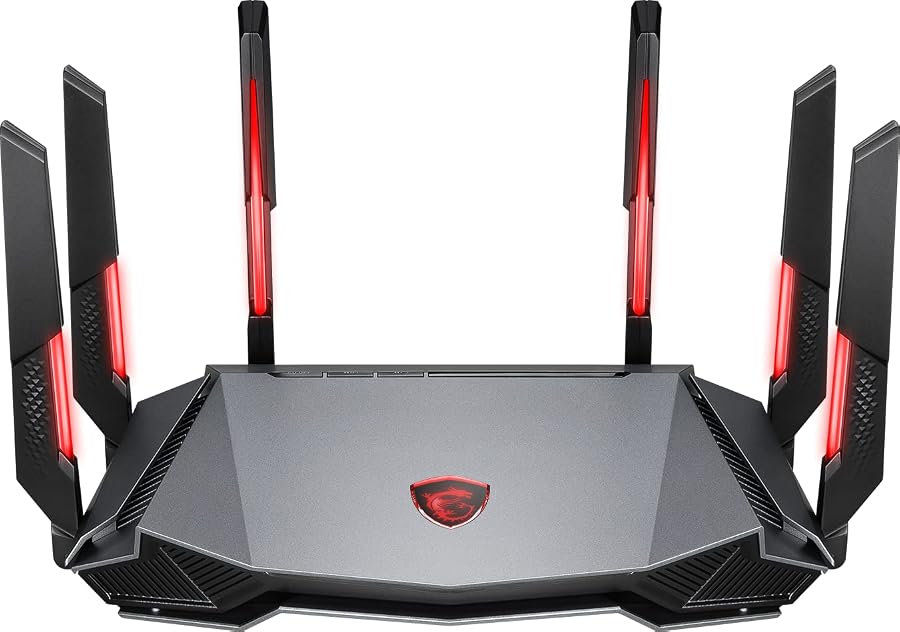
- Six fixed external antennas configured for broad gaming and studio coverage
- Flexible deployment capabilities including standalone routing and dedicated Access Point Mode operation
- Advanced wireless network protection supporting WPA-PSK, WPA2-PSK, and modern WPA3-PSK encryption standards
- Chassis lighting controls featuring Mystic Light RGB synchronization to coordinate with compatible studio hardware
Key Specifications
| Attribute | Detail |
|---|---|
| Wi-Fi Generation | WiFi 6 / WiFi 6E (802.11ax) |
| Frequency Band Class | Tri-Band (2.4GHz, 5GHz, 6GHz) |
| Maximum Data Transfer Rate | 6.6 gigabits_per_second |
| Internal Processor | 1.8 GHz Quad-Core Processor |
| Installed RAM | 512 MB |
| Physical Port Bandwidth | 2500 Mbps LAN / 2500 Mbps Upstream |
| Antenna Configuration | 6 Fixed External Antennas |
| Operating System | Linux |
| Wireless Security Protocols | WPA-PSK, WPA2-PSK, WPA3-PSK |
| Control and Special Features | Touch Control, Access Point Mode, Game Accelerator, Mystic Light |
MSI RadiX AXE6600 WiFi 6E Spectrum and Bandwidth Performance
The primary technical advantage of deploying the msi radix axe6600 wifi 6e platform lies in its direct access to the clean 6GHz radio frequency spectrum. In traditional dual-band environments, wireless communication navigates congestion across 2.4GHz and 5GHz bands, where smart accessories, mobile devices, and neighboring networks cause packet collisions. Operating as an msi radix axe6600 tri-band router, this unit provides an uninhibited highway across 6GHz. For production spaces where a workstation like the msi titan 18 hx ai rtx 5090 requires pristine wireless connectivity to upload massive video projects, the 6GHz band removes interference from legacy devices.
Throughput across all three bands reaches up to 6.6 gigabits per second across eight simultaneous streams. This multi-stream structure allows the router to distribute heavy workloads without bottlenecking when several network clients demand high bandwidth at the same time. The 2.4GHz band manages basic studio utilities and low-priority peripherals, while 5GHz and 6GHz channels handle high-bitrate video streams and cloud backups. Leveraging 802.11ax MU-MIMO communication, the router communicates with multiple devices in parallel rather than cycling sequentially, preserving network responsiveness during live studio broadcasts.
However, utilizing the 6GHz spectrum requires understanding its physical propagation characteristics. Higher frequency waves attenuate more rapidly through physical obstructions such as thick walls, studio soundproofing, and dense dividers. While the six fixed antennas are tuned for wide coverage, optimal transmission speeds on the 6GHz band require placing the router near your primary production machines. When working within an open-concept studio or dedicated editing suite, the clean spectrum yields unmatched wireless stability, but distant rooms rely on the broader range of 5GHz and 2.4GHz bands.
Traffic Prioritization with MSI RadiX AXE6600 AI QoS
Managing an active production environment often involves competing demands on upstream and downstream bandwidth. When a video editor uploads a project to cloud storage while a live stream runs on another machine, standard routers can suffer bufferbloat, causing dropped frames. The msi radix axe6600 ai qos engine addresses this hurdle by inspecting data packets and categorizing them based on real-time application demands. Rather than requiring users to manually configure complex bandwidth limits, the system dynamically balances network traffic using dedicated presets.
The router features four distinct traffic management profiles: Gaming, Streaming, Work-From-Home, and an AI Auto mode. For content broadcasters utilizing the msi radix axe6600 for streaming, selecting the streaming profile ensures that live broadcast packets receive primary scheduling priority over background downloads. This automated prioritization prevents bitrate drops during a live show, even if auxiliary studio devices initiate large transfers. The AI Auto mode continuously monitors packet behavior, elevating latency-sensitive tasks while buffering non-critical data transfers in the background.
Underpinning these automated quality-of-service calculations is the 1.8 GHz quad-core processor. Inspecting network traffic in real time without introducing routing latency requires substantial processing power. The quad-core architecture ensures deep packet inspection does not create computational bottlenecks, maintaining low ping and consistent routing throughput even when running intensive network tasks alongside an mpg 341cqr qd-oled x36 display workstation. While effective on automatic settings, advanced studio engineers should note that scheduling rules remain tied to preconfigured AI profiles rather than fully customized manual queuing scripts.
Studio Throughput and the MSI RadiX AXE6600 2.5G Port
Modern video production workflows frequently push beyond standard gigabit Ethernet infrastructure. Transferring uncompressed footage between local network-attached storage units and editing rigs demands faster physical throughput. The msi radix axe6600 2.5g port delivers 2500 Mbps of LAN bandwidth, providing more than double the speed of traditional 1000 Mbps connections. For creative professionals working with high-performance desktop hardware such as the msi 5070 ti, multi-gigabit wired routing prevents network-level choking during file ingest and local backups.
In addition to serving as a high-speed local LAN connection, the multi-gigabit port features a maximum upstream data transfer rate of 2500 megabits per second. This flexibility allows content creators with multi-gigabit fiber internet packages to utilize the port as a high-speed WAN connection, channeling high-bandwidth internet directly into the router. Whether configured for high-speed upstream connectivity or dedicated to an internal production server, this port ensures that internet connections exceeding 1 Gbps are not artificially throttled at the routing gateway.
A critical design consideration, however, is the presence of a single 2.5G port alongside standard connectivity options. Because there is only one 2500 Mbps connection, creators cannot simultaneously establish a 2.5G WAN incoming feed from their modem and a 2.5G LAN outgoing feed to a workstation or NAS. If your studio workflow requires multi-gigabit speeds across both incoming internet and internal local storage, you will need to place an external multi-gigabit switch downstream from the router, an important hardware nuance within the official msi radix axe6600 specs.
MSI RadiX AXE6600 Setup and Management Experience
Deploying high-performance networking equipment into a busy studio should not require complex configuration routines. The msi radix axe6600 setup workflow is designed around accessible management, allowing creators to establish local area networks, secure wireless SSIDs, and configure QoS modes quickly. Operating on a Linux foundation, the router provides a stable operating environment that maintains reliable uptime during continuous file synchronization. The unit also includes physical touch controls directly on the chassis, allowing users to make rapid operational adjustments without opening the browser management interface.
For larger production spaces that already rely on a primary enterprise gateway or specialized firewall appliance, the unit includes a native Access Point Mode. Switching to this operating mode disables the internal routing and NAT engines, transforming the hardware into a high-performance wireless transmission point that broadcasts Wi-Fi 6E connectivity across the studio without causing double-NAT conflicts. This flexibility makes the msi gaming router axe6600 an effective networking expansion module for studios that want 6GHz tri-band speeds and Game Accelerator prioritization on systems like the msi titan 18 hx dragon edition norse myth.
The aesthetic integration of the hardware also caters to studio environments where equipment sits in view on camera. With onboard Mystic Light RGB synchronization, the router allows creators to align lighting effects with other compatible studio hardware or dim the lighting entirely to avoid visual distractions. On the security front, the hardware supports modern WPA3-PSK encryption alongside legacy WPA-PSK and WPA2-PSK protocols. This security suite guarantees that production servers, client deliverables, and private studio assets remain protected from unauthorized wireless intrusion.
Check MSI RadiX AXE6600 on Amazon
Is the MSI RadiX AXE6600 Worth It
Determining whether the MSI RadiX AXE6600 represents the right investment depends heavily on the specific networking bottlenecks in your workspace. For independent streamers, video editors, and digital creators operating in device-heavy environments, the inclusion of the dedicated 6GHz band and automated AI QoS provides tangible real-world improvements. If you regularly battle wireless latency fluctuations while live broadcasting or lose valuable production time waiting for video files to sync across crowded channels, the tri-band architecture provides a clean transmission path that standard dual-band routers cannot replicate.
Conversely, creators who rely strictly on multi-client wired infrastructure may find the physical port selection somewhat restrictive. Because the router features only a single 2.5G port, studios that need simultaneous multi-gigabit connections to both a broadband modem and a local storage server will need to purchase an auxiliary switch. Furthermore, if you do not own Wi-Fi 6E compatible client devices, the primary benefit of the clean 6GHz spectrum will remain untapped until your studio hardware is upgraded to support 802.11ax across that higher band.
Ultimately, is msi radix axe6600 worth it for content creators who need to eliminate wireless friction in mixed-device studios? The answer is yes for users who value straightforward QoS automation, clean 6GHz spectrum availability, and multi-gigabit upstream or downstream headroom. Its combination of an agile 1.8 GHz quad-core processor, dedicated traffic modes, and solid Access Point Mode flexibility makes it a capable network anchor for solo creators and expanding digital production teams alike.
FAQ
What frequency bands does the MSI RadiX AXE6600 operate across?
The MSI RadiX AXE6600 operates across three distinct wireless spectrum bands: 2.4GHz, 5GHz, and 6GHz. The 2.4GHz band manages legacy hardware and smart accessories, the 5GHz band handles general computing tasks, and the 6GHz band delivers high-throughput, low-interference transmission for Wi-Fi 6E devices.
Can the MSI RadiX AXE6600 function as an access point?
Yes, the router includes an integrated Access Point Mode. When enabled, this feature bypasses internal routing and NAT translation, allowing the hardware to act solely as a wireless broadcast hub connected to an existing upstream studio gateway or firewall without IP conflicts.
What processor powers the MSI RadiX AXE6600?
The router is powered by an onboard 1.8 GHz quad-core processor paired with 512 MB of RAM. This hardware provides the processing capacity necessary to handle simultaneous 8-stream wireless traffic, deep packet inspection, and real-time AI QoS prioritization.
Does the MSI RadiX AXE6600 support WPA3 wireless security?
Yes, the unit supports WPA3-PSK alongside WPA-PSK and WPA2-PSK protocols. This allows studio administrators to enforce modern cryptographic protection across newer client hardware while maintaining backward compatibility with older studio gear that requires legacy WPA2 encryption.
How does the AI QoS feature work on the MSI RadiX AXE6600?
The AI QoS engine automatically analyzes data packets to identify specific application traffic. Users can select predefined profiles such as Gaming, Streaming, Work-From-Home, or AI Auto, which prioritize mission-critical broadcast packets over background downloads to prevent latency spikes.


