As Amazon Associates, we earn from qualifying purchases. This means we may receive a small commission at no extra cost to you if you click through and make a purchase.
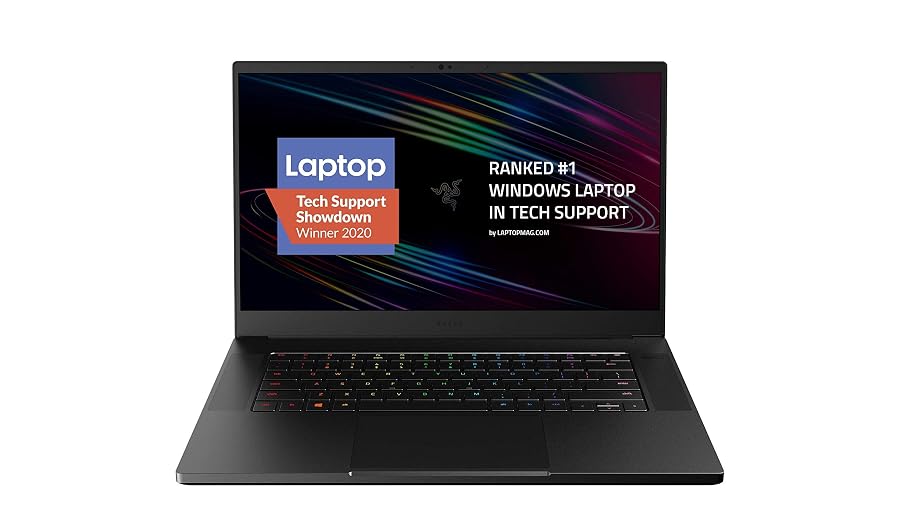
For digital content creators, vloggers, and traveling video editors, choosing a portable workstation requires balancing raw computational muscle with strict thermal control. The Razer Blade 15 targets professionals who demand desktop-grade rendering speeds within a slender unibody frame. Powered by an 8-core 10th Gen Intel Core i7-10875H processor and dedicated NVIDIA graphics, this machine aims to handle multi-track video timelines, visual effects rendering, and heavy multimedia exports without forcing you to sit at an immovable studio desk. Understanding whether this specific hardware revision satisfies demanding creative software suites comes down to examining how its internal architecture holds up during real-world computational strain.
This configuration combines an ultrafast 300Hz Full HD panel with a custom vapor chamber cooling mechanism enclosed in a precision-milled aluminum shell measuring just 0.7 inches thick. While originally engineered to capture the high-framerate gaming market, the underlying hardware directly translates to timeline scrubbing efficiency and accelerated hardware encoding in premier video production suites. In this comprehensive review, we evaluate the thermal stability, connectivity options, display strengths, and overall mobile usability of this laptop to determine whether it serves as a dependable engine for your production workflow.

What You Get With the Razer Blade 15
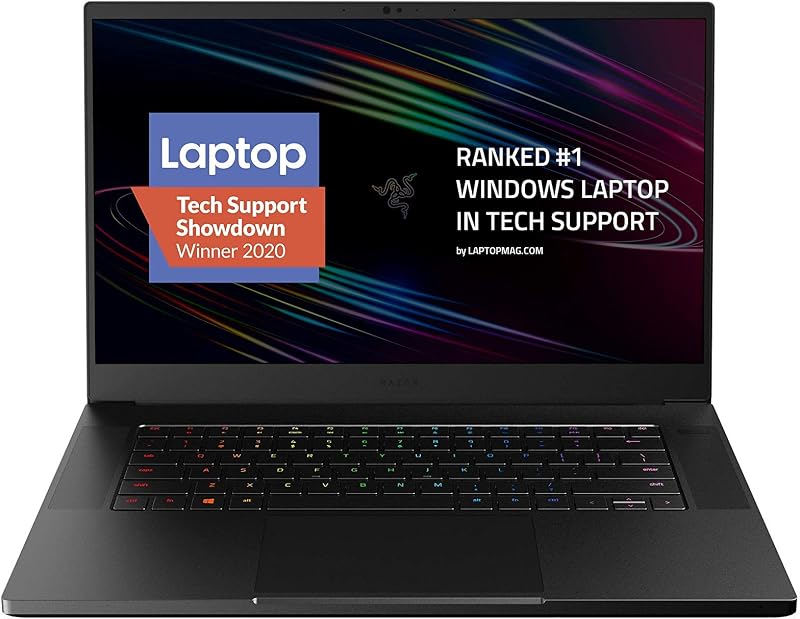
The machine arrives configured with performance-oriented components selected to support demanding computational tasks and intensive graphical rendering inside a compact portable footprint.
- Intel Core i7-10875H 8-core processor with maximum clock speeds reaching up to 5.1GHz Max Turbo
- Dedicated NVIDIA GeForce RTX graphics featuring Max-Q design and 8GB of GDDR6 video memory
- 15.6-inch Full HD display sporting a 300Hz refresh rate and slender bezels in a 16:9 aspect ratio
- 16GB of system memory for handling active software multitasking and background operating system services
- 512GB solid-state drive for internal operating system boot files and active creative project storage
- Custom vacuum-sealed, liquid-filled copper vapor chamber cooling solution spanning central processing components
- Precision CNC aluminum unibody frame measuring 0.7 inches thin with an anodized black finish
- Per-key RGB backlit keyboard integrated with Razer Chroma lighting customization software
- Broad external port selection highlighted by Thunderbolt 3, HDMI output, and Bluetooth compatibility
- Integrated front-facing video camera, factory-installed Windows 10 Home, and 230-volt charging support
Key Specifications
| Specification Category | Hardware Detail |
|---|---|
| Processor Model | Intel Core i7-10875H (8 Cores, 16 Threads, up to 5.1GHz) |
| Graphics Hardware | NVIDIA GeForce RTX 2070 Super Max-Q (8GB GDDR6 VRAM) |
| Display Panel | 15.6-inch Full HD (1920×1080), 300Hz Refresh Rate, 16:9 Aspect Ratio |
| System Memory | 16GB RAM |
| Internal Storage | 512GB Solid State Drive (SSD) |
| Thermal Management | Vacuum-sealed liquid-filled copper vapor chamber |
| External Interfaces | Thunderbolt 3, HDMI, Bluetooth |
| Chassis Construction | CNC Aluminum Unibody, 0.7 inches thin |
| Total Unit Weight | 4.4 pounds |
| Operating System | Windows 10 Home |
Thermal Performance Under Sustained Creator Workflows
Video rendering and multi-layer compositing generate intense sustained thermal energy that quickly overwhelms traditional heat-pipe laptop designs. The custom razer blade 15 vapor chamber cooling mechanism approaches heat dissipation differently by utilizing a hermetically sealed, liquid-filled copper chamber that spans both the 8-core CPU and dedicated GPU. As temperatures rise during long export sessions, liquid inside the chamber evaporates into vapor, travels toward the cooler edges of the chassis, condenses back into liquid, and cycles continuously. This engineering helps spread thermal spikes evenly across a wide surface area rather than concentrating heat directly beneath critical silicon dies.
In a demanding razer blade 15 creator workflow, managing heat directly influences export render times and prevents thermal throttling. When working with 10-bit video footage, background rendering and timeline playback force both the processor and the razer blade 15 rtx 2070 super to operate simultaneously at high clock frequencies. The vapor chamber thermal architecture ensures consistent razer blade 15 thermal performance over prolonged render queues, preserving stable clock frequencies longer than conventional notebooks of similar thickness. While the aluminum unibody does warm up under heavy compute loads—acting essentially as a secondary heatsink—the active airflow prevents system crashes during deadline-critical project delivery.
For editors who work out in the field or in hotel rooms during production trips, understanding fan behavior is equally critical. When rendering timeline effects or running noise reduction passes, the dual fans spool up aggressively to expel hot air through the rear ventilation vents. While audible in quiet recording spaces, this active cooling profile is essential to prevent premature thermal throttling. Creators who often compare compact workstations might consider how this thermal design stacks up against smaller models like the razer blade 14, where physical chassis space for vapor chambers is naturally more constrained.
Display Quality and High-Refresh Capabilities for Editing
High-refresh screens were originally introduced for competitive gaming, but the razer blade 15 300hz display introduces noticeable practical advantages for desktop productivity and editing navigation. At 300 frames per second capability, mouse cursor tracking, timeline scrubbing, and multi-window navigation feel remarkably fluid, eliminating UI stutter and eye fatigue during marathon cutting sessions. When cutting fast-paced action sequences or sports highlights, the heightened refresh rate helps editors identify frame drops and motion artifacts that might go unnoticed on standard 60Hz panels.
Nevertheless, creative professionals evaluating the razer blade 15 for video editing must carefully consider resolution priorities. The native 1920×1080 Full HD resolution provides crisp visuals on a 15.6-inch diagonal screen, but it does not offer the native 4K workspace that allows 3840×2160 footage to be previewed at 1:1 pixel scaling. While the product listing notes that an OLED 4K touch display exists in certain production configurations, this specific unit utilizes the 300Hz Full HD panel. Editors who require pixel-accurate 4K playback will find themselves using the high-refresh internal screen for editing tools while outputting their preview window to a dedicated external production monitor.
The 16:9 aspect ratio remains the industry standard for broadcast and widescreen video production, ensuring that standard television and online streaming projects fill the screen without unnecessary letterboxing. While some modern creative workstations, such as the razer blade 16 2023, have moved toward taller 16:10 aspect ratios to grant extra vertical timeline height, the traditional 16:9 layout on this laptop remains exceptionally comfortable for video software arrangements featuring a split preview monitor and standard horizontal timeline track view.
Port Selection and Storage Realities in Studio Setups
Seamless connectivity is the foundation of any productive workstation, and the razer blade 15 thunderbolt 3 port provides the wide bandwidth needed for studio expansion. Content creators moving multi-gigabyte raw camera files can attach high-speed NVMe external storage arrays to transfer footage in minutes rather than hours. Beyond data transfer, Thunderbolt 3 supports external display connectivity and high-bandwidth docking hubs, enabling editors to transform this compact laptop into a multi-screen editing station with a single cable connection.
Alongside the Thunderbolt port, the integrated HDMI output offers convenient plug-and-play capability when connecting directly to studio televisions, client reference monitors, or overhead production projectors. The listing notes broad compatibility with external displays, keyboards, and mice, as well as Bluetooth peripherals for wireless audio monitoring and input control. This versatility ensures that whether you are delivering an on-site presentation or cutting footage on a studio desk, external device integration remains straightforward and free of cumbersome adapter chains.
A vital reality check within the 2020 razer blade 15 specs involves the internal storage configuration. The included 512GB solid-state drive provides quick boot times and rapid application launches, but 512GB fills up swiftly once Windows 10 Home, creative suites, project cache files, and high-bitrate video footage are loaded. Creators will inevitably need to rely on external solid-state scratch drives or consider internal drive upgrades to accommodate substantial media libraries. Those researching newer chassis iterations like the razer 16 laptop will note that modern laptops often wrestle with similar base storage decisions, making external disk management an essential skill.
Portability and Build Durability in the Field
Field creators demand hardware that can withstand the physical rigors of travel without bending or flexing in transit. Crafted from precision-milled CNC aluminum, the unibody shell of this laptop exhibits an exceptional degree of structural rigidity. At just 0.7 inches thin, it slides cleanly into standard backpack laptop compartments and camera bags, avoiding the bulky, angular protrusions common to many dedicated performance machines. The matte black finish offers a discreet, professional profile suitable for corporate meeting spaces and commercial production sets.
At 4.4 pounds, the laptop balances portability against the substantial thermal hardware and battery cells required to keep high-tier components running. While noticeably lighter than desktop-replacement workstations of past generations, carrying the laptop alongside its 230-volt power supply adds noticeable weight to a traveling creator daypack. When shooting on location, access to reliable power outlets is necessary to maintain maximum CPU and GPU clock speeds, as high-draw tasks will quickly deplete battery reserves when disconnected from wall power.
Daily usability in varied working environments is augmented by the per-key RGB backlit keyboard and integrated front video camera. The keyboard backlighting allows seamless typing in dim client viewing rooms and late-night editing suites, while the front camera supports video conferencing and remote production check-ins. Although the listing does not specify internal SD card reader inclusion—requiring creators to pack a USB-C or Thunderbolt card reader in their gear kits—the overall build quality instills confidence when packing up and relocating between shooting locations.
Check Razer Blade 15 on Amazon
Is the Razer Blade 15 Worth It
Determining whether the 2020 Razer Blade 15 is worth it comes down to matching your creative demands against its specific hardware configuration. For freelance videographers, multimedia editors, and digital creators who require dedicated GPU acceleration in a durable, slim chassis, this machine delivers dependable performance. The combination of an 8-core Intel Core i7 processor and dedicated RTX graphics enables swift video scrubbing, efficient color grading passes, and responsive multi-layer timeline playback that standard ultrabooks cannot replicate.
However, buyers who work predominantly with native 4K media and need to preview footage at exact 1:1 scaling without an external monitor should weigh the limitations of the 1080p panel. Additionally, those who produce multi-terabyte documentary projects will need to factor in the necessity of external scratch disks due to the 512GB internal storage limit. If your workflow thrives on 1080p delivery, high-framerate motion analysis, and flexible connectivity via Thunderbolt 3, this laptop represents a capable balance of power, durability, and travel-friendly design.
Ultimately, this system stands out for creators who prioritize structural durability and smooth timeline interaction over maximum screen resolution. The CNC aluminum construction, vapor chamber thermal architecture, and 300Hz display make it a dependable mobile engine for creative teams on the move. For professionals seeking a workstation that transitions seamlessly from active production shoots to desk editing setups, it remains a compelling option.
FAQ
Does the 2020 Razer Blade 15 handle 4K video editing?
Yes, the 8-core Intel Core i7-10875H processor and dedicated NVIDIA GeForce RTX graphics provide the processing muscle and video memory required to edit and render 4K video timelines. However, because the built-in screen displays in Full HD (1920×1080), previewing 4K footage at native resolution requires connecting an external 4K monitor via HDMI or Thunderbolt 3.
What graphics card powers this configuration of the Razer Blade 15?
This configuration features the NVIDIA GeForce RTX 2070 Super Max-Q with 8GB of GDDR6 video memory, designed to deliver high-performance rendering and graphics acceleration in a slim laptop chassis. The product listing also references RTX 2080 Super Max-Q alternatives within the broader model family.
Can you connect external displays using the ports on the Razer Blade 15?
Yes, the laptop features an HDMI port and a high-bandwidth Thunderbolt 3 port, both of which support video output to external computer monitors, studio displays, and presentation projectors. The specifications also confirm compatibility with Bluetooth-enabled peripherals for expanded workstation integration.
How does the vapor chamber cooling benefit content creators?
The liquid-filled copper vapor chamber cooling system spreads heat away from the 8-core processor and graphics card across a wide surface area inside the thin 0.7-inch chassis. This thermal management helps prevent premature thermal throttling during sustained video exports and heavy timeline renders.
Is 16GB of RAM sufficient for creative video editing applications?
The included 16GB of system RAM is sufficient for standard Full HD editing workflows, multi-track audio production, and basic 4K video cuts. Creators who frequently handle complex visual effects compositions or run multiple Adobe Creative Cloud applications concurrently may find 16GB at capacity during peak processing.