As Amazon Associates, we earn from qualifying purchases. This means we may receive a small commission at no extra cost to you if you click through and make a purchase.
Choosing a playback receiver for your workspace, studio monitor, or living room setup depends heavily on format support, physical footprint, and seamless media handoff. The Roku Streaming Stick 4K is designed to serve viewers and content creators who need dependable ultra-high-definition output alongside broad dynamic range capabilities without bulky hardware. Whether you need a dedicated media stick to review uploaded 4K deliverables on a client-facing television or simply want an effortless entertainment platform, this model focuses on delivering high resolution and clean wireless integration in an ultra-compact package. In this Roku Streaming Stick 4K review, we analyze what this compact player offers, examine its technical specifications, and explain how it performs for practical playback tasks.
Beyond standard consumer entertainment, creators and video hobbyists often require a reliable secondary display receiver capable of casting timelines, verifying master color rendering, and moving effortlessly between locations. This article provides a comprehensive evaluation of the Roku Streaming Stick 4K, covering its core hardware profile, setup demands, wireless reception, and display compatibility. By breaking down real-world concerns such as transportability, wireless stability, and navigation efficiency, this guide will help you determine whether this streaming stick matches your production workflow and media consumption needs.

What You Get With the Roku Streaming Stick 4K
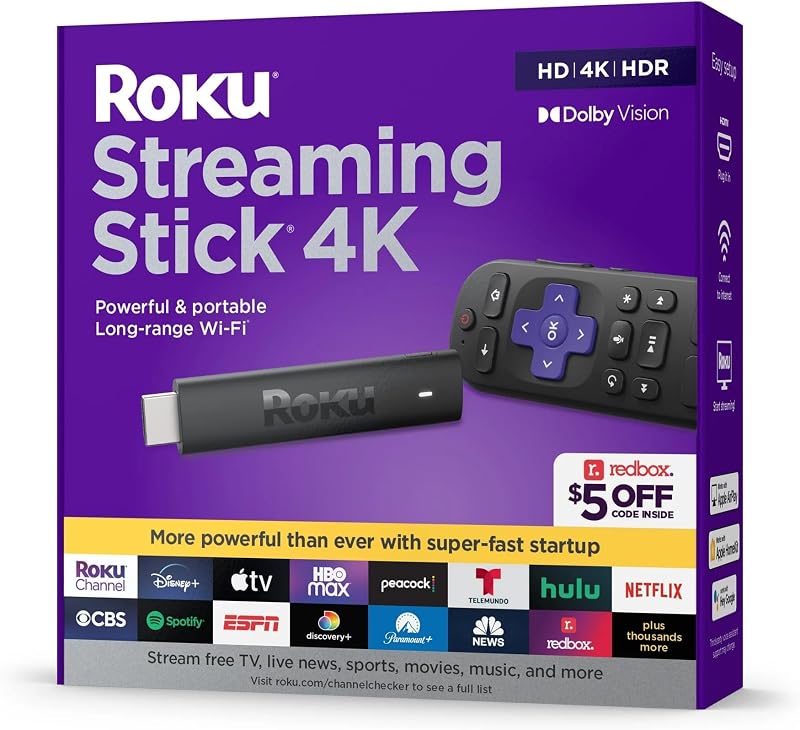
The Roku Streaming Stick 4K package focuses on minimal clutter and fast physical deployment, supplying the essential components required to turn any compatible television or HDMI-equipped monitor into an active streaming station.
- Roku Streaming Stick 4K streaming device in a compact TV stick form factor
- Voice remote featuring dedicated TV controls for power and volume adjustment
- Redesigned long-range Wi-Fi receiver integrated with the connection hardware
- USB connectivity hardware for powering the device
- Quick-start guidance for connecting the hardware to HDMI and local networks
Key Specifications
| Attribute | Detail |
|---|---|
| Model Number | 3820R |
| Form Factor | TV Stick |
| Dimensions | 3.7″L x 0.8″W x 0.5″H |
| Color | Black |
| Supported Resolutions | 4K UHD, HDR, 1080p, 720p |
| High Dynamic Range Support | HDR, Dolby Vision |
| Connectivity | Wi-Fi, HDMI, USB, AirPlay, Voice Assistants |
| Connector Types | HDMI, USB 2.0 |
| Controller Type | Voice Control, TV Controls |
| Compatible Devices | Television |
Picture Quality and Dynamic Range Handling
For visual creators, vloggers, and video editors, viewing final exports in accurate high dynamic range is essential before publishing. When evaluating the Roku Streaming Stick 4K HDR Dolby Vision capabilities, the stick outputs up to 4K UHD resolution alongside standard HDR and Dolby Vision metadata to compatible television displays. This level of dynamic range support ensures that high-contrast scenes retain highlight information and deep black levels without clipping, which makes the unit a practical secondary preview tool for video editors who want to check how graded footage renders on standard consumer displays. If you frequently inspect client drafts or personal video projects, having both standard HDR and Dolby Vision passthrough directly from supported apps provides a realistic preview of consumer viewing conditions.
While the hardware passes these dynamic range standards effectively to compliant screens, the listing does not specify integrated manual hardware color profiles or lookup table support. As a result, those considering Roku Streaming Stick 4K display calibration must rely on the underlying television or monitor settings rather than internal software calibration sliders. For creative hobbyists comparing different media players across categories, reviewing our guide on roku streaming sticks can help clarify how different stick formats handle video processing pipelines. When connected to a properly profiled consumer panel, the stick provides sharp, lifelike detail across native 4K content streams.
In addition to 4K UHD rendering, the player retains backwards compatibility with 1080p and 720p output, scaling content cleanly across older or lower-resolution auxiliary monitors in an edit suite. This flexibility prevents handshake errors when swapping between different production monitors, field screens, or television sets in client lounges. For day-to-day media consumption, services like Netflix, Hulu, and Disney+ stream with crisp color separation and high fidelity, fulfilling both leisure viewing and reference checking requirements.
Wireless Streaming and AirPlay Casting Integration
A smooth wireless connection is critical for streaming high-bitrate video, especially when operating far from your network access point. This device incorporates a redesigned long-range Wi-Fi receiver built directly into the external cabling system. In production environments where studio monitors or edit bays sit in separate rooms from the primary router, relying on Roku long range WiFi performance ensures stable data throughput for uninterrupted 4K streaming. Stable wireless delivery minimizes buffer interruptions, which is crucial whether you are reviewing high-resolution footage or watching long-form commercial media.
For Apple-centric workflows, the inclusion of native AirPlay support represents a major functional asset. Using the Roku Streaming Stick 4K AirPlay functionality allows video editors, vloggers, and photographers to mirror project previews, photo drafts, or rough video cuts directly from an iPhone, iPad, or Mac straight to an external client television. This eliminates the friction of copying rough drafts to flash drives or uploading unlisted draft videos to cloud hosting just to evaluate visual pacing on a big screen. Those weighing different streaming ecosystem approaches may also want to compare this setup against the firestivks 4k max to see how alternative operating systems handle screen mirroring.
The device also integrates voice assistant compatibility, providing alternative methods for initiating search queries and opening playback applications. Whether commanding the interface through voice or casting an uncompressed gallery of stills via local network protocols, the wireless receiver maintains a steady handshake. Creators who share project progress with collaborators in studio spaces can rely on this interface to jump between media sources without manual cable swapping.
Portability and Travel for Field Workflows
Field production and travel present unique challenges for video professionals who need consistent display setups across hotels, temporary edit spaces, and remote client offices. Measuring just 3.7 inches long, 0.8 inches wide, and 0.5 inches thick, the stick boasts a minuscule physical profile that fits inside any camera bag, gear pouch, or laptop case. Packing the Roku Streaming Stick 4K for travel gives traveling editors a familiar operating system and playback platform regardless of what television or HDMI monitor awaits them at a rental property or hotel room.
Because the physical stick plugs directly into the display’s HDMI port, it conceals completely behind the monitor panel without requiring a shelf, mounting plate, or dedicated stand. Power is supplied via USB 2.0, meaning you can power the unit through a compatible television USB port or standard USB wall adapter, though the listing does not specify exact minimum milliamp requirements. For creators who frequently set up client viewing stations in temporary convention booths or production suites, this all-in-one stick design minimizes cable clutter and setup footprint significantly compared to tabletop players like the roku ultra 4k streaming player.
The durable compact housing also ensures that ports and connectors remain protected inside transit cases. The streamlined TV stick form factor makes it easy to switch displays on the fly: unplug the HDMI connector, pull the USB cable, and insert it into the next display without complex reconfigurations. This level of physical flexibility makes the player an excellent companion tool for location shoots and mobile editing desks.
Setup Simplicity and Remote Navigation
A complicated installation process can disrupt busy shooting and editing schedules, making plug-and-play simplicity a valuable asset. The Roku Streaming Stick 4K setup process requires only plugging the stick into an open HDMI port, connecting the power cable to a USB source, and completing on-screen prompts to connect to Wi-Fi. The entire configuration is direct and quick, allowing you to establish an active playback terminal on an auxiliary studio display in minutes. Looking closely at the Roku Streaming Stick 4K specs, the combination of HDMI connectivity, USB 2.0 power, and wide resolution support ensures broad compatibility across both vintage and modern screens.
Daily control is handled through the included voice remote, which features integrated TV controls for power and volume adjustment alongside voice commands. Utilizing Roku voice remote controls streamlines workflow by allowing users to adjust audio levels, power off the display, and search for specific content libraries using voice input without juggling multiple remotes. The voice interface speeds up channel navigation and helps locate specific media titles rapidly, which saves time when transitioning between client review sessions and casual viewing.
The on-screen navigation interface remains clear and responsive, prioritizing installed apps such as Netflix, Hulu, Disney+, and specialized media channels without burying settings under convoluted menus. While power users who need dedicated wired gigabit Ethernet ports or expandable micro-SD storage might look at traditional tabletop boxes, the stick format maximizes responsiveness while keeping hardware intrusion to absolute zero.
Check Roku Streaming Stick 4K on Amazon
Is the Roku Streaming Stick 4K Worth It
Determining whether the Roku Streaming Stick 4K is worth it comes down to your space constraints, workflow requirements, and display needs. For independent creators, vloggers, and remote professionals who need a pocket-sized 4K HDR playback device with integrated AirPlay casting, this stick delivers immense practical utility. It bridges the gap between casual entertainment and professional preview utility by offering Dolby Vision support, 4K resolution, and long-range wireless stability inside an unobtrusive stick form factor.
For buyers who already operate in a fixed studio setting with a permanent, wired Ethernet infrastructure, a larger desktop streaming box may offer additional physical ports. However, if your priority is portability, clean monitor cable management, and seamless iOS/macOS casting for fast review workflows, the Roku Streaming Stick 4K stands out as an exceptionally balanced media player. It eliminates bulk while retaining top-tier video format decoding and versatile voice-enabled controls.
Ultimately, this device serves both everyday television streamers and visual artists seeking an agile secondary screen solution. Its dependable wireless receiver, comprehensive HDR compatibility, and compact build make it a high-value tool for anyone wanting simple, clutter-free access to high-resolution media across various environments.
FAQ
Does the Roku Streaming Stick 4K support Dolby Vision and HDR10?
Yes, the Roku Streaming Stick 4K supports 4K UHD, HDR, and Dolby Vision, allowing it to output rich contrast and accurate dynamic range on compatible televisions.
Can you use AirPlay to cast content from an Apple device to the Roku Streaming Stick 4K?
Yes, the device features built-in AirPlay connectivity, enabling you to cast videos, photos, and project drafts directly from an iPhone, iPad, or Mac to your television.
What physical connectors are present on the Roku Streaming Stick 4K?
The device includes an HDMI connector for plugging directly into a display port and a USB 2.0 port used for supplying power and connecting the long-range Wi-Fi receiver.
Does the included remote control television power and volume?
Yes, the included voice remote incorporates dedicated TV controls for power and volume, allowing you to operate both the streaming interface and core display functions with a single controller.
Can the Roku Streaming Stick 4K be powered directly from a TV USB port?
The stick connects via a USB 2.0 cable for power. It can be powered by a television USB port if the port supplies sufficient power, though the listing does not specify exact power draw requirements.