
As Amazon Associates, we earn from qualifying purchases. This means we may receive a small commission at no extra cost to you if you click through and make a purchase.
Investing in ultra-fast solid-state storage requires balancing sustained bandwidth against massive project footprints, and the Samsung 9100 PRO 8TB targets high-end creators who refuse to compromise on either front. Powered by the PCIe 5.0 x4 interface, this M.2 2280 internal drive pushes theoretical boundaries with sequential read speeds reaching up to 14,800 MB/s and sequential writes reaching up to 13,400 MB/s. For creative professionals managing uncompressed multi-cam footage, complex 3D scenes, or real-time visual effects, this level of throughput removes storage latency from the equation. At the same time, delivering this speed across an expansive 8TB capacity provides a centralized workspace where entire production archives and scratch caches can live simultaneously without forcing daily project offloads.
Determining whether this flagship solid-state drive is the right addition to your workstation comes down to hardware synergy and production demands. Harnessing these maximum Gen5 transfer rates requires an updated motherboard architecture equipped with native PCIe 5.0 M.2 lanes and reliable thermal mitigation. In this detailed review, we explore the samsung ssd 9100 pro 8tb specs, break down how the drive sustains high-bitrate video editing timelines, analyze its power efficiency and thermal design, and compare its real-world value against previous NVMe generations to help you decide if it fits your production rig.
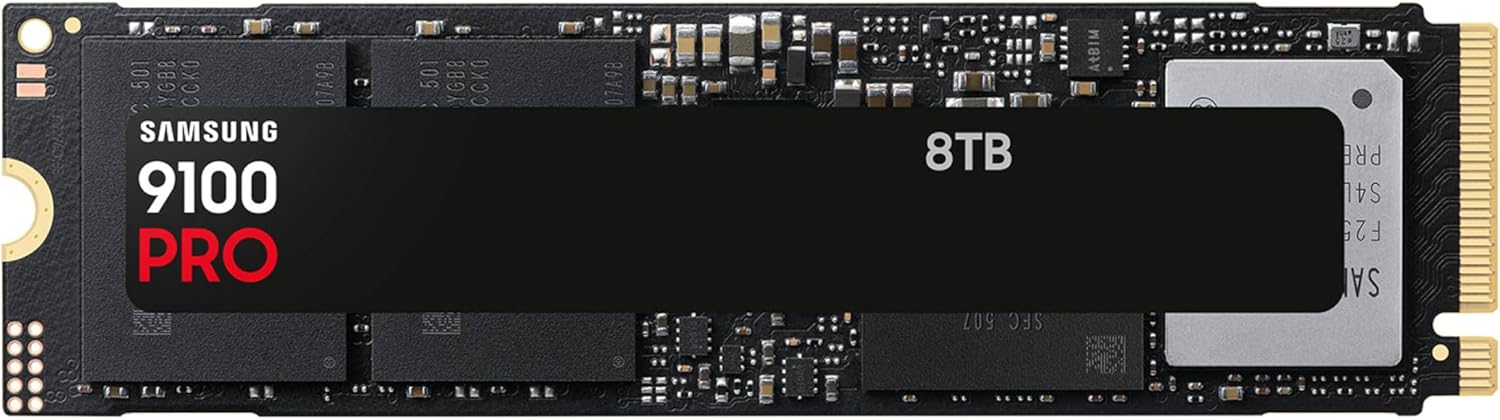
What You Get With the Samsung 9100 PRO 8TB

The Samsung 9100 PRO arrives as a bare internal M.2 solid-state drive engineered to drop directly into compatible desktop motherboards and select laptop chassis. Samsung supplies the core hardware alongside access to their dedicated drive management software utility, giving system builders the baseline tools needed for installation, diagnostic tracking, and data security.
- Samsung 9100 PRO 8TB PCIe 5.0 NVMe M.2 2280 internal solid-state drive
- In-house 5nm controller architecture designed for optimized power efficiency
- Integrated 8GB cache memory for responsive metadata indexing and fast multitasking
- Access to Samsung Magician Software for firmware updates, performance diagnostics, and health monitoring
- Built-in hardware encryption features to safeguard proprietary project files
- Standard M.2 2280 form factor design compatible with desktop motherboards and high-end laptops
Key Specifications
| Attribute | Detail |
|---|---|
| Digital Storage Capacity | 8 TB |
| Hardware Interface | PCIe 5.0 x4, NVMe |
| Form Factor | M.2 2280 |
| Sequential Read Speed | Up to 14,800 MB/s |
| Sequential Write Speed | Up to 13,400 MB/s |
| Random Read Speed | Up to 2,200K IOPS |
| Random Write Speed | Up to 2,600K IOPS |
| Installed Cache Memory | 8 GB |
| Controller Fabrication | 5nm power-efficient process |
| Security Technology | Hardware Encryption |
PCIe 5.0 Throughput and Video Editing Timelines
The headline metric of this storage drive is its extraordinary throughput. Harnessing four lanes of PCIe 5.0 bandwidth allows the unit to reach up to 14,800 MB/s reads and 13,400 MB/s writes. When configuring the samsung 9100 pro 8tb for video editing, these metrics represent far more than synthetic benchmark victories. High-resolution workflows—such as handling multiple angles of 8K ProRes 422 HQ or raw cinema camera files—place extreme demands on sequential data transfer. A standard Gen4 drive can hit saturation when multiple high-bitrate video streams play back concurrently on an unrendered timeline. The samsung 9100 pro pcie 5.0 speed headroom ensures that dropping playheads across complicated sequences produces immediate playback without dropped frames or scrubbing stutter.
The vast 8TB footprint further transforms the practical editing experience. Large creative facilities often rely on complicated network storage or tiered drive pools where current media sits on a fast local NVMe and older media is archived to secondary drives. Managing an intensive samsung 9100 pro 8tb 8k workflow directly on the local machine allows editors, colorists, and visual effects artists to maintain entire multi-terabyte raw directories on a single volume. Rendering video clips, generating high-density wave forms, and exporting final master files benefit immediately from the rapid samsung 9100 pro 8tb read write speeds, drastically cutting downtime across tight delivery schedules.
While primary editing timelines thrive on internal speed, high-volume production studios often deploy hybrid workflows. Editors offloading raw field cards might shuttle rushes over an external interface using portable gear such as the samsung t9 portable ssd 1tb before transferring batches directly into the 9100 PRO workspace. Once datasets arrive on the internal Gen5 drive, software like DaVinci Resolve and Adobe Premiere Pro can access media pools, render caches, and project databases simultaneously without encountering sequential or random read bottlenecks.
Generational Advancements and Samsung 9100 PRO 8TB vs 990 PRO
Evaluating the generational gap reveals significant architectural refinement when comparing the samsung 9100 pro 8tb vs 990 pro. While the previous generation reached the practical throughput ceiling of the PCIe 4.0 interface, the 9100 PRO doubles that data potential on PCIe 5.0. For editors familiar with previous flagships like the samsung 990 pro w/ heatsink ssd 2tb, pcie gen4 m.2 2280 internal solid state hard drive, seq. read s, the leap to Gen5 unlocks virtually double the sequential transfer rate alongside random read and write boosts reaching up to 2,200K and 2,600K IOPS. This random I/O boost is critical when handling thousands of small assets, LUTs, audio stems, and database indexes that populate professional production suites.
Beyond raw bandwidth, thermal efficiency marks one of the most vital upgrades on this drive. Early PCIe 5.0 controllers developed an industry reputation for drawing excessive power and running excessively hot, often prompting aggressive thermal throttling. Samsung addressed this by employing an advanced 5nm controller process, boosting power efficiency by up to 49 percent compared to the 990 PRO series. This lower power draw per megabyte transferred allows the drive to deliver sustained performance without generating unsustainable heat inside dense workstation environments.
Capacity scaling also represents a critical distinction. While earlier flagship solid-state drives typically topped out at 2TB or 4TB, offering an 8TB configuration on a single M.2 2280 form factor is a major advantage for system builders with limited motherboard slots. Those planning secondary boot drives or dedicated operating system partitions might still consider smaller capacity options like the 9100 pro 1tb, but for creators seeking uncompromised capacity and throughput on a single dedicated scratch drive, the 8TB tier stands in a class of its own.
Thermal Control and Sustained Heavy Data Transfers
Sustaining peak transfer speeds during heavy data ingest is essential for production drives. The samsung 9100 pro 8tb thermal control architecture combines the power efficiency of the 5nm controller with advanced onboard thermal management routines to regulate operating temperatures. In high-bandwidth environments, uncontrolled thermal buildup can cause an NVMe drive to throttle speeds downward to protect internal flash chips. By keeping the core silicon efficient, the 9100 PRO maintains high sequential throughput across larger data blocks before temperature thresholds require intervention.
Another operational factor to consider during massive continuous transfers is Samsung Intelligent TurboWrite technology. The drive achieves its top sequential write speeds of up to 13,400 MB/s by writing data to an optimized high-speed buffer. The listing notes that Intelligent TurboWrite operates within a specific data transfer size buffer. When writing uninterrupted multi-hundred-gigabyte file dumps that exceed this dynamic buffer capacity, write speeds will adjust to native NAND write levels. For typical creative workflows, including large video clip renders and folder transfers, the buffer proves ample to absorb data bursts at full PCIe 5.0 speeds.
System builders must remember that while the drive integrates advanced internal thermal control, PCIe 5.0 drives operate best when assisted by passive or active motherboard cooling. The bare M.2 form factor relies on the heatsinks supplied by modern workstation motherboards or dedicated aftermarket cooling solutions. Ensuring adequate chassis airflow across the drive area prevents thermal build-up during day-long rendering sessions, protecting both the drive hardware and your sustained transfer speeds.
Gaming Performance and Workstation Integration
Although creative workflows place immense value on sequential throughput, the samsung 9100 pro 8tb gaming performance demonstrates equal prowess for high-end enthusiasts. Modern PC titles increasingly employ DirectStorage APIs that bypass CPU decompression bottlenecks to stream textures directly from solid-state storage to the GPU. With random read speeds scaling up to 2,200K IOPS and immense Gen5 bandwidth, asset loading screens become imperceptible, and complex open-world games stream dense environments seamlessly without hitching.
The enormous 8TB capacity provides a massive advantage for game developers and enthusiast gamers alike. Contemporary game installations frequently surpass 100GB each, quickly exhausting conventional 1TB and 2TB drives. With 8TB available on a single drive, users can maintain expansive game libraries, high-resolution texture mods, development builds, and gameplay capture footage simultaneously without needing constant drive uninstalls or secondary storage management.
Integration across desktop platforms is straightforward, provided the target motherboard supports the M.2 2280 standard. While the drive is backward-compatible with PCIe 4.0 and PCIe 3.0 slots, running it on an older interface caps maximum bandwidth to the ceiling of that specific slot. To unlock the full 14,800 MB/s speed potential, installation in a native PCIe 5.0 x4 CPU-connected M.2 slot is required. The listing also notes compatibility with laptops, though prospective buyers should verify that their mobile chassis offers sufficient physical clearance and thermal dissipation for a high-performance Gen5 drive.
Check Samsung 9100 PRO 8TB on Amazon
Is the Samsung SSD 9100 PRO 8TB Worth It
Determining whether the investment makes sense comes down to whether your computer setup and daily file workloads can legitimately saturate PCIe 5.0 speeds. For working video editors, 3D animators, virtual production studios, and commercial creators handling heavy 8K raw camera footage, the answer is a decisive yes. The combination of up to 14,800 MB/s reads, reliable thermal regulation via the 5nm controller, and an enormous 8TB single-drive capacity resolves both the speed bottleneck and the physical slot limitations common to modern workstation builds.
Conversely, casual users, standard office multitaskers, and general gamers on PCIe 4.0 motherboards will find this drive far exceeds their everyday requirements. Without a native PCIe 5.0 interface and file transfers large enough to leverage these transfer rates, the operational difference over existing Gen4 SSDs will feel minimal in day-to-day web browsing or basic application launches. For these users, traditional Gen4 options or standard external drives provide ample speed for general file backup.
Ultimately, the Samsung 9100 PRO 8TB represents a premier, specialized tool for power users building an uncompromised workstation. It delivers industry-leading sequential and random performance backed by proven in-house NAND and DRAM manufacturing. If your livelihood hinges on reducing render timelines, eliminating scrubbing lag on high-resolution timelines, and consolidating multiple terabytes of active creative media onto one blazing volume, this flagship drive delivers exactly what creative professionals require.
FAQ
Does the Samsung 9100 PRO 8TB require a PCIe 5.0 motherboard slot to work?
The drive uses a standard M.2 2280 form factor that is backward-compatible with PCIe 4.0 and PCIe 3.0 motherboard slots. However, running the drive on an older PCIe revision limits its sequential transfer speeds to the maximum bandwidth of that specific generation. A native PCIe 5.0 x4 slot is mandatory to achieve the full sequential read speeds up to 14,800 MB/s and write speeds up to 13,400 MB/s.
How does Intelligent TurboWrite impact sustained transfer speeds?
Intelligent TurboWrite utilizes a high-speed write buffer to deliver peak sequential write performance up to 13,400 MB/s. When handling massive continuous data transfers that exceed this allocated buffer capacity, write speeds will drop to native flash memory levels until the buffer clears. For the vast majority of standard project exports and asset transfers, the buffer size is sufficient to maintain peak performance throughout the operation.
Does the Samsung 9100 PRO 8TB come with an integrated heatsink?
The standard listing configuration is a bare M.2 2280 drive without an attached bulky heatsink. This design ensures maximum mechanical compatibility across desktop motherboards that feature their own integrated heatsink covers, as well as select high-performance laptops. Because PCIe 5.0 drives generate substantial thermal energy during intensive operations, pairing the drive with a functional motherboard heatsink and good case airflow is strongly recommended.
What features does Samsung Magician Software provide for this drive?
Samsung Magician Software provides a centralized control suite for managing the drive. Users can monitor drive temperature and overall health status, verify genuine components, benchmark sequential and random read and write speeds, install seamless firmware updates, and configure hardware encryption settings to keep stored data secure.
Can I install the Samsung 9100 PRO 8TB inside a creative laptop?
The product listing specifies compatibility with laptops as well as desktop PCs. However, prospective laptop upgraders should verify that their machine supports the M.2 2280 form factor, provides adequate internal cooling to manage high-speed NVMe thermal output, and features a PCIe 5.0 interface if maximum sequential speeds are expected.


