
As Amazon Associates, we earn from qualifying purchases. This means we may receive a small commission at no extra cost to you if you click through and make a purchase.
If you are building a streamlined desk setup for video editing, audio production, or digital illustration, managing a separate laptop dock alongside a display shelf often clutters your workspace with unnecessary cables. The Anker 10-in-1 Monitor Stand tackles this friction point by merging an ergonomic display riser with a fully integrated ten-port connectivity station. Designed for creators and remote professionals looking for the best monitor stand with usb-c hub integration, this gray aluminum accessory elevates your screen while routing data, video, networking, audio, and power through a single host connection.
In this comprehensive anker 10-in-1 monitor stand review, we examine how the hybrid form factor performs in real production environments. We analyze the daily utility of its 5Gbps data channels, single 4K display output, pass-through charging performance, and physical stability. Whether you need an anker 10-in-1 monitor stand for macbook workflows or a Windows productivity station, this guide evaluates the port layout, ergonomic elevation, and technical constraints to help you decide if it fits your workspace.
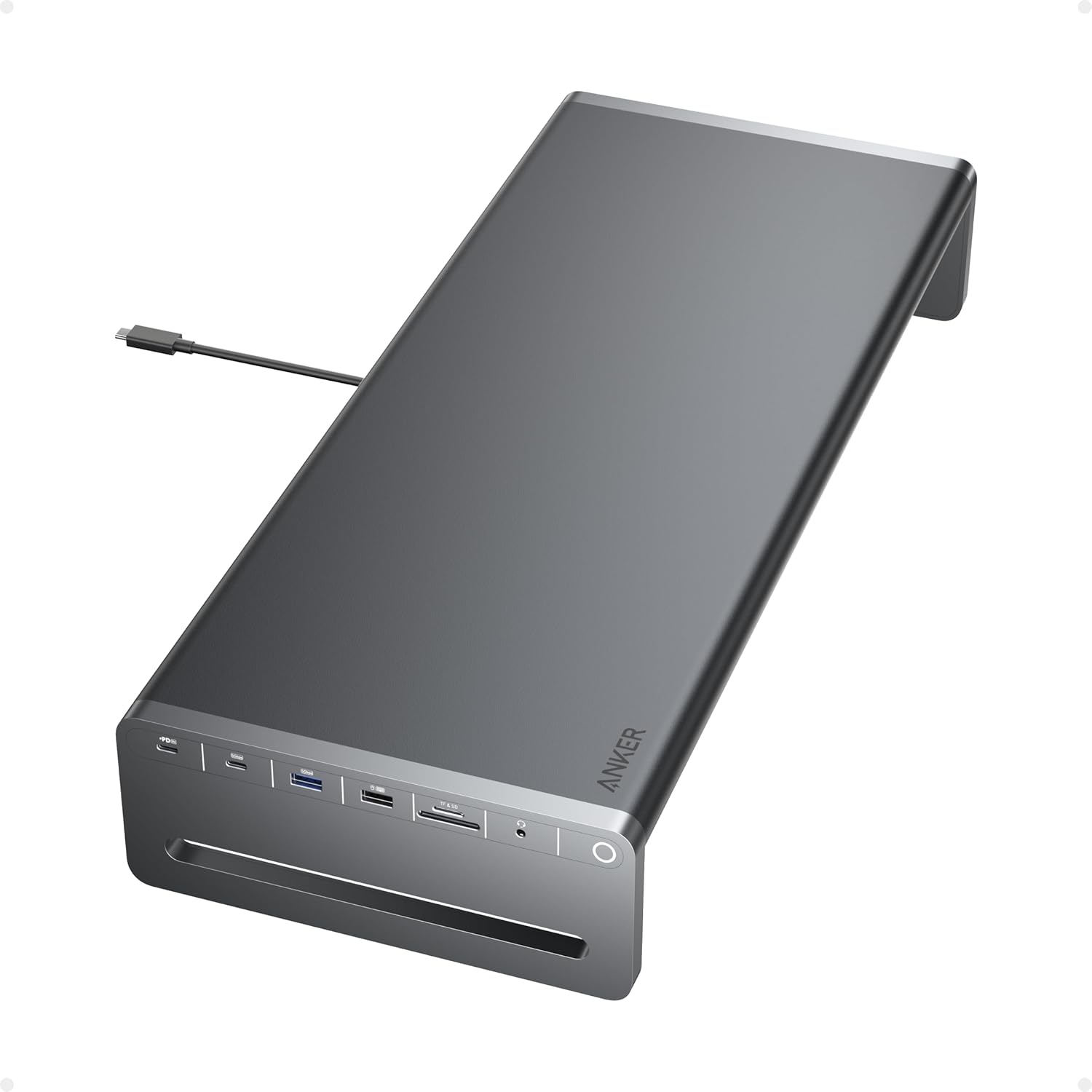
What You Get With the Anker 10-in-1 Monitor Stand

The package focuses on essential hardware integration, providing the physical riser with its permanently attached upstream host cable alongside standard warranty documentation for quick setup.
- Anker USB-C Hub (10-in-1, Monitor Stand) with built-in 3.3-foot host cable
- Welcome guide and documentation
- 18-month warranty coverage
- Access to customer service
- Integrated 100W Power Delivery input port
- Single HDMI video output supporting 4K at 60Hz
- Full-size SD card reader slot and microSD card reader slot
- One 5Gbps USB-C data port and one 5Gbps USB-A data port
- Two 480 Mbps USB-A 2.0 peripheral ports
- Gigabit Ethernet jack and 3.5mm audio interface
Key Specifications
| Specification Attribute | Technical Detail |
|---|---|
| Model Number | A8376 |
| Material and Finish | Aluminum chassis in Gray |
| Physical Dimensions | 8.7 inches long by 3.5 inches wide by 21.3 inches high |
| Item Weight | 3.3 pounds |
| Total Port Count | 10 ports (including 5 total USB ports) |
| Host Connection | Built-in 3.3-foot USB-C cable |
| Power Delivery | 100W PD input supporting up to 85W pass-through charging |
| Video Output | 1x HDMI supporting 4K at 60Hz |
| Data Transfer Speeds | Up to 5Gbps (USB-C and USB-A 3.0), 480 Mbps (USB-A 2.0) |
| Operating System Support | macOS 12 Monterey or newer, Windows 10/11, ChromeOS |
Display Performance and Video Output Limitations
When assessing external display capabilities, the anker monitor stand 4k 60hz specification provides smooth visual performance for single-monitor creative setups. Routing your primary visual workspace through the HDMI port delivers full 3840×2160 resolution at a 60Hz refresh rate, provided your host laptop supports DisplayPort Alternate Mode over its USB-C port. For editors reviewing high-framerate timelines, grading photographs, or tracking audio waveforms, a consistent 60Hz output prevents the cursor stutter and interface lag that plague lower-tier 30Hz video connections.
However, creators who rely on extensive multi-screen setups need to consider the physical port routing. The stand is strictly configured for a single external display. The listing notes that both integrated USB-C ports do not support display functionality or video transmission. If your editing workflow demands dual or triple external displays, a dedicated multi-display hub like the anker 14 in 1 usb c docking station offers broader video output versatility.
For minimalist setups built around an ultrawide or standard 4K panel, the plug-and-play HDMI connection functions without background driver utilities. Modern operating systems, including macOS 12 Monterey and Windows 10, detect the attached screen instantly. Routing the video cable through the back of the riser keeps visual signal lines organized and away from your laptop edge.
Port Selection and Daily Creative Cable Management
The positioning of the ten connection points directly benefits common creative tasks. Having front-facing access to both standard SD and microSD card slots is a distinct workflow advantage for vloggers, photographers, and drone pilots who regularly ingest camera files. Instead of hunting behind a monitor or connecting a loose card dongle, storage media slides directly into the front lip of the stand for quick offloading.
For peripheral management, the anker usb-c hub 10-in-1 monitor stand uses a two-tier distribution of USB bandwidth. High-speed external solid-state drives and high-capacity flash drives can take advantage of the 5Gbps USB-C and 5Gbps USB-A connections for swift project transfers. Meanwhile, everyday input hardware such as keyboards, mice, and studio controllers can occupy the two 480 Mbps USB-A 2.0 ports, keeping the faster data channels open for storage drives.
Connectivity is rounded out with a physical Ethernet port and a 3.5mm audio jack. Creators uploading client archives or streaming live video feeds gain the stability of a hardwired network line rather than relying on inconsistent wireless signals. Those who have explored ultra-compact adapters like the anker nano display will appreciate that this stationary desktop stand provides a broader range of permanent I/O connections for fixed studio installations.
Power Delivery and Laptop Charging Limits
Managing workstation power across connected accessories is straightforward thanks to the anker 85w charging monitor stand power architecture. The unit incorporates a dedicated 100W Power Delivery input port designed for pass-through power routing. The internal circuitry, card readers, and USB channels consume roughly 15W to operate, allowing up to 85W of continuous charging to reach the host laptop.
An 85W charging profile easily satisfies the demands of mainstream creative notebooks, such as the 13-inch and 14-inch MacBook Pro, MacBook Air, and slim Windows laptops. During intensive rendering or export sessions, 85W of continuous power keeps internal batteries sustained without triggering thermal throttling caused by weak charging sources. However, large mobile workstations equipped with heavy discrete GPUs that demand 100W or more may draw power faster than the stand can supply under sustained rendering loads.
It is important to remember that this stand operates as a pass-through charging dock, and the package does not include an external wall charger. To supply the maximum 85W pass-through rate to your notebook, you must supply your own 100W USB-C Power Delivery wall charger. While heavy-duty desktop docks like the anker prime docking station frequently include large dedicated power supplies, this monitor stand gives you the flexibility to utilize an existing high-wattage USB-C charger.
Setup Ergonomics and Workspace Footprint
Ergonomics form the core reason to choose an anker usb-c dock monitor riser instead of a flat desktop hub. The aluminum riser lifts your monitor to a comfortable viewing height, encouraging an upright neck and spine posture during prolonged editing sessions. Elevating the display screen also frees up desk space directly beneath the platform, giving you a convenient place to tuck away a compact keyboard, audio mixer, or graphics tablet when not in use.
The unit features a sturdy gray aluminum chassis measuring 8.7 inches long, 3.5 inches wide, and 21.3 inches high, with a total weight of 3.3 pounds according to the official anker a8376 specs. This heft keeps the stand stationary when plugging in memory cards, audio cables, or USB drives. The integrated 3.3-foot host cable offers plenty of length to place your laptop on either side of the riser or on an elevated arm without putting strain on the connection port.
The aluminum construction also helps dissipate heat generated by continuous 85W power pass-through and rapid drive transfers. The neutral gray finish integrates smoothly with modern creative hardware, including aluminum MacBooks and contemporary studio monitors, providing a unified appearance across your desk.
Check Anker 10-in-1 Monitor Stand on Amazon
Is the Anker 10-in-1 Monitor Stand Worth It
Evaluating whether this combined docking stand fits your desk depends heavily on your monitor layout. If you run a streamlined creative workstation centered around a single high-resolution 4K monitor and a portable laptop, this hardware provides tremendous functional value. Merging an ergonomic riser, SD card readers, gigabit networking, and 85W laptop charging eliminates the need for separate desktop shelves and external dongles.
For independent video editors, photographers, and audio producers working on macOS or Windows machines, the convenience of front-facing ports speeds up daily production. Having immediate access to memory card slots and high-speed USB ports simplifies transferring media from cameras. The permanently attached 3.3-foot host cable allows you to unhook your laptop in seconds when working on location, then reconnect all studio peripherals with a single plug upon return.
However, the stand is not suited for users who require dual external monitors or those running Linux, which the manufacturer explicitly lists as unsupported. Because the USB-C ports are limited to data and power, multi-display video editing suites will require an alternative hardware configuration. For single-display creators seeking to maximize desk space and posture comfort, the Anker 10-in-1 Monitor Stand is an exceptionally well-engineered solution.
FAQ
Does the Anker 10-in-1 Monitor Stand support dual external monitors?
No, the stand does not support dual external displays. It features a single HDMI port that drives one external display at 4K resolution up to 60Hz. The listing explicitly states that both integrated USB-C ports do not support display functionality or video passthrough.
What operating systems are compatible with the Anker 10-in-1 Monitor Stand?
The stand is compatible with macOS 12 Monterey and newer, Windows 10 and 11, and ChromeOS on laptops that support DisplayPort Alternate Mode and USB Power Delivery. The listing explicitly states that the device is not compatible with Linux.
Does the monitor stand include a power adapter in the box?
The listing does not specify an included wall power brick in the package contents. What you get includes the stand with its attached 3.3-foot host cable, a welcome guide, an 18-month warranty, and customer support. To deliver up to 85W of charging to your laptop, you need to connect your own 100W USB-C Power Delivery charger to the stand’s PD input port.
What transfer speeds do the USB ports on this stand support?
The stand provides one USB-C and one USB-A port that operate at data transfer speeds up to 5Gbps. It also features two USB-A 2.0 ports with transfer rates up to 480 Mbps, which are intended for connecting peripherals such as keyboards, mice, and receivers.
Can I connect this monitor stand to a Thunderbolt or USB4 laptop?
Yes, the stand supports host connections over standard USB-C, USB4, and Thunderbolt ports. As long as your laptop port supports DisplayPort Alternate Mode for video and USB Power Delivery for pass-through charging, the stand will operate properly.


