
As Amazon Associates, we earn from qualifying purchases. This means we may receive a small commission at no extra cost to you if you click through and make a purchase.
Finding a mobile workstation capable of handling complex visual effects, high-resolution timeline scrubbing, and multi-app rendering without encountering memory bottlenecks comes down to component balance. The ASUS ProArt P16 configured with 64GB of LPDDR5X system memory represents the highest tier of this platform, engineered specifically to eliminate memory constraints for professionals who juggle demanding creative software suites simultaneously. By combining AMD’s Ryzen AI 9 HX 370 processor with dedicated NVIDIA GeForce RTX 5070 graphics and a color-critical 4K OLED touch display, this machine aims to serve as a comprehensive desktop replacement for creators on the move.
Because memory on this chassis is soldered directly to the motherboard, selecting the 64GB capacity at purchase is a vital consideration for anyone running complex color grades, dense 3D scenes, or extensive video cache files that easily overwhelm standard memory configurations. This breakdown examines every critical aspect of this build, including the factory-tuned thermal modifications performed by authorized boutique builder HIDevolution, the real-world utility of the 16-inch 4K touchscreen, graphics performance, physical connectivity, and overall workflow practicality so you can determine if this workstation fits your creative production needs.
![HIDevolution [2025] ASUS ProArt P16 H7606WP Black 16" 4K OLED Touch, 2.0 GHz Ryzen AI 9 HX 370, RTX 5070, 64 GB LPDDR5X RAM, 2 TB PCIe SSD, Windows 11 Pro](https://m.media-amazon.com/images/I/51a7WCIF39L._AC_SL1080_.jpg "HIDevolution [2025] ASUS ProArt P16 H7606WP Black 16\" 4K OLED Touch, 2.0 GHz Ryzen AI 9 HX 370, RTX 5070, 64 GB LPDDR5X RAM, 2 TB PCIe SSD, Windows 11 Pro")
What You Get With the ASUS ProArt P16
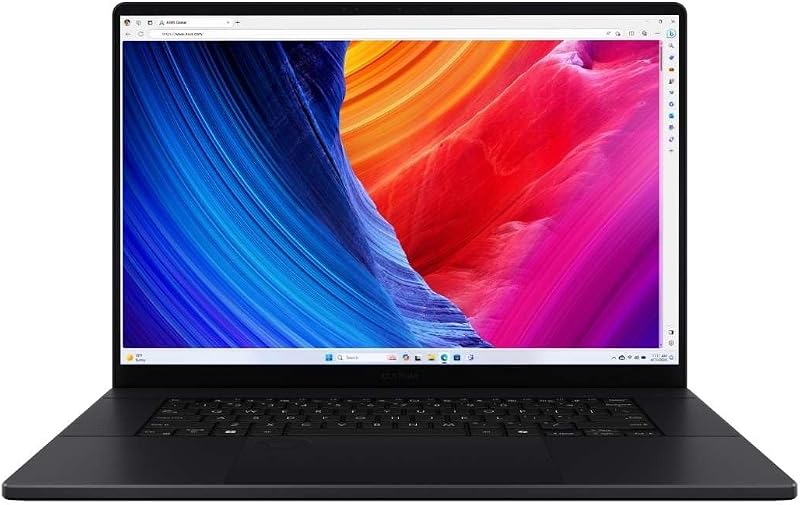
The ASUS ProArt P16 arrives configured through HIDevolution as an authorized ASUS build-to-order system, featuring upgraded thermal interface materials applied directly before shipment alongside comprehensive hardware validation testing.
- ASUS ProArt P16 clamshell laptop in black chassis finish
- AMD Ryzen AI 9 HX 370 processor with 12 cores, 24 threads, and up to 5.1 GHz max boost
- NVIDIA GeForce RTX 5070 laptop GPU with 8 GB GDDR7 dedicated video memory
- 64 GB LPDDR5X on-board system memory
- 2 TB M.2 PCIe 4.0 x4 NVMe solid-state storage
- 16.0-inch 4K (3840 x 2400) 60Hz OLED touchscreen display
- Backlit integrated keyboard and precision touchpad
- Pre-installed Windows 11 Pro operating system
- Thermal Grizzly Conductonaut liquid metal on CPU and Gelid GC Extreme on GPU
- One-year limited warranty coverage backed by HIDevolution support staff
Key Specifications
| Attribute | Specification |
|---|---|
| Processor | AMD Ryzen AI 9 HX 370 (12 cores, 24 threads, 2.0 GHz base, up to 5.1 GHz boost, 36 MB cache) |
| Graphics | NVIDIA GeForce RTX 5070 Laptop GPU (8 GB GDDR7 dedicated VRAM) |
| Memory | 64 GB LPDDR5X on-board RAM |
| Storage | 2 TB M.2 PCIe 4.0 x4 NVMe SSD |
| Display | 16.0-inch 4K (3840 x 2400) 60Hz OLED Touchscreen |
| Operating System | Windows 11 Pro |
| Dimensions | 13.97 x 9.72 x 0.68 inches |
| Weight | 4.1 pounds |
| Connectivity | HDMI video output, M.2 expansion slot, Wi-Fi |
| Thermal Interface | Thermal Grizzly Conductonaut (CPU) and Gelid GC Extreme (GPU) |
Handling Heavy Video Editing and Multitasking Pipelines
Demanding video production pipelines depend heavily on available system RAM to maintain smooth playback and prevent software crashes. Utilizing the ASUS ProArt P16 for video editing allows editors to scrub through multi-camera timelines, process high-bitrate codecs, and run background rendering tasks without exhausting system resources. In software like DaVinci Resolve or Adobe Premiere Pro, dynamic memory allocation quickly consumes standard RAM capacities when motion graphics, color grading nodes, and audio plugins are stacked onto a single project. The 64GB memory ceiling provides ample room for these concurrent background tasks, allowing fluid playback without dropping frames or stalling render queues.
A crucial consideration regarding the asus proart p16 64gb ram specs is that the LPDDR5X memory is soldered directly on board. Because there are no SO-DIMM expansion slots to swap higher-capacity sticks into the motherboard later, choosing the 64GB option guarantees long-term usability for heavy multitasking pipelines. Unlike gaming-first platforms such as the asus rog strix that prioritize high-refresh panels and modular gaming components, this ProArt model prioritizes expansive memory bandwidth to keep creative suites responsive while simultaneously running asset managers, browser tabs, and raw file conversion tools.
Storage speed plays an equally critical role in video timelines, and the built-in 2 TB M.2 PCIe 4.0 x4 NVMe solid-state drive ensures that large video caches, scratch disks, and media libraries load almost instantaneously. For editors handling extended documentary shoots or multi-terabyte raw footage libraries, the internal M.2 expansion slot accommodates additional solid-state storage. Coupled with an external display connected through the native HDMI port, the laptop transitions smoothly between a self-contained mobile workstation and the core hub of a multi-monitor editing desk.
Processing Hardware and Graphics Capabilities
At the center of this machine is the AMD Ryzen AI 9 HX 370 processor, featuring a 12-core, 24-thread architecture. Operating at a base clock speed of 2.0 GHz with the ability to boost up to 5.1 GHz under heavy single-core demand, this processor integrates 36 MB of Smart Cache to manage complex computing instructions. The processor also incorporates dedicated neural processing capabilities designed to accelerate AI-driven creative features, such as automatic object masking, facial recognition tracking, voice isolation, and upscaling algorithms directly on the device.
Visual computation is powered by the ASUS ProArt P16 RTX 5070 dedicated mobile graphics card, equipped with 8 GB of GDDR7 video memory. This GPU accelerates hardware encoding and decoding for modern video formats, speeds up rendering in 3D applications like Blender and Cinema 4D, and handles real-time effect processing in creative suites. While heavy-duty desktop replacements like the asus rog strix scar 16 cater to aggressive wattage envelopes in bulky enclosures, the ProArt balances high computational throughput with a slender 0.68-inch profile and a manageable 4.1-pound carry weight.
Windows 11 Pro coordinates this hardware, providing advanced thread scheduling across the processor’s high-efficiency and performance cores. When working with demanding digital assets, operating system overhead is kept in check, allowing background exports to utilize the RTX 5070 encoder while the user continues composing motion assets or adjusting vector artwork in the foreground. The synergy between high core counts and dedicated graphics memory ensures consistent responsiveness across both video editing and design suites.
Visual Fidelity and the 4K OLED Touch Display
Any comprehensive ASUS ProArt P16 4K OLED review must focus on the laptop’s display panel, which is tailored directly to the demands of visual artists. The 16.0-inch screen offers a crisp 3840 x 2400 resolution in a 16:10 aspect ratio, providing extra vertical canvas space that is particularly useful for multi-track audio and video timelines. The OLED technology delivers infinite contrast ratios with deep black levels, eliminating backlight bleed around high-contrast visual elements and providing accurate tonal representation for precise color grading.
Touchscreen functionality adds an intuitive, tactile dimension to modern editing tasks. Editors can scrub along timelines, navigate bins, and interact directly with creative tools using finger gestures on the display surface. For mobile professionals who frequently transition between studio spaces and on-location production environments—similar to the flexible workflow demands covered in our asus proart gopro edition analysis—having touch input built into a color-precise primary display speeds up quick adjustments in the field when an external mouse or graphics tablet is unavailable.
One specific operational parameter is the panel’s 60Hz refresh rate. While competitive gaming laptops feature displays reaching 140Hz or higher, this 4K OLED screen is explicitly calibrated for cinematic production, photography, and graphic design where 24, 30, and 60 frames per second represent standard delivery formats. The absolute pixel density and deep contrast of the 4K OLED panel take precedence over ultra-high refresh rates, making it an ideal environment for critical color correction, image retouching, and detailed visual inspection.
Thermal Management and Custom Shop Enhancements
Maintaining cool internal components in a chassis measuring only 0.68 inches thick presents significant engineering challenges. In this custom-configured build, ASUS ProArt P16 thermal performance receives a notable boost from HIDevolution through upgraded thermal interface materials. Rather than relying on standard factory compound, the processor is treated with Thermal Grizzly Conductonaut liquid metal, while the dedicated graphics chip receives Gelid GC Extreme thermal paste.
Liquid metal features substantially higher thermal conductivity compared to standard silicone-based pastes. By accelerating heat transfer from the AMD CPU die directly into the cooling system’s heat pipes, the machine reduces thermal throttling under prolonged rendering cycles. This improvement allows the 12-core processor to maintain its boost frequencies for longer periods during heavy CPU-based exports, batch image processing, or physics simulations without forcing fans to ramp up abruptly under brief computational spikes.
Beyond material upgrades, the ASUS ProArt P16 HIDevolution custom shop process includes rigorous quality control checks prior to shipment. Each unit undergoes burn-in stress testing for temperature stability, benchmark verification to confirm hardware performance targets, visual display checks for panel abnormalities, and hardware tests covering the backlit keyboard, touchpad, and physical ports. This validation protocol ensures that the laptop operates reliably out of the box, reducing the risk of downtime for creative professionals facing firm project deadlines.
Check ASUS ProArt P16 on Amazon
Is the ASUS ProArt P16 Worth It
Evaluating whether the ASUS ProArt P16 64GB is worth it depends on the intensity of your creative workflow and your mobility requirements. For professional video editors, motion graphics designers, and colorists who work with 4K or higher footage on location, the combination of 64GB of RAM, a 2TB NVMe SSD, and a factory-calibrated 4K OLED touchscreen inside a 4.1-pound chassis makes this machine a formidable mobile studio. The soldered nature of the memory makes investing in the 64GB tier a smart decision, ensuring the machine remains capable as creative software suites demand more RAM over time.
However, this laptop is not built for everyone. Casual hobbyists and general productivity users whose workloads never saturate 16GB or 32GB of RAM will find this hardware tier far beyond their everyday requirements. Furthermore, 3D artists who require massive VRAM pools exceeding the 8GB limit of the RTX 5070, or users who prioritize high-refresh displays for competitive gaming over color accuracy, may prefer alternate hardware categories designed specifically for those niches.
For its intended audience, this ASUS ProArt P16 creator laptop strikes a well-calibrated balance between performance, thermal stability, and form factor. The upgraded thermal compounds applied by HIDevolution resolve typical slim-chassis heat limitations, while the expansive 64GB memory pool ensures dependable multitasking across the most demanding visual software suites available today.
FAQ
Can the 64GB RAM on the ASUS ProArt P16 be upgraded later?
No, the 64GB LPDDR5X memory is soldered directly to the motherboard. Because there are no removable SO-DIMM slots, the memory capacity cannot be expanded after purchase. Selecting this 64GB model ensures maximum available memory headroom for the lifespan of the laptop.
How does the 60Hz refresh rate affect video editing workflows?
A 60Hz refresh rate is perfectly aligned with standard broadcast, digital video, and film editing workflows, which typically operate at 24, 30, or 60 frames per second. While gamers may prefer higher refresh rates for fast-paced motion, video editors and colorists benefit far more from the 4K resolution, touch interface, and deep contrast delivered by this OLED panel.
What custom thermal upgrades does HIDevolution perform on this laptop?
HIDevolution upgrades the system cooling by applying Thermal Grizzly Conductonaut liquid metal on the AMD processor and Gelid GC Extreme thermal compound on the dedicated NVIDIA graphics card. They also conduct comprehensive burn-in temperature stress testing and benchmark validation before shipping the system.
Does the ASUS ProArt P16 support external displays and storage?
Yes, the laptop features an integrated HDMI video output for connecting external monitors and production displays. For storage expansion, the motherboard includes an internal M.2 slot to add another solid-state drive alongside the primary 2TB NVMe SSD.
Is the ASUS ProArt P16 lightweight enough for travel and field work?
Weighing 4.1 pounds and measuring 0.68 inches thick, the ASUS ProArt P16 is built as a portable clamshell workstation. It is light and slim enough to carry comfortably in a standard camera bag or backpack while delivering desktop-grade performance on location.


