As Amazon Associates, we earn from qualifying purchases. This means we may receive a small commission at no extra cost to you if you click through and make a purchase.
Finding a computer that balances a minimal desktop footprint with uncompromising creative rendering performance has long forced content creators into difficult compromises. The MINISFORUM G1 Pro targets this exact dilemma by integrating high-tier mobile and desktop workstation components into a sleek, small-form-factor design. If you are a video editor, 3D artist, or gaming enthusiast wondering whether this compact system can genuinely handle heavy creative suites and modern titles without the bulk of a traditional full-tower PC, the hardware configuration provides an encouraging answer. With an AMD Ryzen 9 processor and dedicated GeForce RTX graphics packed into a clean white enclosure, it represents a purpose-built solution for demanding desktop workflows.
In this review, we examine every functional facet of this g1 pro gaming pc to see how it operates in real-world creative environments. We explore its computing and graphical capabilities, monitor connectivity across multi-panel editing desks, networking speeds for high-volume asset transfers, and long-term hardware expandability. Whether you need a compact rendering rig for a home studio, a secondary workstation for travel production, or an all-in-one entertainment and editing station, this breakdown will help you determine if it aligns with your production needs.
What You Get With the MINISFORUM G1 Pro

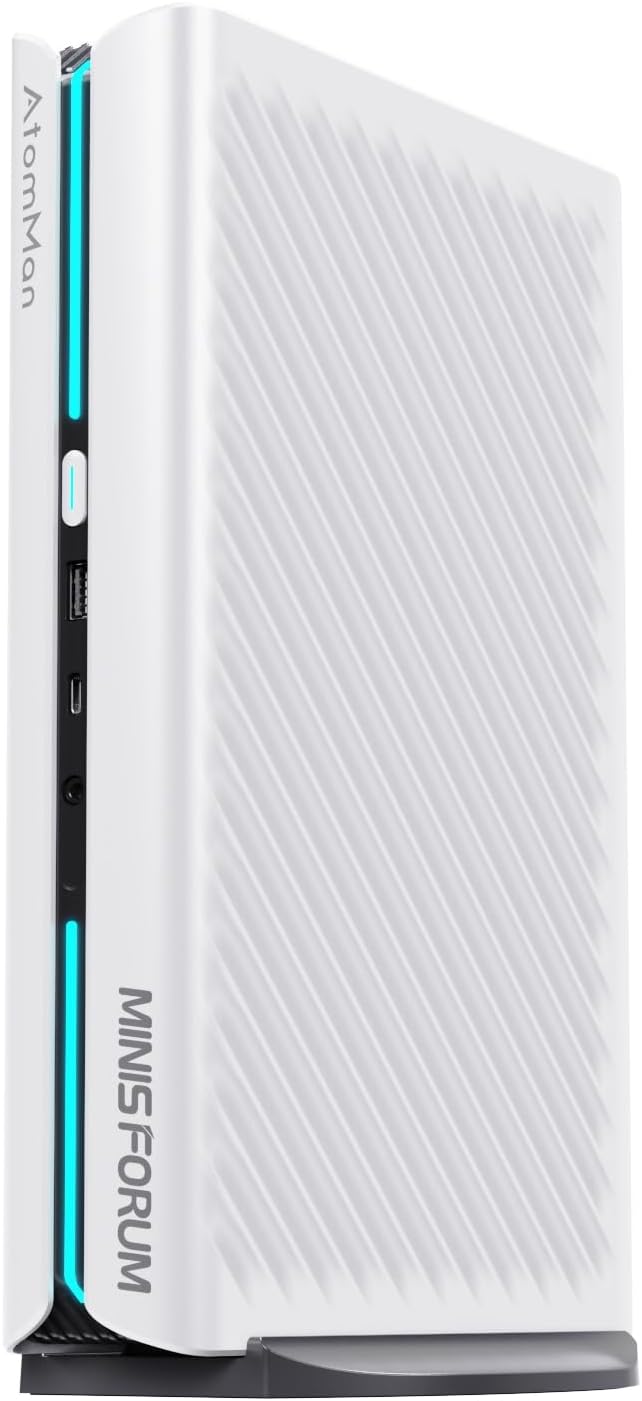
The MINISFORUM G1 Pro arrives as a fully assembled, compact desktop computing unit finished in a clean white chassis designed to blend seamlessly into modern studio desks and gaming spaces. The listing highlights a comprehensive hardware package pre-configured with top-tier internal components, generous high-speed connectivity options, and room for user-driven storage and memory expansion.
- AMD Ryzen 9 8945HX processor featuring 16 cores, 32 threads, and boost clock speeds up to 5.4GHz
- Dedicated NVIDIA GeForce RTX 5060 graphics card with 8GB VRAM and DLSS super-resolution support
- 32GB of pre-installed DDR5-5200MT/s system memory
- 1TB M.2 2280 PCIe 4.0 solid-state drive for high-bandwidth system storage
- Comprehensive video connectivity featuring two HDMI ports, two DisplayPort 2.1 ports, and one DisplayPort 1.4 output
- High-speed networking via a dedicated 5G RJ45 Ethernet port, Wi-Fi 7 wireless module, and Bluetooth 5.4
- Internal expansion provision with a secondary M.2 2280 PCIe 4.0 slot and upgradeable DDR5 memory slots
- Internal PCIe 4.0 x16 interface structure and active fan cooling system
Key Specifications
| Component / Feature | Manufacturer Specification |
|---|---|
| Processor | AMD Ryzen 9 8945HX (16 Cores, 32 Threads, up to 5.4GHz) |
| Graphics Processing Unit | NVIDIA GeForce RTX 5060 (8GB VRAM, PCIe 4.0 x16 slot inside) |
| Installed System Memory | 32GB DDR5 SDRAM (5200 MT/s) |
| Maximum Memory Capacity | Expandable up to 64GB (listing specification table notes up to 96GB) |
| Internal Primary Storage | 1TB M.2 2280 PCIe 4.0 SSD |
| Storage Expansion | Additional M.2 2280 PCIe 4.0 slot (upgradeable up to 2TB) |
| Video Output Ports | 2x HDMI, 2x DisplayPort 2.1, 1x DisplayPort 1.4 |
| Multi-Display Support | Up to 4 simultaneous displays (maximum resolution 3840×2160) |
| Networking | 5G RJ45 Ethernet, Wi-Fi 7 (16×16 spatial streams), Bluetooth 5.4 |
| Peripheral Ports | 3x USB ports, 3.5mm audio and headphone jack |
| Thermal Design | Active fan cooling architecture |
Processing Power for Creator Workflows and Multitasking
At the center of the system sits the g1 pro ryzen 9 8945hx processor, an elite piece of silicon configured with 16 physical cores and 32 threads capable of reaching clock frequencies up to 5.4GHz. In creative software environments like video editing suites, audio workstations, and 3D modeling programs, high core and thread counts are vital for smooth project handling. When scrubbing through multi-track 4K video timelines or rendering complex animation sequences, the CPU divides complex computational passes across its parallel threads, preventing sluggish playback and application stutter.
The minisforum g1 pro performance profile is well-suited for creators who run multiple resource-intensive applications at once. Editors frequently keep grading panels, audio post-production software, browser research tabs, and streaming software open simultaneously. The pre-installed 32GB of high-speed DDR5 memory running at 5200 MT/s provides substantial headroom for aggressive multitasking. Power users who rely on dedicated macro keypads like the razer tartarus pro to manage complex editing hotkeys and timeline cuts will appreciate how quickly the processor responds to rapid input commands without background processing lags.
When assessing the g1 pro for video editing, the system architecture proves capable of handling heavy rendering pipelines and export queues. Video codecs that heavily load the central processor, such as compressed 10-bit color formats, rely directly on processing throughput to decode frames in real time. Because the Ryzen 9 8945HX handles background tasks effortlessly, creators can initiate an asset render while continuing to compose design graphics or handle project management tasks without bringing the operating system to an unresponsive crawl.
Dedicated Graphics Performance and Multi-Monitor Real Estate
A frequent drawback among compact mini desktop systems is their reliance on integrated graphics, which severely bottlenecks GPU-accelerated tasks. The minisforum g1 pro rtx 5060 sidesteps this limitation by incorporating a dedicated NVIDIA GeForce RTX 5060 graphics card with 8GB of dedicated video memory. This dedicated GPU accelerates timeline effects, real-time color grading, and artificial intelligence filters in creative software, while also supporting real-time ray tracing and DLSS super-resolution for gaming. Content producers who want to switch from an editing session to an evening of high-frame-rate gaming receive competent rendering capability directly from the internal PCIe 4.0 x16 graphics card architecture.
Evaluating minisforum g1 pro gaming benchmarks and graphical throughput reveals solid performance across modern gaming titles and multimedia projects. With dedicated ray tracing hardware and DLSS frame generation support, the graphics card delivers fluid frame rates at 1080p and 1440p resolutions, while smoothly displaying native 4K media at up to 3840×2160 pixels. This makes the computer equally viable as a living room entertainment station or an active gaming battle station where visual clarity, shadow fidelity, and realistic reflections matter.
Display flexibility is another standout feature for studio creators. The G1 Pro includes five total display connections—two HDMI ports alongside three DisplayPort interfaces (comprising two DisplayPort 2.1 and one DisplayPort 1.4 output). The system supports up to four ultra-high-definition monitors running simultaneously. Video creators can dedicate one screen to full-screen timeline playback, another to project file bins, a third to color scopes, and even hook up a studio wall display like a samsung frame pro for client previews, creating a vast and cohesive visual production environment.
High-Speed Networking and Workspace Connectivity
Modern content creation involves handling enormous video files, raw audio stems, and vast asset libraries that challenge standard network bandwidth. The MINISFORUM G1 Pro tackles network congestion by providing a built-in 5G RJ45 Ethernet port. Compared to standard Gigabit or even 2.5G ports, a 5G wired connection dramatically accelerates transfers between the local workstation and a network-attached storage (NAS) system. Editors can stream raw media files directly from local storage servers without experiencing dropped frames during playback.
Wireless connectivity is equally advanced thanks to the inclusion of Wi-Fi 7 and Bluetooth 5.4. While older Wi-Fi 6 standards operate with up to 8×8 spatial streams, the Wi-Fi 7 module on this unit supports up to 16×16 spatial streams. This doubling of spatial streams substantially enhances throughput, reduces wireless latency, and maintains strong network stability even across crowded studio frequencies. Bluetooth 5.4 provides stable, low-energy pairing for wireless editing mice, mechanical keyboards, audio monitoring headphones, and mobile devices such as the one plus 15 pro for quick wireless file drops.
Physical peripheral ports on the machine include three USB ports and a dedicated 3.5mm audio and headphone jack, alongside its comprehensive display array. The compact white chassis saves considerable desk surface area compared to bulky mid-tower cases, leaving more physical room for audio interfaces, microphone arms, and camera mounts. Users with an extensive array of external USB drives and accessories will likely want to pair the machine with a powered USB hub to expand the three onboard USB ports into a broader workstation interface.
Thermals and Long-Term Upgrade Potential
Putting powerful silicon inside a compact chassis naturally raises questions regarding minisforum g1 pro thermals. To maintain stable clock speeds during intense video exports or gaming runs, the G1 Pro utilizes an active fan cooling system. The internal cooling design directs continuous airflow across the Ryzen processor and dedicated RTX graphics card to dissipate heat away from critical components. Because it relies on active fans, users can expect audible airflow when the system is pushed to its absolute limits, though this active management prevents thermal throttling from derailing long export jobs.
When considering whether this machine represents the best mini pc for content creation over a multi-year horizon, minisforum g1 pro upgradeability becomes an essential factor. Unlike ultra-thin machines with soldered memory, the G1 Pro comes equipped with removable DDR5 memory modules. The pre-installed 32GB configuration can be upgraded to 64GB (with the technical specification table noting capacity support up to 96GB), giving video editors the ability to expand memory capacity as project complexity and file sizes grow.
Storage expansion is straightforward as well. The pre-installed 1TB M.2 2280 PCIe 4.0 SSD delivers the high read and write speeds necessary for fast operating system boots and swift project loading. MINISFORUM provides an additional internal M.2 2280 PCIe 4.0 slot that supports SSD upgrades up to 2TB. Having a secondary dedicated NVMe slot allows editors to separate their operating system and primary applications from their working video cache and scratch disks, improving drive endurance and organizing workflow assets efficiently.
Check MINISFORUM G1 Pro on Amazon
Is the MINISFORUM G1 Pro Worth It
Determining if the minisforum g1 pro worth it comes down to how you structure your creative workspace and production pipeline. If you are a digital nomad, a studio creator with limited desk space, or a gamer seeking desktop-tier performance without a massive tower dominating your room, this machine hits an appealing sweet spot. The blend of a 16-core AMD Ryzen 9 8945HX processor, dedicated NVIDIA GeForce RTX 5060 graphics, and robust 5G wired and Wi-Fi 7 wireless networking delivers genuine desktop productivity inside a compact footprint.
However, buyers who need extensive internal PCIe expansion slots for dedicated capture cards, internal sound processing hardware, or arrays of traditional 3.5-inch spinning hard drives should consider a conventional full-sized desktop case instead. Furthermore, users with dozens of wired legacy peripherals will need to factor in an external USB docking solution due to the three onboard USB ports.
For independent content creators, vloggers, video editors, and PC gamers who want a clean, minimalist setup capable of powering four simultaneous displays and rendering complex 4K media, the MINISFORUM G1 Pro is a compelling and capable workstation. Its combination of expandable DDR5 memory, dual PCIe 4.0 M.2 slots, and dedicated ray-tracing graphics provides an excellent balance of power, design, and practical functionality.
FAQ
Can the MINISFORUM G1 Pro drive four 4K monitors simultaneously?
Yes. The MINISFORUM G1 Pro features five video outputs—two HDMI ports, two DisplayPort 2.1 ports, and one DisplayPort 1.4 port. It supports up to four simultaneous displays at resolutions up to 3840×2160, making it well-suited for extensive multi-monitor workstation setups.
What graphics card is installed in the MINISFORUM G1 Pro?
The G1 Pro comes equipped with a dedicated NVIDIA GeForce RTX 5060 graphics card with 8GB of video memory. It connects internally via a PCIe 4.0 x16 slot interface and supports real-time ray tracing as well as DLSS super-resolution technology.
How much can you upgrade the memory and storage on this mini PC?
The computer comes pre-installed with 32GB of DDR5-5200MT/s RAM, which can be expanded up to 64GB (the specification table also notes support up to 96GB). For storage, the pre-installed 1TB M.2 2280 PCIe 4.0 SSD can be upgraded to 2TB, and there is an additional M.2 2280 PCIe 4.0 slot available for a second drive.
What networking capabilities does the MINISFORUM G1 Pro offer?
The system features a high-speed 5G RJ45 Ethernet port for ultra-fast local network and NAS file transfers. For wireless connections, it includes modern Wi-Fi 7 supporting up to 16×16 spatial streams, alongside Bluetooth 5.4 for peripheral pairing.
Is the MINISFORUM G1 Pro suitable for demanding video editing?
Yes. With a 16-core, 32-thread AMD Ryzen 9 8945HX processor reaching speeds up to 5.4GHz, 32GB of fast DDR5 memory, and dedicated RTX 5060 graphics, the machine has the hardware necessary to handle multi-track 4K video editing, complex color grading, and media encoding tasks.