As Amazon Associates, we earn from qualifying purchases. This means we may receive a small commission at no extra cost to you if you click through and make a purchase.
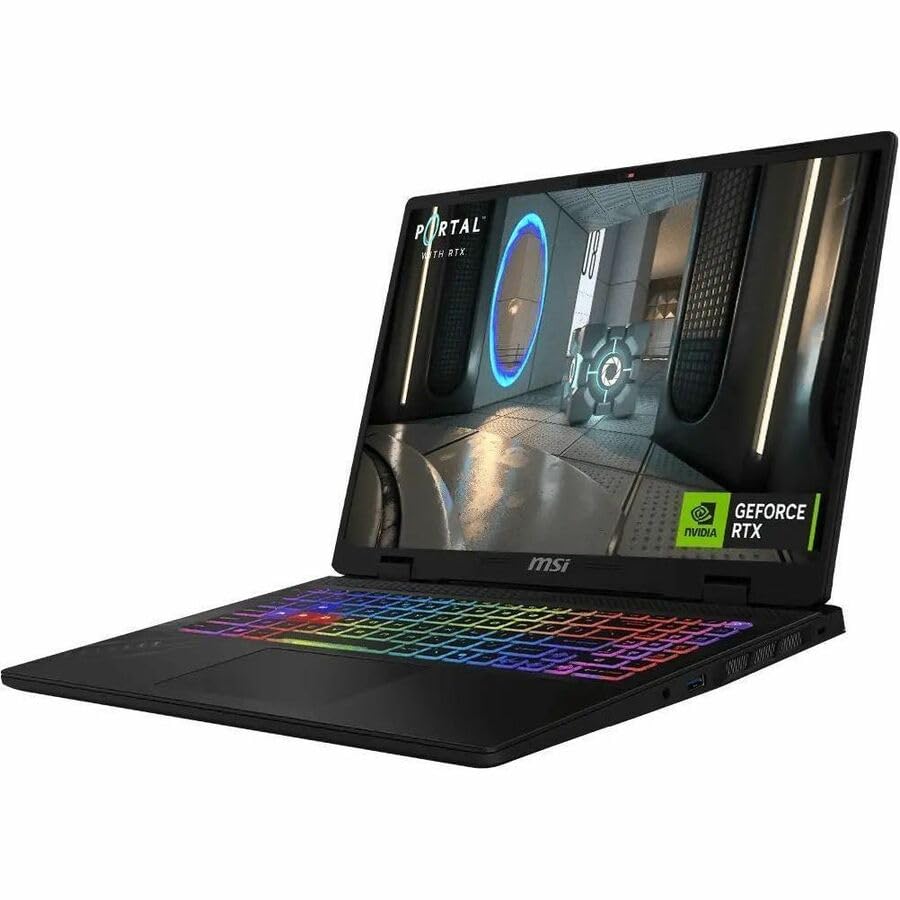
When balancing heavy video production pipelines with high-frame-rate gaming, choosing a laptop requires inspecting processing limits, memory headroom, and screen fidelity. The MSI Crosshair 16 enters the market configured specifically to merge gaming responsiveness with demanding computing duties. Driven by an Intel Core Ultra 7 255HX processor and an NVIDIA GeForce RTX 5060 discrete graphics card, this machine positions itself as a dual-purpose rig capable of handling continuous timeline rendering, live streaming encode tasks, and complex multi-application desktop setups.
Finding out whether this laptop satisfies modern creator demands means looking closely at how its hardware specifications perform when processing video timelines and running creative suites. In this msi crosshair 16 review, we analyze the official hardware profile, screen specifications, physical footprint, and practical workflow implications to determine if this machine provides the stability and rendering power you need for content creation.
What You Get With the MSI Crosshair 16

The MSI Crosshair 16 HX AI D2XWFKG-210US comes configured out of the box with modern processing and visual hardware tailored for intensive computational tasks and multimedia playback.
- Intel Core Ultra 7 255HX processor equipped with Intel AI Boost for on-device acceleration
- NVIDIA GeForce RTX 5060 discrete graphics processing unit with 8 GB of GDDR7 video memory
- 16-inch QHD+ display panel running at 2560 x 1600 resolution with a 240 Hz refresh rate
- 32 GB of installed system memory for seamless execution of background programs
- 1 TB solid-state drive for fast boot cycles and project asset storage
- Pre-installed Windows 11 Home operating system
- Integrated front-facing camera for video conferencing and streaming
- Cosmos Gray gaming notebook chassis engineered around the Intel HM870 chipset
- Standard manufacturer warranty protection
Key Specifications
The following table outlines the core technical details for the MSI Crosshair 16 as stated in the manufacturer documentation.
| Attribute | Detail |
|---|---|
| Processor | Intel Core Ultra 7 255HX (with Intel AI Boost) |
| Graphics Coprocessor | NVIDIA GeForce RTX 5060 (8 GB GDDR7) |
| Chipset | Intel HM870 |
| Display Size & Resolution | 16 inches, 2560 x 1600 (QHD+) |
| Display Refresh Rate | 240 Hz |
| System Memory | 32 GB |
| Internal Storage | 1 TB SSD |
| Operating System | Windows 11 Home |
| Dimensions | 10.5″ L x 14.1″ W x 1.1″ Th |
| Weight | 8.8 pounds |
| Optical Storage | No Information Available |
Processing Power and Dedicated Graphics in Content Workflows
The core computational engine of this laptop relies on the combination of an Intel Core Ultra 7 255HX central processor and the Intel HM870 chipset. A distinct highlight of the msi crosshair 16 intel core ultra 7 architecture is the inclusion of Intel AI Boost. This specialized hardware engine is designed to accelerate on-device artificial intelligence tasks directly within compatible software, assisting with automated live transcription, machine-learning smart filters, and background masking. For vloggers and editors working with complex timeline automations, offloading these processes to dedicated neural compute units helps maintain smooth system interactions while editing high-bitrate video clips.
Handling graphical computations is the msi crosshair 16 rtx 5060, which carries 8 GB of GDDR7 video memory. Transitioning to GDDR7 memory architecture provides fast memory bandwidth, which is essential when buffering raw video frames, computing visual effects, or exporting finished compositions. Creators who frequently build animations or edit multi-track 4K video sequences rely heavily on discrete video memory to prevent frame drops during timeline scrub sessions. While serious desktop builders often compare laptop GPUs against dedicated cards like a standalone msi 5070 ti to maximize raw polygon throughput, the integrated mobile RTX 5060 provides solid hardware-accelerated video rendering within a self-contained notebook format.
In addition to creative timeline tasks, the graphic subsystem incorporates DLSS 4.0 technology. This neural rendering platform primarily targets gaming performance by generating high-resolution imagery from lower base resolutions, ensuring creators can seamlessly transition into high-fidelity gaming sessions when their production day concludes. Overall msi crosshair 16 performance reflects a balanced architecture capable of tackling modern content creation pipelines without sacrificing the graphical muscle expected from a modern gaming platform.
Display Clarity and Refresh Rate for Video Editing
Evaluating msi crosshair 16 display quality reveals a 16-inch panel engineered with a 2560 x 1600 resolution, providing a functional 16:10 aspect ratio. For creative professionals, this taller vertical canvas offers notable advantages over standard widescreen displays. The additional vertical pixel count leaves extra room for multiple audio and video tracks in non-linear editing software, audio envelopes, and tool palettes without cramping the central video preview window. The sharp pixel density of the QHD+ resolution ensures that previewing detailed still photos or fine typography remains crisp and clear.
Complementing the high pixel count is a 240 Hz refresh rate. While ultra-high refresh speeds are traditionally marketed toward competitive multiplayer gamers, creators benefit noticeably during daily user interface interactions. Timeline scrolling, scrubbing through thousands of asset files, and moving complex vector paths across the screen occur with fluid motion that reduces visual fatigue during extended production sessions. However, the listing does not specify precise color gamut coverage metrics, such as sRGB, Adobe RGB, or DCI-P3 percentage ratings. Creators requiring strict color grading standards for professional broadcast delivery should plan their setup accordingly.
Because studio-grade color precision often demands a dedicated wide-gamut canvas, many video editors choose to pair their mobile workstation with a high-end external panel. Linking the laptop to an expansive curved monitor such as the mpg 341cqr qd-oled x36 allows you to keep timeline controls on the primary notebook screen while monitoring color-critical video outputs on a secondary reference display.
Chassis Dimensions and Studio Portability Realities
A realistic evaluation of any creative laptop requires looking at its physical form factor, and the MSI Crosshair 16 is constructed as a substantial, desk-anchored workstation. Measuring 14.1 inches wide, 10.5 inches long, and 1.1 inches thick, the notebook carries noticeable physical volume. Furthermore, the listing indicates an item weight of 8.8 pounds. This weight makes the machine considerably heavier than typical creator ultrabooks, establishing it firmly as a mobile desktop replacement rather than a casual travel companion.
For editors who primarily produce content at a home studio desk or a fixed workstation, the substantial 1.1-inch thickness provides structural space for thermal cooling channels required to dissipate the heat generated by the Core Ultra 7 processor and RTX 5060 GPU. The Cosmos Gray exterior delivers a clean aesthetic suited for studio recording environments, complemented by an integrated front-facing camera for client consultations, live streams, and team meetings. Moving this machine between rooms or into an office studio is straightforward, but users looking for lightweight mobile flexibility should consider the physical mass before planning to edit on airplanes or long commutes.
Creators prioritizing compact mobility over raw processing power often explore lightweight handheld options like the msi claw 8 ex ai+ for quick on-the-go media checks and light tasks. In contrast, this MSI Crosshair 16 gaming notebook prioritizes high-power processing capabilities and large display real estate over lightweight carry weight.
Multitasking Capabilities and System Memory Allocation
A productive msi crosshair 16 creator workflow depends significantly on system memory capacity, and this unit comes equipped with 32 GB of system RAM. Modern video and photo editing applications consume immense quantities of memory, especially when running multiple programs concurrently. With 32 GB available out of the box, you can keep DaVinci Resolve or Premiere Pro open alongside digital audio workstations, motion graphics generators, and dozens of web browser research tabs without running into aggressive memory paging or application crashes.
Storage performance is handled by a fast 1 TB solid-state drive. Solid-state storage ensures the Windows 11 Home operating system boots rapidly, large application suites launch without delay, and gigabytes of source footage stream smoothly directly off the internal drive. While 1 TB provides ample room for operating files, software installations, and active ongoing projects, serious archival workflows will eventually require high-speed external storage arrays as high-bitrate video libraries accumulate.
For users who determine that a 16-inch screen is slightly restrictive for their long-form editing projects and who want an even larger native footprint, examining larger chassis models like the msi crosshair 18 hx offers a broader viewing area. However, within the 16-inch category, this configuration delivers an efficient balance of memory density, fast storage, and responsive hardware management.
Check MSI Crosshair 16 on Amazon
Is the MSI Crosshair 16 Worth It
Answering whether the MSI Crosshair 16 represents the right investment depends primarily on your daily workflow priorities and physical workspace setup. For independent content creators, YouTube vloggers, and digital artists who want a single computing machine that handles timeline rendering during the day and high-fidelity gaming in the evening, this machine provides an impressive hardware combination. The pairing of an Intel Core Ultra 7 255HX, 32 GB of RAM, and the RTX 5060 graphics processor ensures you will not experience memory or rendering slowdowns across standard creator software.
Conversely, if your primary editing workflow requires frequent travel, working on location in remote environments, or packing a lightweight bag for international shoots, the 8.8-pound physical weight and 1.1-inch thickness represent a significant drawback. Furthermore, professionals who demand certified 100% DCI-P3 color gamuts directly on their laptop panel might find the absence of published color metrics limiting without an external reference monitor. For mobile creators who work strictly on the road, a thinner, lighter creative laptop may be better suited to daily transport.
Ultimately, if you view this machine as a transportable desktop powerhouse that stays primarily on a desk plugged into wall power, it delivers exceptional computational value. The inclusion of 32 GB of memory and DLSS 4.0 support ensures long-term usability, making the msi crosshair 16 for video editing and modern content production a capable and resilient workhorse.
FAQ
Can the MSI Crosshair 16 handle complex video editing workflows?
Yes, the combination of the Intel Core Ultra 7 255HX processor, 32 GB of system memory, and the NVIDIA GeForce RTX 5060 graphics card provides ample processing power to manage high-resolution video timelines, visual effects rendering, and multi-stream editing workflows.
What does Intel AI Boost do on the MSI Crosshair 16?
Intel AI Boost is an on-device neural processing feature integrated into the Core Ultra 7 processor. It accelerates artificial intelligence tasks such as automated text transcription, smart video filters, and background separation, allowing these tasks to run efficiently without overwhelming the main CPU or GPU cores.
How does the 16:10 display aspect ratio benefit creative applications?
The 2560 x 1600 resolution provides extra vertical screen space compared to standard 16:9 widescreen panels. This added vertical height gives editors more room for audio tracks, video layers, and editing software toolbars while keeping playback preview windows clearly visible.
Does the MSI Crosshair 16 include an internal optical drive?
The listing documentation states no information is available regarding an internal optical storage device, indicating that physical CD, DVD, or Blu-ray drives are not integrated into this modern notebook chassis. Project files and media must be transferred via USB storage or network downloads.
Is the MSI Crosshair 16 suitable for daily mobile commuting?
Because the laptop weighs 8.8 pounds and measures 1.1 inches in thickness, carrying it daily in a commuter backpack can be demanding. It is designed primarily as a powerful, transportable workstation best suited for home studios, permanent desks, and occasional travel rather than constant handheld mobility.


