As Amazon Associates, we earn from qualifying purchases. This means we may receive a small commission at no extra cost to you if you click through and make a purchase.
Finding a portable computer that balances rendering horsepower with travel-friendly dimensions often leads creators down a narrow path of compromises. The MSI Thin 15 addresses this balance by pairing an Intel Core i5-13420H processor with a dedicated NVIDIA GeForce RTX 4060 graphics card inside a chassis weighing just 4.1 pounds. For video editors, mobile vloggers, and digital creators looking for an agile workstation, this machine offers the baseline hardware necessary to cut multi-stream video projects, manage rendering queues, and scrub through complex visual timelines on the go without the excessive bulk of traditional workstation hardware.
To determine if this configuration fits your mobile production workflow, you need to understand where its strengths sit and where its thin design demands operational trade-offs. While the RTX 4060 graphics processor delivers dedicated 8GB VRAM compute capability for timeline playback and hardware encoding, the slim thermal profile and 1080p panel present distinct functional boundaries. This detailed review examines the msi thin 15 rtx 4060 specs, daily handling ergonomics, sustained thermal characteristics, timeline rendering viability, and expansion options to help you decide if it matches your production requirements.
What You Get With the MSI Thin 15

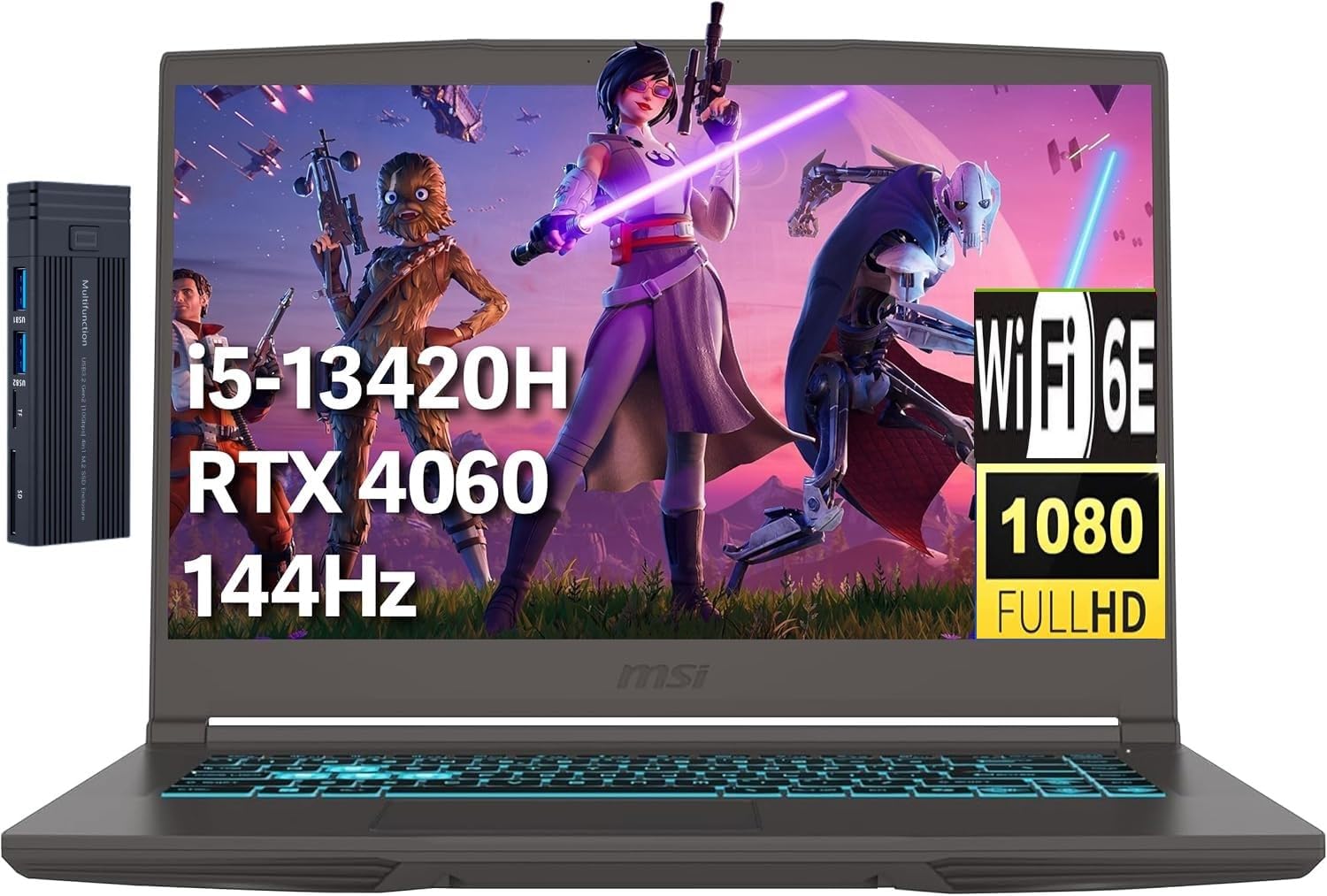
The MSI Thin 15 comes packaged in a gray clamshell chassis engineered for rapid deployment in mobile environments, supplemented by bundled external connectivity hardware designed to improve desktop integration right out of the packaging.
- MSI Thin 15.6-inch laptop in Gray finish
- 15.6-inch Full HD (1920×1080) IPS display running at 144Hz
- Intel Core i5-13420H processor with 8 cores and 12 threads
- Dedicated NVIDIA GeForce RTX 4060 graphics card with 8GB VRAM
- 16GB high-bandwidth system memory
- 512GB PCIe solid-state drive
- External 256GB 9H docking station for expanded connectivity
- Integrated 720p HD front-facing webcam with HD audio
- Built-in backlit keyboard and precision multitouch trackpad
- Pre-installed Windows 11 Home operating system
Key Specifications
| Component / Feature | Manufacturer Specification |
|---|---|
| Processor | Intel Core i5-13420H (8 Cores, 12 Threads, up to 4.6 GHz Max Turbo) |
| Graphics Coprocessor | Dedicated NVIDIA GeForce RTX 4060 Laptop GPU (8 GB VRAM) |
| Display Panel | 15.6-inch FHD (1920×1080) IPS, 144Hz Refresh Rate |
| System Memory | 16 GB High-Bandwidth RAM |
| Internal Storage | 512 GB PCIe Solid State Drive |
| Physical Dimensions | 14.13 inches (L) x 9.99 inches (W) x 0.85 inches (H) |
| Chassis Weight | 4.10 pounds |
| Wireless Connectivity | Intel Wi-Fi 6E, Bluetooth 5.3 |
| Peripheral Interfaces | 1 x USB-C, 3 x USB-A, 1 x HDMI, 1 x RJ45, Audio Combo Jack |
| Operating System | Microsoft Windows 11 Home (64-bit) |
Everyday Portability and Physical Build
Evaluating msi thin 15 portability reveals a machine built primarily for creators who work across coffee shops, hotel desks, and location shoots. Tipping the scales at 4.1 pounds and measuring 0.85 inches thick, this laptop slips into standard camera backpacks and messenger bags without demanding the reinforced straps needed for larger creative rigs. The gray clamshell casing keeps visual branding subdued, making it suitable for client meetings or professional boardroom settings where flashy gaming aesthetics would look out of place.
The physical structure balances minimal carry weight with sufficient rigidity for transit. While high-end workstations like the MSI Titan 18 HX AI RTX 5090 prioritize massive thermal hardware and structural bulk, the Thin 15 focuses strictly on transit convenience. The hinge offers smooth opening motion, and the keyboard deck provides a stable base when hammering out script drafts or editing notes. The integrated backlit keyboard ensures you can continue working inside dim airplanes, editing suites, or production vans without fumbling for keyboard shortcuts.
Port selection is generous for a slim 15.6-inch machine, supporting quick card offloading and client drive backups. You get three USB-A ports for thumb drives, external mice, and card readers, along with a dedicated USB-C interface for newer peripherals. An HDMI port allows rapid connection to on-set monitors or television screens, while an RJ45 Ethernet port ensures you can plug directly into high-speed studio switches when uploading raw video files to remote client servers.
Screen Capabilities and Visual Workspace
The display is centered around an IPS panel with a 1920×1080 resolution, driven by the msi thin 15 144hz display specification. This high refresh rate is immediately noticeable when scrolling through dense project folders, organizing video clips in media pools, or scrubbing playback heads across a timeline. The fluidity of 144Hz lowers visual fatigue during prolonged cut sessions by eliminating mouse trailing and window jitter during window management.
For mobile creators, the 1080p resolution presents both operational benefits and visual limitations. On a 15.6-inch diagonal panel, Full HD provides sharp text scaling without demanding aggressive OS zoom adjustments, leaving your timeline and preview monitor legible. However, editors working with 4K timelines will find their native preview window downscaled substantially. The listing does not specify precise color gamut metrics like DCI-P3 or sRGB coverage, meaning professional colorists should plan to verify critical color grading decisions against a calibrated external monitor using the built-in HDMI port.
Viewing angles remain stable thanks to the IPS architecture, allowing collaborators or directors to review playback over your shoulder without experiencing significant color wash or contrast inversions. The matte finish helps diffuse overhead office fixtures and indirect sunlight, ensuring the screen remains usable when cutting projects outdoors or in brightly lit airport terminals.
Creative Workflow and Video Editing Power
When deploying the msi thin 15 for video editing, the hardware pairing provides substantial power for compressed video formats and dynamic graphical effects. At the core is the msi thin 15 i5 13420h CPU, an 8-core processor equipped with 4 performance cores and 4 efficiency cores across 12 threads. This hybrid architecture permits Windows 11 Home to delegate background operating system tasks and downloads to efficiency cores while dedicating performance cores to rendering pipelines and timeline processing.
Graphics acceleration is handled by the dedicated NVIDIA GeForce RTX 4060 graphics processor featuring 8GB of VRAM. This modern mobile GPU utilizes dedicated video encoders that dramatically shorten export times for H.264 and HEVC codecs. The 8GB video memory pool accommodates GPU-accelerated plugins, noise reduction nodes, optical flow frame interpolation, and multi-layer compositing far more efficiently than older mobile chips like those in the MSI Twin Frozr RTX 2060 Super generation. In demanding software suites, hardware GPU acceleration ensures timeline scrubbing remains fluid even when multiple color adjustments and transitions are stacked.
To sustain an efficient msi thin 15 creative workflow, memory and storage capacity require deliberate management. The included 16GB of system RAM is sufficient for cutting 1080p and light 4K documentary projects alongside open web research tabs. However, the 512GB internal solid-state drive can fill rapidly when storing multi-camera footage libraries and intermediate render caches. MSI includes an external 256GB 9H docking station with this bundle, which provides immediate secondary storage for project archives and expands peripheral connectivity without exhausting laptop ports.
Thermal Performance and Hardware Throttling
Managing heat in a chassis measuring just 0.85 inches thick requires aggressive cooling management, making msi thin 15 thermal performance a central consideration for heavy computational tasks. When executing demanding multi-pass encodes or continuous 3D renders, the Intel Core i5 and RTX 4060 generate substantial heat that is routed through internal copper heat pipes and evacuated through compact side and rear exhaust vents. Creators moving between different MSI configurations, such as the AMD-powered MSI Thin A15, will recognize that thin gaming frames prioritize rapid heat dissipation over quiet operation.
Under continuous rendering loads, the internal cooling fans will spin up to maximum velocity, generating noticeable acoustic noise that can bleed into open desk microphones during live stream captures or voiceover recordings. While the internal thermal design prevents hardware damage, prolonged rendering sessions will cause clock speeds to settle into sustainable power envelopes rather than holding peak turbo frequencies. For content creators, this means timeline exports will remain stable and predictable, though slightly slower than on thick, heavy desktop replacement notebooks.
Surface temperatures on the chassis remain well-regulated across the primary typing zone. The keyboard palm rest stays comfortable during long editing sessions because internal components are clustered near the upper deck and display hinge. To maintain optimal airflow and prevent thermal throttling during multi-hour video exports, creators should operate the laptop on flat, elevated surfaces rather than soft fabric or lap desks that might block the underside intake grilles.
Is the MSI Thin 15 Worth It
Deciding if the msi thin 15 worth it depends entirely on your mobile workflow requirements and your tolerance for slim-chassis operational boundaries. This machine delivers genuine modern processing capabilities by combining a 13th Gen Intel Core i5 processor with an 8GB NVIDIA RTX 4060 GPU, all wrapped in an exceptionally portable 4.1-pound frame. For traveling vloggers, freelance video producers, and hybrid creators who need to edit 4K footage on location without hauling an oversized power brick and heavyweight chassis, this setup delivers immense practical value.
For dedicated studio professionals whose work revolves around color-critical mastering or multi-terabyte raw film production, the system presents clear boundaries. The 1080p display panel requires external monitor verification for broadcast-accurate grading, and the 512GB primary SSD will necessitate immediate reliance on fast external drives or portable SSDs. Furthermore, users seeking completely silent operation during multi-layer video rendering will need to adjust to the audible fan curves typical of compact performance laptops.
When evaluated in the context of a modern msi thin 15 gaming laptop review that doubles as an objective creative assessment, the device succeeds at its stated design objective. It provides modern GPU acceleration, robust port flexibility including RJ45 and HDMI, and responsive Wi-Fi 6E connectivity at an accessible weight profile. Creators who understand these operational realities will find it a capable and dependable field workstation for daily content production.
FAQ
Can the MSI Thin 15 handle 4K video editing smoothly?
Yes, the dedicated NVIDIA GeForce RTX 4060 GPU with 8GB VRAM and the Intel Core i5-13420H processor provide sufficient hardware acceleration to scrub and cut 4K footage smoothly. For multi-stream 4K editing or heavy timeline grading, generating editing proxies ensures the smoothest scrubbing experience inside your video editing suite.
How much internal storage does the MSI Thin 15 include out of the box?
The laptop comes equipped with a 512GB PCIe solid-state drive for your operating system and editing software. This specific bundle also includes an external 256GB 9H docking station, providing supplementary storage space and extra port connectivity for external peripherals.
Is the 144Hz display beneficial for content creation?
The 144Hz refresh rate provides fluid visual feedback when navigating complex desktop layouts, scrubbing playback heads, and organizing files. While high refresh rates are commonly associated with gaming, the reduced visual jitter and smooth motion tracking help reduce eye fatigue during long production sessions.
Does the MSI Thin 15 support multi-monitor setups for studio editing?
Yes, the laptop features a dedicated HDMI output port along with multiple USB interfaces. You can easily connect an external color-accurate studio monitor or secondary preview display to expand your editing canvas beyond the built-in 15.6-inch 1080p panel.
What wireless standards are included with the MSI Thin 15?
The machine includes Intel Wi-Fi 6E for fast wireless file transfers across compatible networks and Bluetooth 5.3 for pairing wireless headphones, editing controllers, and external wireless peripherals.