
As Amazon Associates, we earn from qualifying purchases. This means we may receive a small commission at no extra cost to you if you click through and make a purchase.
Finding a production machine that balances processing horsepower, color accuracy, and mobile versatility is a constant struggle for digital creators. The Surface Pro 11 Elite enters the convertible computing space equipped with Qualcomm’s 12-core Snapdragon X Elite processor, an integrated Neural Processing Unit, and a vibrant 13-inch OLED touchscreen. For video editors, illustrators, and traveling vloggers, the central question is whether this ARM-based convertible can handle intensive creative software, timeline rendering, and multi-layer asset design without the thermal throttling or battery drain common in traditional slim laptops.
In this detailed surface pro elite review, we explore how the tablet functions as a dedicated creative companion in everyday workflows. We evaluate the core surface pro elite specs, screen fidelity, sustained computing output, kickstand usability, and real-world endurance claims. We will also address system capabilities for demanding visual tasks, accessory requirements, and architectural trade-offs to help you decide if this 2-in-1 slate belongs in your equipment kit. If your creative journey started on an older generation machine like the microsoft surface pro 6, this modern silicon design offers a completely transformed hardware experience.
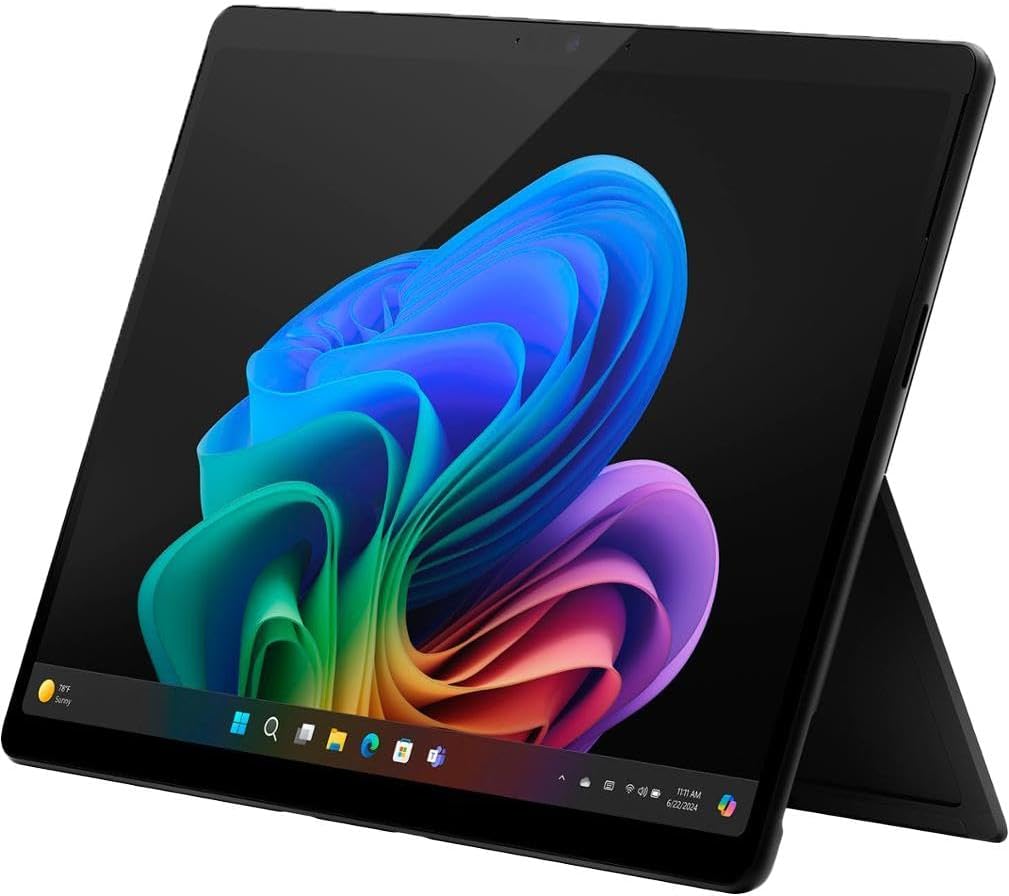
What You Get With the Surface Pro 11 Elite

The retail package delivers the central computing unit along with the essential power delivery hardware needed to get up and running, though studio peripherals require individual consideration.
- Microsoft Surface Pro 11th Edition 13-inch tablet chassis in Black
- Qualcomm Snapdragon X Elite 12-core processor with integrated Adreno graphics and dedicated NPU
- 13-inch OLED Touchscreen display featuring a 2880 x 1920 native resolution
- 16GB of onboard system RAM
- 512GB solid-state drive internal storage
- 65W proprietary power supply unit supporting fast charging via Surface Connect or USB-C
- Integrated 5 MP front-facing camera for high-definition video calls
- Integrated 10 MP rear-facing camera for document capture and field reference photos
- Built-in multi-angle mechanical kickstand
- Windows 11 Home operating system pre-installed
Key Specifications
| Feature | Hardware Detail |
|---|---|
| Processor Model | Snapdragon X Elite (12 Cores) with Copilot+ NPU |
| Graphics Processor | Integrated Qualcomm Adreno GPU (DDR5 SDRAM) |
| Display Panel | 13-inch OLED Touchscreen (2880 x 1920 pixels) |
| System Memory | 16 GB RAM |
| Storage Capacity | 512 GB SSD |
| Operating System | Windows 11 Home (Copilot+ PC Architecture) |
| Battery Runtime | Up to 14 hours manufacturer claim |
| Power Adapter | 65W fast charger via Surface Connect or USB-C |
| Camera Sensors | 5 MP Front-Facing, 10 MP Rear-Facing Photo Sensor |
| Video Connectivity | DisplayPort and Thunderbolt 4 Video Output |
OLED Display Quality and Visual Precision
The centerpiece of the hardware is undeniably the surface pro elite oled display. Spanning 13 inches with a native resolution of 2880 x 1920, this panel provides exceptional pixel density that makes detailed raster illustration, digital painting, and photo grading remarkably clean. Because OLED technology illuminates each individual pixel independently, blacks are genuinely absolute, eliminating the gray haze and edge-lit backlight bleed that have historically plagued tablet screens. This deep contrast profile allows colorists and photographers to judge shadow details and dynamic range gradations with clinical precision, whether setting up a field grade or adjusting complex raster curves in a visual suite.
Working in the classic 3:2 aspect ratio continues to give Microsoft’s convertible lineup a distinct ergonomic advantage over 16:9 widescreen slabs. When working in vertical photo edits or managing multi-track audio timelines, the additional vertical screen real estate reduces scrolling fatigue and leaves room for essential workspace toolbars. Touch responsiveness across the glass is snappy and immediate, offering a natural feel when zooming across large design canvases or panning around high-resolution composite boards.
Visual fidelity remains consistent even when adjusting viewing angles under variable studio illumination. In outdoor field setups or brightly lit coffee shops, the panel maintains readability without severe color shifts. Content creators who rely on true-to-life color depiction will appreciate how the OLED contrast dynamics translate across digital media, making this configuration one of the most visually accurate portable screens Microsoft has delivered to date.
Snapdragon X Elite Performance in Creative Workflows
Under the chassis, the surface pro 11 snapdragon x elite platform delivers a fundamental shift from previous x86 chip generations. With 12 processing cores and a specialized Neural Processing Unit, the system is designed to execute multi-threaded workloads while maintaining cooler surface temperatures. Microsoft’s internal Cinebench 2024 multi-threaded benchmarks demonstrate performance figures that surpass the M3 MacBook Air, signaling that this slim tablet has genuine muscle for compute-heavy visual tasks. This makes the surface pro elite for creators a compelling consideration when rendering motion graphics or applying multi-layer filters on location.
When running creative suites optimized for modern ARM architectures, the machine exhibits impressive responsiveness. For timeline scrubbers and video producers exploring surface pro elite video editing, the integrated Qualcomm Adreno GPU delivers capable hardware acceleration for previewing footage, cutting b-roll, and applying color LUTs. With 16GB of DDR5 RAM and a swift 512GB solid-state drive, switching between raw photo processors, vector drawing software, and web research tabs occurs with minimal hesitation or memory paging bottlenecks. Creators managing mixed workloads can learn more about this architecture in our surface pro, copilot+ pc breakdown.
The dedicated NPU also unlocks native on-device AI acceleration that offloads specialized algorithms from the main processor. Creative software increasingly delegates tasks like automatic rotoscoping, noise removal, subject masking, and neural upscaling to the NPU. It is worth noting, however, that Microsoft indicates select Copilot+ experiences will roll out as free system updates throughout late 2024 into 2025. While foundational processing speeds are high right out of the box, specific automated features will continue expanding through future software enhancements.
Battery Longevity and On-the-Go Charging
Portability means little if an editing slate cannot survive away from an AC wall outlet. The manufacturer-rated surface pro snapdragon x elite battery life reaches up to 14 hours under standard operational conditions. The architectural efficiency of the Snapdragon X Elite chip avoids the aggressive power spikes that often drain traditional processors during mundane tasks. When performing lighter creative duties such as writing scripts, reviewing rushes, or conducting photo culls, power draw remains low, enabling prolonged field sessions without battery anxiety.
When pushing intensive compute tasks like batch exports or 4K timeline rendering, power consumption naturally increases, but the power management system prevents catastrophic battery depletion. The device includes a 65W power supply unit that supports rapid replenishment via either the proprietary Surface Connect port or modern USB-C interfaces. This dual-charging flexibility is invaluable for traveling vloggers and mobile creators who prefer packing a single high-wattage universal USB-C charger rather than multiple proprietary bricks in their camera bags.
Field professionals who frequently produce content on the road or outdoors will appreciate not having to hunt for power receptacles between filming locations. If reliable off-grid mobility is an absolute prerequisite for your production workflow, examining alternatives such as the surface pro 5g can provide further perspective on staying productive away from conventional studio desks. The combination of sustained power reserves and rapid 65W top-ups ensures that downtime is kept to an absolute minimum.
Ergonomics and the Drawing Workflow
A major draw for visual artists is the surface pro elite drawing workflow, enabled by the chassis’ convertible design. The rear chassis features a smooth, friction-hinged kickstand that adjusts seamlessly from an upright laptop viewing stance down to a low-profile drafting table elevation. In this angled studio configuration, the tablet rests securely on the desk, providing a firm, comfortable surface for pressure-sensitive illustration, photo retouching, and vector plotting.
The physical slate itself is remarkably slim, making it easy to cradle in one arm while annotating storyboards or directing shots on set. However, prospective buyers should pay close attention to accessory requirements. The listing makes clear that the detachable Surface Pro Flex Keyboard is sold separately. If you plan to use this machine as a dual-purpose laptop replacement for scriptwriting, metadata tagging, or rapid keyboard-shortcut navigation in editing software, budgeting for the external keyboard accessory is an essential consideration.
External connectivity is well supported despite the slim profile. The device provides DisplayPort and Thunderbolt 4 video output capabilities, enabling swift connection to external studio displays, high-speed RAID storage enclosures, and auxiliary monitoring gear. The built-in 10 MP rear camera serves well for grabbing high-resolution environment references and tracking physical assets, while the 5 MP front camera delivers sharp video during remote client reviews and team conferences.
Check Surface Pro 11 Elite on Amazon
Is the Surface Pro 11 Elite Worth It
Determining whether the Surface Pro 11 Elite represents the right investment comes down to your personal workflow needs and tolerance for the convertible format. For mobile creators, illustrators, and traveling vloggers who need the tactile freedom of a high-contrast touch canvas combined with the raw computational muscle to crunch through modern visual media, this 2-in-1 provides a compelling blend of speed and screen quality. The 13-inch OLED panel alone offers a level of color depth and contrast clarity that traditional mobile workstations struggle to match in this form factor.
At the same time, prospective buyers must evaluate the practical hardware trade-offs. The configuration arrives with Windows 11 Home rather than a Pro license, which may require an operating system upgrade for creators needing specialized enterprise management tools. Additionally, because the Surface Pro Flex Keyboard is sold separately, the initial purchase only gives you the standalone slate. Those looking toward future generation cycles may also want to monitor updates surrounding a potential surface pro 12 before committing their studio budget.
Ultimately, if you prioritize ultra-portable performance, versatile multi-angle drawing ergonomics, and class-leading display fidelity, this machine hits the mark. The Snapdragon X Elite processor brings modern efficiency and multi-threaded muscle to Windows tablets, turning a svelte 13-inch slate into a legitimate mobile studio machine for ambitious creative professionals.
FAQ
Does the Surface Pro 11 Elite include the keyboard in the box?
No, the product listing explicitly specifies that the detachable Surface Pro Flex Keyboard is sold separately. Buyers who need physical typing functionality must purchase the keyboard accessory individually.
Can I connect the Surface Pro 11 Elite to external studio monitors?
Yes, the specifications confirm that the device supports external video output via DisplayPort and Thunderbolt 4 protocols, allowing connection to compatible external displays and studio hubs.
What operating system comes pre-installed on this model?
This configuration comes equipped with Windows 11 Home, fully certified as a Copilot+ PC with dedicated AI acceleration support.
How does the battery recharge when working on location?
The device includes a 65W power supply unit that supports fast charging through either the built-in Surface Connect port or a standard USB-C connection.
Are all Copilot+ AI features functional immediately at setup?
While the hardware and NPU are ready out of the box, the product documentation notes that select Copilot+ experiences require downloading free software updates scheduled for rollout between late 2024 and 2025.


