
As Amazon Associates, we earn from qualifying purchases. This means we may receive a small commission at no extra cost to you if you click through and make a purchase.
When planning mobile shoots, audio sessions, or multi-day travel projects, creators rarely want to risk their primary production computers in harsh field environments. The Dell Chromebook 3100 2-in-1 steps into this demanding role as a compact, utilitarian machine designed to withstand the scrapes and bumps of mobile operations while keeping workflow essentials functional. While originally conceived for educational settings, this convertible laptop provides content creators, travel vloggers, and technical hobbyists with a dependable secondary field terminal. By prioritizing physical resilience and cloud connectivity, it acts as an agile digital notebook, shoot scheduler, and media transfer companion that slides into a camera bag without adding substantial bulk.
Navigating mobile production setups requires knowing whether a lightweight Chrome OS device possesses enough processing power, display clarity, and port versatility to justify its spot in your kit. In this detailed Dell Chromebook 3100 2-in-1 review, we examine how the convertible chassis, screen protection, hardware specifications, and system architecture hold up outside standard office environments. We explore how the device balances dual-core efficiency with lightweight cloud synchronization, what to expect from its internal storage and display, and whether adopting the Dell Chromebook 3100 2-in-1 for field work makes practical sense for your creative routine.
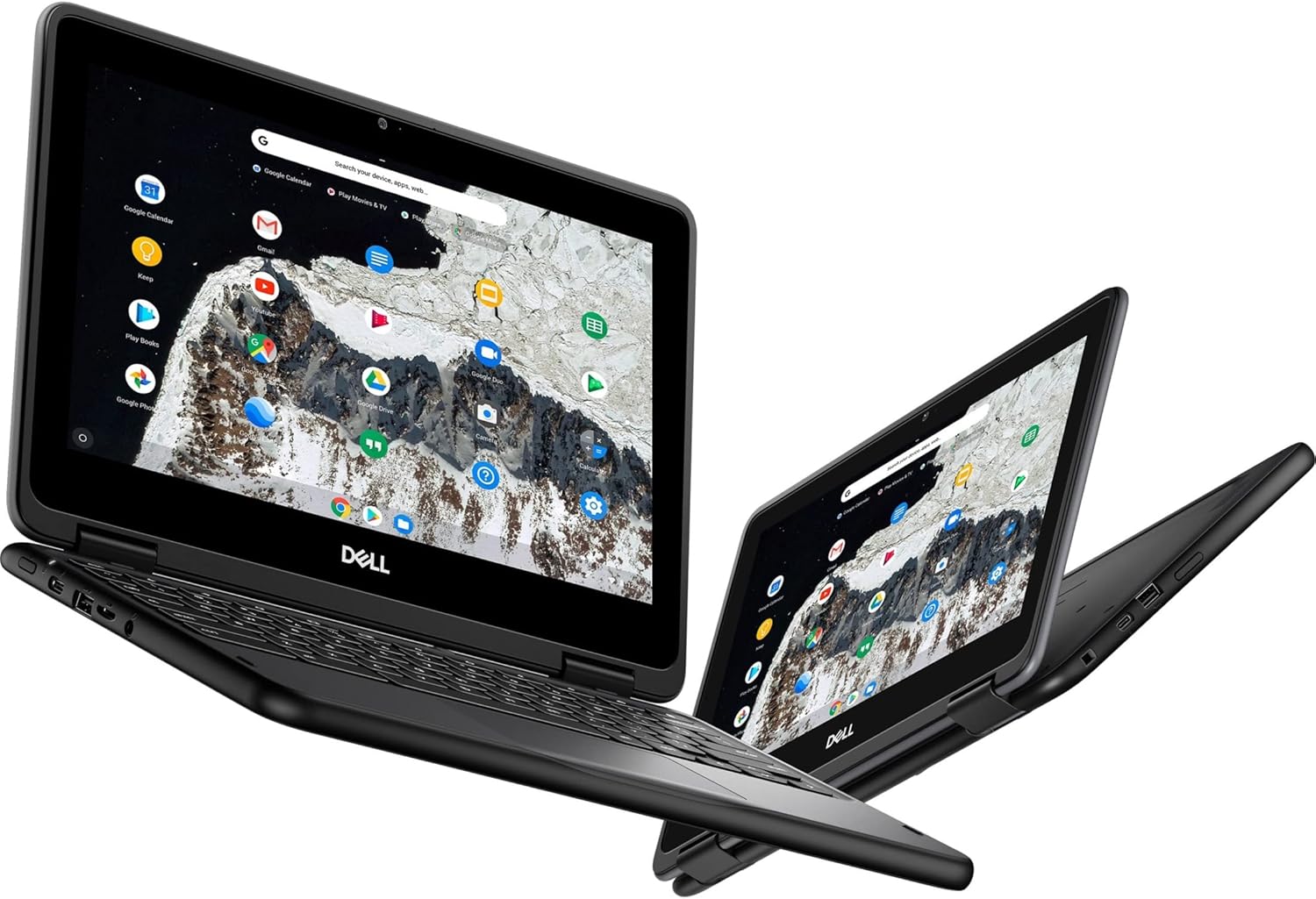
What You Get With the Dell Chromebook 3100 2-in-1

The Dell Chromebook 3100 2-in-1 delivers an all-in-one convertible setup engineered for straightforward deployment without complex configuration. Finished in a practical black exterior, the system pairs low-power internal hardware with durable external shielding, providing users with a cloud-ready platform that integrates directly with basic field peripherals.
- Dell Chromebook 3100 2-in-1 convertible laptop computer in black
- Intel Celeron N4020 dual-core processor with Intel UHD Graphics 600
- 4 GB of DDR4 SDRAM system memory for cloud productivity and document editing
- 32 GB eMMC flash memory using a Serial ATA internal storage interface
- 11.6-inch HD touchscreen display operating at 1366 x 768 native resolution
- Corning Gorilla Glass protective display construction for enhanced scratch and impact resistance
- Integrated front-facing camera for remote video check-ins and communication
- Chrome OS preinstalled with automatic backup software integration
- Peripheral compatibility covering USB devices, SD cards, audio devices, Wireless LAN, and Bluetooth
Key Specifications
| Feature | Specification |
|---|---|
| Processor | Intel Celeron N4020 Dual-Core (2 Core) |
| Graphics Coprocessor | Intel UHD Graphics 600 |
| System Memory | 4 GB DDR4 SDRAM |
| Hard Disk Size | 32 GB eMMC Flash Memory (Serial ATA) |
| Display Size and Resolution | 11.6 Inches, HD 1366 x 768 Touchscreen |
| Display Glass | Corning Gorilla Glass |
| Form Factor | 2 in 1 Chromebook |
| Item Weight | 3.1 pounds |
| Camera | Front Camera |
| Operating System | Chrome OS with Automatic Backup |
Chromebook 3100 Rugged Build and Physical Durability in the Field
Physical resilience is often the deciding factor when selecting secondary hardware for remote production environments. The Chromebook 3100 rugged build stems from its original designation for student use, meaning the chassis is deliberately constructed to endure accidental impacts, drops, and rough handling inside packed gear cases. Weighing 3.1 pounds, the unit carries enough structural heft to feel solid on a workbench or folding camp table without overburdening a shoulder pack during long trekking days.
Display vulnerability is another major issue for mobile operators who frequently pack laptops alongside metal tripod plates, microphone mounts, and camera cages. Dell addresses this by incorporating Corning Gorilla Glass across the 11.6-inch touch panel. This protective glass layer shields the underlying display matrix from direct pressure, grit, and surface abrasions, allowing you to use touch input with dirty fingers or pack the device beside production tools without immediate concern for hairline fractures.
For creators who frequently compare field hardware, evaluating this unit against alternatives like the newer dell chromebook 3120 highlights the enduring appeal of heavy-duty exterior plastics. The textured black shell resists fingerprint oils and minor scuffs, ensuring that cosmetic wear accrued on location does not compromise the machine’s structural integrity or resale utility over multiple production seasons.
Dell Chromebook 3100 Performance for Daily Productivity and Asset Logging
Understanding the hardware ceiling of the Dell Chromebook 3100 performance profile ensures you do not assign it tasks it was never designed to handle. Driven by an Intel Celeron N4020 dual-core processor and 4 GB of DDR4 SDRAM, this machine focuses on low-overhead web applications, spreadsheet updates, script revisions, and digital asset logging. When managing shot lists, writing video descriptions, or coordinating production logistics through browser-based interfaces, the system delivers responsive, predictable responsiveness.
Internal storage is configured as 32 GB of eMMC flash memory over a Serial ATA interface. Because 32 GB leaves minimal headroom after accounting for the Chrome OS installation, users should treat this laptop as an online gateway rather than an offline video vault. The built-in Chrome OS automatic backup software routes documents, operational settings, and app data directly to cloud storage, preventing local data loss if the device suffers physical trauma on location.
If your workflow requires local clip scrubbing or heavy parallel browser tabs, you will quickly notice the limits of a dual-core chip and 4 GB memory pool. Users seeking broader multitasking headroom often research platforms such as the lenovo 500e chromebook gen 3 to gauge processing tiers, but for dedicated note-taking, transcription review, and email triage, the 3100 configuration remains completely serviceable.
Dell 3100 2-in-1 Touch Screen and Convertible Usability
The 360-degree convertible hinge transforms the Dell 3100 2-in-1 touch screen from a standard laptop into a flat tablet, presentation stand, or tent-mode terminal. For video directors and field producers, tent mode provides an ultra-stable footprint on cramped production carts, equipment cases, or vehicle dashboards. In this orientation, the keyboard folds out of harm’s way, leaving the 11.6-inch display unobstructed for viewing running schedules, call sheets, or teleprompter copy.
The display panel features an HD resolution of 1366 x 768 pixels. While this resolution does not match higher-density professional creative monitors, the listing specifically highlights that the screen provides a great movie watching experience. In practice, this means video playback, dailies review for framing, and tutorial streaming are clear and legible, even if fine color grading remains outside the panel’s native capabilities.
Switching into tablet mode lets you carry the device single-handedly down a production line, through an event venue, or around a workshop while checking off equipment inventories. Touch interactions on the Corning Gorilla Glass surface remain fluid, and the compact 11.6-inch diagonal makes holding the unit in portrait orientation manageable without generating excessive wrist strain.
Field Power Connectivity and Peripheral Integration
Field deployment requires reliable connectivity with storage media and input accessories. The Dell Chromebook 3100 2-in-1 specs indicate wide-ranging support for external hardware, noting compatibility with USB devices, SD cards, audio devices, and wireless peripherals operating over Wireless LAN and Bluetooth. Being able to read SD cards directly allows photographers and audio recordists to transfer metadata logs, review directory structures, and upload select stills to cloud storage immediately after wrapping a scene.
Power management in the field is equally critical. Regarding the Dell Chromebook 3100 battery life, the manufacturer listing does not specify exact runtime hours or milliamp capacities. However, the combination of an energy-efficient Intel Celeron N4020 processor and a modest 11.6-inch panel keeps total system draw low. The system’s 240-volt power support ensures broad electrical compatibility when traveling internationally or operating from mobile inverter systems.
While larger devices like the acer 315 15.6 chromebook offer substantially more screen real estate for stationary desk work, they demand wider bags and consume more operational space. The 3100 strikes an intentional balance, favoring small-footprint portability and simple peripheral handshakes over expansive screen space.
Check Dell Chromebook 3100 2-in-1 on Amazon
Is the Dell Chromebook 3100 2-in-1 Worth It
Determining whether the Dell Chromebook 3100 2-in-1 is worth it depends entirely on how you define its role within your equipment arsenal. If you are an independent creator, travel vlogger, or hobbyist seeking a secondary machine to handle administrative tasks, script editing, location logging, and client correspondence, this laptop offers tremendous utility. Its rugged enclosure and Corning Gorilla Glass touchscreen mean you can deploy it in dirty, high-traffic, or outdoor environments without risking your expensive primary editing computer.
Conversely, creators expecting to cut multicam timelines, process complex RAW photo batches, or store hundreds of gigabytes of media directly on the internal drive should look elsewhere. With an Intel Celeron N4020 dual-core chip, 4 GB of memory, and 32 GB of eMMC storage, the hardware is fundamentally structured for cloud collaboration, document management, and lightweight media playback rather than intensive computational heavy lifting.
Ultimately, this convertible Chromebook succeeds by excelling within its targeted operational envelope. As a resilient, low-stress field terminal that safeguards your core workflow communications and documentation, it delivers dependable service where delicate consumer laptops often struggle.
FAQ
Can the Dell Chromebook 3100 2-in-1 edit high-resolution video footage?
No, the hardware is not configured for intensive video rendering or high-resolution timeline editing. Powered by an Intel Celeron N4020 dual-core processor, Intel UHD Graphics 600, and 4 GB of DDR4 SDRAM, the system is designed for web browsing, administrative work, script tracking, and cloud-based applications rather than local media encoding.
What does the product data state about Dell Chromebook 3100 battery life?
The product listing does not specify exact battery life hours or battery pack capacities. In field workflows, battery duration depends on screen brightness, wireless usage, and connected USB peripherals, though the low-power Celeron processor is inherently structured for minimal electrical draw.
How durable is the Dell 3100 2-in-1 touch screen during travel?
The 11.6-inch touchscreen is built with Corning Gorilla Glass, which provides significant resistance against surface scratching and impact stress. Combined with the convertible 2-in-1 chassis, the display is well protected for travel inside crowded camera cases and gear backpacks.
Can I expand the 32 GB internal flash storage?
The internal 32 GB eMMC storage is fixed to the motherboard using a Serial ATA interface, so the internal drive itself cannot be physically upgraded. However, the listing notes compatibility with SD cards and external USB devices, allowing you to connect external media for additional file handling and temporary asset transfers.
Does the Dell Chromebook 3100 2-in-1 include a camera for video meetings?
Yes, the specifications confirm an integrated front-facing camera. This camera allows you to participate in remote production check-ins, virtual meetings, and web conferences directly through Chrome OS communication platforms.


