
As Amazon Associates, we earn from qualifying purchases. This means we may receive a small commission at no extra cost to you if you click through and make a purchase.
Creators, video editors, and multi-display power users frequently hit a performance ceiling when driving high-resolution monitors and high-draw laptops through standard USB hubs. The Dell WD19TBS is engineered to eliminate that bottleneck, serving as a dedicated dell wd19tbs thunderbolt 3 dock built for demanding production desks. If your creative process requires editing high-bitrate footage across multiple screens, offloading camera media from external drives, and keeping a high-performance host system energized through a single cable, this hardware provides a capable and tidy solution. Because this package is an Amazon Renewed bundle supplied with an original 180W power supply, it offers an enterprise-grade hardware base for modern studio setups.
Deciding whether this dock fits your exact production environment requires evaluating its display routing capabilities, sustained charging transfer, and peripheral layout. In this breakdown, we examine the official dell wd19tbs docking station specs, discuss display configurations ranging from a dual-display timeline arrangement to a full dell wd19tbs triple 4k installation, and evaluate the integrated thermal control during sustained workloads. We also examine host system compatibility across Dell systems and rival workstation portables, highlighting both the practical advantages and the trade-offs you must weigh before revamping your desktop cable infrastructure.
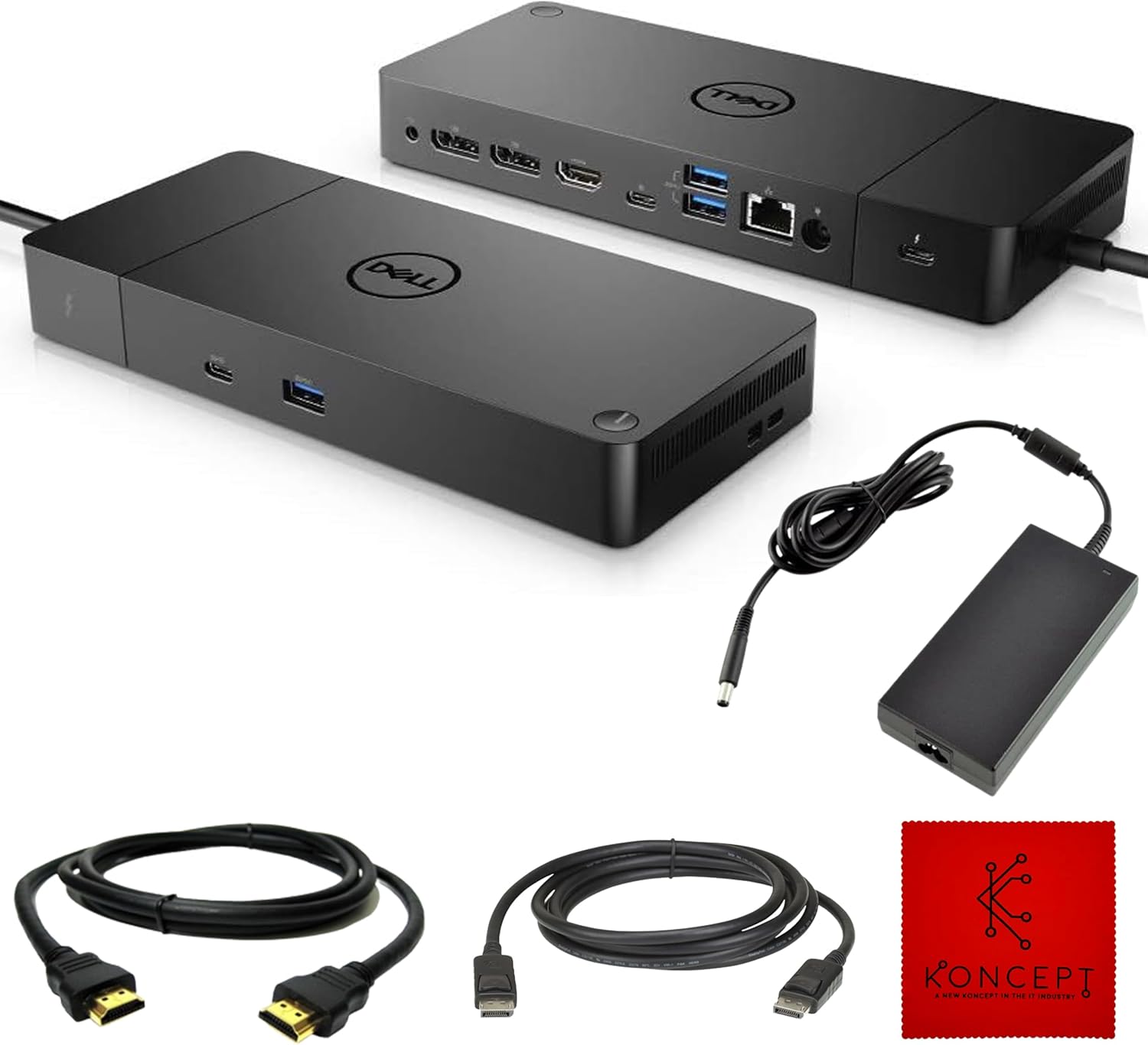
What You Get With the Dell WD19TBS

Opening the package reveals a complete desktop setup bundle focused on rapid deployment without forcing you to shop separately for basic connectivity accessories. The hardware package pairs the central docking module with the critical high-output power brick and dedicated monitor cabling required to drive multi-screen layouts immediately.
- Dell WD19TBS docking station chassis finished in matte black
- Original 180W external AC power adapter
- 1x HDMI cable for connecting consumer-grade or production monitors
- 1x DisplayPort cable for high-bandwidth professional computer displays
- 11 total input and output ports across the front and rear panels
- 1-year limited hardware warranty coverage provided through the renewed program
Key Specifications
| Hardware Characteristic | Listing Specification |
|---|---|
| Model Identification | WD19TBS Renewed |
| Host Interconnect Interface | Thunderbolt 3 and USB-C (DisplayPort Alt Mode) |
| Interface Bandwidth | Up to 40Gbps theoretical transfer speed |
| Total Number of Ports | 11 total ports |
| Total USB Ports | 6 dedicated USB data and peripheral ports |
| Video Interfaces | 2x DisplayPort 1.4, 1x HDMI 2.0, 1x USB-C multi-function DisplayPort |
| Host Power Delivery | Up to 130W power delivery |
| Total Power Supply Wattage | 180W external adapter |
| Wired Network Connectivity | 1x Gigabit Ethernet (RJ-45) |
| Minimum Operating System | Windows 10 |
Display Bandwidth and Multi-Monitor Handling
The primary attraction of this unit for visual creators is its comprehensive video output pipeline driven by the 40Gbps data stream of Thunderbolt 3. Unlike entry-level hubs that throttle refresh rates down when driving multiple screens, this dock manages serious screen real estate without dropping frames. Video editors and colorists can establish a stable dell wd19tbs dual monitor setup running dual high-resolution displays with fluid timeline scrubbing. For complex workstation layouts involving dedicated preview monitors, scopes, and editing timelines, the listing confirms support for up to triple 4K displays operating at 60Hz, or an individual 5K panel through the Thunderbolt 3 pipeline.
Display flexibility stems from the variety of video connections positioned across the rear panel. The hardware integrates two DisplayPort 1.4 outputs, a standard HDMI 2.0 port, and a multi-function USB-C port that carries native DisplayPort signals. This selection allows editors to connect diverse display equipment, ranging from calibrated color grading screens to high-refresh preview displays, without stacking fragile adapters. While smaller portable hubs such as a ugreen 9 in 1 dock serve lightweight travel setups, they cannot match the raw video bandwidth and multi-screen stability offered by dedicated Thunderbolt desktop silicon.
Managing three separate 4K displays at 60Hz simultaneously requires substantial graphical throughput from both the dock and the host machine. When setting up a multi-monitor array, the operating system must support the required display protocols, and the laptop must output sufficient DisplayPort streams over the single Thunderbolt 3 connection. Users should plan their cable routing carefully, utilizing the supplied HDMI and DisplayPort cords alongside high-bandwidth cabling to ensure that each monitor receives an uncompressed visual signal without intermittent dropouts during resource-intensive rendering tasks.
Power Delivery and Thermal Management Under Load
Demanding creative work places continuous thermal and electrical strain on laptop hardware, particularly when rendering complex video timelines, encoding high-frame-rate media, or working with multi-layered graphics files. Utilizing the dell wd19tbs for video editing demands a reliable power pipeline that guarantees the host machine will not discharge its battery while connected to the wall. Thanks to the included 180W power supply, the unit provides up to 130W of dell wd19tbs power delivery directly to compatible systems. This elevated power ceiling is crucial because standard off-the-shelf USB-C adapters generally max out at lower wattages, forcing high-performance laptops to throttle processing speeds or draw supplemental power from internal batteries during extended export sessions.
Thermal control is an equally vital design consideration for desktop hardware operating continuously in creative studios. The listing highlights built-in thermal control designed for dependable daily performance. High-bandwidth transfer rates across multiple 4K display streams and fast peripheral drives generate noticeable operational heat inside dock enclosures. The internal cooling structure in this device ensures that interface controllers do not overheat, preventing unexpected peripheral disconnects or temporary display blackouts that could disrupt an active timeline export or studio session.
When comparing workstation-grade desktop hubs against general-purpose charging units like the anker prime docking station, having an external 180W brick provides a significant operational cushion. The dock uses the headroom between the 180W wall supply and the 130W host delivery to cleanly power external drives, connected accessories, and high-draw peripherals across its ports without starving the host computer of its necessary wattage. This electrical headroom translates directly into consistent stability during production-heavy workdays.
Port Distribution and Workstation Setup Integration
A central design objective of any dell wd19tbs workstation setup is minimizing clutter while maximizing peripheral access. With 11 total ports and 6 dedicated USB connections, this dock separates permanent desktop connections from everyday plug-and-play accessories. The rear I/O layout handles fixed studio infrastructure: two DisplayPort 1.4 connectors, the HDMI 2.0 port, two USB-A 3.1 ports for input devices or audio interfaces, a Gigabit Ethernet (RJ-45) jack for secure high-speed local network storage access, and the multi-function USB-C DisplayPort output. Running these connections from the rear panel keeps your creative desk organized and free of stray wiring.
Quick-access connectivity is managed on the front panel, where users find a USB-C 3.1 port and a USB-A 3.1 port equipped with PowerShare capability. The PowerShare feature is particularly useful for content creators who need to recharge wireless studio mics, smartphones, or camera accessories quickly without waking the host computer. Users seeking comprehensive connection options often cross-shop dense multi-port solutions such as an anker 14 in 1 usb c docking station, but the deliberate separation of display outputs, high-speed USB data, and dedicated Ethernet on this model ensures that daily production gear remains permanently wired and ready.
One notable physical omission in the official product specifications is the absence of an integrated 3.5mm analog audio jack and an integrated SD card reader. The listing does not specify a built-in 3.5mm headphone connector, meaning creators who rely on analog headphones or standard desktop studio monitors will need to connect their audio gear via an external USB interface, a monitor headphone output, or a separate USB-C digital converter. For professional editors who already route sound through dedicated USB audio interfaces or studio mixers, this omission is minor, but hobbyists relying on analog audio cables should plan their desk wiring accordingly.
System Compatibility Across Laptops and Operating Systems
System compatibility represents an essential verification step before integrating any high-bandwidth dock into an active workspace. According to the manufacturer data, this hardware is fully compatible with Dell Latitude, Precision, and XPS laptop families. Beyond Dell systems, the listing confirms operational support across a wide variety of third-party machines, including HP EliteBook series, Lenovo ThinkPad models, and Microsoft Surface units. The baseline requirement for host devices is support for either Thunderbolt 3 or USB-C with DisplayPort Alternate Mode, alongside a minimum operating system requirement of Windows 10.
Understanding how the dock interfaces with non-Dell laptops is critical for creative teams operating mixed-hardware studios. While standard Thunderbolt 3 data speeds of up to 40Gbps and video output pipelines function across compliant third-party notebooks, maximum power delivery can vary. Dell proprietary 130W charging profiles are tailored specifically for Dell Precision and XPS hardware, whereas standard USB Power Delivery protocols on third-party laptops might negotiate lower charging tiers. If you are pairing this hub with an HP, Lenovo, or Surface notebook, verify that your machine accepts charging over USB-C or be prepared to use your OEM laptop charger alongside the dock during intensive computational workloads.
Furthermore, operating system support should be taken seriously when designing a reliable studio layout. The manufacturer explicitly mandates Windows 10 as the minimum supported operating platform. Creative professionals who depend on stable network throughput via the Gigabit Ethernet port, seamless peripheral enumeration across the six USB sockets, and instant multi-monitor handshakes will find that Windows workstations offer plug-and-play reliability without requiring custom configuration fixes or aftermarket patch utilities.
Is the Dell WD19TBS Worth It
Evaluating whether the dell wd19tbs is worth it for your studio setup requires weighing its enterprise-tier performance against its specific renewed hardware scope. For video editors, 3D animators, and heavy multi-taskers running modern Windows workstations, the answer is an enthusiastic yes. The combination of genuine 40Gbps Thunderbolt 3 bandwidth, the ability to drive triple 4K monitors or a massive 5K canvas, and the inclusion of an original 180W power supply capable of supplying 130W to demanding host laptops makes it one of the most capable single-cable desktop solutions available.
Conversely, creators whose daily workflows center on simple tasks, lightweight ultrabooks, or single 1080p monitors may find this dock over-engineered for their immediate needs. Users who rely heavily on built-in SD card readers for camera card dumps or who demand native 3.5mm analog headphone jacks directly on the front panel will have to add peripheral hubs or external sound interfaces to bridge those gaps. If your primary goal is basic port expansion rather than high-resolution video streams and high-wattage charging, simpler multi-port hubs might provide a less cumbersome footprint.
Ultimately, if your creative workstation centers on a Dell XPS, Precision, Latitude, or compatible Thunderbolt laptop that constantly demands substantial power and multi-screen workspace, this docking station delivers exceptional utility. Backed by a 1-year limited hardware warranty and bundled with both HDMI and DisplayPort cables right out of the box, it provides a clean, robust, and dependable solution for transforming your laptop into a full-scale creative production engine.
FAQ
Does the Dell WD19TBS support a triple 4K monitor configuration?
Yes, the hardware specifications confirm that the dock supports up to triple 4K displays running at 60Hz, as well as an individual 5K display, when connected through a supported Thunderbolt 3 host connection.
How much power does the Dell WD19TBS supply to a connected laptop?
The dock provides up to 130W of power delivery to supported host computers using the included original 180W external power adapter, providing sufficient wattage for high-performance laptops during heavy rendering tasks.
Can the Dell WD19TBS be used with non-Dell laptops?
Yes, the listing confirms compatibility with a wide range of systems that support Thunderbolt 3 or USB-C DisplayPort Alt Mode, including Lenovo ThinkPad, HP EliteBook, and Microsoft Surface devices running Windows 10 or later.
What cables are included in the box with the Dell WD19TBS?
The package includes the Dell WD19TBS docking station, the original 180W AC power supply, one HDMI cable, and one DisplayPort cable for immediate multi-screen setup.
Does the Dell WD19TBS include a 3.5mm audio jack for headphones?
The official listing does not specify a built-in 3.5mm analog audio port on this renewed model, so audio connections should be handled via the USB-C or USB-A ports using an external audio interface or through connected monitor speakers.


