As Amazon Associates, we earn from qualifying purchases. This means we may receive a small commission at no extra cost to you if you click through and make a purchase.
Finding a desktop computer that fits onto a crowded production desk without sacrificing processing performance is a regular challenge for digital artists, sound engineers, and video editors. The HP Z2 Mini G9 is engineered specifically to answer that demand by shrinking enterprise workstation computing into an ultra-dense, small-form-factor chassis. Configured with a 14th-generation Intel Core i5-14500 processor, high-speed DDR5 system memory, and a solid-state drive, this compact desktop targets creators who want workstation-tier reliability without housing a massive full-tower case beneath their studio furniture. For those planning an upgrade, understanding how this specific configuration balances computing power against compact thermal constraints is essential before committing workspace real estate.
In this detailed HP Z2 Mini G9 review, we examine every functional aspect of this machine based strictly on its published hardware specifications and technical architecture. We analyze what the 14-core Intel platform delivers for creative tasks, how the factory hardware configuration affects daily multitasking, what ports and display outputs are available for audio and video gear, and whether the overall package offers the right blend of reliability and value for your editing desk. By looking closely at how its hardware matches creative software demands, this breakdown will help you determine whether this micro workstation fits your studio production needs.
What You Get With the HP Z2 Mini G9

The HP Z2 Mini G9 workstation arrives as a focused hardware package designed to get a creative workstation up and running with minimal clutter. According to the manufacturer listing details, the retail package provides the core system along with essential peripheral hardware to begin immediate setup.
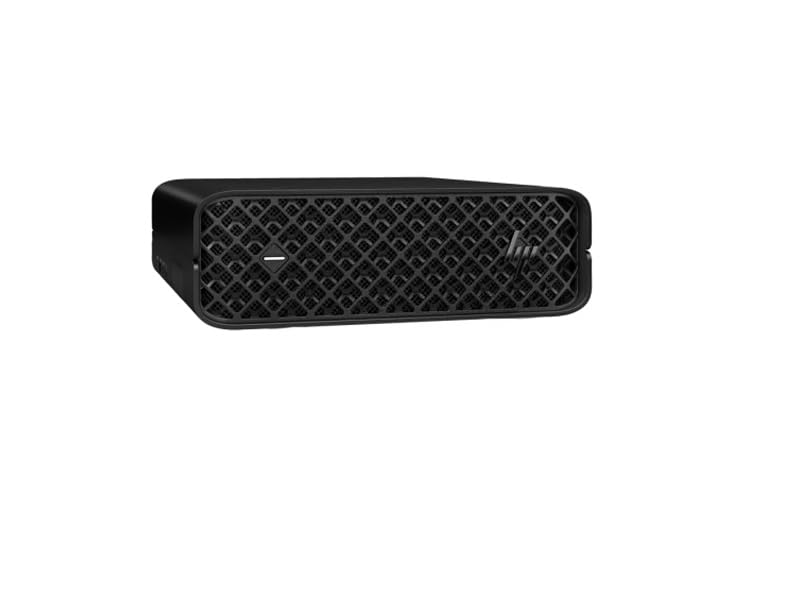
- HP Z2 Mini G9 Workstation compact desktop chassis finished in black
- Intel Core i5-14500 14th Gen processor with 14 cores and 20 threads built into the system
- 16 GB of DDR5 5600 MHz system memory pre-installed
- 512 GB PCI Express NVMe solid-state drive storage unit
- English peripheral keyboard included in the box
- Pre-installed Windows 11 Pro 64-bit operating system
- Integrated wireless LAN adapter and gigabit Ethernet hardware interface
- Integrated DisplayPort video output interfaces for external display connectivity
Key Specifications
Reviewing the underlying hardware numbers provides a realistic view of what the HP Z2 Mini specs deliver out of the box for technical and creative workloads.
| Hardware Component | Factory Specification |
|---|---|
| Processor Model | Intel Core i5-14500 (14th Gen) |
| Core and Thread Count | 14 Cores (Tetradeca-core), 20 Threads |
| CPU Cache | 24 MB L3 Cache |
| System Memory Installed | 16 GB DDR5 SDRAM (1 x 16GB) |
| Memory Clock Speed | 5600 MHz (5.60 GHz) Non-ECC |
| Maximum Memory Capacity | 16 GB (as stated in product listing) |
| Internal Storage | 512 GB PCI Express NVMe SSD |
| Graphics Hardware | Shared Graphics Memory (Integrated Intel Chipset) |
| Operating System | Windows 11 Pro |
| Connectivity Ports | DisplayPort, Ethernet, USB, Wireless LAN |
| Product Dimensions | 19.6 x 6.8 x 11.7 inches |
Processing Power and Creator Multitasking Performance
At the center of this mini workstation sits the 14th-generation Intel Core i5-14500 processor. Featuring a tetradeca-core architecture with 14 physical cores and 20 execution threads supported by 24 MB of L3 cache, this CPU delivers substantial computing muscle for modern productivity. In technical creative work, having a high thread count allows the computer to process complex background operations smoothly, such as rendering audio effects stems, exporting timeline sequences, or compiling code. The hybrid core scheduling inherent to the 14th-generation architecture distributes background OS tasks to efficient threads while directing demanding timeline playback to high-performance cores.
For audio creators working in digital audio workstations, the multi-threaded architecture of the HP Z2 Mini i5 14500 provides stable performance across high track counts populated with virtual instruments and processing plugins. Many creators comparing compact systems look across different silicon designs, such as mini systems built around a Ryzen 7 7840HS, but the 14-core Intel configuration here is tailored specifically for steady desktop workstation duties. The 24 MB cache ensures lower latency when swapping data between active threads, reducing processing dropouts during intensive multitrack recording and editing sessions.
However, users planning an HP Z2 Mini for video editing must take note of the graphics configuration. The listing specifies shared graphics memory running through the integrated Intel chipset rather than an independent dedicated workstation GPU. For 1080p timeline edits, multi-camera vlog assembly, and general color balancing, the integrated engine functions adequately. However, workflows heavily dependent on real-time GPU-accelerated motion graphics, 3D viewport rendering, or intensive 4K temporal noise reduction will rely entirely on system RAM and shared graphics execution, making this specific configuration best suited for CPU-centric tasks rather than heavy 3D production.
Memory Bandwidth and Storage Responsiveness
System responsiveness in any production setup depends heavily on RAM throughput and storage transfer rates. This model includes HP Z2 Mini DDR5 RAM running at a swift 5600 MHz clock speed. Compared to older DDR4 workstation platforms, DDR5 substantially widens the memory bus bandwidth, allowing the processor to fetch creative assets and large audio sample libraries with minimal delay. Operating at 5.60 GHz, this memory module ensures that application launching, large file manipulation, and web-based research tools remain fluid even when running alongside heavy creative suites.
The system comes factory-equipped with a single 16 GB DDR5 module. While 16 GB represents the standard baseline for operating systems like Windows 11 Pro and daily creative multitasking, power users running complex multi-app pipelines—such as keeping Photoshop, Premiere, and vector design suites active simultaneously—may find memory headroom tighter over time. Notably, the provided technical specifications cite a maximum memory capacity of 16 GB for this configuration. If your workflow demands 32 GB or 64 GB of memory caching for massive compositing files, this listed ceiling is an important operational limitation to consider before purchasing.
Storage performance is handled by a 512 GB PCI Express NVMe solid-state drive. NVMe storage interfaces communicate directly over high-speed PCIe lanes, ensuring rapid operating system boot times, instantaneous file indexing, and snappy load times for productivity suites. While a 512 GB capacity accommodates your operating system, primary applications, and active production files, full-time video editors managing raw footage archives will eventually need to complement the internal drive with external scratch disks or network-attached storage arrays over high-speed interface connections.
Workspace Integration and Studio Connectivity
Maintaining an uncluttered workspace is critical for boutique recording studios, voiceover booths, and compact editing desks. The HP Z2 Mini compact desktop design occupies significantly less physical volume than standard mid-tower workstation towers, allowing users to position the PC flat on a desk, vertically next to audio monitors, or tucked behind studio displays. Its understated black chassis maintains a clean, professional aesthetic that blends seamlessly into commercial post-production suites and home creative studios alike.
Peripheral expandability is central to any serious HP Z2 Mini creator workflow. The rear and peripheral interfaces include dedicated DisplayPort video outputs, high-speed USB ports, and a wired Ethernet jack alongside built-in wireless LAN connectivity. DisplayPort provides a secure, latching digital connection capable of driving high-resolution studio monitors with consistent color precision and refresh stability. Editors connecting multi-display setups can leverage these outputs to keep timelines on one primary color-accurate panel while positioning project bins and mixer controls across secondary displays.
External gear connectivity is equally robust. The available USB ports accommodate external audio interfaces, hardware control surfaces, digital drawing tablets, and external NVMe storage enclosures. For editors evaluating different compact workstation designs, comparing this chassis against machines like the Kamrui Hyper H2 mini gaming PC illustrates the clear enterprise and office engineering priorities of the Z2 line. The inclusion of gigabit Ethernet guarantees reliable, low-latency communication with shared network storage servers, which is indispensable for editors transferring gigabytes of raw video files across a local area network.
Operating System Features and Reliability
Out of the box, the system runs an enterprise-ready operating environment with pre-installed Win 11 Pro. For creative professionals, the professional tier of Windows provides critical tools that standard consumer editions omit. Advanced networking tools, robust domain join capabilities, and Remote Desktop support enable technical professionals to log into their studio workstation remotely to initiate renders or manage project directories from an off-site laptop.
Data security is another primary advantage for independent creators managing client projects. Windows 11 Pro incorporates full BitLocker drive encryption, safeguarding sensitive video footage, proprietary audio mixes, and commercial client assets on the internal NVMe drive in the event that hardware is compromised or transported between studio locations. Advanced group policy management also gives users finer control over automated background operating system updates, ensuring that critical rendering jobs or overnight batch exports are never unexpectedly interrupted by scheduled system reboots.
The enterprise engineering behind the HP Z2 Mini workstation series targets continuous operation under sustained computational loads. Unlike consumer mini PCs designed purely for brief bursts of everyday web browsing, workstation-grade micro desktops are engineered with optimized internal thermal air paths. This purposeful ventilation helps keep the 14-core Intel CPU within stable thermal operating limits during extended video exports and multi-layer rendering sessions, ensuring consistent clock speeds without sudden thermal throttling.
Is the HP Z2 Mini G9 Worth It
Determining whether the HP Z2 Mini G9 workstation is the right investment depends entirely on the specific hardware demands of your creative medium. If your work revolves around audio production, podcast editing, web development, photography retouching, or light-to-moderate 1080p video editing, this micro workstation presents an exceptionally neat, well-engineered solution. The combination of a 14th-generation 14-core processor, 5600 MHz DDR5 memory, and commercial Windows 11 Pro reliability delivers snappy day-to-day performance within a remarkably small physical footprint.
Conversely, creators whose daily workflows involve heavy 3D rendering, complex visual effects compositing in software like After Effects, or real-time grading of 4K and 6k raw camera formats should weigh their options carefully. Because this specific configuration utilizes shared graphics memory from the integrated Intel chipset and caps system memory at 16 GB according to the listing data, it does not provide the dedicated graphical compute power required for high-end cinematic rendering pipelines. For GPU-intensive production pipelines, a workstation configured with discrete graphics hardware is a more suitable choice.
Ultimately, is the HP Z2 Mini worth it for creator studios? For independent producers, podcasters, and creative professionals who prioritize rock-solid system stability, low-clutter desk organization, fast multi-threaded computing, and professional operating system tools, this configuration delivers reliable workstation value. It eliminates the bulky tower aesthetic without compromising the processing speed needed to manage demanding professional project timelines efficiently.
FAQ
What processor is included in this HP Z2 Mini G9 configuration?
This model is equipped with a 14th-generation Intel Core i5-14500 processor. It features 14 cores (tetradeca-core) and 20 execution threads, supported by 24 MB of L3 cache, providing strong multithreaded processing for computational and creative workloads.
Does this HP Z2 Mini come with dedicated graphics hardware?
No, the product listing specifies that this system utilizes shared graphics memory via the integrated Intel chipset. It does not include a discrete graphics card, making it best suited for audio production, photography, office productivity, and standard video timeline editing rather than intensive 3D GPU rendering.
How much system memory and storage is pre-installed?
The desktop comes with 16 GB of DDR5 SDRAM clocked at 5600 MHz arranged as a single 16 GB module. Storage is handled by a fast 512 GB PCI Express NVMe solid-state drive.
What operating system is installed on the machine?
The HP Z2 Mini G9 comes with Windows 11 Pro pre-installed, offering enterprise-level security features like BitLocker encryption and advanced network remote management tools designed for professional workstations.
What display interfaces are supported for monitor setups?
The unit features DisplayPort video outputs for connecting external monitors. These interfaces allow you to drive modern high-resolution displays directly from the workstation’s integrated video output hardware.
Are any accessories included in the workstation package?
The listing states that an English peripheral keyboard is included in the box alongside the workstation unit. The listing does not specify whether a mouse or additional display adapter cables are included.


