
As Amazon Associates, we earn from qualifying purchases. This means we may receive a small commission at no extra cost to you if you click through and make a purchase.
If you are building an editing suite, 3D workspace, or digital audio workstation, choosing the right pre-built desktop often comes down to stability, expandability, and raw compute efficiency. The Lenovo ThinkStation P3 Tower directly targets professionals, vloggers, and independent creators who need sustained multithreaded speed and professional graphics reliability without assembling a custom PC from scratch. Rather than chasing consumer gaming aesthetics, this desktop is engineered specifically for workstation tasks such as multitrack video rendering, high-resolution timeline scrubbing, and complex asset simulations.
In this specific hardware configuration, Lenovo equips the chassis with an Intel Core Ultra 9 285 vPro processor, 64 GB of fast DDR5 memory, a blazing PCIe Gen5 solid-state drive, and an enterprise-grade NVIDIA RTX 2000 Ada Generation graphics card with 16 GB of video memory. In this lenovo thinkstation p3 tower review, we break down how these hardware components function together, explore the extensive front and rear port layout, examine thermal and platform reliability, and assess whether this machine provides the longevity and workflow efficiency needed for your creative studio.
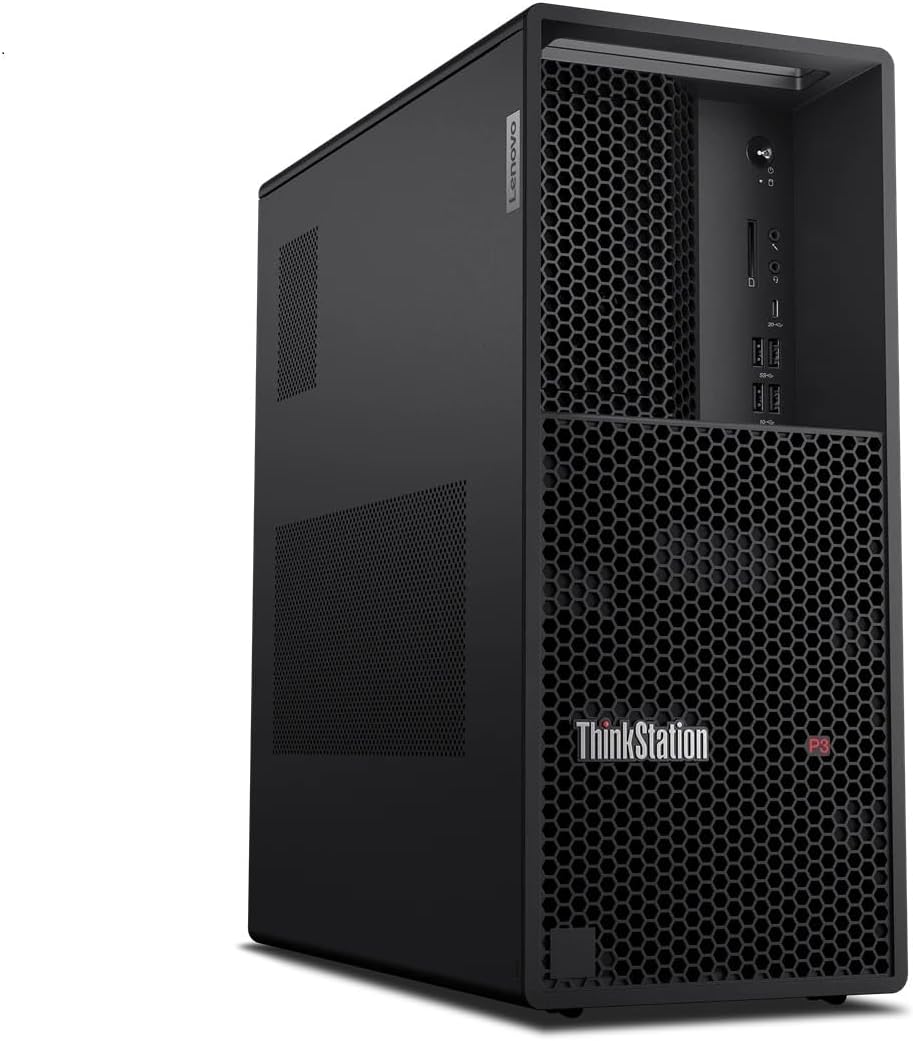
What You Get With the Lenovo ThinkStation P3 Tower

The ThinkStation P3 Tower Gen 2 ships in unopened retail packaging as a complete workstation package configured by Lenovo, requiring only your display monitors and preferred workspace peripherals to get operational.
- Lenovo ThinkStation P3 Tower desktop computer in black tower enclosure
- Intel Core Ultra 9 285 vPro processor with integrated neural processing unit
- NVIDIA RTX 2000 Ada Generation graphics card with 16 GB GDDR6 memory
- 64 GB DDR5-5600 MT/s UDIMM memory pre-installed in a 2 x 32 GB configuration
- 1 TB M.2 2280 PCIe Gen5 Performance TLC Opal solid-state storage drive
- 750-watt power supply unit
- Intel Wi-Fi 7 BE200 2×2 and Bluetooth 5.4 wireless card
- Lenovo USB Traditional Keyboard in black (English US layout)
- Lenovo USB Calliope wired optical mouse in black
- Windows 11 Pro 64-bit operating system pre-installed
- Lenovo One Year On-site Warranty with eligibility for up to five years of Premier Onsite Support upon registration
Key Specifications
| Hardware Component | Specification Detail |
|---|---|
| Processor | Intel Core Ultra 9 285 vPro (Performance cores up to 5.40 GHz, Efficient cores up to 4.60 GHz, 40 MB cache, integrated NPU) |
| Graphics Card | NVIDIA RTX 2000 Ada Generation (16 GB GDDR6) |
| System Memory | 64 GB DDR5-5600 MT/s UDIMM (2 x 32 GB) |
| Primary Storage | 1 TB SSD M.2 2280 PCIe Gen5 Performance TLC Opal |
| Operating System | Windows 11 Pro 64-bit |
| Power Supply | 750 watts |
| Cooling Method | Air cooling |
| Wireless Connectivity | Intel Wi-Fi 7 BE200 2×2 BE vPro and Bluetooth 5.4 |
| Security Architecture | ThinkShield, discrete TPM, Intel Hardware Shield, Intel Total Memory Encryption |
| Optical Drive | Not available |
Raw Processing Power for Creator Workflows
The centerpiece of this workstation is the thinkstation p3 tower intel core ultra 9 285 processor, featuring performance cores reaching up to 5.40 GHz, efficient cores clocking up to 4.60 GHz, and a substantial 40 MB cache. This hybrid architecture dynamically distributes compute tasks, allowing background exports, file compression, and asset indexing to run across power-efficient cores while latency-sensitive tasks like timeline editing remain responsive on high-frequency performance cores. The inclusion of an integrated neural processing unit also handles on-device AI tasks, offloading local AI enhancement models and reducing reliance on cloud computing services.
Graphics workloads are driven by the lenovo thinkstation p3 rtx 2000 Ada Generation card, which carries 16 GB of dedicated GDDR6 memory. For creators working in DaVinci Resolve, Adobe Premiere Pro, or 3D modeling suites like Blender and AutoCAD, having 16 GB of professional VRAM is crucial for maintaining real-time playback across color grades, complex noise reduction nodes, and heavy geometry viewports. Unlike consumer GPUs that prioritize raw raster gaming framerates, the RTX 2000 Ada provides certified driver stability for professional software suites, minimizing crashes during lengthy batch renders.
When evaluated as a lenovo thinkstation p3 for video editing, the synergy between the Ultra 9 CPU and RTX 2000 Ada GPU provides seamless timeline playback with multi-stream 4K and compressed camera codecs. Editors moving from compact form factors such as the lenovo thinkstation p3 ultra will appreciate how the standard tower form factor provides ample thermal headroom for the 750W power supply and discrete GPU to maintain peak clock speeds without throttling during continuous overnight exports.
Memory Capacity and PCIe Gen5 Storage Speeds
System responsiveness during massive multitasking hinges on system memory and drive bandwidth, both of which are prominent highlights in the lenovo thinkstation p3 specs. Out of the box, this unit includes 64 GB of DDR5-5600 MT/s RAM arranged in a dual-channel 2 x 32 GB configuration. For vloggers and post-production artists running simultaneous instances of After Effects, Photoshop, audio editing software, and a web browser loaded with reference assets, 64 GB ensures that the operating system avoids paging files to disk, eliminating micro-stutters during project switching.
Storage performance is equally forward-looking thanks to the 1 TB M.2 2280 PCIe Gen5 solid-state drive with Opal encryption support. Gen5 NVMe storage delivers extraordinary read and write throughput compared to older Gen4 and SATA drives, which translates to near-instantaneous project loading, swift caching of 10-bit video footage, and rapid ingestion of high-resolution RAW photo catalogs. Mobile editors considering a transition from systems like the lenovo thinkpad p16s gen 3 will notice an immediate difference in local disk file transfers when moving multi-gigabyte video b-roll directories across internal partitions.
The thinkstation p3 creator workstation configuration prioritizes data integrity alongside speed through TLC Opal hardware-level encryption. Creative teams handling NDA-bound client assets or commercial film projects benefit from integrated drive security that keeps proprietary production assets secure against physical drive extraction, ensuring enterprise-grade protection remains entirely transparent to day-to-day timeline operations.
Connectivity and Expansion for Desktop Peripherals
A dedicated editing desk relies heavily on accessible I/O, and the ThinkStation P3 Tower Gen 2 front panel is engineered for rapid peripheral swapping. Creators frequently plug in high-speed external storage drives, cameras, and audio monitors, and the chassis delivers a 20Gbps USB-C port (USB 3.2 Gen 2×2) on the front fascia alongside two 10Gbps USB-A ports and two 5Gbps USB-A ports. Separate 3.5mm headphone/microphone combo and dedicated 3.5mm microphone jacks round out the front cluster, allowing quick connection of studio monitoring headphones without crawling behind the desk.
The rear interface ensures versatile display routing and permanent device connections. Video outputs include one HDMI 2.1 TMDS port and two DisplayPort 1.4 connectors, offering native multi-monitor support for editors who utilize dedicated timeline, preview, and color scopes displays across dual or triple monitor setups. Rear data connections provide two additional 5Gbps USB-A ports—one supporting Smart Power On to wake the PC directly from supported peripherals—along with two USB 2.0 ports ideal for connecting the included USB mouse and traditional keyboard. If you require consolidated single-cable docking solutions across multiple machines, pairing the system with a lenovo thinkpad thunderbolt 4 workstation dock can help streamline peripheral routing on complex multi-computer production desks.
Networking is managed through both a physical RJ-45 Gigabit Ethernet port and cutting-edge Intel Wi-Fi 7 BE200 wireless connectivity with Bluetooth 5.4. While wired Ethernet remains the preferred standard for connecting to local network-attached storage (NAS) video servers, having integrated Wi-Fi 7 ensures multi-gigabit wireless capability when operating in modern studios equipped with high-throughput wireless mesh networks.
Chassis Architecture, Cooling, and Enterprise Security
Underneath its utilitarian matte black exterior, the lenovo thinkstation p3 gen 2 uses a disciplined internal layout optimized for continuous airflow. Built with professional air cooling, the tower routes intake air directly across the CPU heatsink, memory modules, and the discrete NVIDIA RTX 2000 Ada card before exhausting it out the rear. This acoustic profile is engineered for quiet, predictable fan curves, avoiding the abrupt, distracting fan revving often heard in consumer gaming pre-builts like the lenovo legion tower 5i (gen 8) during sudden render spikes.
Enterprise hardware integration distinguishes this workstation from typical consumer desktop assemblies. Intel vPro technology provides IT managers with hardware-level out-of-band management, remote diagnostics, and fleet deployment capabilities. Creative agencies with distributed teams or dedicated IT staff can remotely troubleshoot OS issues, verify hardware states, and deploy workstation patches without needing physical desk access.
Security is bolstered from the silicon level through Lenovo ThinkShield, Intel Hardware Shield, and Intel Total Memory Encryption. A discrete Trusted Platform Module (dTPM) safeguards cryptographic keys, biometric credentials, and system authentication tokens. When paired with Windows 11 Pro, these hardware security mechanisms ensure that sensitive commercial project files, client media libraries, and proprietary software licenses remain safeguarded against physical and firmware-level intrusion attempts.
Check Lenovo ThinkStation P3 Tower on Amazon
Is the Lenovo ThinkStation P3 Tower Worth It
Determining whether the ThinkStation P3 Tower is the right machine for your desk depends on your workflow demands and reliance on software stability. If you are an independent creator, commercial videographer, 3D designer, or CAD professional who requires certified graphics drivers, PCIe Gen5 disk speeds, and 64 GB of memory out of the box, this machine delivers an exceptionally balanced, enterprise-ready platform. The Core Ultra 9 285 processor and 16 GB RTX 2000 Ada GPU eliminate the common bottlenecks found in everyday consumer PCs.
However, if your daily tasks revolve purely around lightweight administrative work, standard office productivity, or casual 1080p video cutting, this configuration represents far more computing capability and platform overhead than necessary. Additionally, users who frequently archive footage to legacy optical media should note that the listing confirms an optical drive is not available on this chassis, requiring an external USB optical unit if physical disc authoring is required.
Ultimately, this workstation provides immense long-term value for production environments where rendering stability, hardware encryption, on-site warranty coverage, and high-bandwidth front-panel connectivity directly impact earning potential. For serious creative professionals looking for a turnkey workstation backed by on-site support, the system stands as a rock-solid, future-proof studio workhorse.
FAQ
Does the Lenovo ThinkStation P3 Tower come with an optical drive?
No, the listing confirms that an optical drive is not available on this configuration. Users who need to read or burn CDs, DVDs, or Blu-ray discs will need to connect an external USB optical drive to one of the tower’s USB ports.
What display outputs are available on the ThinkStation P3 Tower?
The system features one HDMI 2.1 TMDS port and two DisplayPort 1.4 outputs on the rear panel, allowing seamless multi-monitor configurations for video editing, grading, and multitasking without needing extra adapters.
How fast are the front USB ports on the ThinkStation P3 Tower?
The front panel includes one USB-C port supporting 20Gbps (USB 3.2 Gen 2×2, data transfer only), two USB-A ports supporting 10Gbps (USB 3.2 Gen 2), and two USB-A ports supporting 5Gbps (USB 3.2 Gen 1), alongside dual 3.5mm audio jacks.
What operating system and warranty are included?
The workstation comes with Windows 11 Pro 64-bit pre-installed and includes a Lenovo One Year On-site Warranty. You can also add up to five years of Lenovo Premier Onsite Support by registering the computer with Lenovo.
What wireless networking standards does the system support?
This configuration includes an Intel Wi-Fi 7 BE200 2×2 BE vPro wireless adapter alongside Bluetooth 5.4, in addition to a standard RJ-45 Gigabit Ethernet port for wired connections.


