As Amazon Associates, we earn from qualifying purchases. This means we may receive a small commission at no extra cost to you if you click through and make a purchase.
Finding the right balance between clean power delivery, thermal stability, and overall component safety is a critical milestone when assembling an entry-level workstation. The MSI MAG A550BN enters the market targeted squarely at hobbyist desktop builders, video editors, and indie content creators who need a dependable power supply unit without unnecessary bloat. Rated at 550 watts with 80 PLUS Bronze efficiency certification, this unit is engineered to provide sufficient sustained electrical flow for multi-core desktop processors paired with mainstream graphics hardware. For creators who depend on timeline responsiveness and export stability, choosing an appropriate power supply ensures that transient voltage spikes do not interrupt demanding render sessions.
This comprehensive MSI MAG A550BN review examines the vital operational characteristics of this power supply unit, ranging from its baseline electrical output to its thermal acoustic footprint in a working studio. Throughout the following analysis, we assess the verified MSI MAG A550BN specs, evaluate real-world wattage headroom for modern creative software suites, unpack installation considerations, and determine whether this 550W 80 PLUS Bronze PSU reliability meets the expectations of daily media production. Whether you are assembling a compact editing rig or upgrading a general home office system, this breakdown delivers the practical data needed to make an informed buying decision.

What You Get With the MSI MAG A550BN
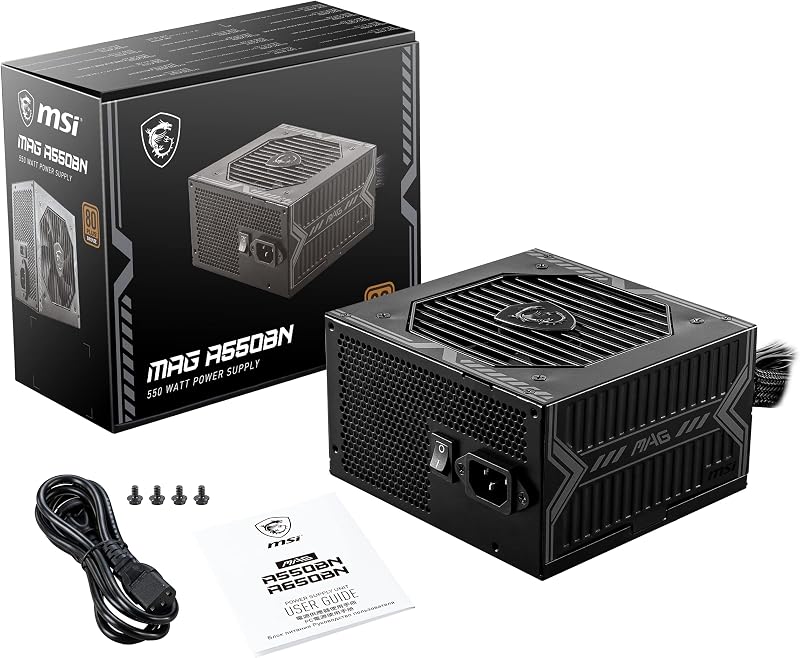
The MSI MAG A550BN arrives in standardized retail packaging designed for immediate system integration. Inside the box, the product listing identifies the core hardware components and fundamental connectivity hardware required to power a modern personal computer system:
- MSI MAG A550BN 550W power supply unit
- Integrated wiring harness featuring EPS CPU power connections
- PCI Express auxiliary power leads for discrete graphics cards
- SATA power connectors for high-capacity internal storage drives and solid-state media
- Legacy peripheral Molex connectors for chassis fan controllers and expansion hubs
- Internal 120mm air cooling fan integrated directly into the chassis housing
- Manufacturer identifier code 306-7ZP2A11-CE0 and UPC 4526541038761
Key Specifications
| Specification Attribute | Manufacturer Detail |
|---|---|
| Brand | MSI |
| Model Name / Number | MAG A550BN |
| Continuous Wattage Output | 550 Watts |
| Efficiency Certification | 80 PLUS Bronze |
| Form Factor | Standard ATX |
| Cooling Mechanism | Single 12-centimeter (120mm) Air Cooling Fan |
| Cabling Architecture | Full Modular (as designated by manufacturer listing) |
| Supported Input Voltage Range | 100V to 240V AC |
| Primary Cable Connectors | EPS, PCI Express, SATA, Molex |
| Target Platform Compatibility | Personal Computer |
Power Delivery and System Headroom for Creators
When selecting a power unit for digital content production, the total wattage headroom determines both component longevity and overall platform stability. The MSI MAG A550BN provides a dedicated 550-watt continuous output designed to support modern mid-tier central processors alongside dedicated graphics cards. Creative workloads, particularly high-resolution video rendering, RAW photo compilation, and multi-track audio sequencing, draw continuous, elevated loads across both the CPU and GPU rails. While high-performance workstations running top-tier hardware may demand higher-tier alternatives like the msi mag 650w, a 550-watt envelope offers an exceptional sweet spot for modern mainstream platforms utilizing efficient 65W to 105W processors matched with mid-tier rendering GPUs.
The 80 PLUS Bronze certification ensures that the unit maintains a minimum efficiency baseline across light, typical, and full-load states. High electrical efficiency minimizes energy lost as stray thermal dissipation, which directly benefits creators working in compact workspaces. Because power lost to heat requires additional fan cooling and contributes to ambient room warming, the bronze efficiency profile helps maintain consistent operational thresholds throughout prolonged background exports. By sustaining steady electrical regulation across its primary output stages, this MSI 550W Bronze power supply keeps internal component degradation to a minimum while preventing system lockups during intense render runs.
Calculating your MSI MAG A550BN wattage headroom requires accounting for transient power spikes that occur during heavy graphic timeline scrubbing or real-time preview generation. Modern microarchitectures frequently exhibit momentary microsecond load surges when transitioning from idle states to complete multi-threaded execution. With 550 watts on tap, builders operating a standard 6-core or 8-core CPU alongside a modern mid-range workstation accelerator will find plenty of breathing room, ensuring that typical average system draws remain around 50 to 70 percent of maximum rated output. This optimal operational zone allows the power supply unit to maintain high electrical efficiency while keeping operating temperatures thoroughly manageable.
Acoustic Footprint and Studio Noise Levels
Acoustic performance is a paramount factor for content creators, voiceover artists, and audio engineers who share physical space with their production hardware. The MSI MAG A550BN noise level is directly tied to its internal 12-centimeter cooling fan, which uses an air-cooling curve mapped to the unit’s thermal output. In creative workflows, ambient microphone pickup from whirring internal fans can compromise voice recordings and introduce unwanted low-frequency noise floors into finished audio tracks. The inclusion of a large 120mm fan allows the unit to push adequate CFM volume at relatively low rotational speeds compared to smaller fan implementations.
During standard workflow activities such as timeline organization, text editing, interface navigation, and web-based research, the power supply operates under mild thermal stress. In this low-demand state, the 12-centimeter fan maintains a low RPM acoustic profile that easily blends into standard office backgrounds without introducing distracting tonal hums. For audio hobbyists monitoring acoustic tracks on open-back studio headphones, this reduced noise signature ensures that delicate frequency spectrums remain clear and audible without physical isolation booths.
When you trigger hardware-accelerated video rendering or heavy 3D rendering jobs, the thermal management system increases the fan curve proportionally to exhaust trapped hot air from the chassis. Even under sustained loads, the 120mm fan design avoids the harsh high-pitched bearing whine often associated with compact or low-grade power units. While extreme silent-enthusiast rigs might utilize oversized multi-fan liquid loops, the air cooling method implemented within this unit remains well-suited for general content development studios, keeping noise well within acceptable daily working boundaries.
Cable Routing and Physical Installation
Physical cable management directly impacts both interior chassis airflow and the final aesthetic presentation of a desktop setup. The product listing categorizes the MSI MAG A550BN as featuring a full modular architecture, offering comprehensive connector support including EPS system bus connectors, PCI Express auxiliary lines, SATA connections, and traditional Molex leads. When building out creator-focused systems on modern motherboards like the msi mag b850m mortar wifi, having dedicated EPS cabling guarantees stable direct-to-socket power deliverability without stretching cables awkwardly across the motherboard tray.
Efficient cable layout within modern mid-tower and compact ATX chassis is vital for preserving unobstructed airflow pathways over critical system components. Unmanaged bundles of extraneous cables impede ambient air pulled through front intake fans, inadvertently raising the ambient internal temperatures of your primary storage drives and graphic cards. By providing targeted harness groups for SATA mass storage arrays and dedicated PCI Express graphics connections, the MSI MAG A550BN cable management setup allows system integrators to tuck unnecessary leads away into bottom chassis shrouds or dedicated routing channels behind the rear panel.
From an installation perspective, the unit adopts standard ATX physical dimensions, ensuring broad physical chassis compatibility across standard micro-ATX, mid-tower, and full-tower computer cases. The standard four-screw mounting pattern matches universal rear-panel cutouts, while the intake fan orientation can be oriented upward or downward depending on whether your chassis features bottom-filtered power supply vents. For builders maintaining clean workspaces, the standard form factor reduces physical clearance friction during initial installation and future interior cleaning procedures.
Workstation Suitability for Video Editing and Rendering
Selecting the MSI MAG A550BN for video editing and content production tasks depends largely on the specific balance of system hardware you intend to deploy. Digital video editing suites, motion design engines, and visual effects software rely heavily on sustained power distribution. Unlike typical gaming sessions where power draws continually fluctuate based on on-screen action, media rendering pushes continuous, flat-line 100 percent processing loads onto both hardware tracks for tens of minutes or hours at a time. The MSI MAG A550BN is constructed to manage these uninterrupted operating conditions with consistent electrical regulation.
For independent creators operating standard 1080p and 4K production pipelines in modern editing suites, a 550-watt power ceiling provides ample support for balanced hardware configurations. A typical modern 65-watt TDP processor, paired with 32GB to 64GB of system memory, multiple NVMe solid-state drives, and a modern 75W to 160W graphics card, typically registers total platform peak loads under 350 watts during hardware-accelerated exports. This leaves roughly 200 watts of supplemental margin, allowing the power unit to absorb auxiliary external peripherals such as USB audio interfaces, capture cards, card readers, and secondary storage arrays without destabilizing internal rails.
However, creators building high-end editing rigs equipped with heavy workstation hardware or multi-GPU acceleration pipelines will naturally surpass the operational capabilities of a 550-watt unit. High-end video production utilizing uncompressed 6K or 8K REDCODE RAW footage often demands high-wattage platforms such as the msi mag 850w to supply dedicated dual-channel EPS lines and high-draw graphics cards. For budget-conscious creators, hobbyist vloggers, and streaming desktop operators, the A550BN fulfills everyday workstation demands without forcing builders into higher-capacity power platforms that exceed their hardware draws.
Check MSI MAG A550BN on Amazon
Is the MSI MAG A550BN Worth It
Deciding whether this power supply is the right fit for your rig comes down to assessing your current component list, anticipated workflow complexity, and future upgrade roadmap. The MSI MAG A550BN provides a robust foundation for entry-level to mid-range creators who require stable, continuous power delivery without overbuilding their power subsystem. For YouTube creators, digital illustrators, audio producers, and indie video editors running balanced mid-tier desktop components, this unit offers an exceptional balance of continuous wattage, 80 PLUS Bronze efficiency, and broad ATX chassis compatibility.
Conversely, enterprise creators, full-time 3D animation artists, and power users planning to integrate top-tier graphic flagships or multi-drive internal scratch arrays should view 550 watts as a practical ceiling rather than an open-ended canvas. If your creative roadmap includes upgrading to power-intensive flagship graphics hardware within the next operating cycle, investing in a unit with greater wattage headroom from the outset is the smarter path. But for systems that stay within mainstream power profiles, the MAG A550BN delivers the operational stability needed to prevent crashes and file corruption during intensive rendering jobs.
Ultimately, the unit stands out as a dependable, no-nonsense hardware choice for creators seeking an established brand name with proven platform support. Its reliable air cooling, comprehensive connector loadout, and global input voltage flexibility between 100V and 240V make it a practical, risk-free hardware selection for budget workstation builds. If your daily production relies on clean baseline power and predictable thermal characteristics, the MSI MAG A550BN easily satisfies core system requirements.
FAQ
Can the MSI MAG A550BN handle continuous 4K video rendering?
Yes, provided your workstation components fall within the 550-watt continuous power budget. A balanced system running a mid-tier modern multi-core processor and a mainstream discrete graphics card generally consumes between 250W and 380W during active 4K timeline rendering, leaving plenty of operational margin for stable, continuous exports.
What form factor chassis does this power supply fit?
The MSI MAG A550BN is built to the standard ATX form factor specification. It installs seamlessly into standard ATX mid-tower, full-tower, and compatible micro-ATX chassis that feature standard ATX power supply mounting bays and rear-panel screw patterns.
How loud is the cooling fan during intensive workloads?
The internal 120mm air cooling fan utilizes an automated thermal curve designed to regulate fan speed based on power supply temperature. While the fan accelerates under heavy multi-hour rendering loads to expel internal warmth, its 12cm blade diameter prevents high-pitched bearing whine, keeping studio acoustic levels within standard desktop working thresholds.
Does this power supply support international input voltages?
Yes, the MSI MAG A550BN supports universal alternating current input voltages ranging from a minimum of 100 volts up to a maximum of 240 volts. This allows the unit to operate reliably across varying regional power grids without requiring external step-down converters.
What types of hardware power cables are provided?
The power supply provides dedicated connector lines including EPS system bus connectors for CPU power delivery, PCI Express leads for discrete graphic cards, standard SATA power plugs for internal storage drives, and legacy 4-pin Molex connectors for chassis peripherals and fan hubs.