
As Amazon Associates, we earn from qualifying purchases. This means we may receive a small commission at no extra cost to you if you click through and make a purchase.
Finding a display that successfully anchors both a creative desk and an enthusiast gaming rig is a delicate balancing act. Creative hobbyists, video editors, and vloggers evaluating the Samsung 32 Odyssey G51F often want to know whether a high-refresh gaming screen can truly deliver the color fidelity, crisp workspace, and day-to-day comfort required for production work. While traditional gaming panels frequently compromise on contrast or ergonomic flexibility in pursuit of raw frame rates, this monitor brings a compelling mix of specifications to the table. It provides a sharp 2560 x 1440 resolution, high native contrast, and responsive motion handling that appeals directly to users who cut video during the day and jump into competitive gaming sessions at night.
To determine whether this monitor belongs on your desk, we must examine how its technical design translates to real-world tasks. This detailed breakdown explores the core panel characteristics, real-world workspace utility for multimedia editing, motion clarity in fast-paced titles, and overall physical adjustments. We also look closely at how the listing specifications match up against user expectations so you can make an informed buying decision for your studio or workstation setup.
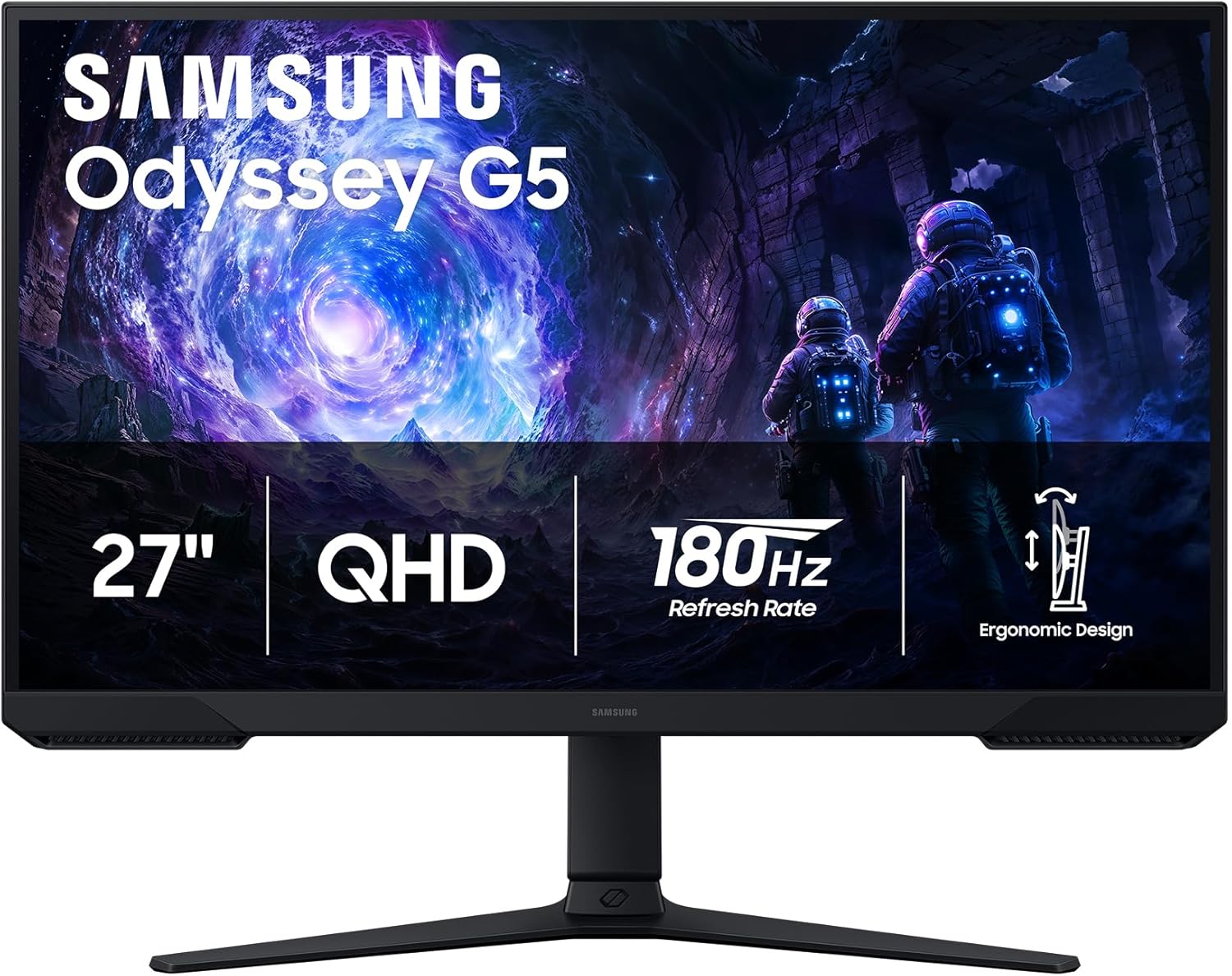
What You Get With the Samsung 32 Odyssey G51F

The manufacturer positions this display as an agile desktop centerpiece designed for both immersive media consumption and competitive play, packaging several core display technologies into a single unit.
- QHD resolution featuring 2560 x 1440 pixels for 1.7 times the pixel density of standard Full HD screens.
- HDR10 high dynamic range processing engineered to render brighter highlights and nuanced shadow depth.
- Fast 180Hz refresh rate designed to minimize motion latency and display stutter across fluid gaming scenes.
- 1ms MPRT response time to accurately capture rapid in-game movements without disruptive blur.
- AMD FreeSync adaptive synchronization support to eliminate screen tearing and choppy frame pacing.
- Ergonomic stand offering dedicated tilt, pivot, and height adjustments to personalize viewing angles.
- Black Equalizer image adjustment tool that illuminates dark scenes to reveal low-light details.
- Matte screen finish applied to reduce glare and ambient light reflections in bright studio spaces.
Key Specifications
| Specification | Detail |
|---|---|
| Display Resolution | QHD 2560 x 1440 pixels |
| Panel Technology | VA (Vertical Alignment) LCD |
| Refresh Rate | 180Hz |
| Response Time | 1ms (MPRT) |
| Static Contrast Ratio | 3000:1 |
| Peak Brightness | 300 cd/m² |
| Color Gamut | 0.72 |
| Viewing Angles | 178 degrees horizontal and vertical |
| Dimensions With Stand | 24.34″ W x 20.5″ H x 9.22″ D |
| Item Weight | 10.1 pounds |
Visual Fidelity and Panel Performance in Daily Use
When assessing monitor quality, the underlying panel type dictates nearly every aspect of visual presentation. The Samsung Odyssey G51F VA panel contrast ratio of 3000:1 provides a noticeable advantage over standard IPS monitors, which typically sit closer to 1000:1. In dimly lit editing suites or dark gaming rooms, this elevated contrast produces deep, satisfying blacks rather than the washed-out dark gray tones common on other LCD screens. When reviewing high-contrast footage, cutting cinematic sequences, or watching moody narrative films, the deep black floor adds substantial visual weight and perceived three-dimensional depth to the picture.
However, color performance is where creator requirements demand close scrutiny. The listing notes a 0.72 color gamut rating, which generally corresponds to standard color space coverage rather than wide-gamut professional creative standards like DCI-P3 or Adobe RGB. For web-focused video editors, social media creators, and vloggers publishing primarily to platforms like YouTube and Instagram, standard color coverage is sufficient for everyday editing and consistent rendering. Creators needing broadcast-certified color grading or fine print reproduction, on the other hand, may find the gamut somewhat limiting compared to specialized panels like the odyssey oled g5.
Another factor in overall image quality is the Samsung Odyssey G51F HDR10 performance. With a brightness specification of 300 cd/m², the screen can decode and display HDR10 signals, delivering clean highlight accents and defined shadow boundaries. However, 300 cd/m² represents standard desktop brightness rather than the searing output seen on professional HDR mastering monitors. The matte screen finish does an admirable job of diffusing harsh ambient room lighting, preventing window reflections from washing out your preview canvas during afternoon working hours.
Productivity and Timeline Handling for Creators
Evaluating the Samsung 32 Odyssey G51F for video editing requires a practical look at screen real estate and desktop efficiency. The display runs at a native resolution of 2560 x 1440 pixels, which yields 1.7 times the pixel density of traditional 1080p Full HD monitors. This bump in density delivers noticeably sharper user interface elements, cleaner timeline tracks, and legible typography in video editing software such as Premiere Pro, DaVinci Resolve, or Final Cut Pro. You can comfortably display full multi-track audio lanes, media pools, and a dedicated 1080p preview playback window at 1:1 pixel scaling without crowding the interface.
In a standard Samsung G51F 1440p creator workflow, the 16:9 aspect ratio provides an intuitive canvas for standard widescreen video production. Because native 16:9 content matches the monitor profile perfectly, editing full-screen video leaves no wasted black letterbox bars on the sides. While ultrawide displays offer horizontal timeline extension, 16:9 remains the standard aspect ratio for general media consumption and digital broadcasting, making it easier to gauge how your final export will appear to an audience viewing on standard monitors, televisions, or smartphones.
Off-angle viewing is another consideration for creative workspaces, particularly when collaborating with clients or teammates seated beside you. The specifications cite a 178-degree viewing angle horizontally and vertically. While the VA architecture maintains readable text across broad angles, extreme off-center viewing can introduce mild gamma and saturation shifts compared to high-end IPS panels. Positioned directly in front of the screen, creative hobbyists will appreciate the consistent contrast and sharp details across their primary working field.
Motion Clarity and Gaming Responsiveness
For users who split their desk time between video production and fast-paced gaming, motion performance is a critical buying factor. The Samsung Odyssey G51F 180Hz gaming refresh rate represents a noticeable upgrade over standard 144Hz and 60Hz panels, rendering motion with fluid precision. Fast cursor movements, rapid timeline scrubbing, and high-velocity camera pans in first-person titles feel immediate and snappy. The 1ms response time (MPRT) works in tandem with the high refresh rate to curb trailing artifacts, keeping edges well-defined when tracking moving targets or skimming through fast-moving video clips.
Tearing and frame fluctuations can quickly disrupt an immersive gaming session, which is where AMD FreeSync proves valuable. By synchronizing the monitor refresh rate dynamically with your graphics card frame output, FreeSync reduces choppiness, input lag, and visual tearing. Whether you are flying through complex 3D rendering engines or testing gameplay captures, frame delivery remains steady and free of distracting horizontal splits. This adaptive sync makes the monitor an easy fit for both mid-range and higher-tier graphics cards that can drive 1440p resolutions at high frame rates.
Samsung has also integrated a hardware Black Equalizer feature, which allows users to dynamically adjust low-light shadow values. In competitive shooters, brightening dark corridors helps identify opponents hiding in deep corners without completely blowing out brighter highlights. For content creators, this tool can also double as a quick diagnostic view to spot noisy compression artifacts or crushed shadow details in raw night-time video footage before rendering. Buyers transitioning from earlier entry-level displays like the earlier generation samsung odyssey g5 will notice the improved 180Hz headroom and responsive panel tuning.
Desk Placement and Ergonomic Adjustability
A monitor that cannot adapt to your workstation posture can quickly lead to neck strain during long editing sessions. The Samsung Odyssey G51F ergonomic stand addresses this by offering comprehensive physical adjustability, including tilt, pivot, and height adjustments. Being able to raise or lower the panel ensures the top third of the screen aligns naturally with eye level, promoting healthy posture. Furthermore, the pivot function allows the panel to rotate into a vertical orientation, which is exceptionally useful for programmers, scriptwriters, and editors reviewing vertical short-form video formats like TikToks and YouTube Shorts.
Physical footprint is another vital consideration when organizing desktop gear, microphones, and studio audio monitors. With a total weight of 10.1 pounds and dimensions measuring 24.34 inches wide, 20.5 inches high, and 9.22 inches deep, this monitor occupies a manageable footprint on standard desks. The matte dark chassis prevents distracting glare from desktop studio lights, and the moderate 35-watt power consumption keeps thermal output and electrical draw remarkably low during continuous all-day use.
Shoppers frequently evaluate the Samsung 32 vs 27 Odyssey G51F form factors when selecting their setup footprint. It is worth noting that while searchers look for 32-inch options in this family, the specific listing specifications for this G51F unit indicate an active screen size of 27 inches with a 24.34-inch cabinet width. For many desk setups, a 27-inch 1440p panel is considered the optimal sweet spot for pixel density, offering sharp visuals without demanding extra viewing distance. Those who genuinely require an ultra-spacious 32-inch curved panel might compare this footprint against screens like the samsung odyssey g7 32-inch gaming monitor, but this flat G51F model fits much easier into compact workstation environments.
Check Samsung 32 Odyssey G51F on Amazon
Is the Samsung 32 Odyssey G51F Worth It
Deciding whether the monitor is the right purchase comes down to how you balance creative tasks with interactive entertainment. If you are asking is Samsung 32 Odyssey G51F worth it, the answer depends entirely on your primary workflow. For hybrid creators, hobbyists, vloggers, and streamers who spend their days editing standard web content and their evenings playing fast-paced games, the monitor offers an exceptional combination of speed and depth. The 180Hz refresh rate, 3000:1 contrast ratio, and fully adjustable ergonomic stand create a versatile desktop environment that handles everyday computing with ease.
On the other hand, commercial colorists and professionals who work exclusively in print, broadcast television, or HDR mastering may need a display tailored specifically to high-end color grading. Because the panel features a 0.72 color gamut and peak brightness of 300 cd/m², it is designed for general multimedia and gaming workflows rather than strict broadcast color verification. For creators who already have a calibrated secondary display or whose output is destined purely for the web, this trade-off is minor compared to the benefits of smooth 180Hz motion and deep VA black levels.
Ultimately, this display hits a practical middle ground. It avoids the steep hardware demands and higher costs of larger 4K displays while delivering tangible ergonomic benefits and fluid gaming performance. If you want a dependable, sharp 1440p workhorse that supports healthy desk posture, deep visual contrast, and high-frame-rate gaming, the Samsung Odyssey G51F represents a well-rounded and versatile investment for any multi-purpose creative station.
FAQ
What are the core Samsung 32 Odyssey G51F specs?
The Samsung Odyssey G51F listing specifies a QHD 2560 x 1440 resolution, a 180Hz refresh rate, a 1ms MPRT response time, and a 3000:1 static contrast ratio. It utilizes a VA LCD panel with a matte finish, 300 cd/m² brightness, a 0.72 color gamut, and operates with a 35-watt power consumption profile.
Can the Samsung Odyssey G51F be used for video editing?
Yes, the display works well for general video editing, YouTube content creation, and vlogging workflows. The 2560 x 1440 resolution provides ample space for video editing timelines and toolbars, while the 3000:1 contrast ratio delivers deep blacks. However, color-critical broadcast editors may require a monitor with wider professional color space coverage than its 0.72 gamut rating.
How does the 180Hz refresh rate perform during fast gaming?
The 180Hz refresh rate delivers exceptionally smooth motion and reduces input latency during fast gameplay. Combined with a 1ms MPRT response time and AMD FreeSync support, it minimizes motion blur, screen tearing, and frame stuttering, making it ideal for competitive esports and action-heavy titles.
Does the monitor include built-in speakers or USB ports?
The listing does not specify whether the monitor includes integrated speakers or a built-in USB hub. Buyers should plan to connect dedicated desktop speakers or headphones directly to their computer or audio interface for production sound monitoring.
What adjustments does the ergonomic stand support?
The included ergonomic stand allows for tilt, pivot, and height adjustments. This allows users to align the screen with their eye level for comfortable posture, or rotate the panel vertically to review portrait-oriented media, read documents, or code.


