
As Amazon Associates, we earn from qualifying purchases. This means we may receive a small commission at no extra cost to you if you click through and make a purchase.
When assembling a home flight deck, finding a balanced flight control system often requires choosing between disjointed modular peripherals and compromise-heavy budget gear. The Turtle Beach VelocityOne Flight directly solves that challenge by packaging a full 180-degree yoke, a modular dual-throttle quadrant, an integrated pitch trim wheel, and fingertip rudder controls into a single desktop console. For virtual pilots, streaming creators, and simulation enthusiasts looking for serious immersion without cluttering floor space with separate pedals, this hardware delivers a complete flight deck foundation. It is engineered specifically to provide an out-of-the-box flight solution that mounts securely to multi-purpose workstations while handling everything from light single-engine trainers to multi-engine commercial airliners.
Choosing the right hardware comes down to how smoothly the console integrates into your daily simulation workflow and workspace layout. Designed specifically for cross-platform utility across Windows 10 and 11 PCs as well as Xbox Series X, Xbox Series S, and Xbox One consoles, this system eliminates the configuration headaches common to fragmented peripheral bundles. In this comprehensive review, we examine the complete hardware architecture, analyze how its modular throttle levers and fingertip rudders streamline daily desk use, break down the physical specifications, and evaluate whether this all-in-one console represents the ideal flight simulator companion for your workspace.
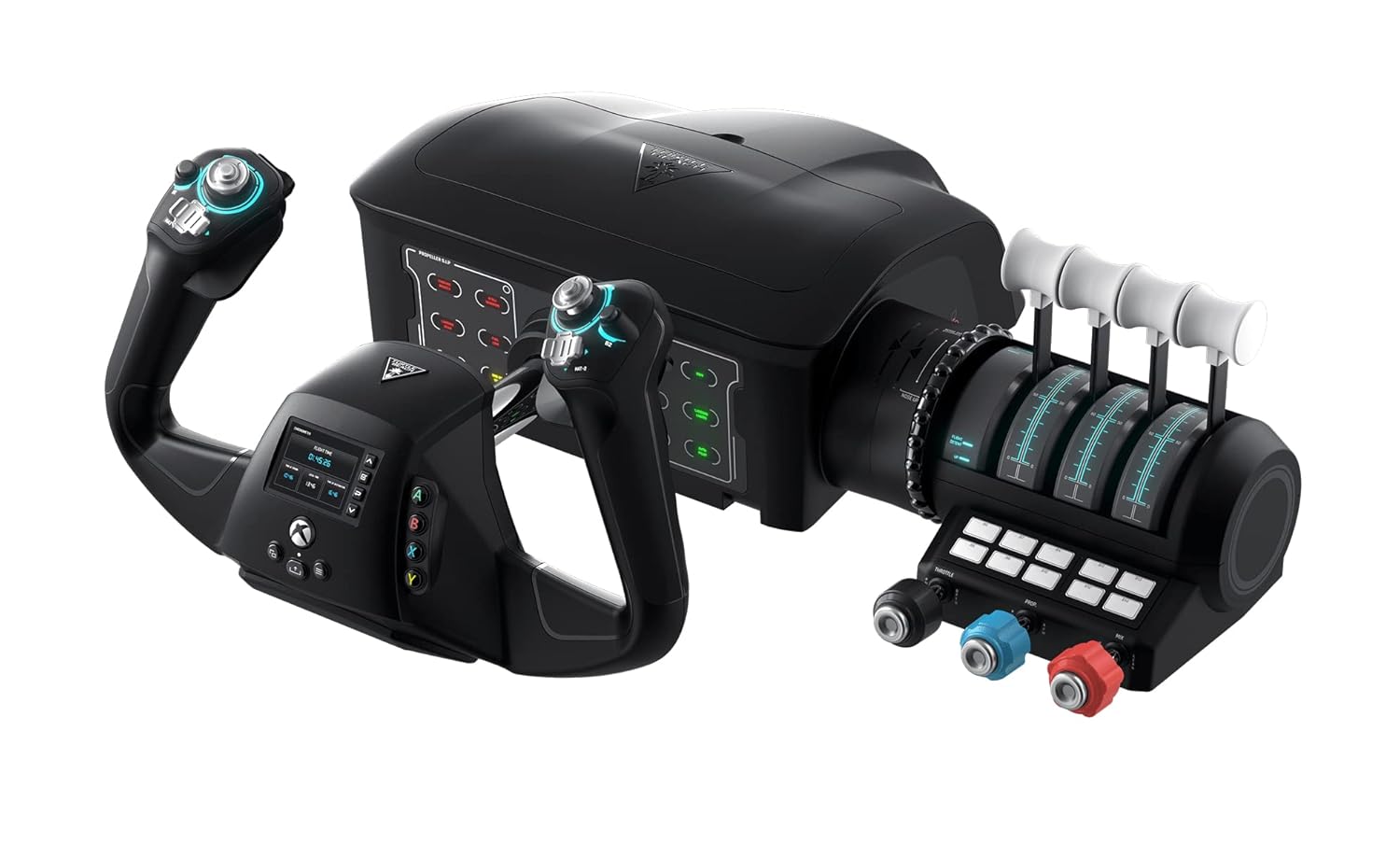
What You Get With the Turtle Beach VelocityOne Flight

The Turtle Beach VelocityOne Flight arrives as a self-contained flight control ecosystem designed to eliminate the need for third-party peripheral brackets or separate modular add-ons. Right out of the box, the system provides both general aviation and commercial transport control options alongside comprehensive mounting hardware.
- Universal all-in-one control console combining a full-size yoke handle, throttle quadrant, and dedicated pitch trim wheel
- True-to-life 180-degree yoke handle rotation powered by non-contact hall effect sensors for smooth, drift-free centering
- Modular throttle quadrant featuring detachable levers and customizable lever tops for dual-engine and multi-engine aircraft profiles
- Integrated fingertip rudder and brake controls located directly on the yoke handles for complete yaw authority without floor pedals
- Full-color flight management display designed to configure profiles, calibrate axes, and learn system features in real time
- Authentic Status Indicator Panel engineered for PC simulation environments with illuminated warning and system annunciators
- Equipped with 12 analog axes, two point-of-view switches, and two 4-way HAT switches for comprehensive cockpit mapping
- Dedicated pitch trim wheel calibrated for fine control surface adjustments during climb, cruise, and descent phases
- Integrated secure clamping system engineered to firmly attach the console to a wide variety of desktop thicknesses
- Native compatibility with Xbox consoles and Windows PC platforms running titles like Microsoft Flight Simulator 2020 and Microsoft Flight Simulator 2024
Key Specifications
| Specification Attribute | Hardware Detail |
|---|---|
| Brand and Model | Turtle Beach VelocityOne Flight (TBS-0715-02) |
| Controller Architecture | Universal Flight Simulation Yoke with Modular Throttle Quadrant |
| Yoke Handle Rotation | 180-degree rotation with non-contact hall effect sensor technology |
| Hardware Platform Compatibility | Xbox Series X, Xbox Series S, Xbox One, Windows 10 & Windows 11 PCs |
| Input Configuration | 12 analog axes, 26 assignable buttons, two POV switches, two 4-way HAT switches |
| Rudder and Yaw Controls | Integrated fingertip bumper and trigger controls on yoke handle |
| Cockpit Displays | Full-color Flight Management Display and authentic Status Indicator Panel (PC only) |
| Trim Surface Control | Dedicated integrated pitch trim wheel |
| Connectivity and Power | Corded electric USB interface |
| Physical Dimensions and Weight | 9.8 inches deep by 6.46 inches wide by 19 inches high; 10.0 pounds |
Desk Space Integration and Clamping for Multi-Use Workspaces
Integrating dedicated flight hardware into a multi-use creator workspace presents distinct layout hurdles. At ten pounds and measuring nineteen inches wide, this console commands substantial surface area. Finding suitable flight sim gear for desk setup workflows requires balancing flight ergonomics against routine tasks like video editing or daily writing. Because the unit combines the yoke base and the throttle quadrant into a continuous console structure, it preserves vertical and horizontal alignment without forcing you to position separate throttle bases alongside your keyboard tray.
The console features a secure clamping system integrated directly into the housing, which fastens down against standard desktop surfaces without requiring permanent bolts or drilling. The integrated clamps drop down to grip desk edges tightly, resisting the forward push and rearward pull exerted during vigorous flare maneuvers or gusty crosswind landings. When flight sessions end, the clamps loosen quickly, allowing creators who share a single workspace for streaming and office work to stow the unit away without disassembling delicate linkages.
Cable management remains straightforward thanks to the corded electric USB interface. A single main cable carries both data and power to the console, minimizing the tangled wire nests typical of multi-device cockpit builds. For streamers who need to maintain an uncluttered desk layout while broadcasting, pairing this cockpit system with clean wireless accessories such as the turtle beach stealth 700 headset ensures seamless audio monitoring without dragging cords across the yoke shaft during flight maneuvers.
Modular Throttle Quadrant and Flight Simulator Yoke Mechanics
Aircraft control realism depends heavily on mechanical precision and control resistance. The turtle beach flight simulator yoke features a full 180-degree handle rotation that mimics the travel angle of authentic civilian aircraft yokes. Inside the housing, non-contact hall effect sensors track movement across the roll and pitch axes. Because these sensors measure magnetic fields rather than physical wiper contacts, they prevent the sensor wear, signal jitter, and axis drift that often plague entry-level flight peripherals over prolonged use.
Throttle management receives equal mechanical consideration through the turtle beach modular throttle quadrant. This assembly features swappable lever handles and customizable button caps that allow virtual pilots to configure dual-lever general aviation setups with throttle, prop, and mixture, or multi-engine commercial profiles with split throttle levers and flap controls. Having multiple assignable detent points and smooth lever sweeps gives flight sim hobbyists the tactile precision necessary to set cruise power or manage approach descent rates with fine accuracy.
Complementing the levers is a dedicated pitch trim wheel set into the quadrant base. Pitch trim adjustments in simulation titles frequently feel coarse when mapped to keyboard keys or standard digital buttons. This dedicated rotary wheel delivers smooth continuous rotation, letting you trim off control pressures accurately during level-off maneuvers. For users whose desks simply lack the footprint to mount a wide console, a compact single-stick controller like the turtle beach velocityone flightstick offers an alternative layout, but it cannot replicate the true dual-hand mechanical authority offered by this full-size yoke and quadrant pairing.
Integrated Rudder Controls and Cockpit Management Features
One of the most persistent complaints among home cockpit builders is the requirement for dedicated floor rudder pedals, which crowd knee wells and slide around on smooth flooring. The turtle beach velocityone rudder controls eliminate this necessity by embedding tactile bumper switches and progressive triggers directly into the yoke grip handles. Pilots can execute smooth taxi turns on the ground, counter adverse yaw during steep turns, and apply precise rudder corrections on final approach using their index fingers without taking their hands off the yoke.
Cockpit situational awareness is further enhanced by the integrated full-color Flight Management Display. Built directly into the yoke hub, this screen allows pilots to configure control profiles, calibrate analog axes, and test button mappings on the fly. The display provides a direct visual reference for active trim positions and control responses, allowing you to fine-tune axis sensitivity without opening multiple configuration menus inside your simulation software.
On the console base, an authentic Status Indicator Panel presents illuminated warning lights and system annunciators reminiscent of modern airliner overhead panels. However, simulation hobbyists must note a platform distinction: while the Status Indicator Panel illuminates warning lights dynamically on PC systems, this feature is restricted to basic backlighting on console platforms due to Xbox OS communication limits. Despite this console-specific limitation, the physical layout offers unmatched cockpit immersion for desktop sim aviators.
Setup and Platform Compatibility Across Flight Simulation Titles
Getting your simulation cockpit configured quickly is vital for maintaining enthusiasm across long flight sessions. The turtle beach velocityone setup is engineered for plug-and-play operation across Xbox Series X, Xbox Series S, Xbox One, and Windows 10 and 11 PCs. Simply connecting the corded electric USB cable into an available port allows supported operating systems to recognize the twenty-six buttons, two POV switches, two 4-way HAT switches, and twelve analog axes without hunting for obscure third-party drivers.
Software integration is particularly robust when using turtle beach flight for msfs 2024 and Microsoft Flight Simulator 2020. The control system features comprehensive pre-configured control mappings for standard single-engine aircraft, twin-engine turboprops, and multi-engine airliners. Loading into a flight profile assigns primary flight surfaces, engine levers, landing gear, and flap controls automatically, allowing newcomers to launch flights immediately while leaving deep customization pathways open for advanced sim enthusiasts.
Cross-platform versatility is a primary strength of the turtle beach flight xbox pc compatibility architecture. Pilots who practice VFR navigation on an Xbox console in the living room can unplug the console and move it directly to a dedicated Windows editing desk without losing calibrated profiles. Pairing the flight deck with modern gaming audio hardware like the stealth 700 gen 3 creates a streamlined, low-latency setup that keeps comms clear with virtual air traffic control while maintaining a tidy workstation.
Check Turtle Beach VelocityOne Flight on Amazon
Is the Turtle Beach VelocityOne Flight Worth It
Determining whether this all-in-one flight controller fits your simulation goals requires weighing its complete feature set against your desktop space. If you are asking is turtle beach velocityone flight worth it, the answer is an enthusiastic yes for pilots seeking a comprehensive cockpit experience in a single purchase. By integrating a 180-degree yoke, a modular dual throttle quadrant, a dedicated trim wheel, and fingertip rudders, it replaces what would otherwise require four separate peripheral purchases and a tangled web of connection cables.
This console proves exceptionally valuable for Xbox sim pilots and hybrid desktop creators who cannot accommodate standalone rudder pedals under their desks. The combination of non-contact hall effect sensors, customizable modular lever tops, and the integrated Flight Management Display creates an authentic flight training atmosphere that elevates standard simulator software into a realistic flight training environment. It eliminates the clunky deadzones and imprecise inputs typical of entry-level gamepads.
However, users with very shallow desks or those who insist on dedicated metal floor pedals should consider their layout carefully before buying. At ten pounds and nineteen inches across, this console demands substantial desk depth to clamp properly. For sim pilots who have the desk real estate and want seamless compatibility across modern simulation titles on PC and Xbox, this console provides one of the most cohesive and satisfying desktop flight experiences on the market.
FAQ
Can the Turtle Beach VelocityOne Flight be used without purchasing separate rudder pedals?
Yes. The yoke handle features integrated fingertip rudder bumpers and triggers positioned naturally where your fingers rest. These controls provide complete rudder and differential braking authority during taxi, crosswind landings, and coordinated turns, eliminating the need to buy or store separate floor pedals.
Does the Status Indicator Panel work identically on Xbox and PC?
The Status Indicator Panel provides authentic real-time system warnings and annunciator lighting when connected to a Windows 10 or 11 PC. On Xbox Series X|S and Xbox One consoles, the status panel acts as an ambient backlit display rather than an active telemetry annunciator due to console software communication limits.
What flight simulation titles are officially supported?
The console is engineered specifically for Microsoft Flight Simulator 2020 and Microsoft Flight Simulator 2024 across both Xbox and Windows PC platforms. It also operates across other major PC flight simulation titles as a standard multi-axis USB flight controller with assignable buttons and analog axes.
Can the modular throttle quadrant handles be customized for different aircraft types?
Yes. The modular throttle quadrant comes with swappable lever handles and customizable button caps. Pilots can configure the levers for single-engine general aviation craft using throttle, propeller pitch, and fuel mixture, or reconfigure them with multi-engine commercial jet airliner throttle levers and flap controls.
What sensor technology does the yoke handle use for flight surface control?
The yoke handle features non-contact hall effect sensors across its 180-degree rotation axis and pitch shaft. These magnetic sensors eliminate mechanical potentiometers, preventing sensor degradation and maintaining precise, drift-free input accuracy over long-term use.


