
As Amazon Associates, we earn from qualifying purchases. This means we may receive a small commission at no extra cost to you if you click through and make a purchase.
For flight sim pilots and virtual aviators who want authentic multi-axis control without dedicating half a room to cockpit hardware, finding the right input gear is a delicate balance between desktop footprint and granular capability. The Turtle Beach VelocityOne Flightstick addresses this exact compromise by packing an eight-axis control suite, integrated throttle levers, and console compatibility into a single self-contained unit. Designed specifically for PC and Xbox simulation enthusiasts, it delivers an all-in-one alternative to sprawling separate throttle and stick configurations without sacrificing essential flight inputs.
Whether you are charting cross-country routes in Microsoft Flight Simulator or engaging in dogfights across space simulation titles, this controller aims to streamline your desktop workflow. In this guide, we evaluate the build, the tactile feel of its non-contact sensors, lever versatility, and the practical usability of its integrated display. We will cover the complete specifications, examine how it functions across both console and computer platforms, and help you determine if this compact peripheral suits your flight simulation demands.

What You Get With the Turtle Beach VelocityOne Flightstick
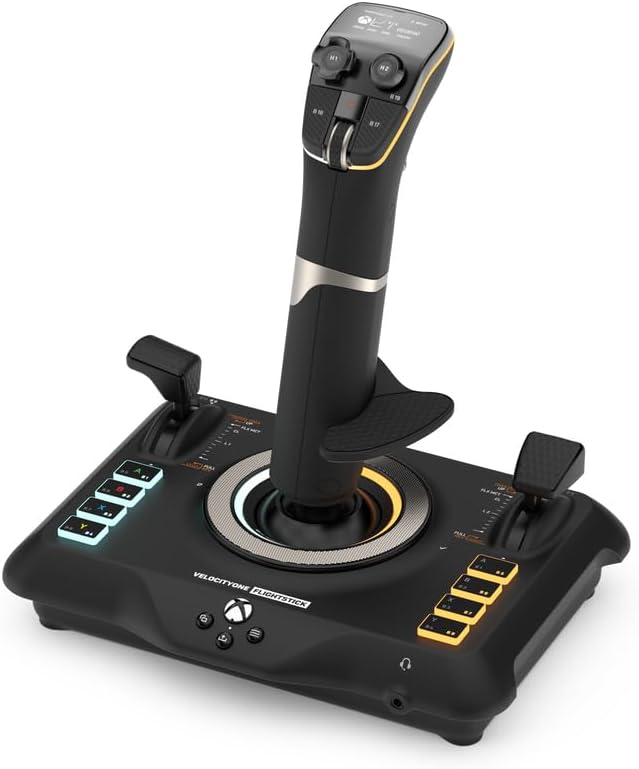
The Turtle Beach VelocityOne Flightstick package delivers a standalone simulation peripheral designed for immediate integration into desktop and console workstations without the need for supplementary peripheral boxes.
- Turtle Beach VelocityOne Flightstick controller unit (Model TBS-0722-05)
- High-precision non-contact main axes mechanism with Hall-effect sensors
- Dual customizable throttle and flap levers with swappable throttle heads
- Integrated OLED flight management display with flight configuration wheel
- Touchpad navigation sensor for direct cockpit cursor manipulation
- Analog POV hat switch and integrated rapid-fire trigger
- Ambidextrous wrist rest and grip layout adaptable for left- or right-handed use
- Integrated nano trim wheel for attitude calibration
- Corded electric USB-C connectivity cable
- Adjustable RGB ambient and functional lighting zones
- One-year limited manufacturer warranty documentation
Key Specifications
| Specification Attribute | Manufacturer Detail |
|---|---|
| Brand & Model | Turtle Beach VelocityOne Flightstick (TBS-0722-05) |
| Hardware Compatibility | Windows 10 & 11 PCs, Microsoft Xbox Series X|S, Xbox One |
| Controller Type | Single-unit ambidextrous flight simulation joystick |
| Axis Technology | 8 axes total with high-precision non-contact Hall-effect main axes |
| Programmable Buttons | 27 assignable physical buttons |
| Display Type | Integrated full-color OLED Flight Management Display |
| Navigation Inputs | Touchpad sensor, analog POV hat switch, rotary flight configuration wheel |
| Throttle Controls | Dual multifunction levers with min/max detents and swappable heads |
| Connectivity & Power | Corded electric via USB-C connection |
| Dimensions & Weight | 6.46 x 8.54 x 9.07 inches; 1.8 pounds |
Desktop Footprint and Ergonomic Versatility
Creators and sim hobbyists with shared editing and gaming desks often struggle with traditional Hands On Throttle-and-Stick hardware that demands broad desk space or heavy clamp fixtures. The compact footprint of this flightstick, measuring 6.46 by 8.54 by 9.07 inches, consolidates full-flight functionality into a single self-standing baseplate. At 1.8 pounds, the unit rests easily on standard desktop mats, allowing users to shift or stow the hardware effortlessly when transitioning between creative video editing and evening flight operations.
Ambidextrous engineering represents a core operational strength of the stick housing. Flight sim pilots who operate airliner captain seats frequently prefer left-handed stick handling to manipulate central throttle pedestals with their right hand, whereas combat aviators conventionally rely on right-handed primary control. The symmetrical grip contours, swappable lever caps, and reversible hand rest accommodate both left-handed and right-handed command. Aviators comparing larger dual-unit cockpit hardware can explore our turtle beach flight review to evaluate whether an expansive yoke or this condensed joystick better aligns with their available desk space.
Evaluating the turtle beach velocityone flightstick vs hotas hardware reveals practical trade-offs in physical stability. Because the unit consolidates dual throttle levers and the primary flight stick on a single 1.8-pound base, intense combat dogfights require controlled hand movements to avoid lifting the chassis off the desktop. While multi-component HOTAS systems often provide weighty metal plates or integrated desk bolt points, this joystick favors agility, rapid deployment, and minimal cable clutter across standard gaming workstations.
Precision Handling and Hall Effect Sensor Architecture
Control fidelity in serious flight simulation depends entirely on axis responsiveness and long-term sensor reliability. Budget joysticks frequently incorporate standard mechanical potentiometers that wear down, develop dead zones, or suffer from sensor drift over months of physical friction. Examining the official turtle beach velocityone flightstick specs reveals high-precision non-contact main axes driven by magnetic Hall-effect sensors. Because these sensors read position magnetically rather than through physical wiper contacts, the velocityone flight stick hall effect axes deliver ultra-smooth micro-adjustments for crosswind landings without suffering mechanical wear over time.
Beyond primary pitch and roll deflections, the controller incorporates eight distinct physical axes across its frame. The integrated twist axis provides precise rudder control directly from wrist rotation, while an ultra-precise nano trim wheel set into the center of the grip allows pilots to dial in attitude corrections during sustained cruising altitudes. The calibrated internal resistance prevents accidental overcorrection, letting you trim out vertical drift cleanly without breaking focus from navigational instruments.
For creators and drone hobbyists accustomed to standard aerial controllers, the progressive centering spring mechanism offers a very different feel than the loose gimbals discussed in our cetus pro fpv kit evaluation. Centering force is predictable and firm, ensuring prompt return to zero. Furthermore, the dual throttle and flap levers integrate mechanical detents at their extreme positions. Dropping a lever to its lowest detent activates reverse thrusters or speedbrakes, while pushing through the forward detent activates afterburners, boost, or Take Off/Go Around thrust modes with distinct tactile confirmation.
Button Mapping and Control Inputs Across Flight and Space Sims
Deep simulation software requires instant access to landing gear, communication radios, engine controls, and navigation modes without forcing you to hunt across a computer keyboard. The turtle beach velocityone flightstick buttons provide an expansive total of 27 programmable inputs distributed across the base, grip, and head assembly. An analog POV hat switch on the thumb deck facilitates smooth cockpit panning, while the tactile rapid-fire trigger allows instantaneous switch actuation for target tracking and combat firing passes.
Space flight simulation presents unique input challenges that demand full six-degrees-of-freedom control. In the turtle beach velocityone flightstick space sim enthusiasts find an agile interface for zero-gravity maneuvering. Pilots can bind lateral and vertical strafe movements directly to the analog thumb hat while utilizing the twist axis for yaw rotations. The dual integrated levers can be unlinked to control forward propulsion on one track and auxiliary power or shield allocation on the second track, providing intuitive physical control during intense orbital engagements.
A notable workflow enhancement on the flightstick is the built-in touchpad navigation sensor positioned directly beneath the thumb deck. In complex digital cockpits, adjusting GPS flight plans or switching secondary avionics displays normally requires releasing your flight controls to grab a desktop mouse. The integrated trackpad allows full cursor manipulation on your display screen using your thumb, eliminating unnecessary desktop reaching and keeping flight control securely in your primary hand.
Integrated OLED Display and Configuration Workflow
The standout physical feature situated atop the controller housing is the velocityone flightstick oled display, an onboard Flight Management Display that operates independently of third-party computer utilities. Standard flight peripherals generally require players to minimize their simulator to launch external desktop software whenever they wish to modify sensitivity curves or button profiles. This embedded screen centralizes controller setup directly on the physical hardware.
Navigating the display is handled via an intuitive flight configuration rotary wheel positioned adjacent to the screen. Using this mechanical selector, pilots can switch between platform profiles, inspect axis travel, calibrate individual dead zones, and customize integrated RGB lighting accents without tabbing out of an active flight. This standalone utility proves particularly valuable for console sim pilots who otherwise lack access to background configuration software while gaming on television displays.
In addition to setup menus, the OLED screen serves as an active visual monitor, displaying real-time profile data and trim positions during flight. Hobbyists and content creators who stream flight simulator sessions can customize the multi-zone RGB lighting to complement their studio setup, matching ambient cockpit lighting schemes while keeping controller configuration data visible within their peripheral line of sight.
Console Setup and PC Compatibility
Connecting specialized flight simulation equipment across console and computer environments often introduces frustrating configuration obstacles. The turtle beach velocityone flightstick xbox setup overcomes this hurdle through native system integration for Xbox Series X, Xbox Series S, and Xbox One consoles. By selecting Xbox mode via the OLED management screen and connecting the supplied USB-C cable to the console chassis, users achieve immediate plug-and-play operation in titles like Microsoft Flight Simulator without needing third-party adapters or companion controllers.
For computer pilots, setting up the turtle beach velocityone flightstick for pc provides straightforward connectivity across Windows 10 and Windows 11 operating systems. The unit functions seamlessly as a standard DirectInput gaming device, supporting full custom mapping across popular civilian aviation platforms, military flight combat simulators, and space simulators. Because custom profile calibrations and axis curves are saved directly into the flightstick onboard memory, your tuned control parameters remain active whether you transfer the peripheral between a gaming laptop, an office PC, or an Xbox console.
Audio cable management is equally streamlined through the built-in 3.5mm stereo headset jack located on the controller base. Pilots communicating with live air traffic control frequencies or streaming their cockpits can monitor audio directly from the stick. Those who incorporate dedicated communication headsets, like the wireless systems covered in our turtle beach stealth 700 review, will appreciate how clean and wire-free a desktop cockpit remains when redundant audio cables are eliminated from the flying station.
Check Turtle Beach VelocityOne Flightstick on Amazon
Is the Turtle Beach VelocityOne Flightstick Worth It
Determining whether the turtle beach velocityone flightstick is worth it depends on how efficiently you need your workspace to function. For virtual pilots whose desks must transition fluidly from productive daily computing, creative video editing, or podcasting to evening flight simulation, this self-contained controller offers remarkable utility. Packing eight functional axes, 27 buttons, integrated throttle levers, and mouse navigation into a compact 8.54-inch footprint, it replaces cumbersome multi-piece hardware without demanding permanent desk mounting clamps.
For Xbox simulation enthusiasts specifically, the device represents an outstanding balance of capability and simplicity. High-quality console flight gear has historically been limited, and the combination of Hall-effect non-contact sensors, a built-in OLED configuration display, and seamless Xbox compatibility eliminates typical console hardware compromises. However, if your workstation already houses a permanent sim cockpit with room for dedicated metal dual-throttle quadrants, a modular multi-component HOTAS system may provide higher mass and mechanical resistance.
For the vast majority of civilian flight and space sim hobbyists seeking accurate, drift-free sensor tracking, ambidextrous ergonomics, and a clutter-free desk layout, the VelocityOne Flightstick provides an exceptionally well-rounded control center that delivers comprehensive simulation control in a single, refined package.
FAQ
Can the Turtle Beach VelocityOne Flightstick be used by left-handed pilots?
Yes, the controller features an ambidextrous grip layout and symmetrical ergonomics. Pilots can adjust the swappable throttle lever tops and configure the stick orientation to suit either left-handed or right-handed flight operations.
Does the VelocityOne Flightstick require software installation to configure settings?
No, the controller features an integrated OLED Flight Management Display and configuration rotary wheel directly on the housing. This enables pilots to adjust dead zones, axis response curves, profile settings, and RGB lighting without opening external desktop software.
What simulation genres work best with this flightstick?
The flightstick is designed for civil aviation, military atmospheric combat, and space simulation. Features like the analog POV hat for thruster strafing, dual throttle levers, and the rapid-fire trigger make it equally suited for atmospheric planes and multi-axis spacecraft.
How does the flightstick connect to Xbox consoles and PC systems?
The unit connects using a corded electric USB-C cable. It supports native plug-and-play connectivity on Windows 10 and 11 PCs as well as Microsoft Xbox Series X, Xbox Series S, and Xbox One consoles.
What are the benefits of the non-contact Hall-effect axes?
Hall-effect axes use magnetic sensors rather than physical mechanical contacts to measure stick position. This non-contact architecture prevents mechanical wear, eliminates axis drift over time, and delivers ultra-smooth, high-precision flight adjustments.


