
As Amazon Associates, we earn from qualifying purchases. This means we may receive a small commission at no extra cost to you if you click through and make a purchase.
Visual creators and videographers looking to inject dynamic first-person-view movements into their productions often hit a steep barrier when dealing with traditional custom FPV equipment. The BETAFPV Cetus Pro package directly addresses this friction by providing a fully integrated, crash-tolerant micro aircraft bundled with dedicated control hardware. Designed specifically as a beginner-friendly platform, this cetus pro brushless whoop combines ducted structural protection with multi-tiered flight assistance, enabling new pilots to focus on building hand-eye coordination without the constant threat of catastrophic hardware failure on their first flight session.
Transitioning from automated GPS camera platforms such as the dji mini 4 pro fly more combo toward acrobatic manual flying involves an entirely different muscular rhythm and spatial awareness. In this cetus pro fpv kit review, we examine the flight stability systems, frame endurance, radio and goggle performance, operational constraints, and workflow utility. The breakdown below details the included hardware, technical specifications, and progressive control tiers so you can determine whether this starter kit fits your learning curve.
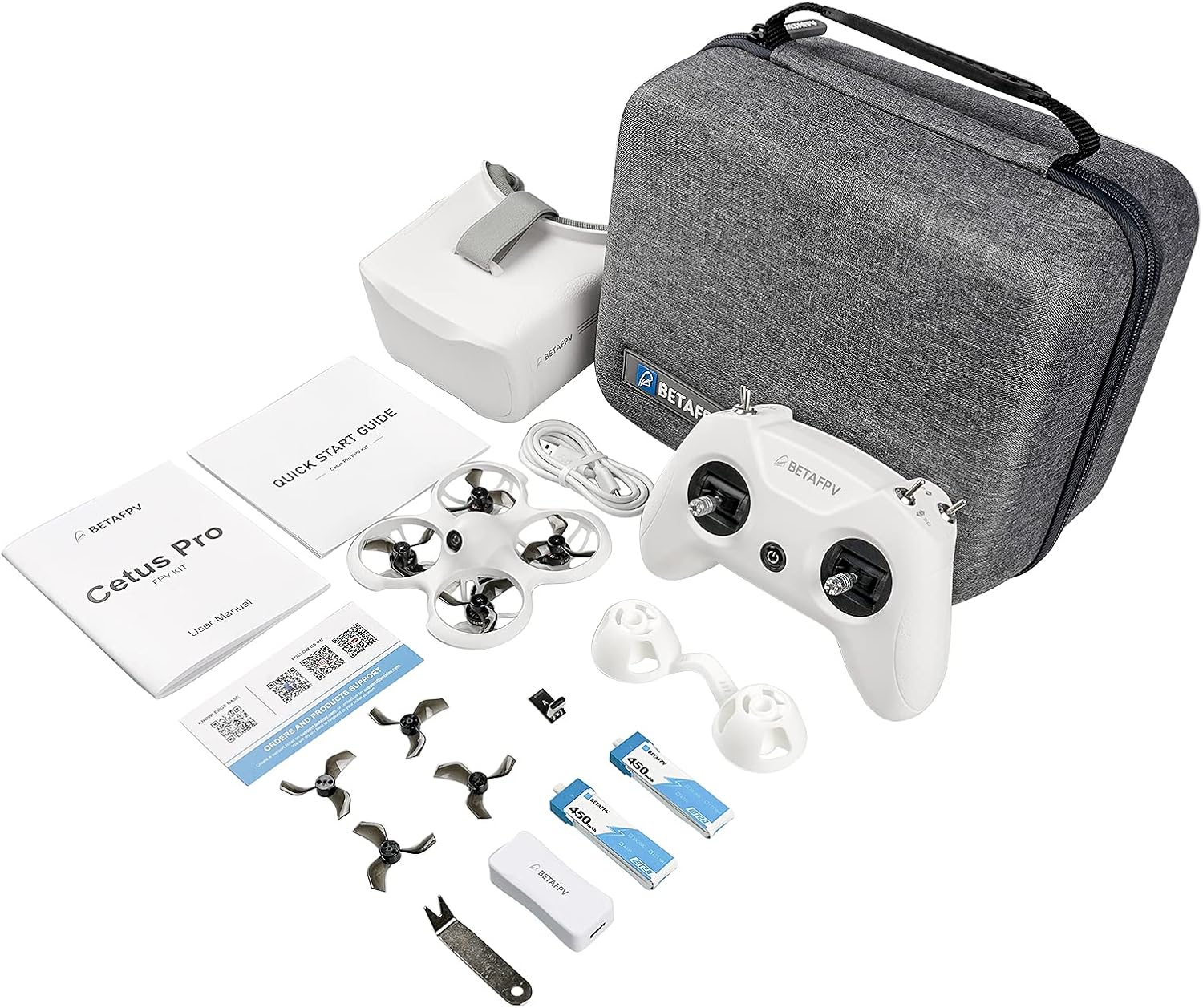
What You Get With the BETAFPV Cetus Pro

The kit arrives as a consolidated setup that supplies the foundational equipment required to begin flying immediately without having to source individual radio receivers or display monitors.
- BETAFPV Cetus Pro brushless quadcopter featuring an impact-resistant white plastic, PP, and PVC frame
- LiteRadio 2 SE transmitter utilizing radio frequency connectivity and integrated USB charging support
- VR02 FPV goggles equipped with an integrated display receiver system for real-time video monitoring
- Rechargeable 450 milliamp_hours lithium polymer flight battery engineered for micro quadcopter discharge rates
- Auxiliary flight module combining a barometer and laser positioning sensor for indoor hover stability
- USB data and charging cable for battery maintenance and remote connectivity
Key Specifications
| Attribute | Detail |
|---|---|
| Brand | BETAFPV |
| Model Name | Cetus Pro FPV Kit |
| Motor Configuration | Brushless whoop |
| Flight Modes | Normal, Sport, Manual (with Slow, Mid, Fast speed settings) |
| Stabilization Sensors | Integrated barometer and optical laser module |
| Camera Resolution | 1200TVL CMOS sensor |
| Video Capture Format | MP4 |
| Battery Capacity | 450 milliamp_hours (Lithium Polymer) |
| Maximum Operating Range | 80 meters |
| Connectivity | Radio Frequency and USB |
Flight Modes and Gradual Skill Development
Mastering FPV flight requires a systematic approach to stick sensitivity and throttle modulation. The betafpv cetus pro flight modes are engineered to bridge the gap between fully automated hover stabilization and entirely unassisted manual control. The system offers three primary flight profiles: Normal mode, Sport mode, and Manual mode. In Normal mode, the aircraft actively maintains its orientation and relies on the integrated barometer and optical laser to sustain indoor position, delivering dependable cetus pro altitude hold functionality. If an operator removes their hands from the control sticks, the drone halts forward drift and settles into an automated hover, eliminating the uncontrolled vertical drops common in traditional manual trainers.
As flight confidence builds, pilots can disengage the automated altitude limiter by switching into Sport mode. This intermediate tier maintains angle limitations to prevent the drone from pitching upside down while granting the pilot direct control over throttle elevation and forward acceleration. Both Normal and Sport modes provide three switchable operational speeds: Slow, Mid, and Fast. This granular scaling allows novices to practice fine indoor lines at slow velocity before dialing up responsiveness for open-area drills. Unlike complex custom builds or larger pre-built trainers such as the ironquad xplorerhd rtr fpv kit, this software-assisted progression ensures operators can adapt at their own pace without encountering unmanageable stick sensitivity.
The ultimate goal for visual creators training on micro whoops is Manual mode, also recognized across the FPV sector as Acro mode. In Manual mode, all digital angle limits, self-leveling algorithms, and laser-assisted altitude locks are deactivated. The aircraft mimics the unrestricted physics of professional cinematic FPV rigs, rotating freely on its pitch, roll, and yaw axes. By containing these three disparate control profiles inside a single platform, the platform functions as an effective system of cetus pro for beginners that remains useful long after the basic principles of flight are mastered.
Crash Resilience and Indoor Recovery Mechanics
Indoor practice spaces present constant physical hazards, including furniture legs, plaster walls, and low ceilings. The Cetus Pro uses a unibody frame constructed from plastic, polypropylene (PP), and polyvinyl chloride (PVC) materials. This composite duct arrangement encloses the spinning propeller blades completely, shielding delicate motor shafts and indoor surfaces from impact damage. While modular lightweight racers such as the betafpv meteor75 pro ii frame prioritize raw weight reduction, the ducted architecture of the Cetus Pro emphasizes structural deformation absorption so the quadcopter can bounce off drywall without snapping an arm.
Beyond structural durability, the quadcopter incorporates an automated self-protection function programmed directly into the flight management system. When the onboard sensors register a severe collision with an obstacle, the aircraft automatically disarms its brushless motors and drops to the ground instantly. This automated kill switch prevents motor burnout, ESC overcurrent damage, and stripped propeller hubs when the aircraft is pinned against an immovable object. The system also monitors power levels and link integrity continuously, executing a controlled emergency landing sequence if the radio connection drops or if battery voltage falls beneath safe operating limits.
Retrieving inverted aircraft during indoor drills quickly becomes tedious without automated uprighting tools. To solve this friction point, the drone integrates betafpv cetus pro turtle mode. When the quadcopter impacts an obstruction and lands inverted on its top frame, the operator does not need to cross the room to reposition the craft manually. Activating turtle mode via the radio transmitter reverses two motor rotations, using propeller thrust to lever the frame over onto its landing struts so you can resume flight immediately.
Transmitter Ergonomics and Goggle Visual Feed
The interface between pilot and aircraft relies on the bundled literadio 2 se transmitter and vr02 fpv goggles. The LiteRadio 2 SE transmitter is modeled after standard modern gaming controllers rather than bulky industrial aviation radios. This familiar physical footprint provides comfortable thumb positioning for pilots transitioning from digital consoles or standard drone controllers. It communicates via radio frequency connectivity to maintain low-latency stick inputs, while its onboard USB port supports computer connectivity for pilots who want to practice maneuvers inside FPV desktop simulators before flying real hardware.
The VR02 FPV goggles provide an enclosed analog viewing environment that isolates the pilot’s vision from external light glare. The headset incorporates an integrated antenna system inside the chassis, avoiding external stalks that could bend or snap during transport. The display links directly to the quadcopter’s 1200TVL CMOS optical sensor, delivering a standard-definition composite visual feed tailored for immediate spatial orientation. While the visual stream does not provide the high-definition fidelity of high-end digital transmitters, its low transmission delay is critical for avoiding obstacles when maneuvering through confined hallways.
Media storage is managed via SD card compatibility, with video capture saved in the MP4 file format for flight review. For creators studying lines and trajectory, reviewing captured video helps identify throttle inconsistencies and framing errors. The physical goggles feature an adjustable headband that balances the front-heavy casing against the face, making longer flight drills comfortable during repetitive battery testing.
Signal Boundaries and Operational Flight Range
Every micro quadcopter operates within distinct physical and technological limits, and understanding the official betafpv cetus pro specs prevents unexpected signal dropouts. The transmitter and receiver system features a maximum operating range of 80 meters. In an open backyard or empty indoor warehouse, 80 meters provides ample volume to practice figure-eights, split-s maneuvers, and orbit lines. However, flying through multi-room residential layouts with dense concrete walls or metal framing will degrade both the radio frequency link and the analog video feed well before reaching that distance barrier.
Power delivery is handled by an individual 450 milliamp_hours lithium polymer cell. Because brushless motors demand substantial current draw to generate the thrust necessary for punch-outs and dynamic recoveries, flight endurance is measured in brief bursts rather than the extended durations common to photography drones. While the listing does not specify the exact runtime in minutes, micro whoops in this class generally require pilots to manage battery voltage carefully. Creators using the kit to train for commercial production should anticipate rotating through multiple batteries to maintain momentum during dedicated practice sessions.
The onboard 1200TVL camera is calibrated for wide-angle orientation rather than final cinematic deliverables. The CMOS sensor adjusts dynamically to varying light exposure, but performance declines in low-light indoor rooms or harsh direct sunlight. Beginners should focus on flying in evenly illuminated spaces where the ground plane and ceiling boundaries remain clearly defined on the goggle display.
Check BETAFPV Cetus Pro on Amazon
Is the BETAFPV Cetus Pro Worth It
Deciding whether the system justifies your investment depends primarily on your current piloting skill and production goals. If you are an absolute newcomer or a camera operator seeking an inexpensive, low-risk bridge to develop genuine manual muscle memory, the platform delivers exceptional utility. The inclusion of barometer and laser-backed altitude stabilization eliminates the sheer panic of initial flights, while the durable plastic ducting prevents expensive repair bills during inevitable wall collisions. It packages all essential hardware together, allowing you to bypass the technical complexities of radio binding, receiver protocols, and component matching.
Conversely, experienced FPV pilots or visual creators who already possess an existing open-source radio controller and analog or digital goggles will find the kit redundant. Advanced freestyle pilots will quickly outgrow the 80-meter operational ceiling and the integrated analog camera feed, preferring modular setups with custom tuning options and higher transmission output. Furthermore, because this aircraft is designed for indoor agility and crash survival, it cannot carry heavy action cameras for commercial client deliverables.
Ultimately, if your objective is to learn the exact physical dynamics of FPV flight in a controlled environment without risking high-value production tools, the system represents one of the most cohesive training investments available. It is an educational launchpad designed to take abuse, build instinctive stick control, and transition you into manual acrobatic flight with minimal setup friction.
FAQ
How does the Cetus Pro altitude hold work indoors?
The altitude hold function uses an integrated barometer paired with an optical laser positioning sensor located on the underside of the frame. This sensor combination measures air pressure changes and ground distance to lock the drone at a steady hover height whenever the pilot releases the throttle stick on the transmitter.
What is the function of turtle mode on the Cetus Pro?
Turtle mode is an automated motor-reversing recovery feature. If the quadcopter crashes and comes to rest upside-down on the floor, activating turtle mode via the radio transmitter spins two opposite motors in reverse to flip the aircraft upright onto its landing feet, allowing you to take off again without retrieving it manually.
Can the LiteRadio 2 SE transmitter connect to a computer via USB?
Yes, the LiteRadio 2 SE transmitter features integrated USB connectivity. This connection allows the remote to interface with personal computers as an input device for practice inside standard FPV flight simulator software, allowing pilots to build stick muscle memory before taking the physical drone airborne.
How far can the BETAFPV Cetus Pro fly from the operator?
The maximum operating control range is rated at 80 meters under clear conditions using radio frequency communication. Physical obstructions such as thick interior drywall, metal studs, and electronic interference will reduce this functional distance during indoor practice runs.
What happens if the Cetus Pro encounters a severe mid-air collision?
The drone features a built-in self-protection function that detects sudden structural impacts. Upon experiencing a hard collision with a wall or obstacle, the flight control software automatically cuts power to the brushless motors and disarms the quadcopter, protecting the electronic speed controllers and motors from sustained strain.


