
As Amazon Associates, we earn from qualifying purchases. This means we may receive a small commission at no extra cost to you if you click through and make a purchase.
Deciding whether to invest in the ASUS TUF VG27AQ3A comes down to how well your daily routine balances high-speed responsiveness with visual precision. When building a workstation intended for dual purposes, many creators discover that typical gaming screens compromise too heavily on color range, while dedicated design panels rarely provide the high frame rates necessary for fluid gaming. This asus tuf 27 inch monitor bridges that exact divide by uniting a 2560 x 1440 QHD resolution with an elevated 180Hz refresh rate on a modern Fast IPS panel. For editors, digital illustrators, and hobbyist streamers, this configuration delivers sharp text, crisp asset rendering, and responsive playback without forcing you into an unwieldy desk layout.
In this comprehensive asus tuf vg27aq3a review, we explore every dimension of this hybrid display to help you choose the right screen for your desk. We will walk through the out-of-the-box experience, outline the verified technical details, and evaluate the panel across four core operational areas: color presentation, motion processing, physical workstation integration, and dynamic range performance. Whether you produce digital content for web distribution, manage complex video timelines, or relax with competitive multiplayer titles after hours, this breakdown outlines precisely what you can expect from this fast IPS display.

What You Get With the ASUS TUF VG27AQ3A
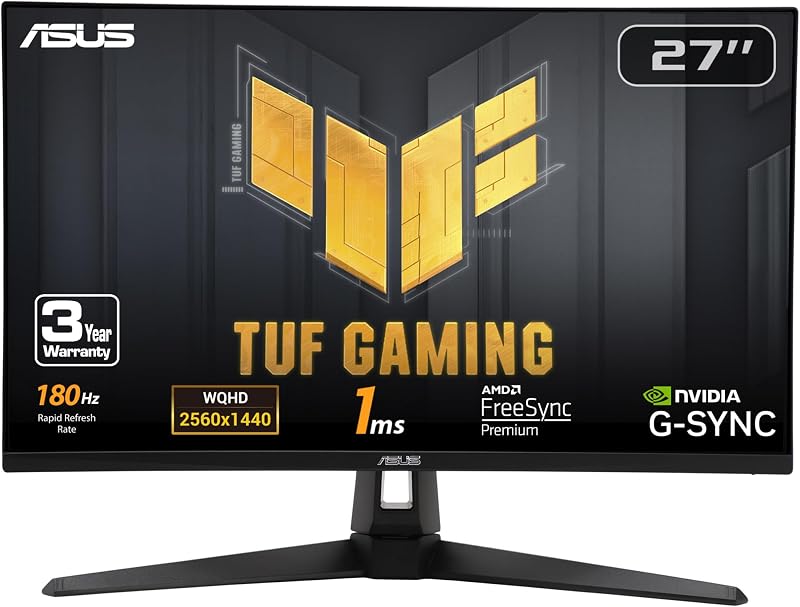
Unboxing this display reveals an accessory bundle geared toward immediate assembly and straightforward deployment, eliminating the need to search for aftermarket connection cables or specialized screwdrivers.
- ASUS TUF VG27AQ3A 27-inch Fast IPS monitor panel
- Matching display stand and base assembly
- DisplayPort cable supporting full 1440p bandwidth at 180Hz
- L-shaped screwdriver tailored for stand installation
- Power cord and dedicated power adapter
- Quick start guide for streamlined physical and digital setup
- Warranty card containing official manufacturer terms
- Three-month complimentary Adobe Creative Cloud subscription redemption card
Key Specifications
| Specification | Detail |
|---|---|
| Screen Size | 27 inches |
| Native Resolution | 2560 x 1440 pixels (QHD Wide 1440p) |
| Aspect Ratio | 16:9 |
| Display Technology | Fast IPS LED |
| Refresh Rate | 180Hz |
| Response Time | 1ms |
| Color Gamut | 130% sRGB |
| Contrast Ratio | 1000:1 |
| Viewing Angles | 178 degrees horizontal / 178 degrees vertical |
| Pixel Pitch | 0.23 mm |
| Brightness | 856.5 lm |
| Screen Finish | Matte |
| Dimensions and Weight | 24.2 inches deep x 8.4 inches wide x 17.9 inches high; 4.6 kg |
Color Coverage and Visual Accuracy in Creative Workflows
Using an asus tuf 27 inch monitor for video editing requires dependable color fidelity across the entire workspace, and the ASUS TUF VG27AQ3A delivers a 130% sRGB color gamut on its Fast IPS panel. This wide color volume ensures that primary tones and subtle gradations in graphic layouts, web-destined video projects, and digital artwork appear vibrant and consistent. While creative professionals who grade high-end cinematic projects often look toward dedicated grading displays like the asus proart gopro edition, content creators publishing to YouTube, Twitch, and web platforms will find that the 130% sRGB volume provides more than enough visual depth to ensure assets render attractively across consumer hardware.
Panel consistency remains a vital pillar of visual production, and this display maintains wide 178-degree viewing angles horizontally and vertically. When scrubbing through video timelines or inspecting fine image details, colors and contrast remain stable even if you shift your seating position or view the monitor from an off-axis angle. The 1000:1 contrast ratio provides clear separation between intermediate shadows and highlights, allowing editors to discern dark cuts without severe crush. The asus tuf vg27aq3a color accuracy is further reinforced by the Fast IPS architecture, which prevents the severe color shifts and luminance drop-offs that often plague budget gaming monitors running older panel types.
Integrating an asus 27 inch monitor creative workflow setup also benefits significantly from the 2560 x 1440 resolution. At a 27-inch diagonal, QHD yields a pixel pitch of 0.23, which strikes an optimal balance between sharpness and readability without forcing aggressive operating system scaling. Video editing applications have sufficient screen real estate to present audio tracks, media bins, and high-definition preview windows on a single canvas without feeling cramped. This visual headroom allows hybrid creators to cut footage efficiently throughout the workday before transitioning seamlessly into entertainment.
Motion Handling and Variable Refresh Rate Performance
Motion performance is where the asus tuf vg27aq3a 1440p 180hz configuration truly shines, offering an exceptionally responsive experience whether scrubbing high-framerate video assets or navigating fast-paced competitive games. The native 180Hz refresh rate delivers fluid motion with minimal input delay, providing three times the refresh cadence of standard 60Hz office panels. When compared to other high-speed panels in this class, such as the samsung odyssey g50d 27, the 180Hz ceiling on this display provides ultra-smooth tracking for rapid camera pans, dynamic animations, and complex vector editing where instantaneous visual feedback is essential.
Eliminating motion blur is central to the design of this asus elmb sync monitor. ASUS Extreme Low Motion Blur Sync (ELMB Sync) allows the backlight-strobing blur reduction technology to operate simultaneously with variable refresh rate technologies, rather than forcing you to choose between smooth synchronization and low blur. Backed by a 1ms response time, the asus tuf fast ips display drastically reduces pixel ghosting and smearing during high-velocity sequences. This allows creators who review high-framerate action footage or play competitive shooters to maintain crystal-clear subject definition across the screen.
Tear-free visual synchronization is handled effortlessly through integrated support for AMD FreeSync Premium, NVIDIA G-Sync compatibility, and VESA AdaptiveSync. Variable refresh rate is enabled by default, ensuring that frame rate fluctuations generated by your graphics card are matched seamlessly by the monitor. During demanding creative renders, 3D viewport navigation, or graphics-heavy gaming scenes where frame rates naturally fluctuate, this multi-standard VRR implementation prevents screen tearing and stuttering without introducing noticeable display latency.
Workspace Integration and Physical Ergonomics
Setting up the monitor on a creative desk is made straightforward by its compact operational footprint and thoughtful packaging. Measuring 24.2 inches deep, 8.4 inches wide, and 17.9 inches high, the unit occupies an efficient amount of desk area while maintaining solid stability through its base. The total weight of 4.6 kg makes repositioning simple, whether you are situating it on a compact standing desk or mounting it within a multi-display array. Users evaluating related models like the asus tuf gaming vg27aq5a will appreciate that this chassis emphasizes practical workspace efficiency alongside durable construction.
The display panel features a matte screen finish that actively diffuses ambient lighting from overhead studio lights, side windows, or backlights. For creators working in rooms with unpredictable illumination, this anti-glare treatment minimizes distracting reflections and eye strain during extended editing sessions. ASUS includes an L-shaped screwdriver directly in the box, allowing you to assemble the stand to the display quickly without having to hunt through a toolbox. The physical footprint ensures your keyboard, mousepad, and audio interface can sit comfortably in front of the screen without crowding your working environment.
Audio needs are addressed through integrated internal speakers, providing built-in sound playback directly from the display housing. While serious audio mastering and commercial sound design will always demand dedicated studio monitors or reference headphones, having built-in speakers is extremely useful for basic desktop sound checks, video call monitoring, and quick previewing of recorded audio clips. These internal drivers save valuable desk space by eliminating the immediate requirement for external desktop sound bars in space-constrained workspaces.
High Dynamic Range and Hardware Connectivity
Visual depth and dynamic lighting are enhanced through support for High Dynamic Range via the HDR-10 standard. When previewing HDR video timelines, high-contrast imagery, or HDR-compatible games, the monitor expands the perceived depth between bright highlights and deep shadows. The listing specifies a brightness rating of 856.5 lm, delivering ample illumination to showcase contrast-rich content cleanly in typical home office or studio lighting environments. While standard edge-lit panels do not deliver the localized dimming of professional reference mastering units, the HDR-10 decoding ensures compatible assets render with expanded tonal details.
Connecting the monitor to your workstation graphics hardware is facilitated right out of the box with the included high-bandwidth DisplayPort cable. This ensures you can immediately unlock the full 2560 x 1440 resolution at 180Hz without needing to purchase separate third-party cords to achieve maximum bandwidth. The monitor operates on a standard 240-volt power configuration using the bundled power cord and external power adapter, maintaining consistent electrical performance under demanding graphical loads.
To further bolster its appeal for content creation, the monitor includes a complimentary three-month subscription to the Adobe Creative Cloud suite, with redemptions valid through August 31, 2028. This value-added bundle gives buyers instant access to industry-standard tools including Premiere Pro, Photoshop, After Effects, and Illustrator. For an aspiring content creator or student setting up a studio, this software access significantly reduces initial startup costs and provides an immediate production platform to exploit the 130% sRGB color capabilities of the screen.
Check ASUS TUF VG27AQ3A on Amazon
Is the ASUS TUF VG27AQ3A Worth It
Determining whether the asus tuf 27 inch monitor is worth it depends on whether your workload crosses the boundary between visual design and high-frame-rate recreation. For independent video editors, vloggers, graphic designers, and remote workers who desire a single display for both vocational tasks and competitive play, this unit represents an outstanding balance of features. The combination of 1440p clarity, 130% sRGB gamut coverage, and a fluid 180Hz refresh rate means you do not have to settle for the sluggish 60Hz operation of standard office displays or the poor color rendering of low-end gaming panels.
However, specialized users should evaluate their specific production requirements before making a decision. If your daily work focuses exclusively on high-end commercial print design, cinema-grade DCI-P3 color grading, or professional broadcast mastering, you will likely prefer a dedicated color-calibrated reference display with custom LUT support and hardware calibration sensors. Likewise, users who require extreme 4K desktop scaling or ultrawide multi-window timelines may find a single 27-inch 16:9 canvas constraining for dense audio mixing and multi-cam editing.
For the vast majority of hybrid creators, hobbyist streamers, and gaming enthusiasts, the ASUS TUF VG27AQ3A strikes a sweet spot in the mid-size display market. It delivers genuine dual-purpose performance by combining accurate web-standard color handling with esports-grade motion clarity. When factoring in the included DisplayPort cable, L-shaped screwdriver, built-in speakers, and the three-month Adobe Creative Cloud membership, it offers a thoroughly practical package for any modern desk setup.
FAQ
Can the ASUS TUF VG27AQ3A be used for professional video editing?
Yes, the display is well-suited for web-focused video editing, YouTube production, and digital design thanks to its Fast IPS panel, 130% sRGB color gamut coverage, and 2560 x 1440 resolution. While Hollywood colorists requiring strict Rec. 709 hardware calibration or DCI-P3 reference curves may prefer specialized studio displays, this monitor provides the color accuracy and timeline workspace necessary for mainstream creative production.
How does ELMB Sync operate on this monitor?
ASUS Extreme Low Motion Blur Sync (ELMB Sync) enables backlight strobing to operate simultaneously with variable refresh rate technologies like AMD FreeSync Premium and G-Sync compatibility. This unique pairing eliminates motion blur and ghosting without introducing screen tearing, allowing fast-moving visual assets and games to remain crisp during rapid frame changes.
Does the ASUS TUF VG27AQ3A support both NVIDIA and AMD graphics cards?
Yes, the monitor includes broad synchronization compatibility supporting AMD FreeSync Premium, NVIDIA G-Sync compatibility, and VESA AdaptiveSync. Variable refresh rate is enabled by default, ensuring smooth, tear-free visuals regardless of which major graphics card brand powers your computer.
Are internal speakers included with this display?
Yes, the ASUS TUF VG27AQ3A features integrated speakers built directly into the chassis. While they do not replace dedicated reference studio monitors for fine audio mastering, they provide convenient audio output for general desktop listening, video calls, and quick media checks without requiring external speakers.
What accessories are provided in the box?
The package contains the 27-inch display panel and stand, a DisplayPort cable, an L-shaped screwdriver for assembly, a power cord with an external power adapter, a quick start guide, a warranty card, and a voucher for a three-month Adobe Creative Cloud subscription valid through August 31, 2028.


