As Amazon Associates, we earn from qualifying purchases. This means we may receive a small commission at no extra cost to you if you click through and make a purchase.
Visual creators, traveling vloggers, and independent editors frequently face a tough dilemma when shopping for a portable production laptop: should you carry a heavy gaming rig with noisy fans, or settle for an underpowered ultraportable with a washed-out screen? The ASUS Vivobook S 15 OLED establishes a compelling middle ground for creative specialists who demand professional-grade color accuracy and intensive multithreaded calculation without excessive bulk. Engineered on the Intel Evo platform and driven by a high-wattage 13th Gen Intel Core i9-13900H processor, this Midnight Black notebook prioritizes screen fidelity and responsive computing for graphic design, photo retouching, and mobile content creation.
In this comprehensive asus vivobook s15 oled creator review, we examine whether this machine delivers the practical reliability required for modern creative workflows. We evaluate how the 2.8K 120Hz panel handles color-critical work, examine processing benchmarks under sustained export workloads, analyze the thermal and battery balance, and explore port versatility alongside budget-friendly alternatives like the standard asus vivobook 15 laptop. By looking past marketing buzzwords and focusing on verified hardware capabilities, this guide clarifies whether this specific configuration matches your studio or field production needs.

What You Get With the ASUS Vivobook S 15 OLED
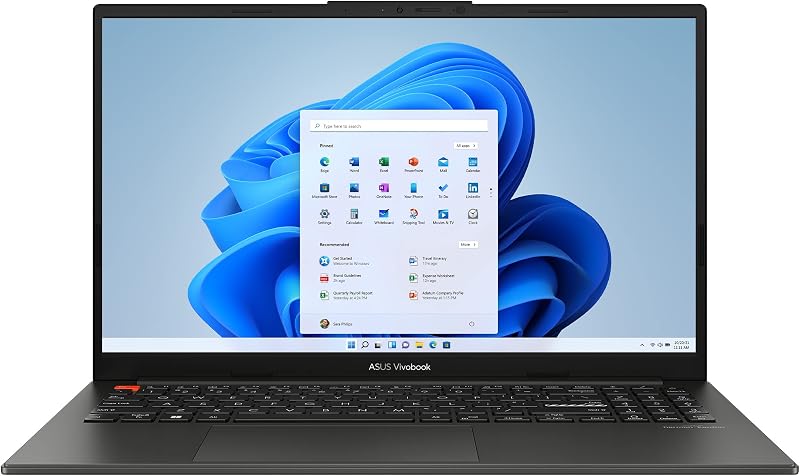
The ASUS Vivobook S 15 OLED arrives in a streamlined Midnight Black chassis designed for everyday portability, pairing high-end processing hardware with a factory-calibrated visual workspace. Inside the packaging, the manufacturer includes the laptop alongside its dedicated 19-volt charging adapter and basic documentation, delivering a self-contained productivity setup built around the following verified specifications:
- 15.6-inch 2.8K (2880 x 1800) OLED display featuring a 16:9 aspect ratio, ultra-slim NanoEdge bezels, 120Hz refresh rate, and 0.2ms response time
- VESA CERTIFIED Display HDR True Black 600 certification with 600 nits peak brightness and a 1,000,000:1 contrast ratio
- Full 100% DCI-P3 color gamut coverage for cinema-grade color reproduction
- 13th Gen Intel Core i9-13900H processor with 14 cores, 20 threads, 24MB cache, and maximum boost speeds up to 5.4 GHz
- Integrated Intel Iris Xe graphics coprocessor
- 16GB of high-speed LPDDR5 system memory
- 1TB M.2 NVMe PCIe 4.0 solid-state drive for rapid file transfers and operating system responsiveness
- Comprehensive port array featuring 1x Thunderbolt 4 port, 1x USB 3.2 Gen 1 Type-A, 1x USB 2.0 Type-A, HDMI 1.4, and a 3.5mm combo audio jack
- Intel Evo platform verification ensuring rapid system wake and optimized power management
- Built-in ergonomic backlit keyboard, front-facing camera, and biometric fingerprint recognition sensor
- Pre-installed Windows 11 Home operating system
Key Specifications
| Component or Feature | Manufacturer Specification |
|---|---|
| Processor | Intel Core i9-13900H (14 cores, 20 threads, up to 5.4 GHz, 24MB cache) |
| Display Panel | 15.6-inch 2.8K (2880 x 1800) OLED, 120Hz, 0.2ms, 600 nits peak brightness |
| Color and Contrast | 100% DCI-P3, 1,000,000:1 contrast, VESA Display HDR True Black 600 |
| Graphics Coprocessor | Integrated Intel Iris Xe Graphics |
| System Memory | 16GB LPDDR5 RAM |
| Internal Storage | 1TB M.2 NVMe PCIe 4.0 SSD |
| High-Speed Connectivity | 1x Thunderbolt 4 (display and power delivery), Wi-Fi 6E, Bluetooth 5 |
| Legacy and Peripheral Ports | 1x USB 3.2 Gen 1 Type-A, 1x USB 2.0 Type-A, HDMI 1.4, 3.5mm combo audio |
| Biometrics and Input | Fingerprint recognition sensor, integrated backlit keyboard |
| Operating System | Windows 11 Home |
Display Quality for Visual Editing and Content Creation
When evaluating the asus vivobook s15 oled display quality, the panel stands out as the undisputed centerpiece of this machine. With a native resolution of 2880 x 1800 spread across a 15.6-inch canvas, pixel density is exceptionally sharp, rendering fine typography, RAW image grain, and minute video details without noticeable aliasing. The 1,000,000:1 contrast ratio made possible by individual organic light-emitting diodes allows pixels to turn completely off, achieving true black levels that standard IPS panels simply cannot match. Backed by VESA CERTIFIED Display HDR True Black 600 and a peak brightness rating of 600 nits, HDR grading and shadow detail evaluation become viable right on the laptop screen.
Color reproduction represents another critical area where this panel excels for media professionals. Featuring 100% DCI-P3 color gamut coverage, the display provides the expansive color spectrum required for digital cinema workflows, commercial photography, and YouTube video mastering. Color shifts are virtually non-existent across broad viewing angles thanks to the uniform panel construction. Furthermore, the 120Hz refresh rate and lightning-fast 0.2ms response time elevate the everyday editing experience. Timeline scrubbing, high-frame-rate preview playback, and UI navigation feel remarkably fluid, reducing visual fatigue during prolonged cut sessions compared to conventional 60Hz laptop panels.
While the display excels in color accuracy and responsiveness, creators working in bright ambient environments should plan for reflection management. The deep black levels come paired with a glossy screen finish that can catch glare from overhead studio lights or open office windows. For creators who need a massive visual canvas for multi-window desktop work, expansive workstations such as the asus vivobook 18 offer greater overall screen area, but the S 15 OLED offers far superior color depth, black levels, and contrast fidelity for critical grading and color work.
Core i9 Processing and Real-World Editing Performance
The foundation of the asus vivobook s15 oled performance rests on the 13th Gen Intel Core i9-13900H processor. Featuring 14 cores divided into 6 high-performance cores and 8 efficiency cores alongside 20 threads, this CPU provides serious computational power for an ultraportable design. The asus vivobook s15 oled i9 13900h tears through intensive single-threaded instructions with clock speeds reaching up to 5.4 GHz, while multi-threaded tasks benefit from 24MB of smart cache. In practical terms, this allows digital audio workstations, large photo catalog rendering in Adobe Lightroom, and complex multi-layered vector illustrations to process with minimal lag or hesitation.
When evaluating the asus vivobook s15 oled for video editing, understanding the graphics hardware is crucial. Because this laptop utilizes integrated Intel Iris Xe graphics rather than a dedicated discrete GPU, it approaches video rendering through CPU brute force and Intel Quick Sync hardware acceleration. For 1080p and standard 4K timeline editing using H.264 or HEVC codecs, Quick Sync handles decoding and playback smoothly. However, editors relying heavily on GPU-accelerated plugins, complex 3D tracking in After Effects, or intensive noise reduction nodes in DaVinci Resolve will notice processing bottlenecks, as the system shares its 16GB LPDDR5 memory pool between the operating system, applications, and video frame buffering.
System storage and memory play an equally decisive role in sustained creative work. The included 1TB PCIe 4.0 NVMe solid-state drive delivers rapid read and write velocities, ensuring seamless transfer of high-bitrate video clips, instant project loading, and rapid scratch disk caching. While the 16GB LPDDR5 RAM supports robust multitasking across multiple creative applications simultaneously, power users who keep Premiere, Photoshop, and numerous browser tabs open at once must manage memory usage intentionally. Creators curious about alternative low-power architectures might explore efficiency-focused models like the asus vivobook flip 14 oled touchscreen copilot+ pc – intel evo edition powered by intel core ultra 7, but this Core i9 machine remains the heavyweight pick for raw x86 computing power.
Port Connectivity and Studio Peripherals
Studio connectivity on this laptop is anchored by the asus vivobook s15 oled thunderbolt 4 port, which offers high-bandwidth bidirectional transfer rates up to 40Gbps. For video creators and photographers, this single interface serves as a high-speed pipeline for offloading footage from external NVMe drives, connecting CFexpress card readers, and hooking into multi-port studio docks. Because the Thunderbolt 4 port natively supports DisplayPort video output and Power Delivery, you can drive high-resolution external monitors while keeping the machine charged through a single unified cable setup.
The remaining peripheral selection presents a mixed collection of modern convenience and legacy interfaces. ASUS equips the laptop with one USB 3.2 Gen 1 Type-A port for standard flash drives and external hard drives, alongside an older USB 2.0 Type-A port. In a professional editing environment, the USB 2.0 port is best reserved for basic input devices like a wireless mouse transceiver or keyboard dongle rather than data transfer. The inclusion of an HDMI 1.4 port provides easy hookups for meeting room projectors, but creators should note that HDMI 1.4 is limited when outputting to external 4K monitors at high refresh rates, making the Thunderbolt 4 port the preferred method for external display workflows.
Wireless and input features round out the hardware suite to maintain productivity when working away from your home studio. Integrated Wi-Fi 6E provides dependable wireless throughput when downloading large project archives or backing up proxy files across local network storage. A built-in 3.5mm combo audio jack accommodates studio monitoring headphones for latency-free sound editing. For input security, the backlit keyboard features comfortable travel for evening scripting sessions, complemented by a responsive fingerprint sensor that enables instant Windows Hello logins without typing passwords on location.
Battery Life Expectations and Mobile Workflow
Assessing the asus vivobook s 15 oled battery life requires an honest appraisal of the components running under the hood. As an Intel Evo verified device, the laptop incorporates rapid wake times and efficient power-saving algorithms during light computing tasks. When you are writing scripts, answering client emails, or browsing the web at moderate brightness levels, the laptop delivers reliable daily stamina. However, the combination of a high-performance Core i9 processor and an ultra-high-resolution 120Hz OLED screen naturally draws substantial wattage when pushed beyond basic productivity.
Under heavy media production workloads—such as compiling 4K video timelines, running continuous RAW batch exports, or rendering visual effects—battery longevity decreases significantly. Running intensive tasks forces the 14 CPU cores and cooling fans to operate near capacity, rapidly consuming stored energy. For serious editing sessions on the road, creators should plan to carry the included 19-volt power supply. Fortunately, the system features fast-charging technology that rapidly replenishes the battery, allowing you to top up during lunch breaks or between shoot locations.
Regarding physical form factor, the Midnight Black chassis balances screen size against packable dimensions. The ultra-slim NanoEdge bezels keep the overall chassis footprint compact enough to slip into standard camera bags and commuter sleeves without unnecessary friction. Creators who prioritize multi-day untethered battery endurance over raw processing power might consider ARM-based alternatives such as the asus vivobook 16 snapdragon. However, for users whose workflows depend entirely on traditional x86 Windows software packages, the Vivobook S 15 OLED delivers an exceptionally portable balance of display quality and processing muscle.
Check ASUS Vivobook S 15 OLED on Amazon
Is the ASUS Vivobook S 15 OLED Worth It
Determining whether the asus vivobook s15 oled is worth it comes down to matching your primary creative workload against its specific hardware configuration. If you are a photographer, graphic designer, UI/UX specialist, or digital audio producer, this laptop represents an outstanding investment. The 2.8K 120Hz OLED display provides exceptional color fidelity and contrast that elevates photo retouching and graphic layouts, while the 14-core Core i9-13900H processor handles multi-track processing and heavy application multitasking with remarkable speed.
Conversely, creators whose daily work revolves around 3D modeling in Blender, heavy motion graphics rendering, or demanding multi-camera 4K and 8K color grading will find the machine limited by its integrated Intel Iris Xe graphics. Without dedicated video RAM, demanding GPU-accelerated tasks take longer to finish, and complex timeline effects can drop frames during live playback. If high-end 3D rendering or GPU-intensive visual effects dominate your studio pipeline, investing in a machine with a dedicated graphics card remains essential.
For independent creators, content vloggers, and traveling professionals who need an accurate screen, fast storage, and top-tier CPU performance in an elegant package, the Vivobook S 15 OLED fulfills its intended role effectively. Its combination of an Intel Evo foundation, Thunderbolt 4 expansion, generous 1TB NVMe drive, and class-leading display technology delivers a refined, reliable portable studio for visual artists on the move.
FAQ
Can the ASUS Vivobook S 15 OLED handle 4K video editing?
Yes, the laptop handles 1080p and standard 4K video editing smoothly when working with compressed formats like H.264 and HEVC, thanks to Intel Quick Sync hardware acceleration built into the Core i9-13900H processor. However, because it relies on integrated Intel Iris Xe graphics rather than a dedicated graphics card, heavy GPU-accelerated effects, complex 3D motion titles, and multi-stream RAW timelines will experience performance slowdowns.
What are the primary ASUS Vivobook S 15 OLED specs?
The key asus vivobook s15 oled specs include a 15.6-inch 2.8K 120Hz OLED display with 100% DCI-P3 coverage, an Intel Core i9-13900H processor with 14 cores and 20 threads, integrated Intel Iris Xe graphics, 16GB of LPDDR5 RAM, and a 1TB PCIe 4.0 NVMe SSD. It also features Thunderbolt 4 connectivity, Wi-Fi 6E, a backlit keyboard, and Windows 11 Home.
Can you upgrade the RAM in this laptop?
The listing specifies that the laptop includes 16GB of LPDDR5 RAM; however, the listing does not specify whether the internal memory is user-upgradeable or soldered directly to the motherboard. Creators requiring more than 16GB of memory for massive enterprise projects should factor this capacity limit into their purchasing decision.
How do you connect an external 4K monitor to this laptop?
While the laptop includes an HDMI 1.4 port, that connection is limited in refresh rate when driving high-resolution displays. The best way to connect an external 4K monitor is via the Thunderbolt 4 port, which supports DisplayPort protocol over USB-C, allowing you to drive 4K monitors at full 60Hz or higher refresh rates with an appropriate cable or adapter.
Does the OLED screen cause noticeable glare in bright rooms?
The 2.8K OLED screen has a glossy panel finish that delivers punchy contrast and deep black levels, but it can reflect overhead studio lighting or direct sunlight. The display reaches up to 600 nits peak brightness in HDR mode, which helps combat ambient illumination, though working indoors out of direct sun provides the most accurate editing conditions.


