As Amazon Associates, we earn from qualifying purchases. This means we may receive a small commission at no extra cost to you if you click through and make a purchase.
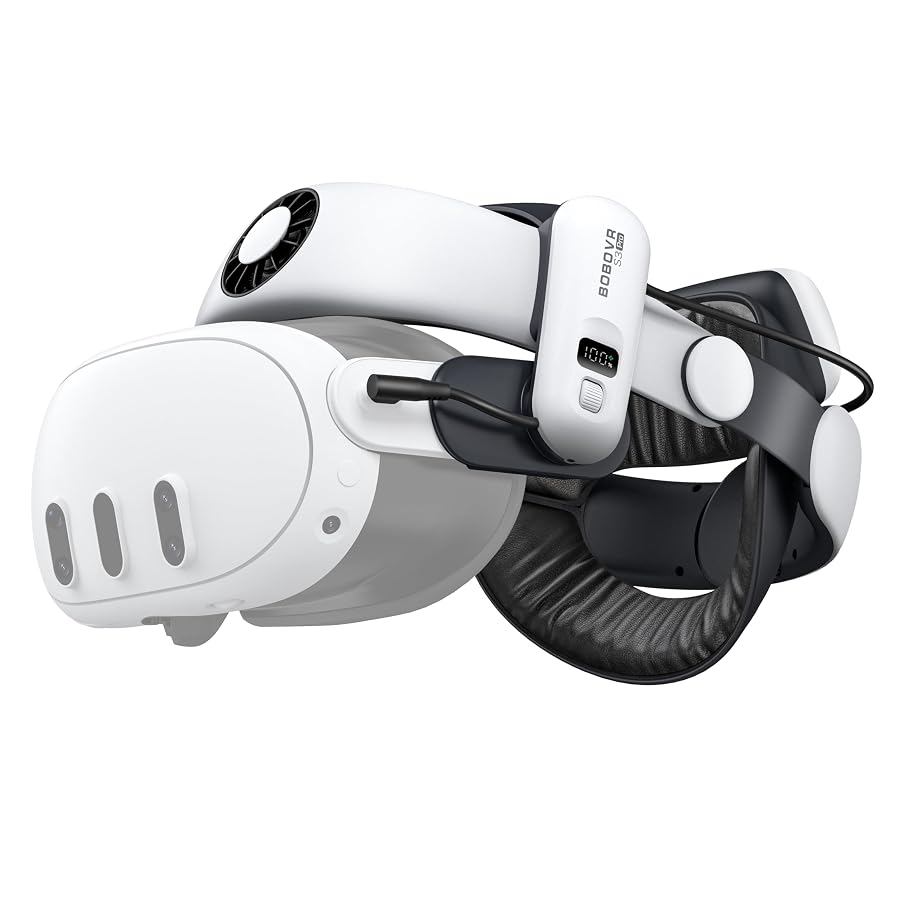
Finding the right balance between comfort, thermal management, and power delivery remains one of the greatest hurdles for standalone spatial computing. The BOBOVR S3 Pro is engineered specifically to address these limitations for Meta Quest 3 and Quest 3S users who rely on their headsets for heavy production tasks, extended gaming sessions, and immersive media creation. If you regularly experience front-heavy facial fatigue, lens fogging, or the rapid battery depletion common to the Quest 3 under high processing loads, this halo-style strap provides an integrated solution. It delivers a high-capacity power architecture paired with active air cooling directly to the forehead, moving beyond standard passive strap replacements.
In this detailed BOBOVR S3 Pro review, we examine how the strap integrates into high-demand workflows. We break down the engineering behind the B100 battery system, the real-world utility of the built-in air cooling fan, the ergonomic restructuring of the rear padding, and the technical specifications that separate this strap from standard Quest 3 accessories. Whether you are editing multi-angle spatial footage, navigating demanding simulation software, or multitasking across virtual desktop monitors, understanding how this hardware handles weight and heat will determine if it fits your production setup.

What You Get With the BOBOVR S3 Pro
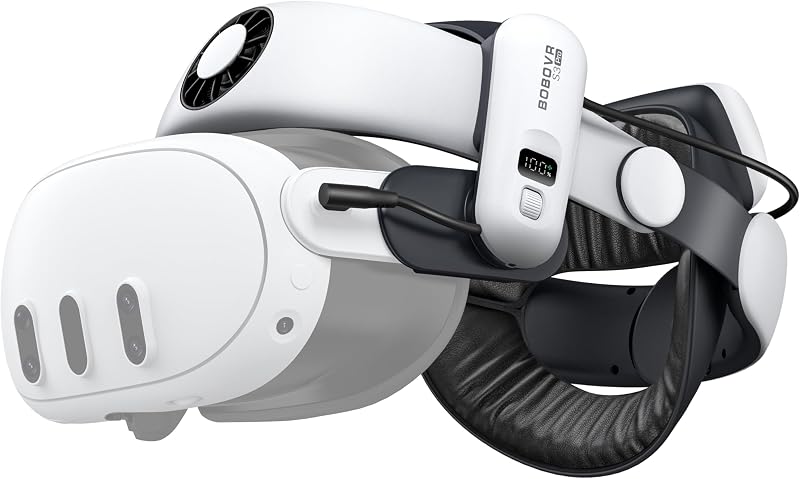
The product package focuses strictly on ergonomic support, cooling hardware, and upgraded power delivery for Meta’s third-generation spatial computing hardware. Inside the retail packaging, you find the core mechanical components and accessories needed for immediate installation:
- BOBOVR S3 Pro Cooling System Head Strap
- BOBOVR B100 Rechargeable Battery Pack (10000mAh equivalent configuration)
- Flexible Honeycomb Rear Head Pad
- Integrated 3.5mm power connector cable
- Top support bracket with removable overhead adjustment pads
- Manufacturer documentation and 18-month warranty registration details
Key Specifications
Evaluating the technical parameters helps clarify how the BOBOVR S3 Pro specs translate to daily performance and extended wearability:
| Attribute | Detail |
|---|---|
| Brand | BOBOVR |
| Model Number | S3 Pro |
| Hardware Platform | Meta Quest 3 / Quest 3S |
| Item Weight | 576 g |
| Color | White |
| Battery Pack Model | B100 Battery System |
| Battery Cell Configuration | Two 5000mAh lithium cells in series (7.3V total, 10000mAh / 3.65V equivalent) |
| Cooling Mechanism | Built-in Head Air Cooling System with 100-level roller adjustment |
| Cable Connector Type | 3.5mm Jack |
| Manufacturer | ShenZhen XiaoZhai Technology Co., Ltd |
| Warranty Coverage | 18 Months |
Active Cooling Performance and Heat Dissipation
Heat management has historically been one of the weakest aspects of standalone VR headsets. During intensive processing tasks—such as native 4K video playback, high-refresh wireless PCVR streaming, or complex mixed reality spatial tracking—the Quest 3 generates considerable warmth across the front chassis and facial interface. The BOBOVR S3 Pro cooling fan tackles this directly by channeling air over the user’s forehead. Because the strap uses an overhead air delivery port positioned above the facial interface, it encourages micro-circulation that cools the skin and reduces internal lens fogging without blowing uncomfortable drafts directly into your eyes.
The control scheme uses a step-less roller mechanism integrated into the top frame of the strap. By pressing the roller, users activate the internal fan motor, and rolling the dial adjusts the output across a 100-level flexible wind speed range. Silent motor technology keeps mechanical vibration and electrical hum low, allowing content creators and streamers to operate the cooling system without introducing noise artifacts into nearby condenser microphones or onboard headset audio. For creators who run intensive tasks in warm studio environments, this airflow prevents sweat accumulation and preserves the lifespan of third-party PU leather or fabric facial interfaces.
It is important to note the operational dependencies of the cooling assembly. According to the manufacturer data, the air conditioning system requires the B100 battery pack attached to provide the necessary operational voltage; the cooling fan cannot operate from the older generation B2 batteries. This integrated circuit design routes dedicated power directly through the strap structure, ensuring that continuous airflow does not leech runtime from the internal headset battery.
B100 Battery Architecture and Power Delivery
Battery limitations represent the primary bottleneck for continuous creator workflows on the Quest 3. The BOBOVR B100 battery pack introduces an entirely overhauled power architecture that addresses the high wattage demands of modern mixed reality. Rather than relying on a standard single-cell parallel configuration, the B100 houses two 5000mAh lithium cells wired in series to produce a 7.3V operating baseline, equivalent to a 10000mAh capacity at 3.65V. Compared to the older B2 pack found on legacy setups like the BOBOVR M2 Pro, the B100 expands total energy capacity by 92% while maintaining the exact same physical volume, with only a 28% increase in overall battery weight.
Thermal isolation plays a massive role in maintaining safe power delivery. BOBOVR re-engineered the architecture to separate the primary discharge module from the actual lithium cell housing. By moving the discharge circuitry outside the main battery cell compartment, the strap prevents heat buildup from radiating directly into the back of your skull. Furthermore, the updated electrical architecture improves discharge efficiency by 6% over prior generations. This high output efficiency ensures that the available capacity is double that of the older B2 unit, preventing the Meta Quest 3 internal battery from draining while connected under demanding graphic loads.
Workflow continuity is maintained through the signature magnetic hot-swappable interface. Users can snap the B100 onto the rear magnetic bracket blindly with one hand without removing the headset, making the BOBOVR S3 Pro for extended VR sessions an exceptionally seamless system. The manufacturer has also incorporated a built-in low-battery sound alert, providing an audible warning tone so you know precisely when to swap magnetic packs before the headset battery begins discharging its own emergency reserves.
Weight Distribution and Seated Ergonomics
Adding hardware to an already front-heavy spatial computing device requires careful mechanical balance. At 576 grams, the S3 Pro adds noticeable physical mass to the overall rig, but its halo-style suspension architecture shifts pressure away from sensitive facial bones. Instead of pressing the headset against your cheeks and eye sockets like a traditional elastic strap, the S3 Pro rests the weight on the sturdy frontal forehead pad and the rear occipital support. This weight offset dramatically enhances overall BOBOVR S3 Pro comfort, allowing creators to keep the headset mounted for hours without developing deep facial pressure marks.
Ergonomic versatility is further refined by the flattened back structure. Previous halo designs often featured bulky rear adjustment dials and rounded battery brackets that forced the user’s neck forward when leaning back. The S3 Pro flattens the rear assembly, allowing you to rest your head naturally against high-back task chairs or reclined headrests. If you spend your working hours editing virtual timelines while seated in an ergonomic office chair like the Sihoo Doro C300 Pro V2 ergonomic office chair, the strap remains unobtrusive against the headrest, preventing unwanted neck strain during stationary computing.
Customization across different head shapes is achieved through modular padding and articulated joints. The included honeycomb pad provides a tactile, non-slip grip that anchors securely to the base of the skull, minimizing slippage during sudden physical movements. Users who prefer minimal contact can detach the overhead support brackets, or adjust the side arms along their height-adjustment rails to align the optical sweet spot of the Quest 3 pancake lenses precisely with their pupil line.
Hardware Compatibility and Physical Setup
Mechanical tolerances and electrical connectors are tailored strictly to Meta’s third-generation devices. The S3 Pro side rails slide directly over the rigid speaker arms of the Meta Quest 3 and Quest 3S, locking into place with positive friction clips. Unlike universal strap adapters that rely on generic friction mounts, these rails are custom-molded to match the exact angles and acoustic ports of the Quest 3 chassis, ensuring integrated spatial audio channels remain unobstructed. Those upgrading from a prior-generation setup like the BOBOVR M3 Pro will find the rigid side arm attachment method familiar, though the frame geometry and battery bracket dimensions have been overhauled.
Power transmission from the rear battery cradle to the front headset is managed via a dedicated cable utilizing a 3.5mm jack connector interface on the strap side before routing into the headset port. The cable management clips molded into the halo frame keep the cord flush against the side rail, preventing loose loops from catching on desktop microphones, headphone cables, or creator accessories. The mechanical installation requires zero tools: you detach Meta’s factory fabric strap, snap the S3 Pro side arms into position, route the top strap through the front bracket, and seat the rear B100 battery pack onto its magnetic contacts.
Cross-generation compatibility is strictly limited. The listing specifies that the S3 Pro is compatible exclusively with the Meta Quest 3 and Quest 3S platforms. Because the B100 battery architecture uses unique contact spacing and higher discharge parameters required for the active cooling fan and Quest 3 power consumption, older accessories cannot be mixed and matched arbitrarily. If you own older B2 batteries from previous headsets, they cannot power the S3 Pro cooling fan, making the B100 the mandatory power source for the full feature set.
Is the BOBOVR S3 Pro Worth It
Determining whether the S3 Pro fits your gear bag depends largely on how you utilize standalone mixed reality. If you use your headset for productivity, spatial computing, or prolonged PCVR gaming sessions, the BOBOVR S3 Pro battery life and active ventilation system eliminate the two most persistent barriers to immersion: thermal discomfort and rapid battery drain. The ability to cycle high-capacity B100 packs while maintaining forehead airflow transforms the Quest 3 from a short-session gaming device into a sustained production workstation.
Conversely, users who prioritize minimal weight and maximum portability may find the 576-gram strap assembly overly substantial. If your usage is limited to quick 20-minute fitness games or casual media viewing on airplanes, the added bulk and structured halo frame may complicate compact storage. The strap adds undeniable physical footprint to the headset, meaning standard ultra-compact travel cases will not accommodate the S3 Pro without upgrading to larger third-party luggage.
For creators, developers, and enthusiast users, the engineering refinements justify the footprint. The separation of the discharge module from the battery cells, the 10000mAh equivalent capacity, the 100-level silent cooling system, and the flattened rear geometry for seated desk use collectively address the primary shortcomings of the stock headset. If uninterrupted uptime and thermal stability are essential to your VR workflow, this battery strap delivers an exceptionally comprehensive accessory upgrade.
FAQ
Does the BOBOVR S3 Pro work with the Meta Quest 2?
No, the BOBOVR S3 Pro is specifically engineered for and compatible only with the Meta Quest 3 and Quest 3S hardware platforms. The side arm mounting rails and electrical dimensions do not support the older Quest 2 chassis.
Can I use my existing BOBOVR B2 batteries with the S3 Pro strap?
While mechanical attachment may physically fit the magnetic dock, the listing explicitly notes that the head air cooling system requires the B100 battery pack to function and is not compatible with the older B2 battery pack due to electrical architecture differences.
How do you adjust and control the cooling fan speed?
The cooling fan is operated via an integrated roller control located on top of the strap frame. Pressing the roller turns the fan on or off, and scrolling the dial allows you to adjust the wind speed across 100 flexible levels.
What makes the B100 battery pack different from previous battery models?
The B100 battery pack houses two 5000mAh lithium cells in series (7.3V total, equivalent to a 10000mAh single pack at 3.65V). Compared to the B2, it provides a 92% increase in capacity with only a 28% increase in weight, improves discharge efficiency by 6%, features an audible low-battery alert, and separates the discharge module to reduce rear heat buildup.
What is included inside the box with the BOBOVR S3 Pro?
The standard retail package includes the S3 Pro cooling system head strap, one B100 battery pack, a flexible honeycomb rear pad, and the manufacturer documentation backed by an 18-month warranty.