As Amazon Associates, we earn from qualifying purchases. This means we may receive a small commission at no extra cost to you if you click through and make a purchase.
For creators, vloggers, and traveling video editors, replacing heavy portable monitors with wearable virtual displays has evolved from a novelty into a serious mobile workstation conversation. The VITURE Luma Pro aims directly at this workflow by combining a 152-inch virtual canvas, 1200p resolution, and factory-calibrated color into a lightweight pair of wearable glasses. Whether you are cutting timeline sequences on a laptop in a coffee shop or managing multiple browser tabs while working remotely, assessing how virtual displays handle fine interface elements is critical before swapping out a physical monitor. In this viture luma pro review, we examine whether these viture pro xr glasses deliver the visual fidelity and desktop utility required for demanding mobile production.
Working in extended reality demands sharp edge-to-edge optics, comfortable weight distribution, and responsive software capable of pinning windows securely in space. This breakdown details what comes with the glasses, examines the official viture luma pro specs, and assesses practical workspace ergonomics. We analyze the viture luma pro multi screen workflow via SpaceWalker, evaluate the viture luma pro 1200p display for timeline scrubbers and color grading, and explore the glasses’ integration across laptops and gaming gear.

What You Get With the VITURE Luma Pro

The VITURE Luma Pro package centers on the XR eyewear itself alongside integrated optical and comfort adjustments designed to accommodate diverse facial structures and daily editing demands straight out of the box.
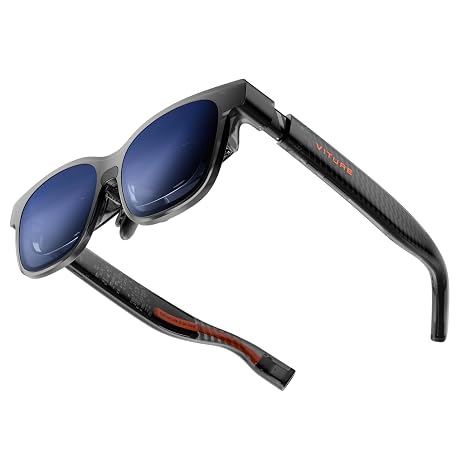
- VITURE Luma Pro wearable XR glasses with translucent frame styling and dynamic light effects.
- Integrated 1200p micro-display optics projecting a virtual 152-inch screen with a 52-degree field of view.
- Built-in rotary diopter dials supporting myopia adjustment up to -4.0D without corrective lens inserts.
- Electrochromic lens dimming film built directly into the front glass for one-tap ambient light reduction.
- Magnetic ergonomic nose pad and tilt-adjustable temples designed for personalized frame balancing.
- Flexible arm hinges engineered to reduce temple pressure during extended multi-hour sessions.
- Spatial sound hardware tuned by HARMAN embedded directly into the temple arms.
- Access to SpaceWalker desktop software enabling multi-screen spatial setups on compatible Mac and PC operating systems.
Key Specifications
| Specification Attribute | Listing Detail |
|---|---|
| Virtual Display Size | 152 inches |
| Native Resolution | 1200p |
| Field of View (FOV) | 52 degrees |
| Peak Brightness | 1000 nits |
| Refresh Rate | 120Hz |
| Color Accuracy | DeltaE < 2 |
| Integrated Myopia Adjustment | Up to -4.0 diopters |
| Audio Engineering | HARMAN audio system with enhanced bass and highs |
| Available Sizes | Regular (IPD 64.0±6.0 mm) and Large (listing does not specify exact Large IPD range) |
| Multi-Screen Capability | Up to three virtual displays via SpaceWalker on Mac and PC |
Display Fidelity and Color Precision for Timeline Work
Fine UI scaling and color fidelity dictate whether a wearable display can handle digital audio workstations or non-linear video suites. The viture luma pro 1200p display utilizes proprietary optical tuning paired with an expansive 52-degree field of view, delivering a perceived 152-inch canvas. For editors assessing the viture luma pro for video editing, the vertical 1200p resolution provides noticeable overhead compared to standard 1080p wearable panels. That extra vertical real estate makes smaller UI text, clip labels, audio waveform peaks, and detailed timeline tracks significantly easier to read without squinting.
Color rendition is another crucial benchmark for visual creatives. The listing specifies Hollywood-grade color precision with a DeltaE of less than 2, ensuring that color palettes, LUT previews, and contrast balances remain faithful to source footage. Backed by 1000 nits of peak brightness and a fluid 120Hz refresh rate, scrubbing high-frame-rate b-roll or monitoring animation playback remains smooth and visually stable. Compared to competing wearable solutions such as the viture luma ultra xr glasses, the Luma Pro balances extreme brightness with optical sharpness tailored specifically for sustained detail work.
Ambient lighting conditions often degrade wearable screen contrast when working outdoors or under bright studio overheads. To combat washing out, the Luma Pro features an electrochromic film integrated into the outer lens that darkens electronically at the touch of a button. For extreme lighting environments, the listing also notes that an optional lens shade is available to block out reflections completely. This allows video editors to focus on fine shadow adjustments and clipping highlights without fighting glare from surrounding studio fixtures.
Multi-Screen Management and Computer Compatibility
Expanding beyond a single laptop monitor into a comprehensive multi-display workspace is essential for editors who keep their media bins, timeline, and preview windows separated. The viture luma pro multi screen workflow relies on the proprietary SpaceWalker software, which facilitates up to three virtual displays anchored in 3D space when connected to Mac or PC systems. This eliminates the clutter of dragging bulky portable LCD panels through airports, providing an expansive panoramic desktop in a compact travel pouch.
Using these viture xr glasses for mac systems allows video creators to organize their workspace ergonomically. Editors can orient monitors in horizontal configurations, switch panels to vertical orientations for reviewing vertical video formats and chat streams, or toggle a specialized code mode for script writing and web development. While standard single-display mirroring functions natively over supported video-out USB-C ports, the multi-display arrangement hinges entirely on SpaceWalker delivering low-latency 3DoF tracking so windows remain fixed as you turn your head.
Hardware connectivity extends across broader ecosystems as well. Outside of production suites, the glasses function seamlessly with gaming hardware and media playback setups. Those comparing alternatives in the portable AR display market often evaluate hardware like the air 3s pro ar glasses to see how desktop window managers interact with different operating systems, but VITURE provides unified utility through dedicated SpaceWalker desktop profiles.
Ergonomic Adjustments and Long-Session Wearability
A wearable display is only as effective as its physical comfort during multi-hour rendering and editing sessions. The VITURE Luma Pro addresses facial fit variability by offering two frame sizes: Regular, calibrated for an interpupillary distance (IPD) of 64.0±6.0 mm, and Large, though the listing does not specify the exact numeric IPD range for the Large frame. Having discrete physical sizes ensures that users do not suffer optical misalignment, edge blurring, or binocular disparity caused by rigid, one-size-fits-all frames.
Fine-tuning fit on the face is supported by flexible frame arms, tilt-adjustable temples, and an interchangeable magnetic ergonomic nose pad. These components allow users to shift the vertical angle and optical distance of the glasses relative to their pupils, which is vital for maintaining clarity across all corners of the 52-degree FOV. The translucent frame design also incorporates dynamic light effects that can illuminate or sync animations to reflect your gaming persona or productivity mode, adding a customizable aesthetic element.
Nearsighted creators benefit from rotary diopter controls integrated directly into the upper edge of the frame. The built-in myopia adjustment accommodates prescriptions down to -4.0 diopters without requiring external prescription clip-ons. Users simply dial the knurled wheels until text elements snap into focus. The listing notes that if your vision prescription requires correction stronger than -4.0D, separate prescription lens inserts remain necessary to achieve optimal sharpness.
Spatial Audio Quality and Gaming Versatility
Audio monitoring during editing or gaming requires clear frequency separation and directional placement. The Luma Pro integrates an evolved sound system engineered in collaboration with HARMAN audio experts. Embedded directional speakers located in the temples deliver deeper low-end bass and crisper high-frequency clarity compared to previous generations, making it easy to identify dialogue cuts or background noise spikes in a vocal track while keeping the ears open to environmental cues.
When switching from workstation duties to downtime, the viture luma pro gaming setup offers extensive console integration. The listing highlights dedicated support for Switch 2 alongside native compatibility with PSPlay and XBXPlay streaming software. VITURE has also co-developed an XR-compatible controller with 8BitDo, establishing an integrated hardware ecosystem tailored for remote console streaming and handheld gaming without needing a physical television.
Additionally, the glasses incorporate the world’s first real-time 2D-to-3D software conversion algorithm. This feature allows users to transform conventional streaming media and flat games into stereoscopic 3D on the fly. Creatives interested in advanced smart frame optics can compare these multimedia attributes against standalone display devices like the air 3 pro ar glasses, which also explore immersive personal screening for creators on the move.
Check VITURE Luma Pro on Amazon
Is the VITURE Luma Pro Worth It
Deciding if the VITURE Luma Pro is worth it depends largely on how much your daily workflow values a multi-monitor desktop without the physical bulk. For video editors, software developers, and traveling vloggers who find themselves constrained by a single laptop screen in hotel rooms or transit hubs, the 1200p resolution, 1000 nits brightness, and three-screen SpaceWalker desktop support provide an exceptionally sharp and functional workstation that fits into a pocket.
For casual consumers who only want a personal media viewer for streaming movies on a plane, some of the advanced productivity tools, such as multi-screen orientation and tilt-adjustable temple balancing, might exceed everyday needs. However, the one-touch electrochromic darkening film and built-in myopia adjustment up to -4.0D eliminate common pain points associated with AR eyewear, removing the hassle of carrying snap-on clip lenses or dark magnetic shades.
Ultimately, the VITURE Luma Pro stands out as an uncompromising visual tool for technical users who need accurate color reproduction, razor-sharp UI readability, and robust hardware integration across Mac, PC, and gaming platforms. If your creative process thrives on expansive screen real estate and flexible positioning outside the traditional studio desk, these XR glasses represent a capable, modern hardware investment.
FAQ
Can the VITURE Luma Pro be used with prescription glasses?
The glasses feature built-in rotary myopia adjustment dials that accommodate nearsighted vision up to -4.0 diopters directly on the frame, eliminating the need to wear prescription glasses underneath. For vision prescriptions stronger than -4.0D or those with astigmatism correction, the listing specifies that additional prescription lens inserts are required.
How many virtual monitors does the VITURE Luma Pro support simultaneously?
When running the proprietary SpaceWalker software on a compatible Mac or PC, the VITURE Luma Pro supports up to three virtual displays pinned in panoramic 3D space. Users can arrange these virtual monitors horizontally, vertically, or in code layout modes to match their workflow.
Does the VITURE Luma Pro require external shades to block daylight?
No, the glasses feature built-in electrochromic film that instantly darkens the lenses at the touch of a button to block ambient lighting. However, the listing notes that an optional physical lens shade is also available for users working in extreme high-reflection environments.
What gaming consoles are compatible with the VITURE Luma Pro?
The glasses are compatible with all major gaming consoles and devices, offering dedicated integration for Switch 2 as well as official partnerships with PSPlay and XBXPlay for remote console streaming. VITURE also offers an XR-compatible controller co-developed with 8BitDo.
What are the two sizing options available for the frame?
The glasses are offered in Regular and Large frame sizes to accommodate different interpupillary distances. The Regular size accommodates an IPD of 64.0±6.0 mm, while the listing does not specify the exact numeric IPD measurement range for the Large frame.