As Amazon Associates, we earn from qualifying purchases. This means we may receive a small commission at no extra cost to you if you click through and make a purchase.
Mobile creators, remote video editors, and tech hobbyists constantly struggle with the physical limitations of single-screen laptop displays when working away from a desk. The VITURE Luma Ultra aims to solve this constraint by projecting a massive virtual workspace directly into your field of view using compact wearable optics. If you are debating whether this new generation of XR eyewear can legitimately replace a multi-monitor desktop workstation on the go, the answer depends largely on how you prioritize pixel clarity, head-tracking stability, and platform compatibility. It is engineered specifically for power users who demand higher visual fidelity than standard wearable displays, pairing a customized optical engine with onboard spatial tracking sensors.
Choosing the right XR headset means knowing what kind of performance to expect across your daily gear, whether you are editing video timelines on a MacBook, managing command lines on a Windows machine, or relaxing with portable gaming consoles. In this comprehensive breakdown, we examine the viture luma ultra specs, evaluate how its visual clarity holds up under text-heavy workflows, test the practical reality of its 6DoF tracking system, and clarify which connected accessories are required to unlock its complete feature set. We will also weigh the viture luma ultra vs pro lineage to help you decide if this flagship model justifies a permanent spot in your mobile creative kit.

What You Get With the VITURE Luma Ultra

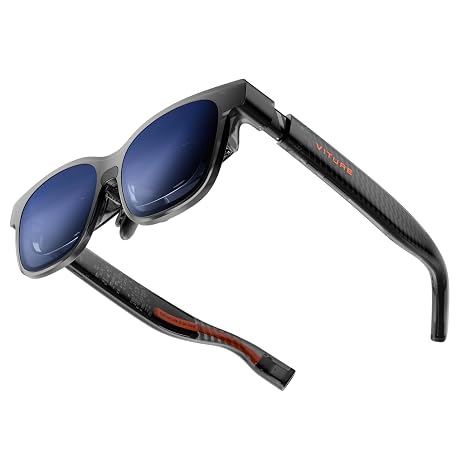
The hardware package centers around a lightweight pair of wearable smart glasses equipped with dedicated spatial computer vision cameras, designed to deliver high-resolution personal computing without bulky headgear. Out of the box, the system focuses on direct device compatibility, integrated visual adjustment, and spatial sensor integration.
- Sony Micro-OLED displays delivering 1200p resolution and up to 1500 nits of peak brightness
- Front-facing RGB camera accompanied by dual depth cameras for spatial environment awareness
- Virtual screen projection equivalent to a 152-inch display running at a fluid 120Hz refresh rate
- Electrochromic lenses that tint electronically at the touch of a button to block ambient lighting
- Integrated rotary myopia adjustments supporting prescriptions up to -4.0D directly on the frame
- Open-ear acoustic speakers tuned specifically by HARMAN for spatial and media listening
- SpaceWalker software ecosystem compatibility across macOS, Windows, and compatible mobile platforms
- Direct USB-C video connectivity for gaming handhelds like Steam Deck, ROG Ally, and Legion Go
- Compatibility with optional ecosystem expansions including the VITURE Pro Neckband and VITURE Pro Mobile Dock
Key Specifications
| Feature | Specification |
|---|---|
| Display Engine | Sony Micro-OLED |
| Virtual Screen Size | 152 inches |
| Native Resolution | 1200p ultra-sharp virtual display |
| Peak Brightness | 1500 nits |
| Refresh Rate | 120Hz |
| Tracking Capabilities | Full 6DoF spatial tracking supported |
| Integrated Sensors | Front RGB camera and dual depth cameras |
| Lens Dimming Technology | Electronic electrochromic tint adjustment |
| Myopia Correction | Built-in optical dials adjustable up to -4.0D |
| Audio Hardware | HARMAN-tuned open-ear acoustic system |
| Item Weight | 2.93 ounces |
| Package Dimensions | 8.19 x 4.84 x 3.7 inches |
| Model Number | Luma Ultra |
Display Quality and Everyday Visual Clarity
The primary concern for any digital creator considering wearable monitors is edge-to-edge sharpness, particularly when reading fine typography, editing timelines, or parsing terminal windows. The viture luma ultra display quality makes a notable leap beyond standard 1080p smart glasses by deploying upgraded Sony Micro-OLED panels running at a crisp 1200p resolution. In daily use, this boost in pixel density means interface elements and code lines avoid the fuzziness or chromatic aberration that often plagues wider field-of-view displays, presenting an image that the manufacturer characterizes as feeling closer to a 4K desktop monitor.
Illumination plays a crucial role in usability across varied environments, and the 1500 nits of peak brightness ensure that the virtual screen remains legible even when seated near open windows or working in brightly lit coffee shops. To complement this brightness, the viture luma ultra electrochromic lenses allow users to tint the outer optical layer with a simple tap. Rather than forcing you to snap on physical plastic shades, the electronic tinting instantly darkens the background, letting you isolate your workspace from distracting environmental movement. Those familiar with earlier hardware like the luma xr glasses will appreciate how seamless this tinting integration feels during travel.
Visual comfort is further supported by the integrated rotary myopia adjustments positioned on the top rim of the frames. Users with mild to moderate nearsightedness can dial each eye independently up to -4.0D, removing the necessity of wearing contact lenses or ordering separate prescription clip-ons. The high 120Hz refresh rate also ensures that window dragging, web scrolling, and fast frame movements remain exceptionally fluid, drastically reducing the eye strain commonly associated with reading high-density documents on virtual screens.
Multi-Screen Productivity with SpaceWalker
Deploying the viture luma ultra for productivity relies heavily on the companion SpaceWalker software suite. When tethered to a compatible computer, SpaceWalker unlocks capabilities far beyond simple screen mirroring, allowing users to project multi-screen workstations, pin ultra-wide curved layouts, or view native 3D assets with one-click rendering. For remote video editors who need a dedicated preview monitor alongside a sequencing timeline, having virtual multi-monitor setups anchored in mid-air transforms a small laptop into a fully functional editing suite.
Platform integration is broad but carries specific operational nuances that buyers must understand. On macOS and Windows, SpaceWalker natively taps into the glasses’ onboard sensors to provide anchored multi-display views with smooth head tracking. If you are comparing this setup to previous hardware iterations like the luma xr pro, the viture luma ultra spacewalker workflow feels noticeably more anchored due to the enhanced optical pipeline, making side-by-side browser and document management feel practical rather than gimmicky.
Mobile device connectivity is equally streamlined for recent hardware. The glasses support direct video display from USB-C video-output enabled smartphones, including the iPhone 15, 16, and 17 series. However, to access the complete suite of SpaceWalker XR software features on iOS, the listing notes that users will need the upcoming USB-C XR Charging Adapter Ultra. This adapter ensures full software utility while simultaneously providing power delivery to the phone during extended editing sessions.
Spatial Tracking and Sensor Capabilities
The standout hardware feature separating this model from traditional video-out glasses is the inclusion of an optical sensor suite featuring a front RGB camera and dual depth cameras. This hardware cluster delivers genuine spatial awareness, shifting the device from simple head-orientation monitoring into the realm of true viture luma ultra 6dof tracking. With six degrees of freedom, the system does not merely detect when you turn your head; it understands when you physically lean forward, shift backward, or move sideways in space, keeping virtual monitors anchored to exact physical coordinates in your room.
Understanding compatibility boundaries is vital before planning a workflow around gesture inputs. While SpaceWalker on macOS and Windows currently supports 6DoF positioning, the listing clarifies that viture luma ultra hand tracking is planned for a future software update on those desktop platforms. Full hand gesture control and complete 6DoF mobility out of the box are officially supported when pairing the glasses with the VITURE Pro Neckband, which acts as a dedicated computational and processing host.
This division of labor means that desktop users will enjoy rock-solid spatial stability for anchored virtual screens today, while true touchless gesture navigation remains tied to specific companion accessories or impending platform updates. For creators who frequently work in cramped settings like airplanes or train carriages, the 6DoF tracking prevents the virtual workspace from drifting or sliding across your vision when the vehicle turns, representing a major leap forward in mobile usability.
Gaming and Handheld Console Compatibility
Beyond mobile workstation duties, the glasses double as a dedicated personal cinema and big-screen gaming rig. Using the viture luma ultra for steam deck gaming requires no complex configuration; you simply plug the included USB-C cable directly into the handheld’s video-output port. The same plug-and-play simplicity applies to other modern PC gaming portables, including the ASUS ROG Ally and Lenovo Legion Go, projecting an expansive 152-inch virtual screen directly overhead.
Gaming on a virtual display benefits immensely from the 120Hz refresh rate and the rich contrast ratios of Sony Micro-OLED silicon. Fast-paced titles render with deep blacks and sharp HUD elements that remain completely legible even in high-speed action. Audio output is handled by open-ear speakers tuned by HARMAN, delivering clear directional sound and game dialogue while keeping your ears open to room announcements or travel surroundings, avoiding the fatigue of wearing in-ear monitors for hours.
For gamers wanting to bridge the glasses with home consoles or legacy HDMI sources, the ecosystem accommodates further expansion through the optional VITURE Pro Mobile Dock. The dock enables HDMI inputs from devices like modern consoles, while allowing simultaneous passthrough charging so portable gaming handhelds do not drain their batteries during demanding graphical sessions. If you have previously researched the vitrue pro xr glasses, you will find that the Luma Ultra retains this expansive modular dock compatibility while upgrading the visual fidelity of the display itself.
Check VITURE Luma Ultra on Amazon
Is the VITURE Luma Ultra Worth It
Deciding whether the viture luma ultra is worth it ultimately comes down to your tolerance for multi-device workflows and your need for desktop-grade workspace mobility. For nomadic developers, video editors, and power users who spend significant time traveling, the combination of 1200p resolution, instant electrochromic dimming, and built-in myopia adjustment solves the most frustrating friction points found in earlier XR glasses. The ability to pull a massive, razor-sharp multi-monitor setup out of a backpack without carrying physical portable monitors represents massive value for productivity-focused travelers.
However, prospective buyers must recognize the accessory dependencies required to unlock the glasses’ full theoretical capabilities. While basic screen mirroring and desktop SpaceWalker 6DoF work directly over USB-C, advanced features such as standalone wireless operation, autonomous app execution, and camera-based hand gestures require the VITURE Pro Neckband. Similarly, full iOS XR functionality depends on the upcoming Charging Adapter Ultra. If you expect full standalone spatial computing entirely within the frame itself, you may find these hardware requirements cumbersome.
For creators and tech enthusiasts who already live in a USB-C laptop and gaming handheld ecosystem, the VITURE Luma Ultra represents one of the most capable and optically sharp personal displays currently available. If your priority is maximum text clarity, fluid 120Hz gaming, and rock-solid virtual monitor pinning on macOS or Windows, this headset earns a confident recommendation as a cutting-edge productivity tool.
FAQ
How does the 1200p resolution compare to standard 1080p XR glasses?
The 1200p Sony Micro-OLED panel provides a higher vertical and horizontal pixel density than standard 1080p glasses. This extra resolution results in significantly sharper text rendering, cleaner UI elements, and virtually zero edge blur, making fine code, spreadsheet cells, and video editing timelines much easier to read over long working sessions.
Can I use the VITURE Luma Ultra if I wear prescription glasses?
The glasses feature built-in rotary myopia dials on the top of the frame that adjust optical focus up to -4.0D for nearsighted users, allowing many people to use the device without wearing corrective glasses or contact lenses. For users with higher prescriptions or astigmatism, custom prescription lens inserts are required.
What hardware is required to enable full 6DoF tracking and hand gestures?
Full 6DoF spatial tracking and hand gesture control are fully supported when pairing the glasses with the VITURE Pro Neckband. On macOS and Windows, the SpaceWalker software supports 6DoF tracking directly via the onboard cameras, while hand gesture tracking support for desktop systems is slated for a future software update.
How does the VITURE Luma Ultra connect to the Steam Deck and other handhelds?
The glasses connect directly to the Steam Deck, ROG Ally, Lenovo Legion Go, and other compatible gaming devices using a single USB-C cable that supports DisplayPort alternate mode. No external power brick or software driver is needed for basic screen mirroring at up to 120Hz.
Do I need an adapter to use the VITURE Luma Ultra with an iPhone?
The glasses can directly mirror content from USB-C enabled iPhone 15, 16, and 17 models without extra hardware. However, to access advanced SpaceWalker XR features and enable simultaneous charging on iOS devices, the listing specifies pairing the glasses with the upcoming USB-C XR Charging Adapter Ultra.