As Amazon Associates, we earn from qualifying purchases. This means we may receive a small commission at no extra cost to you if you click through and make a purchase.
Finding a compact desktop that balances heavy computing power with desk efficiency leads creators to evaluate small form factor workstations, and this geekom a7 mini pc review explores whether this machine meets modern creative demands. Powered by an 8-core AMD processor, the GEEKOM A7 delivers workstation-level performance inside an ultra-compact aluminum chassis. For vloggers, graphic designers, and video editors seeking to render high-resolution footage without a bulky tower, this desktop combines portability with serious output. Configured with fast memory and expansive storage, it arrives ready for production work.
Evaluating this hardware requires looking closely at how integrated graphics, memory bandwidth, and thermals perform under heavy multithreaded loads. Content creators need to know if the system can sustain timeline scrubbing, export color-graded footage without thermal throttling, and drive multiple displays. In this review, we examine the geekom a7 specs, assess creative capabilities, analyze cooling efficiency, and evaluate studio connectivity to help you determine if this compact workstation fits your production desk.

What You Get With the GEEKOM A7
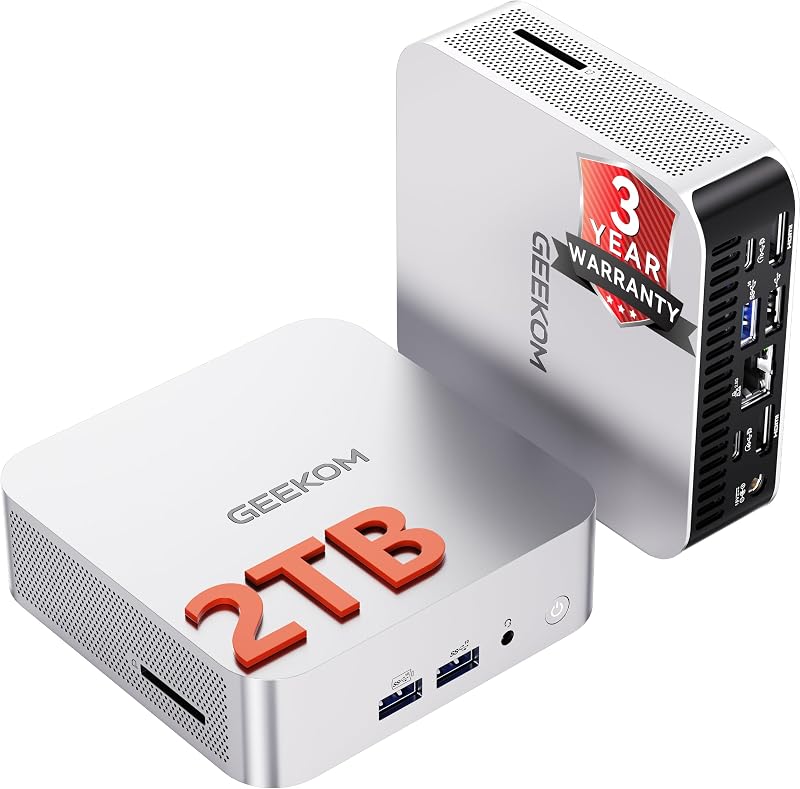
The GEEKOM A7 arrives as a compact desktop workstation designed for creative, office, and multimedia production environments. Backed by an official three-year manufacturer warranty, the hardware package provides an upgraded internal configuration inside a durable metal chassis.
- AMD Ryzen 9 7940HS processor with 8 cores, 16 threads, up to 5.2GHz boost, and a dedicated Ryzen AI Engine NPU.
- AMD Radeon 780M integrated graphics engineered for photo editing, graphic design, and 4K video rendering.
- 32GB of DDR5 RAM operating at 4800 MHz, expandable up to 128GB.
- 2TB PCIe 4.0 NVMe solid-state drive using a PCIe x4 connection for rapid asset access and local storage.
- High-speed 40Gbps USB4 port supporting modern peripherals and external display output up to 8K.
- Dual HDMI ports and DisplayPort interface enabling simultaneous quad-display output.
- Networking suite with a 2.5GbE Ethernet LAN port, integrated Wi-Fi 6E, and Bluetooth 5.2.
- Matte-silver aluminum alloy minimalist chassis featuring an active internal air cooling system.
- Official manufacturer 3-year warranty coverage, with official documentation confirming the unit contains 32GB RAM and a 2TB SSD despite early packaging batch labels.
Key Specifications
| Specification | Technical Detail |
|---|---|
| Processor | AMD Ryzen 9 7940HS (8 Cores, 16 Threads, Up to 5.2 GHz) with Ryzen AI Engine |
| Graphics Processor | AMD Radeon 780M Graphics |
| Installed System Memory | 32 GB DDR5 RAM (4800 MHz speed, 3.4 GHz clock speed, upgradable to 128 GB) |
| Primary Storage | 2 TB PCIe 4.0 NVMe SSD (PCIe x4 interface) |
| Operating System | Windows 11 Support |
| Video Outputs | 1x USB4 (40Gbps), 2x HDMI, DisplayPort (Supports up to 4 displays, up to 8K) |
| Wired Networking | 2.5GbE High-Speed LAN Ethernet Port |
| Wireless Connectivity | Wi-Fi 6E and Bluetooth 5.2 |
| Chassis Material & Color | Minimalist Aluminum Alloy Chassis in Matte-Silver |
| Cooling Architecture | Internal Active Air Cooling Method |
Performance in 4K Video Editing and Creative Workflows
When evaluating the geekom a7 for video editing, the primary driving force is the AMD Ryzen 9 7940HS processor. Built with 8 cores and 16 threads reaching 5.2GHz boost speeds, this processor excels at dividing complex render tasks across parallel computation threads. Content creators working in modern video editors will find that the high core count easily manages multi-track timeline scrubbing and background rendering. Furthermore, the integrated Ryzen AI Engine NPU accelerates AI-assisted tasks like subject tracking and voice isolation without stalling timeline responsiveness.
System memory bandwidth plays a critical role in video production, and the geekom a7 specs include 32GB of DDR5 RAM running at 4800 MHz. In creative applications, 32GB represents the recommended operational baseline for handling 10-bit footage, multi-layer graphics, and concurrent applications without aggressive disk caching. For creators transitioning from compact Intel machines like the geekom mini it13, the DDR5 memory in this unit delivers noticeably swift responsiveness when switching between grading tools and media browsers. With support up to 128GB, users retain an upgrade path as projects expand.
Local storage throughput determines how fast raw video files import, cache, and playback during intensive editing sessions. The factory-installed 2TB PCIe 4.0 NVMe solid-state drive operates over a PCIe x4 interface, ensuring that media libraries and scratch disks load with minimal latency. High write speeds streamline export rendering directly to the primary drive, preventing system bottlenecks. Although early packaging stickers may note 1TB, the system includes the full 2TB configuration, giving creators generous local capacity for demanding multi-gigabyte project directories.
Radeon 780M Graphics Architecture for Visual Workloads
A primary question for creators considering a compact desktop is whether integrated graphics silicon can handle modern GPU-accelerated tasks. The geekom a7 radeon 780m graphics engine delivers integrated graphical computation that rivals entry-level discrete GPUs. Operating on AMD’s advanced graphics architecture, this GPU provides native hardware decoding and encoding for modern video formats, including AV1, HEVC, and H.264. For vloggers working with camera footage, this media engine ensures smooth, hardware-accelerated timeline playback without dropped frames. Color grading operations and video rendering execute with dependable stability.
Beyond video timelines, the graphics subsystem provides substantial capability for photo editing and graphic design suites. Applications like Photoshop, Lightroom, and Illustrator utilize GPU acceleration for live canvas panning, complex layer blending, and batch RAW export rendering. Creators comparing this setup against alternative mini PCs like the bosgame p3 plus will appreciate the balanced performance delivered by the Radeon 780M. High-resolution canvas manipulation occurs without UI stutter, and export queues for large batches of RAW camera files process swiftly using shared DDR5 memory bandwidth.
While the integrated Radeon 780M handles 4K video rendering and photo manipulation admirably, buyers must recognize its intended boundaries. Highly complex 3D modeling scenes in Blender or real-time cinematic ray tracing will naturally challenge integrated silicon more than a dedicated desktop graphics card. However, for digital video creators whose work revolves around practical camera footage, YouTube production, social media reels, and high-resolution graphic design, the geekom a7 creator mini pc delivers ample graphical bandwidth without requiring a bulky, power-hungry desktop tower.
Chassis Design and Thermal Cooling Efficiency
Thermal throttling represents a common concern in compact desktop hardware, especially when pushing an 8-core processor during prolonged export rendering. The geekom a7 thermal cooling architecture relies on an advanced internal air cooling system paired with an all-aluminum alloy exterior chassis. The matte-silver metal casing is more than an aesthetic feature; the aluminum material acts as a natural heat dissipation surface, conducting thermal energy away from internal components. Under standard office tasks, photo organizing, and web browsing, the cooling fan operates quietly to maintain a calm studio environment.
When you start intensive rendering passes, transcode queues, or long timeline exports, the internal cooling fan increases speed to exhaust heat through the chassis vents. The engineered air cooling method prevents the Ryzen 9 7940HS from hitting severe thermal limits, allowing the CPU to sustain high multi-core boost clocks over extended periods. Buyers evaluating compact options against models like the geekom a5 pro will notice that the aluminum unibody build provides both structural durability and effective heat transference, ensuring long render sessions finish reliably without unexpected crashes.
Content creators who record voiceovers or podcasts near their desk will appreciate the smooth fan curve. Rather than abruptly cycling between high and low speeds, the cooling system adjusts fan RPM gradually in response to component temperatures. While fan noise is audible during extended full-load exports, the acoustic profile remains focused as a low-frequency hum rather than a high-pitched whine. This makes the machine easy to place directly on a desktop behind a monitor without disrupting sensitive studio microphones.
Quad Display Support and Studio Workspace Connectivity
Creative workflows depend heavily on expansive multi-monitor screen real estate. The geekom a7 usb4 quad display capability is one of its strongest features for professional setups, offering simultaneous video output across up to four external monitors. The device incorporates a high-speed 40Gbps USB4 port, dual HDMI ports, and a DisplayPort connection. This versatile layout lets you configure a main editing display, a color reference monitor, an audio timeline window, and a dedicated asset browser without external splitters. For high-end visual workflows, the display outputs support resolutions up to 8K.
Beyond external monitors, the 40Gbps USB4 port unlocks significant expansion opportunities for professional peripherals. High-speed external RAID storage arrays, portable NVMe scratch disks, and dedicated video capture cards can transfer multi-gigabyte video files at top throughput. Users researching compact desktop options alongside Intel platforms like the geekom it15 mini pc will find that having full 40Gbps bandwidth ensures external transfers remain rapid. Standard USB ports around the minimalist chassis provide reliable connections for audio interfaces, control surfaces, mice, and keyboards.
Networking capability on this compact workstation is tailored for heavy creative file transfers. The rear panel includes a high-speed 2.5GbE Ethernet port, providing more than double the bandwidth of traditional gigabit connections. For editors working off local Network Attached Storage (NAS) servers, this 2.5GbE connection allows seamless direct playback and editing of raw video footage across your local network. When operating wire-free, the onboard Wi-Fi 6E module provides rapid wireless throughput across the 6GHz band, while Bluetooth 5.2 maintains stable peripheral connections.
Is the GEEKOM A7 Worth It
Determining whether the geekom a7 is worth it comes down to matching your creative workload against its hardware strengths. If you are an independent content creator, video editor, photographer, or remote professional who requires workstation-grade multi-core compute power in an elegant desk footprint, this machine presents an exceptional package. With 32GB of DDR5 memory, a fast 2TB NVMe SSD, and the 8-core Ryzen 9 7940HS processor, the system arrives ready for demanding production work without requiring immediate upgrades. Backed by a three-year warranty, it offers dependable support.
For creators whose daily routine consists of 4K video editing, podcast production, multi-layered digital illustration, and extensive multitasking, the combination of Radeon 780M graphics and dedicated Ryzen AI processing provides substantial computing headroom. Its ability to simultaneously power four high-resolution monitors and ingest files across a 2.5GbE LAN or 40Gbps USB4 interface turns any compact workspace into a fully functioning production studio. The aluminum unibody build looks refined on a studio desk while ensuring durable hardware protection during lengthy project deliveries.
Conversely, if your creative work centers primarily around complex 3D GPU rendering in Octane or Unreal Engine, intensive physics simulations, or high-frame-rate AAA gaming at maximum visual settings, a system with a dedicated desktop graphics card remains the superior choice. Integrated graphics cannot match high-wattage desktop GPUs for extreme 3D tasks. However, for digital storytellers, commercial vloggers, photo editors, and everyday creative power users seeking the ultimate balance of space savings, quiet operation, and multithreaded geekom a7 performance, this mini PC delivers outstanding workstation execution.
FAQ
Can the GEEKOM A7 handle multi-stream 4K video editing?
Yes, the GEEKOM A7 handles multi-stream 4K video editing smoothly thanks to the 8-core, 16-thread AMD Ryzen 9 7940HS processor and AMD Radeon 780M graphics. Integrated media decoders support hardware acceleration for HEVC, H.264, and AV1, while 32GB of DDR5 RAM ensures smooth timeline scrubbing and responsive multitasking in video editing suites like DaVinci Resolve and Adobe Premiere Pro.
How many external displays can you connect to the GEEKOM A7?
The GEEKOM A7 supports up to four external displays simultaneously. This quad-display setup is achieved using the 40Gbps USB4 port, dual HDMI ports, and DisplayPort connection. The system can drive external displays at resolutions reaching up to 8K, making it well-suited for multi-monitor creative editing workspaces and detailed visual production environments.
Can the RAM and storage on the GEEKOM A7 be upgraded?
Yes, both the system memory and solid-state storage can be expanded. The GEEKOM A7 features dual-channel DDR5 RAM slots that support up to 128GB of memory, allowing users to upgrade from the installed 32GB. The installed 2TB PCIe 4.0 NVMe SSD utilizes a standard PCIe x4 interface, giving users the option to replace or upgrade internal storage.
Why do some product packaging boxes indicate 32GB RAM and 1TB SSD?
The manufacturer has officially noted that early batch packaging labels may display 32GB+1TB due to early printing runs. However, the hardware unit inside is fully upgraded to 32GB of DDR5 RAM and a 2TB PCIe 4.0 NVMe SSD. GEEKOM backs this configuration with an official three-year warranty, ensuring buyers receive the full 2TB capacity and support.
What networking options are built into the GEEKOM A7?
The GEEKOM A7 includes a comprehensive networking package designed for professional connectivity. For wired network setups, it features a high-speed 2.5GbE RJ45 Ethernet LAN port, providing superior data transfer speeds when connected to local Network Attached Storage (NAS) servers. For wireless connectivity, it includes integrated Wi-Fi 6E for high-bandwidth wireless networking and Bluetooth 5.2 for wireless peripherals.