As Amazon Associates, we earn from qualifying purchases. This means we may receive a small commission at no extra cost to you if you click through and make a purchase.
If you are setting up an efficient desktop workspace for video editing, YouTube production, or digital audio hobby work, finding speakers that balance desk space with adequate bass response is essential. The Logitech Z313 speaker system offers a practical 2.1 channel solution designed specifically for creators who need an upgrade over thin laptop speakers or basic built-in monitor audio. Built with two compact tabletop satellite units and a dedicated standalone subwoofer, this setup aims to deliver balanced stereo acoustics and low-frequency depth without demanding excessive desk real estate. For video creators and vloggers, having dependable external speakers makes timeline scrubbing, vocal balancing, and long editing sessions much more comfortable by eliminating the constant ear fatigue of wearing headphones.
While commercial music mastering demands dedicated studio monitors and acoustic room treatments, everyday video editing prioritizes clear speech dialogue, functional stereo separation, and immediate volume control. In this detailed logitech z313 2.1 review, we examine the official logitech z313 specs, assess the hands-on utility of the wired control pod, analyze sound clarity for timeline assembly, and evaluate how the compact subwoofer performs under a creator desk. We will also address system compatibility and build quality to help you decide whether this 2.1 speaker setup aligns with your workflow demands.

What You Get With the Logitech Z313
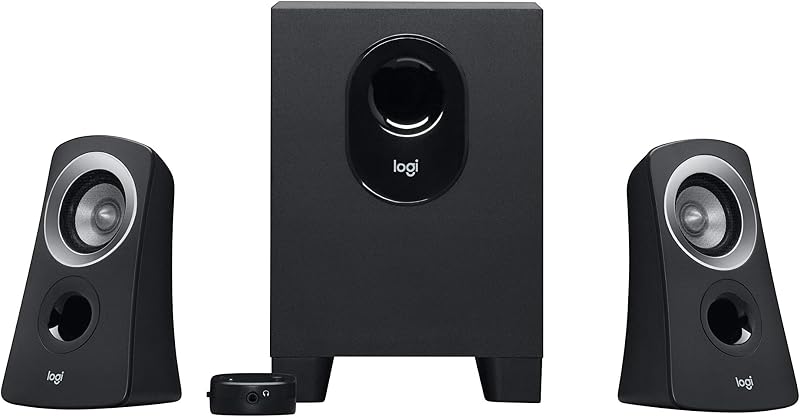
The Logitech Z313 multimedia package includes the core hardware needed to set up an active 2.1 speaker system on personal desktop workstations without requiring secondary amplifiers or complex audio configuration software.
- Two tabletop satellite speakers with 0.75-inch tweeters and black PC enclosure housings
- One compact subwoofer unit with a 5.9-inch woofer and 9-inch subwoofer diameter
- An integrated wired control pod equipped with touch controls for volume adjustment and power
- A fixed 3.5mm analog auxiliary input cable for straightforward device connectivity
- A 25 watts RMS continuous power system designed for balanced desktop stereo output
- Documentation detailing limited warranty terms and personal use operational instructions
Key Specifications
| Attribute | Detail |
|---|---|
| Audio Output Mode | Stereo (2.1 Channel) |
| Rated Power Output | 25 Watts (RMS) |
| Speaker Type | Computer Multimedia Speaker |
| Mounting Type | Tabletop Mount |
| Enclosure Material | PC (Polycarbonate) |
| Tweeter Driver Diameter | 0.75 inches |
| Woofer Driver Diameter | 5.9 inches |
| Subwoofer Diameter | 9 inches |
| Speaker Size | 5.25 inches |
| Audio Input | 3.5mm Auxiliary Cable |
| Control Method | Touch and Dial Control Pod |
| Water Resistance | Not Water Resistant (Is Waterproof: FALSE) |
| Warranty Type | Limited Warranty |
Audio Performance and Sound Quality for Video Editing
Evaluating the logitech z313 for video editing requires a realistic understanding of how its 25 watts RMS power output performs during timeline playback. When cutting video footage, creators manage multiple audio layers simultaneously, including dialogue stems, Foley sound effects, and background music. The stereo output mode provides solid left-to-right stereo panning, allowing you to position off-screen Foley or background ambience accurately across the soundstage. The 0.75-inch tweeters reproduce mid and high frequencies with sufficient crispness, ensuring that spoken dialogue and vocal interviews stay clear above musical tracks without getting lost in muddy frequencies.
Low-end sound frequencies are handled entirely by the separate bass enclosure, which utilizes a 5.9-inch woofer to deliver bass boost enhancement. For video creators assembling b-roll sequences or monitoring podcast intro tracks, this extra low-end response provides satisfying presence that dual desktop speakers fail to replicate. However, the logitech z313 sound quality is tuned for personal multimedia listening rather than clinical audio calibration. When performing critical master passes or checking precise low-frequency rumble, creators often pair this setup with dedicated reference headphones such as the astro a 50 x to catch sub-bass issues that compact multimedia subwoofers might color or overemphasize.
In terms of overall acoustic balance, the system performs well during voiceover reviews and long editing sessions. The polycarbonate satellite enclosures minimize harsh internal resonance at reasonable listening levels, keeping dialogue intelligible and natural. Because nearfield desktop listening does not require pushing the speakers to extreme volumes, editors can work comfortably for several hours without ear fatigue. This acoustic performance provides a dependable baseline that accurately mirrors how everyday viewers will hear your YouTube videos or social media clips on standard consumer hardware.
Desktop Integration and the Control Pod Experience
The defining operational feature of this audio system is the logitech z313 control pod, which brings critical controls right to your desk surface. When you are focused on an active editing timeline, stopping to open software mixer panels or fumbling behind a monitor to adjust speaker knobs interrupts your rhythm. The tethered control pod provides instant physical access to volume adjustment and system power. Having quick touch control over volume levels is especially useful when previewing unrendered video clips that might contain sudden volume spikes or uncompressed sound effects.
Desk ergonomics are equally important for creative workstations crowded with secondary screens, editing controllers, and camera gear. The logitech z313 desktop speakers feature a compact tabletop mount footprint that slots easily next to computer monitors without obstructing screen visibility. The black polycarbonate finish gives the satellites a low-profile aesthetic that blends into professional studio spaces. For creators who operate on narrow floating desks and prefer an ultra-simple two-piece setup without any floor unit, compact stereo units like the logitech z150 speakers offer an alternative path, though they do not deliver the low-end authority found in the Z313 2.1 architecture.
Managing your cables is essential when building an organized logitech z313 creator setup. The control pod, both satellite speakers, and the power cord all connect back to the central subwoofer module. Routing these wires through desk grommets or securing them along desk legs prevents cable clutter around your keyboard and editing mouse. Once configured, the control pod remains stable on your desk, giving you an intuitive interface that streamlines daily media playback.
Subwoofer Placement and Low-End Dynamics
The logitech z313 compact subwoofer is specifically engineered to deliver low-end frequency reinforcement without dominating your under-desk foot space. Featuring a 9-inch subwoofer diameter and a 5.9-inch woofer, the cabinet fits easily in tight corners under an office desk or creator workstation. Unlike massive home entertainment subwoofers that demand wide clearances, this compact enclosure tucks neatly beside a PC tower or desk leg, keeping your floor area open for comfortable seating and natural leg movement during long editing days.
Positioning the subwoofer against an interior wall or in a desk corner enhances bass boost efficiency through room boundary loading. In smaller home offices and studio rooms, boundary placement helps distribute low frequencies evenly across your listening position. This physical reinforcement allows you to hear the punch of background percussion and atmospheric drone sounds without needing to raise total output to distracting levels. The bass module relieves the tabletop satellites from attempting to reproduce deep bass notes, allowing the smaller drivers to focus purely on clean mid-range and high frequencies.
Build quality and environmental durability match standard office electronics expectations. The PC cabinet construction provides sturdy structural integrity for dry indoor personal setups, but the listing confirms the system is not water resistant (Is Waterproof: FALSE). Creators should keep drinks away from the control pod and ensure the subwoofer remains elevated or protected from accidental floor spills. Keeping the woofer vent unobstructed guarantees proper air circulation during extended rendering and editing workflows.
Connectivity and System Compatibility
System flexibility is supported by the straightforward connection options detailed in the logitech z313 specs. The primary connection uses a universal 3.5mm analog input cable, ensuring hassle-free compatibility across a wide spectrum of creative hardware. Video editors can plug the auxiliary jack directly into computer motherboard audio ports, laptop headphone sockets, USB-C docking hubs, or external camera preview monitors. Because it relies on standard analog signaling, there are no proprietary drivers or software applications required, making it truly plug-and-play across Windows, macOS, and mobile devices.
The product listing notes personal use application along with specifications indicating a 10 meters maximum range and antenna location for smartphones or tablets. For creators moving between a main desktop editing rig and a mobile tablet used for scripting or storyboard reviews, direct 3.5mm audio connectivity provides zero-latency sound monitoring. When matching dialogue lip-sync in Premiere Pro, DaVinci Resolve, or Final Cut Pro, zero transmission latency is critical, as even minor delays can cause editors to misalign audio cuts.
Continuous power handling is rated at 25 watts RMS, providing plenty of clean output for typical desk-bound listening distances. Driving multimedia speakers beyond their power limit often creates unpleasant harmonic distortion and driver rattle, which can disguise flaws in your sound mix. The Z313 operates comfortably at moderate volume levels, reproducing audio tracks accurately without introducing artificial clipping or hiss during detailed editing sessions.
Is the Logitech Z313 Worth It
Determining whether the logitech z313 is worth it comes down to matching your production requirements with what a compact 2.1 system does best. For video editors, streamers, vloggers, and audio hobbyists seeking a capable desktop monitoring upgrade, this package provides outstanding daily utility. The separate subwoofer adds necessary depth for cinematic video scoring, while the wired control pod offers quick tactile volume adjustments right at your fingertips without interrupting your creative workflow.
However, serious audio engineers and commercial music producers working on commercial mastering should recognize the natural limits of consumer multimedia speakers. The fixed sound profile, built-in bass boost, and compact polycarbonate cabinets are designed for multimedia enjoyment rather than surgical, uncolored studio monitoring. If your work requires strict acoustic neutrality for broadcast compliance, investing in dedicated studio reference monitors will remain necessary for final mastering tasks.
For general content creators who need dependable, fatigue-free audio playback during daily editing, drafting, and entertainment, the Logitech Z313 delivers balanced acoustics and smart desktop convenience. Its compact dimensions, instant 3.5mm plug-and-play operation, and dedicated bass performance make it a sensible addition to any creator desk.
FAQ
How does the Logitech Z313 connect to editing laptops and computers?
The Logitech Z313 connects using a standard 3.5mm analog audio cable. This input plugs directly into computer audio outputs, headphone jacks on docking stations, or audio interfaces, delivering immediate plug-and-play stereo sound without needing software drivers.
Can the Logitech Z313 replace professional studio reference monitors?
While the Logitech Z313 is well-suited for video editing, rough cuts, and general multimedia playback, it is not designed to replace flat-response studio reference monitors. Its consumer acoustic profile and bass boost feature are built for enjoyable listening rather than clinical audio mastering.
What is the continuous power rating of the Logitech Z313?
The system is rated at 25 watts RMS continuous output power. This provides adequate acoustic volume and clean headroom for personal nearfield listening on editing desks and home workstations without causing distortion.
Is the Logitech Z313 waterproof or suitable for outdoor studios?
No, the Logitech Z313 is not water resistant, and the manufacturer listing explicitly states that it is not waterproof. It is constructed from PC plastic intended strictly for indoor, dry desktop environments.
What does the wired control pod do?
The wired control pod sits directly on your desktop to provide quick, convenient touch controls for adjusting master volume levels and turning system power on or off without needing to access computer software menus.