
As Amazon Associates, we earn from qualifying purchases. This means we may receive a small commission at no extra cost to you if you click through and make a purchase.
Shoppers exploring an ultra-portable Windows machine often wonder whether a pocket-sized micro Surface Go device can handle modern demands or if it remains strictly a media consumption slate. The Microsoft Surface Go 3 configuration analyzed here pairs an Intel Core i3 processor with 8GB of memory and a 128GB solid-state drive, aiming directly at creators, mobile professionals, and students who need a full desktop operating system inside a footprint that barely exceeds a standard paper notebook. Rather than attempting to replace an editing workstation, this particular configuration functions primarily as an ultra-compact field companion for mobile note-taking, script review, quick media ingestion, and travel-oriented document processing.
Evaluating this device requires looking closely at how its lightweight physical build, hardware configuration, and touch-first interface translate to real production environments and daily multitasking. In this detailed review, we examine the physical form factor, display fidelity, processing capabilities, storage expansion options, and battery endurance of this 3rd Generation 2022 release. You will discover exactly what comes packaged in the box, how the Core i3 hardware behaves across varied creative tasks, and whether investing in this compact Windows tablet fits your mobile workflow.
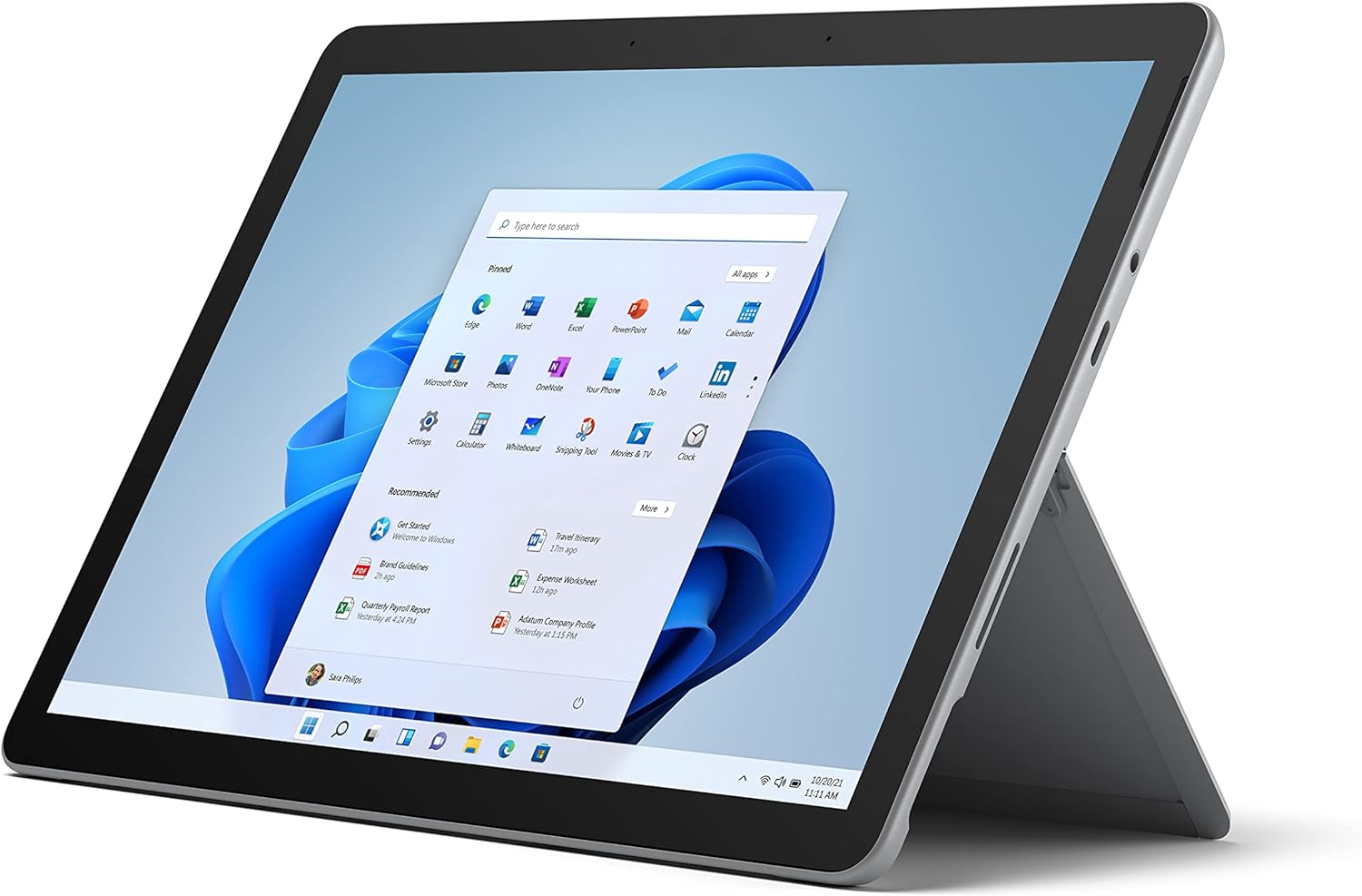
What You Get With the Microsoft Surface Go 3

The listing for this Platinum edition is designated as a device-only package, meaning core input peripherals like keyboards and active styluses must be sourced separately. Inside the retail packaging, Microsoft provides the foundational hardware and essential documentation needed to initialize the device right away:
- The Microsoft Surface Go 3 tablet unit finished in Platinum, featuring an integrated adjustable Kickstand.
- Standard proprietary Surface power supply unit supporting Fast Charging capabilities.
- Quick Start Guide (QSG) detailing setup procedures and initial Windows 11 configuration.
- Safety and regulatory compliance documentation.
- One-year limited manufacturer hardware warranty documents.
Key Specifications
| Specification Attribute | Product Detail |
|---|---|
| Brand and Manufacturer | Microsoft |
| Model Name and Generation | Surface Go (3rd Generation, 2022 Model Year) |
| Model Number | 8VC-00001 |
| Processor Configuration | Intel Core i3 |
| System Memory | 8GB RAM |
| Internal Storage | 128GB SSD |
| Display Size and Resolution | 10.5-inch touchscreen with 220 ppi resolution |
| Starting Weight | 1.2 pounds (tablet only) |
| Operating System | Windows 11 |
| Wired Connectivity | USB-C port, 3.5mm headphone jack, MicroSDXC Card Reader |
| Wireless Connectivity | WiFi and Bluetooth 5.0 |
| Battery and Charging | Up to 11 hours battery life with Fast Charging support |
Field Portability and Physical Construction
Portability is the headline asset of this machine. Weighing in at just 1.2 pounds for the bare tablet, the device effortlessly slips into small sling bags, camera packs, or field pouches without imposing noticeable physical strain during long production days. For vloggers running between shooting locations or creators needing a lightweight digital slate on set, the compact footprint offers freedom that bulkier laptops cannot deliver. The built-in adjustable Kickstand extends smoothly from the back of the magnesium-alloy chassis, allowing the tablet to stand independently on cafe tables, studio carts, or uneven outdoor surfaces without requiring a separate bulky stand.
The physical dimensions also dictate how this micro Surface Go design integrates into tight mobile workspaces. While traditional clamshell machines like the microsoft – surface laptop go 3 – 12.4 touch-screen – intel core i5 with 8gb memory – 256gb ssd (lat demand significant lap space or flat tabletop depth, the kickstand and slate design lets you prop the display at diverse angles suited for viewing shot lists, typing notes, or reviewing field scripts. The minimalist profile ensures you can tuck the device alongside camera gear in tight production kits without occupying the space of a full-size edit machine.
Durability and ergonomic handling remain critical for creators constantly moving between shoots. The smooth edges and rigid exterior chassis feel substantial in the hand despite the featherweight specification, making single-handed handheld operation viable for extended reading or note-taking sessions. Because the device is sold as a standalone slate, creators must decide whether to deploy it bare with touch navigation, pair it with standard Bluetooth peripherals, or invest in the magnetic Type Cover to transform it into an ultra-mobile typing deck.
Processing Efficiency and Real-World Multitasking
Under the hood, this configuration represents the step-up tier for the hardware family, swapping basic entry silicon for an Intel Core i3 processor paired with 8GB of RAM and a 128GB SSD. In practical use, surface go 3 i3 performance delivers a distinct operational uplift over baseline dual-core configurations, particularly when running modern desktop applications inside Windows 11. The presence of 8GB of system memory is essential for multitasking, preventing the severe tab-throttling and application freezes that often plague budget tablets restricted to minimal RAM allocations.
For creative individuals evaluating a surface go 3 for creators workflow, setting realistic computational boundaries is vital. The Intel Core i3 chip easily handles lightweight productivity tools, multi-tab web browsing, cloud collaboration in Google Docs or Notion, high-definition media streaming, and document signing. In a video or photo production pipeline, it serves admirably as a companion terminal for logging metadata, checking audio levels via companion software, or managing project spreadsheets. However, heavy 4K multi-stream timeline editing or complex raw batch rendering will swiftly saturate this dual-core chip, emphasizing that this slate is meant to assist rather than replace dedicated studio editing towers.
Storage performance via the 128GB solid-state drive guarantees prompt boot sequences and quick application launches compared to slower eMMC flash modules found on budget educational variants. While 128GB fills up rapidly once Windows 11 and core applications are installed, the internal drive maintains consistent read and write speeds for day-to-day productivity. When managing larger media libraries or scratch disks, creators will need to lean on external storage solutions or the onboard expandable card slot to maintain adequate operational headroom.
Display Quality and Stylus Interaction
Visual feedback is delivered through a 10.5-inch touchscreen boasting a 220 ppi pixel density, resulting in sharp text rendering, crisp UI elements, and vibrant color presentation. The high pixel density ensures that reading dense documentation, inspecting image previews, and scrolling through timeline notes remains visually comfortable even during lengthy field sessions. The 3:2 aspect ratio is a standout characteristic of the Surface family, offering greater vertical screen real estate than standard 16:9 widescreen formats, which is especially beneficial when reading documents, framing vertical video concepts, or navigating web pages.
Digital creators will appreciate the platform’s native stylus optimization. The display features dedicated surface go 3 stylus support engineered to pair with active pens like the Microsoft Surface Pen. When propped at a low drafting incline using the friction kickstand, the surface go 3 portable tablet mimics a digital sketchpad, making it well-suited for sketching storyboards, annotating PDF scripts, marking up video proof cuts, or signing production agreements on location. Touch response under Windows 11 feels intuitive, supporting fluid multi-finger gestures for zooming into visual assets or cycling through active workspace windows.
When contrasted against enterprise and legacy portable offerings such as the microsoft surface pro 6 or student-oriented models like the microsoft surface se, the 10.5-inch screen strikes a middle ground between ultra-compact portability and legible work area. While a larger panel naturally affords more room for complex desktop toolbars, this 10.5-inch panel maximizes handheld comfort while retaining sufficient pixel precision for critical on-the-go review tasks.
Connectivity and Mobile Workflow Integration
Adapting to field production requires flexible peripheral connectivity, and the Microsoft Surface Go 3 includes a pragmatic assortment of modern ports despite its slim chassis. The built-in USB-C port acts as a versatile interface capable of handling data transfers, external display output, and power delivery via compatible chargers. Vloggers can directly tether high-speed external solid-state drives or connect USB-C card readers to offload footage on location. Furthermore, retaining a dedicated 3.5mm headphone jack offers reliable, zero-latency audio monitoring when editing quick voiceovers or reviewing captured field audio without dealing with Bluetooth interference.
One of the most useful features for field photographers and content producers is the integrated MicroSDXC card reader tucked neatly behind the kickstand. This allows creators to pop a memory card directly out of an action camera, drone, or audio recorder and immediately back up or review assets without carrying dedicated dongles. Combined with Bluetooth 5.0 for wireless mice, keyboards, or wireless monitoring headphones, the surface go 3 mobile workflow can be tailored to minimalist travel setups that require minimal supplemental hardware.
Network connectivity is anchored by integrated WiFi, enabling seamless cloud syncing to OneDrive, Dropbox, or creative cloud platforms when working within studio environments or coffee shops. When remote in the field, mobile hot-spotting from a smartphone or portable cellular hub allows creators to push finished drafts, upload thumbnail graphics, or coordinate production schedules in real time. The combination of wired flexibility and wireless reliability makes this compact slate a resilient node in any distributed creative workflow.
Battery Endurance and Field Reliability
Microsoft rates the surface go 3 battery life at up to 11 hours under idealized conditions, providing substantial runtime expectations for mobile users working away from wall outlets. In day-to-day mixed usage involving active WiFi browsing, document writing, continuous screen brightness adjustments, and background audio streaming, real-world longevity typically settles lower than maximum manufacturer benchmarks. Nevertheless, the platform delivers ample stamina to survive standard production meetings, multi-hour transit flights, or extended remote work sessions without requiring an immediate hunt for AC power.
When power depletion occurs, the inclusion of Fast Charging capabilities significantly reduces downtime. Using the supplied proprietary power adapter or a compatible high-output USB-C power bank, the battery replenishes rapidly, letting you top up during quick lunch breaks or brief studio pauses. The flexibility to charge via either the proprietary magnetic port or standard USB-C ensures that creators carrying multi-port travel chargers do not strictly need to pack the dedicated Microsoft charging brick on short overnight excursions.
Thermal design also impacts sustained reliability in portable scenarios. The compact chassis is engineered to handle light-to-moderate productivity workloads quietly without distracting fan roar during interviews or quiet studio recordings. Because thermal throttling can kick in under continuous, high-load mathematical processing, keeping tasks aligned with the device’s intended scope—writing, communications, asset organization, and lightweight previewing—ensures consistent and stable operational battery efficiency throughout the day.
Check Microsoft Surface Go 3 on Amazon
Is the Microsoft Surface Go 3 Worth It
Determining if the surface go 3 is worth it comes down to matching your performance expectations with the unique constraints of a 10.5-inch slate. If you need an ultra-compact, featherweight Windows 11 computer to function as a secondary production assistant, digital notepad, or highly portable travel workstation, this Intel Core i3 model with 8GB of RAM and 128GB SSD represents the sweet spot of the Go family. It offers vastly smoother operation than entry-level Pentium editions, providing dependable responsiveness for everyday office applications, cloud collaboration, and media consumption.
On the other hand, buyers looking for a primary production workstation capable of intensive 4K video rendering, heavy 3D rendering, or complex DAW multi-track recording will find the compact form factor limiting. Users who need broader screen real estate and workstation-tier processing might prefer full-sized alternatives in Microsoft’s portfolio, such as the microsoft surface 5, which offer higher-voltage processing architectures. Furthermore, because this listing is sold as a device-only package, prospective owners must factor in the additional acquisition of a Type Cover and Surface Pen if full laptop-style typing and precision digital illustration are essential to their daily routine.
Ultimately, the Microsoft Surface Go 3 succeeds brilliantly within its defined niche: providing a true desktop Windows environment inside an extraordinarily compact 1.2-pound chassis. For vloggers seeking a lightweight travel slate, students balancing digital textbooks and lecture notes, or creative directors reviewing scripts on set, this compact slate delivers genuine utility without unnecessary physical bulk.
FAQ
Does the Microsoft Surface Go 3 come with a keyboard and stylus in the box?
No, this specific listing is packaged as a device-only configuration. The retail box includes the tablet unit, the standard power supply, a quick start guide, safety information, and warranty documentation. Input accessories such as the Surface Type Cover and Surface Pen are fully supported but must be purchased separately.
Can the Surface Go 3 handle 4K video editing for vloggers?
The Surface Go 3 powered by an Intel Core i3 processor and 8GB of RAM is optimized for light productivity, media playback, script writing, and field organization. While it can handle very basic video clips or storyboard sequencing, its dual-core low-power architecture is not built for multi-stream 4K timeline rendering or complex grading workloads.
What ports are available on the Surface Go 3 for external accessories?
The physical chassis features a single USB-C port for data transfer, external displays, and charging, alongside a standard 3.5mm headphone jack and an integrated MicroSDXC card reader. Wireless accessories can connect using built-in Bluetooth 5.0 and WiFi.
Can you expand the internal storage on the Surface Go 3?
Yes, while the internal 128GB solid-state drive is fixed, you can expand storage capacity immediately via the integrated MicroSDXC card reader located beneath the kickstand. This provides a convenient method for reading camera cards or storing local document libraries.
How does the Intel Core i3 configuration compare to baseline models?
The Intel Core i3 processor paired with 8GB of RAM and a 128GB SSD delivers significantly better multitasking responsiveness and smoother desktop performance under Windows 11 than entry-level Pentium models equipped with 4GB of RAM and slower eMMC storage.


