
As Amazon Associates, we earn from qualifying purchases. This means we may receive a small commission at no extra cost to you if you click through and make a purchase.
Choosing a mobile workstation has changed significantly with the arrival of Qualcomm silicon in Windows hardware. If you are weighing whether ARM architecture can sustain your everyday production, evaluating the Microsoft Surface Pro 11 equipped with the 10-core Snapdragon X Plus processor is a practical starting point. This 13-inch 2-in-1 pairs 16GB of system memory with a 512GB solid-state drive, aiming directly at mobile creators, vloggers, and independent digital artists who need brisk performance without excessive power consumption. Rather than forcing you toward high-heat internal components, this platform prioritizes thermal efficiency and consistent day-long operation.
In this guide, we examine whether this specific configuration handles the practical demands of on-the-go creative production. We look closely at processor efficiency, display capabilities, real-world emulation stability, and the ergonomics of the bundled Inateck wireless keyboard. Understanding these aspects will help you decide if this 2-in-1 form factor fits your workflow or if an alternative hardware setup makes better sense for your creative toolkit.
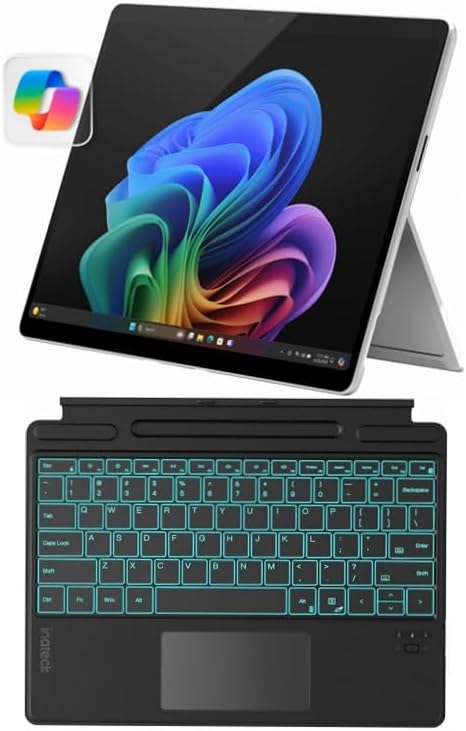
What You Get With the Microsoft Surface Pro 11

This hardware bundle delivers a self-contained mobile workstation that combines Microsoft’s 11th-generation tablet architecture with an external wireless typing interface for immediate desk or field use.
- Microsoft Surface Pro 11 13-inch tablet in Platinum
- Snapdragon X Plus 10-core processor (Model X1P-64-100)
- 16GB system RAM
- 512GB solid-state storage drive
- 13-inch PixelSense touchscreen display
- Inateck Bluetooth backlit keyboard with precision touchpad and pen holder
- Integrated 7-color customizable backlighting on keyboard
- 1-year manufacturer warranty
Key Specifications
| Component | Specification |
|---|---|
| Processor | Qualcomm Snapdragon X Plus (10-Core, X1P-64-100) |
| AI Platform | Copilot+ PC Certified Architecture |
| Memory | 16GB RAM |
| Storage | 512GB SSD |
| Display | 13-inch PixelSense Touchscreen |
| Form Factor | 2-in-1 Tablet and Laptop |
| Bundled Keyboard | Inateck Bluetooth Backlit Keyboard with Touchpad & Pen Holder |
| Color | Platinum |
| Model Year | 2024 (11th Generation) |
| Warranty | 1 Year Manufacturer Warranty |
Creative Application Performance and ARM Compatibility
Evaluating the practical surface pro 11 copilot plus performance requires understanding how ARM architecture interacts with standard creative software. For years, Windows on ARM suffered from limited app availability and slow emulation. With this release, Microsoft implemented an updated emulation layer named Prism, which runs legacy 64-bit x86 software smoothly while native ARM64 applications operate with full hardware acceleration. Applications coded natively for ARM, such as Adobe Photoshop and DaVinci Resolve, run directly on the 10-core Snapdragon X Plus chip without translation overhead, unlocking rapid responsiveness across visual timelines and raw photo catalogs.
When assessing the surface pro 11 for photo editing, the 16GB memory pool provides adequate overhead for managing multi-layered raw image files, organizing expansive batch exports, and running smart masking utilities. The integrated neural processing unit handles background tasks like subject isolation, automated framing, and noise reduction without monopolizing CPU cores. While reviewing creative workstations like the microsoft surface laptop copilot pc, user tests demonstrate that modern ARM silicon maintains stable framerates during video previews, provided your editing tools are compiled natively for the platform.
Software compatibility remains an essential factor before purchasing. While main creative suites now offer native ARM64 builds, certain specialized audio plugins, legacy video encoding drivers, and older color grading utilities have not yet made the transition. In these scenarios, surface pro 11 arm app compatibility relies entirely on Prism emulation. While standard productivity software translates seamlessly, running unoptimized legacy editing plugins can introduce slight rendering delays or higher memory usage compared to native code.
Display Quality and Visual Precision on the PixelSense Panel
Visual fidelity is critical for any visual artist, and the 13-inch PixelSense touchscreen on the Surface Pro 11 delivers an exceptional canvas for mobile work. Featuring a functional 3:2 aspect ratio, the screen displays noticeably more vertical space than standard widescreen panels. This vertical height allows photographers to view portraits with less letterboxing and gives video editors extra room for stacked audio and video tracks inside editing software. The crisp resolution ensures that fine details in high-megapixel raw files remain clear without requiring constant zooming.
For drawing and retouching, the touchscreen offers responsive input with low latency. Although the listing does not specify whether a digital stylus comes packed inside the box, the bundled keyboard includes a dedicated pen storage loop to keep compatible styluses secure during transport. When used with a compatible active pen, the surface pro 11 for creators provides intuitive pressure sensitivity for precise localized cloning, brush adjustments, and hand-drawn annotations directly over video frames.
Working outdoors or near bright studio lighting highlights the panel’s anti-reflective properties and solid brightness levels. Color reproduction remains consistent across varying viewing angles, which is vital when sharing screen previews with clients on location. For vloggers checking exposure balances and color warmth away from an office desk, this screen provides the fidelity necessary to make accurate grading decisions on site.
Battery Efficiency and Thermal Management in the Field
One of the primary selling points of the Snapdragon X Plus architecture is its power efficiency relative to traditional computing chips. In past generations, running multi-layer photo edits on a portable Windows tablet meant draining the battery rapidly and enduring loud internal cooling fans. With the Surface Pro 11, the ARM silicon manages background power states intelligently, allowing the machine to cruise through media logging, text editing, and preliminary timeline assemblies without generating excessive heat.
Under continuous operation, the surface pro 11 snapdragon x plus battery life represents a noticeable leap forward for mobile creators. Users can work from coffee shops, airport waiting lounges, or production sets without remaining tethered to a wall outlet. Even when processing complex image batches, the system balances power across its 10 cores to avoid sudden battery drops. Those who have researched older options like a refurbished microsoft surface pro will notice that this ARM-based generation operates cooler under sustained load while sustaining higher productivity on battery power alone.
Thermal stability directly protects your hardware performance during extended export jobs. Because the Snapdragon X Plus generates less thermal waste than high-wattage desktop-class chips, the chassis avoids the heavy thermal throttling that hampered earlier ultra-thin tablets. This sustained performance allows you to export 1080p and light 4K video clips without experiencing significant processing slowdowns halfway through your render queue.
The Inateck Keyboard Bundle and Workflow Ergonomics
A notable aspect of this specific package is the inclusion of the Inateck Bluetooth backlit keyboard. Unlike proprietary physical keyboards that rely strictly on magnetic pogo-pin data connections, this keyboard utilizes wireless Bluetooth connectivity. This means the keyboard can remain paired and fully functional even when physically detached from the tablet, allowing creators to prop the Surface Pro 11 on a table or tripod mount while positioning the keyboard wherever it feels most comfortable.
Typing ergonomics on the surface pro 11 inateck keyboard bundle are enhanced by its 7-color customizable backlighting. Creators working in dim editing bays, late-night hotel rooms, or outdoor shoots at dusk can easily adjust keyboard illumination to maintain visibility. The integrated precision touchpad supports standard multi-finger gestures, facilitating smooth zooming, desktop navigation, and timeline scrubbing without requiring an external mouse.
The keyboard accessory also includes an integrated pen holder, ensuring your stylus remains secured against the frame when moving between shooting locations. While the wireless Bluetooth connection introduces an internal battery that requires occasional charging, it provides flexible positioning that standard snap-on keyboards cannot match, making it an adaptable accessory for dynamic field kits.
Check Microsoft Surface Pro 11 on Amazon
Is the Microsoft Surface Pro 11 Worth It
Determining if this configuration represents the right investment depends heavily on your software ecosystem and portability requirements. For mobile photographers, travel vloggers, digital illustrators, and content managers, the balance of power, battery endurance, and lightweight design is compelling. The 10-core processor provides sufficient throughput for day-to-day video logging, high-resolution photo retouching, and multitasking, while the 16GB of RAM ensures that multi-application workflows run without memory bottlenecks.
However, users whose daily work requires heavy 3D rendering, complex multi-camera 4K ProRes timelines, or proprietary x86 software plugins may run into hardware and architectural limitations. In those specialized circumstances, a dedicated desktop workstation or a machine with discrete graphics hardware will be more suitable. Buyers who prioritize sheer compute muscle over ultra-portable convenience might also consider future hardware generations, such as an eventual surface pro 12, to address extreme rendering demands.
Ultimately, if you need a dependable, lightweight 2-in-1 that delivers exceptional display quality, cool and quiet field operation, and long battery life for modern creative workflows, this Surface Pro 11 bundle offers a well-rounded and versatile package.
FAQ
Can the Surface Pro 11 run standard desktop Windows applications?
Yes. The Surface Pro 11 runs Windows on ARM, which executes native ARM64 applications directly and uses the Prism emulation engine to run standard 64-bit x86 software. While most mainstream applications run smoothly, specialized legacy drivers or unoptimized plugins may experience minor performance trade-offs.
How does the Inateck keyboard communicate with the tablet?
The included Inateck keyboard connects via wireless Bluetooth. This allows you to type and use the touchpad while the keyboard is magnetically docked to the tablet or placed separately on your workspace for improved ergonomic comfort.
Does this bundle include a digital stylus?
The product listing specifies that the Inateck keyboard includes an integrated pen holder, but it does not specify whether an active stylus is included in the package. Most users will need to purchase a compatible digital pen separately.
What are the key surface pro 11 snapdragon x plus specs for creators?
Key specifications include a 10-core Qualcomm Snapdragon X Plus processor (Model X1P-64-100), 16GB of system RAM, a 512GB solid-state drive, a 13-inch PixelSense touchscreen, Copilot+ PC AI capabilities, and an Inateck Bluetooth backlit keyboard.
Can I use the Surface Pro 11 for video editing?
Yes, the Surface Pro 11 handles 1080p and light 4K video editing effectively, particularly when utilizing native ARM-compiled editing software like DaVinci Resolve. Creators working with complex multi-stream 4K RAW or heavy 3D motion graphics may prefer a dedicated workstation with a discrete graphics processor.


