
As Amazon Associates, we earn from qualifying purchases. This means we may receive a small commission at no extra cost to you if you click through and make a purchase.
Choosing the right companion display can make a substantial difference in everyday production efficiency, and the MSI PRO MP251W arrives as a targeted solution for desks requiring fluid visuals without excessive clutter. If you are debating whether this screen fits your creative desk, the direct answer is that it serves best as a responsive, high-refresh secondary display for timeline navigation, communication panels, and auxiliary preview feeds. Built around a crisp 1080p resolution, modern styling, and fluid motion handling, it targets creators who want clean aesthetics alongside dependable display output. The white chassis integrates smoothly into light-toned studio spaces where bulky dark plastic monitors disrupt the visual harmony of your creative suite.
Understanding what to expect requires looking closely at how its combination of high refresh rate and entry-level resolution behaves during intensive multitasking. While primary color grading displays often demand higher pixel density, an auxiliary monitor thrives on motion smoothness, dependable connectivity, and flexible mounting ergonomics. This detailed breakdown examines the hardware specifications, desktop utility, refresh rate benefits, port accessibility, and real-world considerations to help you decide whether this model deserves a permanent spot on your studio desk.

What You Get With the MSI PRO MP251W
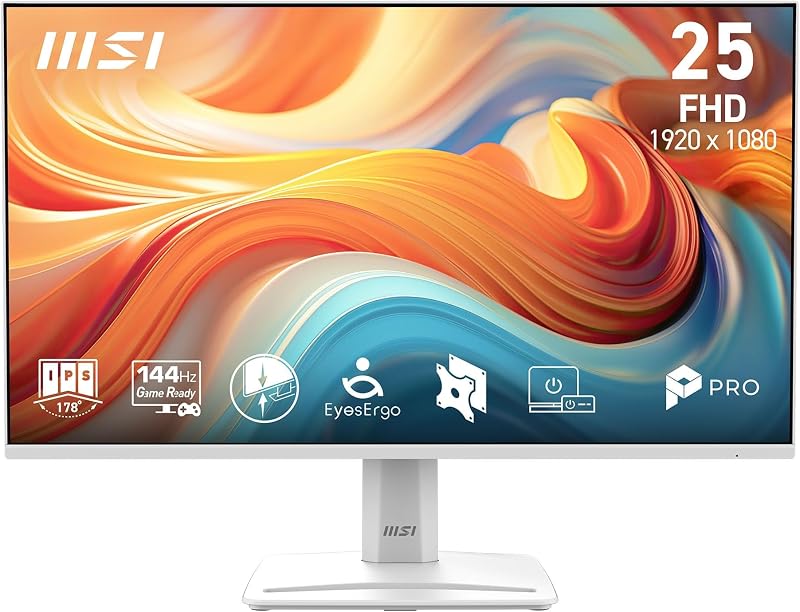
The manufacturer packages this display with essential features designed to integrate smoothly into modern and legacy desktop setups alike, providing a balanced baseline for productivity and media playback.
- FHD 1080p display panel offering 1920 by 1080 native resolution
- 144Hz high refresh rate capability for fluid motion reproduction
- 1ms response time designed to minimize ghosting and trailing
- AMD FreeSync adaptive synchronization support
- Matte screen finish engineered to diffuse ambient room glare
- HDR Ready visual enhancement processing
- Slim bezels with PerfectEdge display framing
- Triple input interface incorporating DisplayPort, HDMI, and legacy VGA ports
- Standard VESA mount compatibility for multi-display arm integration
- White desktop chassis and integrated ergonomic stand assembly
Key Specifications
| Specification Attribute | Manufacturer Detail |
|---|---|
| Native Resolution | 1920 x 1080 (FHD 1080p) |
| Refresh Rate | 144Hz |
| Response Time | 1 millisecond |
| Display Technology | LED Backlit LCD |
| Aspect Ratio | 16:9 widescreen |
| Adaptive Sync | AMD FreeSync |
| Screen Finish | Matte anti-glare |
| Video Inputs | DisplayPort, HDMI, VGA |
| Mounting Standard | VESA compatible |
| Dimensions and Weight | 7.41″D x 21.94″W x 16.51″H, 10.9 lbs |
Visual Performance and Daily Creative Demands
Evaluating this screen for editing tasks requires an honest understanding of how 1080p resolution functions in modern production pipelines. With a native display resolution maximum of 1920 by 1080 pixels, the screen provides standard high-definition clarity across its 16:9 aspect ratio. In a dedicated creative workspace, utilizing the msi pro mp251w for video editing works best when designated as a dedicated timeline host, bin organizer, or audio meter window. It leaves your primary workspace open for 4K video playback, while this panel handles the dense interface elements of software like Premiere Pro or DaVinci Resolve without slowing down your system rendering pipeline.
The screen finish is completely matte, which proves immensely valuable when positioning the monitor near bright studio softboxes, window backlights, or high-output desktop lamps. Glossy screens often turn into mirrors during daytime shooting, but the matte diffusion coating prevents harsh hot spots from obscuring fine editing details. While the unit features HDR Ready processing to accept high dynamic range signals, creators handling mastered client deliverables should still rely on specialized grading monitors like the msi pro max 271upx12g for final color validation. The HDR Ready feature on this panel is geared primarily toward visual punch and expanded signal compatibility during daily preview sessions rather than calibrated broadcast mastering.
For day-to-day visual comfort, the LED LCD technology provides consistent illumination across the active viewing surface. The product listing presents an interesting contrast regarding dimensions, noting a 24.5-inch panel in the title while technical rows mention 15.6 inches, though the physical exterior footprint measuring 21.94 inches wide aligns firmly with standard compact desktop monitors. Incorporating this screen into an active msi pro mp251w creator workflow gives you sufficient desktop real estate to stretch complex multi-track audio projects, run full-length web browsers alongside reference documents, or monitor ongoing live stream chat streams without occupying massive amounts of physical desk space.
Motion Fluidity and Adaptive Sync Capabilities
One of the most defining characteristics of the display is its fluid 144Hz refresh rate, a specification rarely found on budget-friendly productivity panels. Standard office monitors operate at a modest 60Hz, which can cause visible cursor jumping and window judder during rapid mouse movements. Stepping up to a dedicated msi pro mp251w 144hz monitor brings immediate tactile fluidity to the operating system. Scrolling through hundreds of video clips in a media pool, scrubbing horizontally across dense timelines, and flicking through dense asset directories feels instantaneous and smooth, substantially lowering visual fatigue over lengthy editing marathons.
Complementing the high refresh rate is integrated AMD FreeSync technology coupled with a rapid 1ms response time. The msi pro mp251w freesync performance ensures that the panel synchronizes its refresh cycles directly to the frame output of your graphics hardware. When paired with a capable desktop card like an rtx 3060 16gb, frame pacing remains completely unified. This eliminates the screen tearing and micro-stuttering that frequently disrupts both timeline scrubbing and after-hours casual gaming sessions. The 1ms response time prevents fast-moving motion graphics and animated titling sequences from leaving unsightly pixel trails or ghosting artifacts across the panel.
This heightened responsiveness also translates into an elevated everyday computing experience outside editing suites. Creators frequently transition between content development, research, and hobbyist gaming. Having an adaptive sync display capable of native 144Hz output allows your workstation to double seamlessly as an esports entertainment hub. The combination of hardware-level synchronization and low latency ensures that rapid camera sweeps in games remain sharp and legible, delivering substantial functional value beyond basic spreadsheet and word processing duties.
Port Selection and Workspace Compatibility
Input flexibility remains a critical buying concern when integrating a new monitor into an established multi-display arrangement. The connectivity suite includes DisplayPort, HDMI, and a legacy VGA port. Having the msi pro mp251w e14a displayport connection is particularly advantageous for multi-monitor desktop environments, as modern graphics cards typically prioritize DisplayPort connections for their highest refresh rates and adaptive sync protocols. Utilizing DisplayPort leaves your primary HDMI ports available for external capture cards, secondary client televisions, or specialized video transmitters.
For mobile-first video creators working from compact workstations, the HDMI input allows effortless single-cable connectivity to production laptops. Docking an apple macbook pro 14 via a standard multi-port hub or HDMI adapter instantly transforms the laptop into a multi-screen workstation, providing dedicated screen space for video bins, script drafts, and audio controls. The inclusion of a legacy VGA port ensures broad backward compatibility, allowing you to connect legacy studio PCs, dedicated server terminals, or retro production equipment without hunting down specialized digital conversion hardware.
The hardware connectivity layout allows multiple source devices to remain connected simultaneously, reducing cable wear and tear over time. While the listing does not specify internal audio speakers or integrated USB hub passthrough ports, the pure video pipeline covers the most essential standards required for modern creative workflows. By utilizing standard digital connectors alongside an analog backup, the monitor fits effortlessly into both cutting-edge workstation rigs and mixed-generation media studios.
Chassis Design and Ergonomic Mounting Options
Aesthetic cohesion has become an essential consideration for modern desktop creators, vloggers, and streamers whose workspace regularly appears on camera. Designed with a clean, modern white exterior, the msi pro mp251w white setup breaks away from conventional black plastic displays. The casing brightens up desktop environments, pairing nicely with minimalist desks, light birch wood finishes, and white studio gear. The physical footprint measures 7.41 inches deep, 21.94 inches wide, and 16.51 inches tall, while weighing a manageable 10.9 pounds, making it easy to position even on compact tabletop workstations.
The bezel structure utilizes what the manufacturer terms a PerfectEdge display design with noticeably slim bezels along the perimeter. This narrow boundary framing is particularly advantageous for multi-monitor arrays. When placing two displays side by side or mounting this unit vertically adjacent to your primary screen, the slim borders create an almost seamless transition across panels. Your eyes navigate across editing palettes and timelines without encountering thick plastic seams that break concentration.
Ergonomics play a vital role during extended studio sessions, and the inclusion of an msi pro mp251w vesa mount pattern gives you complete control over your screen placement. While the included desk stand provides basic upright stability, mounting the lightweight 10.9-pound chassis to an adjustable articulating gas-spring desk arm dramatically improves posture and frees up precious desk real estate. Swiveling the monitor into a vertical orientation creates an ideal dedicated hub for reading long script documents, tracking vertical social media video edits, or monitoring real-time live stream feeds.
Check MSI PRO MP251W on Amazon
Is the MSI PRO MP251W Worth It
Determining whether this display fits your studio depends primarily on where it sits within your hardware hierarchy. For content creators seeking an ultra-high-resolution canvas for 4K color correction, a 1080p panel will not serve as a master finishing display. However, as an auxiliary workspace monitor designed to handle project bins, streaming tools, web research, and audio editing timelines, the monitor delivers exceptional utility and performance.
The standout advantage lies in the combination of a 144Hz refresh rate, 1ms response time, and AMD FreeSync support within a clean white chassis. Most displays tailored for office workflows remain locked at 60Hz, making the fluid motion of this panel an immediate and noticeable upgrade for daily multitasking. If you value smooth interface responsiveness and want a screen that visually complements a clean, modern studio aesthetic, the overall package offers outstanding functional capability.
Budget-conscious hobbyists, students, and hybrid video editors who require a responsive all-in-one screen will find plenty of everyday satisfaction here. It bridges the gap between everyday office productivity and casual gaming, providing versatile video inputs that accommodate both modern DisplayPort rigs and legacy hardware without requiring specialized adapters.
FAQ
What video connections are available on this monitor?
The display features three distinct video input ports: one DisplayPort, one HDMI port, and one legacy VGA port, allowing flexible connectivity across modern graphics cards, laptops, and older desktop towers.
Can I mount this display to a monitor arm?
Yes, the display supports standard VESA mounting, allowing you to attach the monitor to third-party desk arms, wall brackets, or multi-display desk stands for improved ergonomic positioning.
How does the 144Hz refresh rate benefit video creators?
The 144Hz refresh rate provides noticeably smoother cursor tracking, fluid timeline scrubbing, and reduced window stutter when moving across desktop applications, resulting in less visual fatigue during long editing sessions.
Does the monitor feature a glossy or matte screen?
The display is equipped with a matte screen finish, which diffuses ambient room lighting and prevents harsh reflections from studio softboxes and nearby windows.
Does this model support adaptive sync for gaming?
Yes, the monitor includes AMD FreeSync technology and a 1ms response time to eliminate screen tearing and minimize ghosting during high-speed motion.


