
As Amazon Associates, we earn from qualifying purchases. This means we may receive a small commission at no extra cost to you if you click through and make a purchase.
If you are deciding whether to upgrade your editing setup with an ultrawide canvas, the Samsung Odyssey Neo G9 delivers an expansive dual UHD workspace built for intensive multitasking and immersion. Spanning a 57-inch diagonal with a 32:9 aspect ratio and a 7680×2160 native resolution, this display gives you the exact screen area of two 32-inch 4K monitors side by side without a dividing bezel. To get the most out of its 240Hz refresh rate and dual 4K resolution, however, you need a high-end graphics card capable of driving high-bandwidth outputs alongside sufficient physical desk depth to accommodate its deep curvature.
This review examines how the display holds up across demanding production and creative environments. We analyze hardware connectivity, graphics bandwidth requirements, Quantum Mini-LED precision, and how features like Picture-by-Picture impact productivity. Comparing this dual 4K flagship to standard ultrawide options like the samsung neo g9 clarifies whether the massive 57-inch footprint and cutting-edge inputs align with your specific workstation needs.

What You Get With the Samsung Odyssey Neo G9
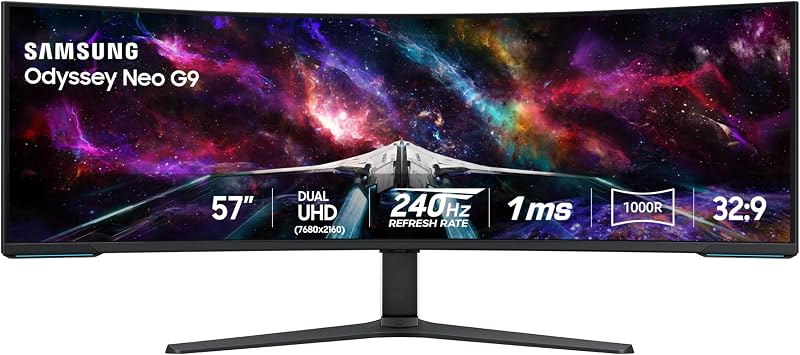
While the listing does not specify which individual connection cables or boxed accessories are packed inside the carton, it outlines the core integrated hardware components and features included with the monitor.
- A 57-inch curved VA display featuring native Dual UHD (7680×2160) resolution and a 32:9 aspect ratio.
- Deep 1000R curvature designed to match human peripheral vision and keep the screen edges within easy view.
- Quantum Matrix Technology powered by Quantum Mini LEDs with 2,392 local dimming zones and 12-bit black levels.
- VESA DisplayHDR 1000 certification with 1,000 nit peak brightness and a 1,000,000:1 contrast ratio.
- Fluid gaming and video motion support featuring a 240Hz refresh rate, 1ms gray-to-gray response time, and AMD FreeSync Premium Pro.
- Input connectivity consisting of DisplayPort 2.1, HDMI 2.1, and an integrated USB Hub.
- Picture-by-Picture and Picture-in-Picture multi-source viewing functions.
- Auto Source Switch+ technology for automatic signal detection when connected systems boot up.
- CoreSync and Core Lighting+ rear ambient illumination systems.
- Ergonomic stand supporting height adjustment, swivel, and tilt, with full compatibility for VESA-standard monitor arms.
Key Specifications
| Specification | Detail |
|---|---|
| Screen Size and Aspect Ratio | 57 inches, 32:9 |
| Display Resolution Maximum | 7680 x 2160 pixels (Dual UHD) |
| Panel Type and Screen Finish | VA LED, Matte finish |
| Curvature | 1000R |
| Backlight Technology | Quantum Mini LED with 2,392 local dimming zones |
| Refresh Rate and Response Time | 240Hz, 1ms (GTG) |
| Brightness and Dynamic Range | 420 cd typical, 1,000 nit peak (VESA DisplayHDR 1000) |
| Contrast Ratio | 1,000,000:1 |
| Color Gamut and Pixel Pitch | 99 gamut, 0.18 mm pixel pitch |
| Connectivity Ports | DisplayPort 2.1, HDMI 2.1, USB Hub |
| Power Consumption | 140 watts |
| Dimensions and Weight | 52.3″ W x 19.7″ D x 24″ H, 41.9 pounds |
Display Bandwidth and Graphics Demands
Evaluating the samsung odyssey neo g9 57 specs highlights an extreme graphics workload: rendering at 7680×2160 means pushing more than 16.5 million pixels simultaneously. This workload represents double the pixel count of a single standard 4K screen. To refresh that massive data volume at high speeds, odyssey neo g9 displayport 2.1 input support is vital. Alongside HDMI 2.1, the inclusion of DisplayPort 2.1 supplies the physical bandwidth needed to deliver high refresh rates and variable refresh rate synchronization via AMD FreeSync Premium Pro without heavy signal compromises.
Before bringing this monitor into your setup, inspecting your graphics card capabilities is an essential step. To run the panel at both native 7680×2160 resolution and 240Hz, your graphics hardware must support DisplayPort 2.1 output standards. Older graphics cards or systems limited to older DisplayPort versions may cap the refresh rate at 60Hz or 120Hz when displaying native resolution. Shoppers exploring high-resolution super-ultrawides like the samsung odyssey 57 should ensure their desktop workstation is equipped with sufficient GPU video bandwidth to leverage the panel’s full potential.
System power delivery is another consideration for high-throughput editing rigs. With a rated power consumption of 140 watts, the display operates internal processing to coordinate its 2,392 local dimming zones, synchronize Core Lighting+ effects, and route high-speed display streams. Creators must ensure their studio power arrangement and workstation chassis can accommodate the heat output and power overhead that accompany top-tier dual UHD computing.
Creative Multitasking and Timeline Real Estate
Using the odyssey neo g9 for video editing changes how you organize editing workspaces. Across the continuous 32:9 panel, timeline-intensive software such as video editors, audio sequencers, and color suites can stretch out across the full lower section without running out of horizontal room. At the same time, an odyssey neo g9 dual 4k workflow allows you to keep media bins, scopes, audio meters, and preview windows open concurrently at native 4K scaling, eliminating the physical black frame dividing traditional two-monitor desks.
For editors who manage two machines at once, the built-in odyssey neo g9 picture by picture capability provides robust hardware splitting. Picture-by-Picture (PBP) allows you to connect two distinct computers—such as a dedicated editing workstation and a live-streaming or office laptop—and display both inputs side by side in their native resolutions. Additionally, Picture-in-Picture (PIP) allows you to resize a secondary video source to take up to 25 percent of the screen area. With Auto Source Switch+, the screen detects when an auxiliary system powers on and switches inputs automatically.
Organizing an efficient odyssey neo g9 creator setup relies heavily on virtual screen partitioning. By setting up grid layouts, you can dedicate individual thirds of the 7680×2160 resolution to separate tasks, such as housing a browser and script notes on the left, a primary editing timeline in the center, and preview monitors on the right. Analyzing the capabilities of the samsung 57 neo g9 shows how this continuous screen area streamlines complex media production by removing multi-cable desktop clutter.
Visual Contrast and Mini-LED Performance
For video producers, color grading enthusiasts, and visual creators, backlighting control is just as important as pixel count. The odyssey neo g9 mini led performance relies on Quantum Matrix Technology powered by Quantum Mini LEDs. Samsung pairs 2,392 independent local dimming zones with 12-bit black levels to regulate light emission across fine screen segments, minimizing light bleed and halo artifacts around bright elements placed against dark backgrounds.
Dynamic range delivery is supported by VESA DisplayHDR 1000 certification, offering a peak brightness of 1,000 nits and a 1,000,000:1 contrast ratio, alongside a typical brightness of 420 cd. This allows HDR content to display specular highlights alongside deep shadow details. The panel features a matte screen finish that diffuses harsh light reflections in bright studio rooms, while the 99 color gamut specification provides dependable color expression across digital media and entertainment workflows.
The display utilizes a VA panel architecture, which yields deep native contrast compared to standard IPS alternatives. While its 178-degree viewing angles keep visuals stable from standard sitting positions, staying aligned with the center of the screen delivers the most accurate contrast and color saturation. Comparing this display to smaller gaming screens such as the odyssey neo g7 reveals how the 57-inch Mini-LED array produces consistent illumination across an expansive surface area when viewed from the sweet spot.
Desk Footprint and Curve Ergonomics
Understanding samsung odyssey neo g9 curve productivity requires looking at its tight 1000R curvature radius. Spanning 52.3 inches in width, a flat screen of this size would cause extreme peripheral distortion and require frequent head turning. The 1000R curve matches the human eye’s natural field of vision, ensuring that windows, menus, and tools situated at the outer edges remain at roughly the same focal distance as the center of the display, thereby reducing neck fatigue during long editing sessions.
However, the physical footprint demands careful desk planning. The monitor measures 19.7 inches deep with its stand and weighs 41.9 pounds. On shallow desks, the stand legs consume considerable working depth, placing the screen closer to your eyes than ideal. The integrated ergonomic stand offers height, tilt, and swivel adjustments to help you align the screen angle. For users wanting to free up desktop space, the display supports VESA-standard monitor arms, provided the third-party mount is rated to support an ultrawide chassis weighing over 40 pounds.
Desk atmosphere and setup aesthetic are further customized by the CoreSync and Core Lighting+ features built into the rear housing. These ambient light zones project colors that match on-screen content directly onto the rear wall. For vloggers, streamers, and studio creators who record their workstations on camera, this integrated lighting creates a dynamic background glow without adding extra lamp clutter to the workspace.
Check Samsung Odyssey Neo G9 on Amazon
Is the Samsung Odyssey Neo G9 Worth It
Determining whether the odyssey neo g9 is worth it depends on your desk dimensions, computing hardware, and specific production workflow. If you are a creator, video editor, or multitasker currently managing two separate 4K displays, this monitor provides a continuous dual UHD canvas without central bezels. The 2,392 Mini-LED dimming zones, DisplayHDR 1000 capability, and flexible Picture-by-Picture tools make it a formidable hub for high-end creative work.
Conversely, this monitor is not suited for compact workspaces or modest hardware setups. With a 41.9-pound weight, a stand depth nearly reaching 20 inches, and a 140-watt power draw, it requires a sturdy, deep desk. Furthermore, if your graphics card lacks modern high-bandwidth DisplayPort 2.1 or HDMI 2.1 capabilities, you will not be able to run high refresh rates at native 7680×2160 resolution, leaving a major portion of the display’s hardware potential unused.
Ultimately, if your computer rig has the graphics horsepower to output dual UHD resolution and your office desk can accommodate its 52.3-inch width, the Samsung Odyssey Neo G9 represents an exceptional workspace upgrade. It combines high-speed gaming capabilities, Mini-LED contrast, and massive dual 4K timeline workspace into a single high-performance package.
FAQ
Can the Samsung Odyssey Neo G9 achieve dual 4K at 240Hz over a single cable?
Yes, the monitor is engineered to reach its native 7680×2160 resolution at 240Hz using its DisplayPort 2.1 input. However, your graphics card must feature compatible DisplayPort 2.1 output ports with sufficient bandwidth to output native dual UHD at that refresh rate.
How does Picture-by-Picture work on the monitor?
Picture-by-Picture (PBP) lets you connect two separate computer inputs and view them simultaneously side by side in native resolution. The monitor also includes Picture-in-Picture (PIP) support, which allows you to place a secondary input window over up to 25 percent of the screen area.
What are the desk dimensions and weight of the Samsung Odyssey Neo G9?
The monitor measures 52.3 inches wide, 19.7 inches deep, and 24 inches high with the included stand. The entire unit weighs 41.9 pounds, requiring a robust, deep desk surface to support its footprint safely.
Can you mount the Samsung Odyssey Neo G9 on a monitor arm?
Yes, the display is fully compatible with standard VESA monitor mounts. Because the monitor weighs 41.9 pounds, you must use a heavy-duty arm specifically rated to carry high-mass, 57-inch curved screens.
Is the 1000R curve practical for creative video editing and timeline work?
The 1000R curvature keeps the entire 52.3-inch horizontal width at a consistent viewing distance from your eyes, making it easier to monitor wide editing timelines and reference panels without excessive head turning. While straight lines can appear slightly curved at first, most creators adapt quickly to the ergonomic field of view.


