
As Amazon Associates, we earn from qualifying purchases. This means we may receive a small commission at no extra cost to you if you click through and make a purchase.
Evaluating whether to replace a dual-display workstation with a single continuous super-ultrawide screen leads directly to the Samsung Odyssey Neo G9 57. This flagship 32:9 curved monitor merges two full 3840×2160 UHD displays into an unbroken 57-inch visual canvas, eliminating the center bezel that interrupts video timelines, audio mixers, and production suites. Featuring an immersive 1000R curvature, the panel brings expansive horizontal workspaces into natural peripheral sightlines, offering a compelling upgrade for high-density creative workflows and desktop multitasking.
Choosing this class of monitor requires understanding its physical and graphical demands, as running a native 7680×2160 resolution at up to 240Hz challenges even premium workstation graphics cards. In this Samsung G95NC review, we explore how the display operates in creative settings, evaluating its visual precision, input bandwidth, multitasking flexibility, and desk ergonomics. The following sections break down hardware specifications, workflow improvements for video editing, local dimming performance, and the practical realities of mounting and driving this massive display.

What You Get With the Samsung Odyssey Neo G9 57
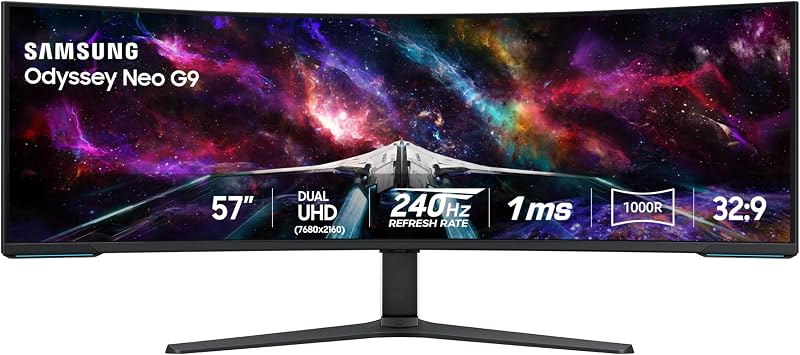
The monitor includes specialized hardware and connectivity engineered to support its substantial footprint and extreme resolution output. According to listing data, the package contains the display panel alongside factory mounting hardware and interface options designed for workstation integration.
- Samsung Odyssey Neo G9 57 curved monitor with anti-glare matte screen finish
- Ergonomic desk stand supporting tilt, swivel, and height adjustments
- VESA-standard mounting interface for heavy-duty monitor arm setups
- DisplayPort 2.1 input for high-bandwidth Dual UHD variable refresh rates
- HDMI 2.1 video inputs for secondary workstations and external consoles
- Integrated USB hub for desktop peripheral routing and cable management
- CoreSync and Core Lighting plus rear ambient lighting system
- Auto Source Switch+ firmware for automated video signal detection
- Quantum Matrix Technology backlight with 2,392 local dimming zones
Key Specifications
| Specification | Detail |
|---|---|
| Screen Size | 57 inches |
| Native Resolution | Dual 4K UHD (7680 x 2160) |
| Aspect Ratio | 32:9 |
| Screen Curvature | 1000R |
| Panel Technology | VA with Quantum Matrix Mini LED |
| Local Dimming Zones | 2,392 zones |
| Refresh Rate | 240 Hz |
| Response Time | 1ms (GTG) |
| Brightness | 1,000 nits peak (DisplayHDR 1000) / 420 cd typical |
| Contrast Ratio | 1,000,000:1 |
| Color Gamut and Depth | 99 color gamut / 12-bit black levels |
| Dimensions with Stand | 52.3″ W x 24.0″ H x 19.7″ D |
| Total Product Weight | 41.9 pounds |
| Power Consumption | 140 watts |
Dual 4K Canvas Capabilities for Video Editing Workflows
Deploying the Samsung 57 Neo G9 for video editing substantially reorganizes how digital creators interact with complex editing suites. In professional post-production software such as DaVinci Resolve and Adobe Premiere Pro, timeline navigation usually requires persistent horizontal scrolling. Spanning a single project across this 7680×2160 panel allows editors to review long multi-cam sequences in full horizontal layout while keeping preview monitors, grading scopes, and media pools cleanly arranged above.
The primary advantage of the Samsung Odyssey Neo G9 Dual 4K surface lies in its native pixel density. Offering a tight 0.18 pixel pitch, visual elements like keyframes, color curves, and audio meters appear exceptionally crisp without scaling artifacts. Creators migrating from previous-generation super-ultrawide panels like the odyssey neo g9 gain critical vertical space, moving from 1440p up to a full 2160 vertical pixels. This extra vertical height accommodates stacked video tracks and detailed audio waveforms without compressing the primary preview monitor.
Visual consistency across this vast panel is maintained through 178-degree viewing angles and an anti-glare matte screen finish. In active studio environments with overhead lights or softboxes, the matte treatment scatters specular reflections rather than creating distracting glare hotspots over dark timelines. The deep 1000R curve bends the edges of the 52.3-inch frame directly toward the user’s natural focal path, reducing neck strain over long editing sessions.
Quantum Mini LED Backlighting and Visual Dynamic Range
Accurate video cutting and grading depend on reliable contrast rendition, which is where Samsung Neo G9 57 Mini LED technology proves its value. Built upon Samsung’s Quantum Matrix Technology, the panel replaces traditional edge-lit guides with an intricate grid of 2,392 local dimming zones. This dense zoning network allows the display to dim dark areas to near-absolute black while driving highlights to intense brightness, effectively mitigating the cloudy blooming halos that often compromise standard VA and IPS panels during high-contrast scenes.
Dynamic range performance is backed by VESA DisplayHDR 1000 certification, delivering up to 1,000 nits of peak brightness alongside a 1,000,000:1 contrast ratio and 420 cd typical luminance. Combined with 12-bit black level processing, the display renders subtle shadow gradations and highlight roll-offs with exceptional smoothness. Video editors working on high-contrast HDR projects can assess highlights without clipping darker scene textures. When comparing this backlighting system to displays like the samsung qn90f 43-inch neo qled 4k (2025), the dense distribution of Mini LEDs ensures tight illumination control across the ultra-wide field.
Color fidelity is supported by a 99 color gamut rating specified in the listing data. While standard office monitors frequently compress saturated primaries, this panel renders rich reds, deep greens, and vibrant blues with convincing tonal separation. Whether reviewing final color grades, mastering motion graphics sequences, or viewing high-resolution digital stills, the combination of quantum-dot color enhancement and precise local dimming ensures that creative work translates predictably to external consumer screens.
Driving Dual UHD Through DisplayPort 2.1
Unlocking the full potential of this 57-inch display requires substantial graphics processing and high-bandwidth connectivity. Transmitting 7680×2160 pixels at 240Hz represents a data throughput demand of roughly 16.5 million pixels per frame at high refresh rates. To handle this workload, the inclusion of Samsung 57 Neo G9 DisplayPort 2.1 inputs provides the high-bandwidth pipeline necessary to handle uncompressed or visually lossless compressed signals without dropping frame rates or color depth.
To reach 240Hz at native Dual UHD, users must connect the monitor to a modern graphics card that features DisplayPort 2.1 with full UHBR bandwidth support. Connecting via HDMI 2.1 or older DisplayPort 1.4 ports still yields native resolution, but refresh rates may be restricted to 60Hz or 120Hz depending on your card’s Display Stream Compression (DSC) capabilities. The Samsung 57 Neo G9 specs also highlight AMD FreeSync Premium Pro support, which synchronizes frame rendering with the panel’s swift 1ms response time, preventing tearing and jitter when scrubbing complex timeline sequences.
Beyond primary video transmission, the display functions as an organized connection point via an integrated USB hub. Connecting input peripherals and external storage directly to the monitor simplifies cable routing down to a single umbilical harness toward the host computer. Furthermore, Auto Source Switch+ firmware monitors connected ports in real time, automatically waking the panel and locking onto new video signals the moment an editing rig, capture workstation, or laptop powers on.
Workstation Ergonomics and Picture-by-Picture Multitasking
Physical planning is essential when integrating this monitor into a professional workspace, as its dimensions measure 52.3 inches wide, 24.0 inches high, and 19.7 inches deep with the stand attached. Weighing 41.9 pounds, the display demands a sturdy desk with at least 30 inches of surface depth to accommodate the sprawling foot base. For creators exploring the broader samsung odyssey 57 family, pairing the display with a reinforced, heavy-duty monitor arm via the standard VESA mounting pattern is the most effective way to reclaim lost desktop surface.
Once properly positioned, Samsung 57 Neo G9 Picture by Picture functionality unlocks remarkable multitasking flexibility by splitting the display into two independent 3840×2160 UHD monitors without any dividing bezels. A creator can simultaneously feed the left side of the display with a primary editing workstation via DisplayPort 2.1 while the right side displays a dedicated streaming PC or audio suite over HDMI 2.1. The firmware also provides Picture-in-Picture (PIP) capability, scaling a secondary input window up to 25% of the screen for real-time monitoring of auxiliary feeds or documents.
These advanced display modes drastically elevate Samsung Neo G9 57 productivity setups by eliminating the need for external hardware switchers and cluttered dual-monitor mounts. Rear-mounted CoreSync and Core Lighting plus modules project ambient bias lighting onto the wall behind the monitor, matching on-screen color values to soften eye strain during extended night editing sessions. Operating at a typical power consumption of 140 watts, the monitor integrates heavy-duty cooling paths across the top and rear chassis to maintain stable operating temperatures during prolonged high-brightness rendering work.
Check Samsung Odyssey Neo G9 57 on Amazon
Is the Samsung Odyssey Neo G9 57 Worth It
Determining if the Samsung 57 Neo G9 is worth it depends on the nature of your workflow and the processing power of your workstation hardware. For professional video editors, broadcast directors, colorists, and advanced multi-window multitaskers, this monitor represents a singular workspace transformation. Replacing two separate 32-inch 4K monitors with one continuous, bezel-free 1000R curved display provides unmatched timeline visibility, exceptional 2,392-zone Mini LED contrast, and seamless dual-system multitasking via native Picture-by-Picture integration.
However, this display is distinctly over-engineered for casual office users, standard document editing, or users relying on basic portable laptops lacking high-bandwidth video outputs. Connecting lower-tier graphics hardware will bottleneck the panel, restricting it to lower refresh rates and sub-native resolutions that fail to justify its physical footprint. Furthermore, anyone working in compact spaces or using shallow office desks will find the 52.3-inch width, 19.7-inch stand depth, and 41.9-pound weight unwieldy without extensive workstation restructuring.
For dedicated visual creators and high-end power users equipped with modern graphics cards, the investment delivers unparalleled desktop utility. If your creative livelihood relies on expansive timeline visibility, accurate HDR backlighting, and flexible multi-device routing, the Samsung Odyssey Neo G9 57 provides a class-leading workstation centerpiece that consolidates your entire digital environment into a single, high-performance panoramic window.
FAQ
What graphics card do I need to run the Samsung Odyssey Neo G9 57 at full resolution and 240Hz?
Running the monitor at its full 7680×2160 native resolution at 240Hz requires a graphics card equipped with DisplayPort 2.1 featuring high-bandwidth UHBR capability. Older graphics cards equipped with DisplayPort 1.4 or standard HDMI 2.1 can still run the display at native resolution, but maximum refresh rates will generally be capped at 60Hz or 120Hz depending on Display Stream Compression support.
Can the Samsung 57 Neo G9 display video from two separate computers simultaneously?
Yes, the monitor includes Picture-by-Picture (PBP) functionality, allowing two separate computer inputs to display side by side in native 3840×2160 UHD resolution. It also features Picture-in-Picture (PIP) mode, which displays a secondary input in a floating window covering up to 25% of the total screen space.
How effective is the matte screen finish against studio reflections?
The screen features a matte anti-glare finish specifically designed to diffuse ambient light from studio fixtures, softboxes, and desk lamps. This prevents sharp reflections from obscuring dark video timelines, grading scopes, and color palettes across the wide 57-inch surface.
Can I mount the 57-inch Odyssey Neo G9 on a standard monitor arm?
While the monitor features standard VESA mounting compatibility, its 41.9-pound total weight and deep 1000R curve require a heavy-duty, counterbalance-rated monitor arm designed specifically for extreme ultrawide displays. Standard desk-clamped arms will struggle with tilt retention and risk sagging under the monitor’s forward center of gravity.
Does the 1000R curvature distort straight lines during editing and graphic design?
The 1000R curvature is engineered to match the natural radius of human vision, keeping the outer edges of the 52.3-inch display equidistant from your eyes when seated at standard desk distances. While viewing the screen from steep side angles can create the appearance of curved horizontal lines, viewing from the center provides a natural, undistorted perspective across wide timelines and application windows.


