
As Amazon Associates, we earn from qualifying purchases. This means we may receive a small commission at no extra cost to you if you click through and make a purchase.
The Samsung Odyssey Neo G9 57 represents a massive leap in desktop real estate, merging two full UHD screens into a single seamless canvas. For digital creators, video editors, and heavy multitaskers, deciding whether this massive screen is the right buy comes down to physical workspace and graphical capability. If your workstation can drive 7680×2160 resolution and accommodate a footprint exceeding four feet in width, this monitor provides an expansive environment without the physical bezels of a traditional two-screen setup. However, driving this vast display surface requires modern hardware that can push high pixel volumes, making it essential to understand what setup compromises you face before committing your desk to it. Evaluating the samsung odyssey neo g9 57 dual 4k configuration reveals how radical resolution shifts affect everyday productivity and creative throughput.
In this detailed review, we examine the practical reality behind the specifications to determine if it fits serious studio work. We break down the samsung odyssey 57 creator workflow advantages, investigate the structural demands of its 1000R curvature, assess display bandwidth constraints across modern GPUs, and review split-screen functionality. By exploring the complete samsung odyssey 57 specs, display technology, and physical ergonomics, this analysis provides the essential details needed to decide if this super ultrawide flagship solves your daily production challenges or introduces unnecessary operational friction.

What You Get With the Samsung Odyssey Neo G9 57
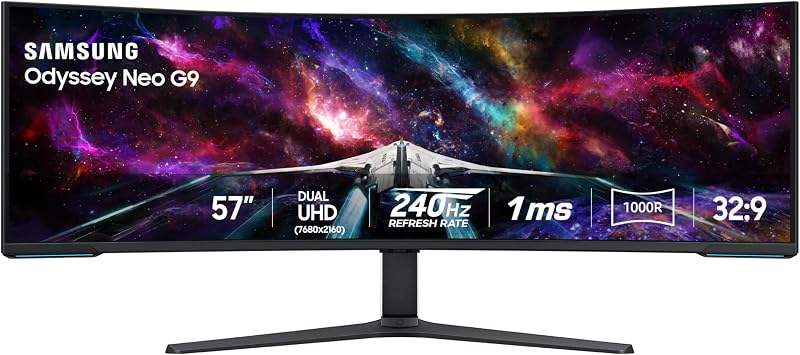
The Samsung Odyssey Neo G9 57 arrives as an ambitious, large-format desktop display packaged with core integration accessories designed to support high-bandwidth video routing and substantial ergonomic adjustment straight out of the package. Samsung equips this 57-inch display with an integrated array of visual backlighting systems and hardware inputs intended to streamline complex workstation connectivity without relying on external switches.
- Samsung 57-inch Odyssey Neo G9 curved monitor with anti-glare matte screen finish
- Ergonomic desk stand featuring height adjustment, tilt, and swivel capabilities
- VESA-standard mounting compatibility for heavy-duty monitor arm configurations
- DisplayPort 2.1 connection supporting extreme native bandwidth and variable refresh rates
- HDMI 2.1 interface ports for high-bandwidth modern computing and console sources
- Integrated USB Hub for connecting desktop peripherals directly through the display
- CoreSync and Core Lighting+ rear projection lighting system for ambient studio illumination
- Auto Source Switch+ technology for automatic signal detection when booting workstations
- Picture-by-Picture and Picture-in-Picture hardware processing capabilities
- Quantum Mini LED backlighting system featuring 2,392 local dimming zones
Key Specifications
Understanding the hardware profile is crucial for verifying workstation compatibility and computing requirements. The table below details the official manufacturer specifications provided for the display.
| Attribute | Detail |
|---|---|
| Screen Size | 57 inches |
| Native Resolution | Dual 4K UHD (7680 x 2160) |
| Aspect Ratio | 32:9 |
| Curvature | 1000R |
| Panel Technology | VA with Quantum Matrix Technology (Quantum Mini LED) |
| Local Dimming Zones | 2,392 zones with 12-bit black levels |
| Refresh Rate | 240Hz |
| Response Time | 1ms (GTG) |
| Peak Brightness and HDR | 1,000 nits peak (VESA DisplayHDR 1000, 420 cd typical) |
| Contrast Ratio | 1,000,000:1 |
| Color Gamut and Finish | 99 (Matte Screen Finish) |
| Dimensions and Weight | 52.3″ W x 19.7″ D x 24″ H; 41.9 pounds |
| Power Consumption | 140 watts |
Managing Physical Desk Space and Weight Requirements
Integrating a 57-inch display into a professional workspace demands substantial planning around desk depth and load capacity. The monitor spans an impressive 52.3 inches across and weighs 41.9 pounds, creating an aggressive footprint that will overwhelm shallow work surfaces. Because the included ergonomic stand has a depth of nearly 20 inches, positioning it on standard 24-inch or even 30-inch deep office desks places the screen uncomfortably close to the user. Achieving a comfortable viewing distance requires a dedicated workstation surface with ample depth, ensuring the massive panel does not push your keyboard, mouse, and editing consoles off the edge.
The aggressive 1000R curvature plays an essential role in keeping the expansive edges within peripheral vision without requiring excessive neck turning. While standard flat ultrawide screens force users to constantly pivot their head side-to-side, the tight samsung odyssey 57 curve radius matches the natural contour of human visual perception. This curve brings the left and right peripheral tools, bins, and communication channels into a unified arc, reducing eye strain over prolonged production sessions. Creators stepping up from smaller displays like the samsung odyssey g7 32-inch gaming monitor will notice how the curvature maintains a consistent focal distance across the entire span.
For studios relying on articulated arms, mounting this display requires industrial-grade hardware. Standard desktop monitor arms are rarely rated to support a 41.9-pound curved chassis, and balancing the forward center of gravity created by the 1000R arc introduces extra torque on the mounting plate. Fortunately, the unit features standard VESA compatibility, allowing users to pair it with specialized heavy-duty monitor arms or reinforced wall brackets. Investing the effort to properly float the panel clears substantial desktop territory underneath the screen, providing room for audio interfaces, color control surfaces, and mechanical input devices.
DisplayPort 2.1 Bandwidth and Hardware Demands
Delivering an astonishing 7680×2160 resolution at a blistering 240Hz refresh rate pushes existing interface protocols to their absolute architectural limits. The samsung odyssey 57 displayport 2.1 implementation exists precisely to handle the gargantuan pixel transmission volume required by Dual 4K visuals. Traditional display interfaces often choke on native 8K-tier horizontal pixel counts, relying on aggressive compression or refresh rate throttling to push a stable signal. DisplayPort 2.1 support gives modern graphics cards the transmission headroom needed to output native resolution without artifacting, stutter, or compromised fidelity.
However, workstation builders must scrutinize their graphics hardware before planning a Dual UHD setup. To unlock the full 240Hz refresh rate at 7680×2160, your graphics processing unit must feature DisplayPort 2.1 connectivity capable of high-bandwidth output. Many workstation and consumer GPUs still rely exclusively on DisplayPort 1.4 or HDMI 2.1 ports, which will limit the monitor to 120Hz at native resolution or require display stream compression. Those seeking a simpler ultrawide experience without extreme GPU demands often opt for balanced panels such as the samsung odyssey g5 34, which avoids the steep hardware barrier imposed by Dual 4K rendering.
Even when operating at 120Hz on existing GPUs, the sheer computational workload of processing dual UHD outputs impacts performance during real-time rendering. Video editing suites, CAD modeling software, and graphic visualization engines must render double the pixels of a conventional 4K panel. When configuring your workstation, pairing this monitor with top-tier graphics hardware is essential to maintain smooth timeline navigation, instantaneous timeline scrubbing, and fluid user interface interactions across complex multi-window applications.
Multitasking and Split Screen Workflows via Picture by Picture
The primary productivity appeal of this display rests on its ability to emulate two discrete 32-inch 4K UHD monitors side-by-side without an intrusive center bezel. Traditional dual-monitor configurations create a physical visual division right down the center of the workstation, breaking focus and forcing compromise in window placement. The seamless 32:9 panel eliminates this gap entirely, providing expansive room for extended timelines, multiple preview viewports, color scopes, and communication windows simultaneously. In day-to-day use, samsung odyssey 57 productivity workflows feel significantly more cohesive than conventional multi-screen arrangements.
Hardware versatility expands dramatically thanks to robust samsung odyssey 57 picture by picture functionality. With Picture-by-Picture, creators can connect two distinct machines—such as a dedicated video rendering workstation and a secondary streaming laptop—and display both inputs simultaneously side-by-side at their native resolutions. This feature transforms the monitor into a unified command console, eliminating the need for redundant screens or external video capture splitters. Additionally, Picture-in-Picture allows you to overlay a secondary video feed on up to 25 percent of the screen surface, ideal for monitoring live camera inputs, client feeds, or rendering progress queues while remaining focused on the main canvas.
Samsung also incorporates an integrated USB hub alongside Auto Source Switch+ technology, streamlining multi-device operational routines. When a secondary workstation or laptop powers on, the display detects the active transmission line and adjusts accordingly, cutting down on time spent toggling through on-screen display menus. For professionals seeking efficient desktop layouts, consolidating multiple displays into a singular curved unit simplifies power distribution and keeps desktop cabling orderly.
Visual Precision for Video Editing and Color Grading
Creative professionals demanding contrast accuracy and expansive horizontal timelines will find a capable platform in this display. Leveraging samsung odyssey 57 mini led architecture powered by Quantum Matrix Technology, the screen utilizes 2,392 local dimming zones to achieve precise lighting control. These miniaturized diodes deliver a 1,000,000:1 contrast ratio alongside 12-bit black level processing, preventing dark editing workspaces from washing out into hazy greys. Combined with VESA DisplayHDR 1000 certification and a peak brightness of 1,000 nits, the panel allows editors to preview high dynamic range material with rich highlight definition.
When deploying the samsung odyssey 57 for video editing, the massive horizontal span fundamentally transforms Non-Linear Editor software interfaces. Video editors working in Premiere Pro, DaVinci Resolve, or Final Cut Pro can stretch full multi-track timelines across the lower half of the screen while dedicating the top area to full-scale 4K preview windows, audio mixers, and color wheels. The dense pixel pitch of 0.18 ensures that fine timeline splices, typography, and interface markers remain razor sharp without visible pixelation, offering clarity that standard 1440p super ultrawides cannot replicate. Creators transitioning from conventional flat displays such as the samsung odyssey g50d 27 gain massive timeline length alongside pristine native 4K media playback.
Despite these high-end visual features, creators must account for the panel’s VA display characteristics. While the 178-degree viewing angles and matte anti-glare finish provide wide visibility without reflective distractions, VA panels inherently exhibit minor gamma shifting when viewed off-axis compared to specialized professional IPS reference monitors. The 1000R curvature mitigates this off-axis shift by angling the outer edges inward directly toward your eyes. While this makes the monitor exceptional for timeline arrangement, VFX compositing, and general grading, high-end Hollywood-grade color mastering studios may still require a dedicated broadcast reference monitor for definitive color verification.
Check Samsung Odyssey Neo G9 57 on Amazon
Is the Samsung Odyssey Neo G9 57 Worth It
Deciding if the samsung odyssey neo g9 57 dual 4k powerhouse justifies a permanent spot on your desk depends on your hardware ecosystem and workflow complexity. If you are a video creator, motion designer, or heavy multitasker who currently juggles two individual 4K displays and desires an unbroken, immersive digital canvas, this monitor delivers an unmatched desktop experience. The combination of dual UHD resolution, 2,392 Mini LED dimming zones, and responsive 240Hz refresh rates bridges the gap between extreme productivity and premier media consumption like no other unit on the market.
On the other hand, workstation users constrained by modest desk dimensions or equipped with older graphics hardware should approach with caution. At 41.9 pounds and spanning over 52 inches wide, this display demands a heavy-duty physical setup and substantial desk depth to remain ergonomically viable. Furthermore, if your system lacks DisplayPort 2.1 or high-bandwidth HDMI 2.1 outputs, you will not be able to tap into its peak 240Hz dual-UHD potential without graphical throttling. For general document editing or casual office tasks, the extensive physical footprint and 140-watt power draw may prove far more demanding than necessary.
Ultimately, when evaluated against the practical needs of modern creators, the answer to whether is samsung odyssey 57 worth it is a definitive yes for high-end studio operators. It consolidates multiple screens, eliminates bezel distractions, provides outstanding HDR dynamic range, and offers top-tier split-screen versatility via Picture-by-Picture. If your desk has the depth to support it and your GPU has the horsepower to drive it, this monitor stands as one of the most capable visual workstations available.
FAQ
Can the Samsung Odyssey Neo G9 57 run two computers at the same time?
Yes. The monitor features Picture-by-Picture processing, allowing you to connect two separate input sources simultaneously and view them side-by-side at their native resolutions without needing extra splitters.
What GPU do I need to run this monitor at Dual 4K and 240Hz?
To achieve the full 7680×2160 native resolution at 240Hz, your workstation graphics card must support DisplayPort 2.1 connectivity with sufficient bandwidth. Operating on older DisplayPort 1.4 connections will cap the refresh rate or require compression.
How wide and heavy is the Samsung Odyssey Neo G9 57?
The monitor measures 52.3 inches wide, 19.7 inches deep with its stand, and 24 inches high. The entire assembly weighs 41.9 pounds, requiring a sturdy, deep desk surface or a specialized heavy-duty VESA monitor arm.
Is the screen finish glossy or matte?
The display features a matte screen finish designed to reduce glare and distracting reflections from studio lights and windows, maintaining clarity across its 57-inch curved surface.
Does the monitor feature integrated ambient lighting?
Yes. It includes Samsung CoreSync and Core Lighting+ technology, which projects colors from on-screen content onto the wall behind your monitor to create an immersive studio atmosphere.


