
As Amazon Associates, we earn from qualifying purchases. This means we may receive a small commission at no extra cost to you if you click through and make a purchase.
Evaluating a visual display for high-resolution post-production, digital editing, and color verification requires a standard of fidelity that typical consumer televisions rarely achieve. Video editors, visual creators, and discerning hobbyists frequently question whether the Sony BRAVIA 8 II delivers genuine studio-grade utility or simply high-end home cinema entertainment. Built around a 65-inch QD-OLED panel that pairs self-luminous organic diodes with an advanced Quantum Dot layer, this screen is engineered to generate pure black levels alongside heightened color luminance. For creators evaluating the Sony BRAVIA 8 II for creators, choosing between dedicated reference monitors and a large-format smart screen comes down to color volume, panel precision, tonal balance, and how effectively the display reveals subtle luminance steps in high dynamic range grades.
This technical review delivers an objective assessment of the Sony BRAVIA 8 II QD OLED display for editing suites, client playback, and media evaluation. Based on an in-depth analysis of the manufacturer specifications, the capabilities of the artificial intelligence processing engine, native refresh handling, and dedicated studio calibration modes, this guide examines what you can expect in an active creative workspace. The following sections explore the included features, hardware specifications, color reproduction behavior, physical studio setup requirements, and whether this display justifies an investment for your workflow.

What You Get With the Sony BRAVIA 8 II
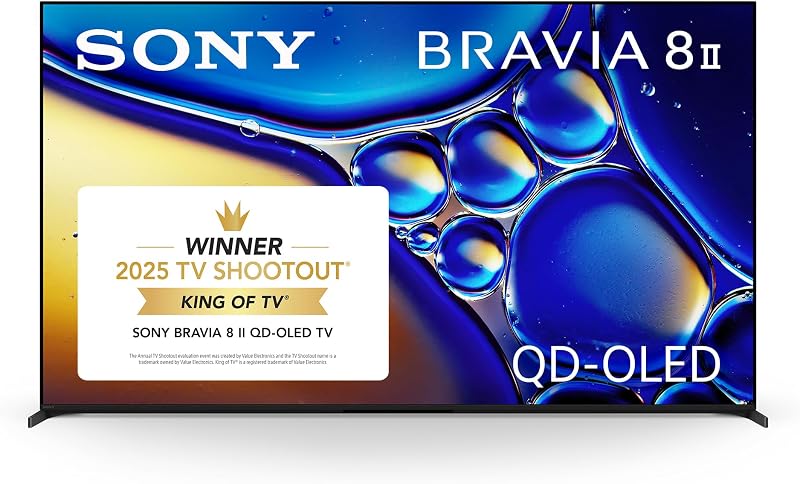
The Sony BRAVIA 8 II arrives with a feature set built around Sony’s high-tier 65-inch QD-OLED panel architecture, combining self-emissive contrast with integrated smart connectivity and creator-focused viewing profiles. Based on the product data, the package includes the following primary hardware features and software capabilities:
- 65-inch 4K QD-OLED display panel featuring over 8 million self-lit pixels for pixel-level illumination
- Quantum Dot color architecture driven by XR Triluminos Max to render billions of real-world colors
- Sony XR Processor with artificial intelligence technology for real-time scene enhancement, contrast, and color optimization
- XR Clear Image processing designed to upscale HD and digital content while restoring lost textural detail
- Studio calibrated picture modes specially tuned for Netflix, Prime Video, and SONY PICTURES CORE
- Comprehensive high dynamic range format support including Dolby Vision, HDR10, and Hybrid Log-Gamma
- Native 120Hz display refresh rate equipped with XR OLED Motion technology for smooth frame handling
- Screen-emanating audio system with support for Dolby Atmos, DTS:X, and IMAX Enhanced audio standards
- Smart TV operating system powered by Google TV with integrated Google Assistant voice searching
- Wireless content streaming integration through Apple AirPlay 2 and Google Cast protocols
- SONY PICTURES CORE entertainment application access with bundled movie titles and IMAX Enhanced releases
- Integrated tabletop stand hardware creating an installed footprint of 13.35 inches in depth
Key Specifications
Understanding the core Sony BRAVIA 8 II specs is critical for determining whether this display satisfies the technical demands of your editing suite. The table below details the essential hardware metrics, physical measurements, and processing technologies provided by the manufacturer.
| Specification Attribute | Listing Detail |
|---|---|
| Screen Size | 65 inches |
| Display Technology | QD-OLED (Self-Luminous Backlight) |
| Native Resolution Support | 4K, 1080p, 720p |
| Native Refresh Rate | 120Hz |
| Maximum Display Brightness | 1000 nit |
| Static Contrast Ratio | 3,000,000:1 |
| Screen Finish | Matte |
| High Dynamic Range Formats | Dolby Vision, HDR10, HLG |
| Image Enhancement Suite | XR Processor, XR Clear Image, XR Contrast Booster 25, XR Triluminos Max |
| Motion Enhancement | XR OLED Motion |
| Viewing Angle | 178 degrees |
| Dimensions With Stand (D x W x H) | 13.35 x 56.88 x 32.75 inches |
| Weight Without Stand | 52.9 pounds |
Color Accuracy and XR Processing in Studio Workflows
Color fidelity is the primary metric for creative post-production, and evaluating a consumer display for mastering begins with sub-pixel mechanics. Traditional OLED panels incorporate a white sub-pixel structure that can wash out color saturation when driving high luminance highlights. In contrast, the Quantum Dot layer deployed on this panel preserves pure chrominance across varying luminance thresholds. By controlling over 8 million self-illuminating pixels with XR Triluminos Max processing, the panel reproduces billions of real-world colors without clipping saturated hues. For creators grading wide-gamut timelines, this Sony BRAVIA 8 II color accuracy ensures faithful rendering of skin tones, foliage, and subtle atmospheric gradients. Video editors familiar with older consumer displays like the sony bravia 8 65 inch will appreciate how the quantum dot architecture preserves saturation in bright scene elements.
Image processing within this display is managed by the Sony BRAVIA 8 II XR processor, which uses artificial intelligence to evaluate visual scenes dynamically. In professional production environments, computational image enhancement must be approached with caution, as artificial sharpening can distort critical evaluation. However, the onboard XR Clear Image technology proves valuable when viewing scaled media, intelligently reconstructing lost detail and suppressing digital compression noise on 1080p or lower-resolution proxy files. This allows editors to preview multi-camera timelines and digital deliverables cleanly on a full 4K screen without generating distracting ringing artifacts or synthetic edge halos.
High dynamic range mastery on this Sony BRAVIA 8 II 4K HDR display is reinforced by XR Contrast Booster 25, which coordinates with a 1000 nit maximum display brightness and a static 3,000,000:1 contrast ratio. Because each self-luminous diode turns off entirely to achieve true zero-nit black levels, there is no backlight bleeding or edge blooming around bright title cards, practical studio lamps, or specular points of light. When evaluating mastered content across Dolby Vision, HDR10, and HLG standards, the display presents deep shadow gradations and peak highlights simultaneously, providing a dependable canvas for assessing high dynamic range balance.
Studio Calibration and Environmental Ambient Control
Calibrating a display to broadcast standards often demands specialized probe hardware and software profiling, creating friction for independent creative studios. The Sony BRAVIA 8 II studio calibration approach mitigates this complexity by offering dedicated picture modes tuned specifically for Netflix, Prime Video, and SONY PICTURES CORE. These modes disable hyper-saturated consumer enhancements, unnatural frame smoothing, and exaggerated contrast curves, establishing an out-of-the-box baseline that respects filmmaker intent. For commercial creators and streaming video producers, this provides a dependable preview of how digital masters will translate to end consumers on major streaming services.
Ambient lighting management in a creative workspace directly influences perceived contrast, and the physical panel surface determines how reflections are handled. Featuring a matte screen finish and a wide 178-degree viewing angle, this panel diffuses harsh reflections from studio lighting, desk lamps, and production rigs. However, because matte coatings scatter ambient illumination across the face of the glass, placing the screen in a room with bright, uncontrolled light can lift perceived black levels and reduce perceived dynamic punch. Maintaining controlled ambient lighting remains crucial when conducting critical color passes, distinguishing this dedicated display from high-output living room screens such as the sony bravia 9 75 inch tv.
Collaborative workflow is further augmented by integrated acoustic engineering and wireless screen mirroring protocols. Rather than relying on downward-firing speakers, the display generates sound directly from the screen surface, backed by Dolby Atmos and DTS:X decoding. In client review bays, spoken dialogue and Foley effects track directly to the actors on screen, establishing natural spatial imaging without requiring an immediate secondary monitor setup. Furthermore, native integration with Apple AirPlay 2 and Google Cast allows visiting producers or collaborators to stream rough cut edits directly from portable devices without stringing temporary video cables across the studio floor.
High Frame Rate Performance and Cadence at 120Hz
Motion reproduction and frame cadence are critical factors when verifying video edits across different production formats. Equipped with native Sony BRAVIA 8 II 120Hz support and XR OLED Motion technology, this display handles standard 24-frame-per-second cinema cadence with precision. Because 120 divides evenly by 24, the panel displays 24p cinematic content using a clean 5:5 frame cadence, completely eliminating the 3:2 pulldown judder common to standard 60Hz displays. For directors, documentary editors, and cinematographers, observing authentic motion cadence is vital for assessing camera pans, tracking shots, and natural shutter blur.
For creators involved in high frame rate commercial production, sports broadcasting, or fast-action gameplay recording, the 120Hz refresh rate delivers fluid motion rendering. The near-instantaneous response time of self-luminous QD-OLED pixels prevents ghosting or trailing behind fast-moving subjects. When connected to high-refresh workstation outputs or modern production systems, the display accurately reflects fast camera sweeps and rapid motion, making it easy to identify frame drops, compression tearing, or focus tracking issues that might go unnoticed on slower panels.
The display operating system is built on Google TV, featuring hands-free Google Assistant voice control for fast navigation between studio apps, broadcast inputs, and streaming platforms. While massive commercial screens like the sony bravia 85 or the ultra-wide format sony bravia 5 98 inch tv cater to expansive studio staging walls, this 65-inch panel offers an ideal balance of visual immersion and pixel density for dedicated post-production suites.
Studio Desk Mounting and Physical Footprint Considerations
Integrating a 65-inch display into an edit suite requires careful planning around physical dimensions, weight distribution, and desk ergonomics. The Sony BRAVIA 8 II measures 56.88 inches wide, 32.75 inches high, and 13.35 inches deep when mounted on its included tabletop stand. Without the stand, the panel weighs 52.9 pounds, requiring a reinforced wall bracket or an industrial studio monitor arm rated for substantial weight. Although the listing mentions an item weight of 16 ounces in one specification field, this represents an obvious listing clerical error, and studio designers should plan mounting hardware around the true 52.9-pound panel weight.
Viewing distance and ergonomic positioning are equally important when working on detailed visual timelines for long sessions. Placing a 65-inch 4K screen roughly five to seven feet from the mixing console or editing desk provides an immersive field of view matching theatrical cinema standards without causing neck strain. While the listing does not specify the exact placement or total count of HDMI connection ports, leaving sufficient clearance behind the display ensures reliable routing of heavy video cables and prevents unwanted strain on connection terminals.
Check Sony BRAVIA 8 II on Amazon
Is the Sony BRAVIA 8 II Worth It
Determining whether this display fits your studio depends on your specific production demands, workspace setup, and creative priorities. If you are asking is Sony BRAVIA 8 II worth it as a dedicated client review screen or primary grading display, it delivers exceptional performance for independent filmmakers, digital creators, and commercial editors. The synergy of self-luminous pure blacks, Quantum Dot color fidelity, 1000 nit peak brightness, and certified studio calibration modes for Netflix and Prime Video makes it a top-tier visual reference display.
For cinephiles and media hobbyists, the panel provides a reference-level cinema experience in home viewing spaces. The native 120Hz refresh rate ensures judder-free 24p cinema playback, while the XR Processor with AI technology optimizes standard and digital content with impressive clarity. Combined with screen-emanating audio, Dolby Vision, and DTS:X support, it handles movies, streaming, and high frame rate gaming with equal finesse.
However, this display may not suit every production environment. Workspaces exposed to heavy, uncontrolled direct sunlight may struggle with the 1000 nit brightness limit, as high-output mini-LED displays can push significantly more raw luminance through intense room glare. Furthermore, professional post-production houses requiring dedicated SDI inputs, hardware-level 3D LUT uploads, or built-in waveform scopes will still need dedicated broadcast reference monitors. For those seeking an outstanding client-facing display or a master-grade editing monitor, the Sony BRAVIA 8 II provides exceptional visual accuracy and processing prowess.
FAQ
Does the Sony BRAVIA 8 II support native 4K 120Hz video playback?
Yes, the display features a native 120Hz refresh rate and supports 4K resolution at 120 frames per second. This provides fluid motion handling for high frame rate video editing, fast-action media evaluation, and responsive high-frame gaming feeds.
How do the studio calibrated picture modes function on this display?
The studio calibrated modes are specifically tuned for Netflix, Prime Video, and SONY PICTURES CORE. These settings adjust image processing to disable exaggerated consumer sharpening and artificial motion smoothing, ensuring color, contrast, and luminance closely follow original creator mastering standards.
What high dynamic range formats are compatible with the Sony BRAVIA 8 II?
The specifications confirm full support for Dolby Vision, HDR10, and Hybrid Log-Gamma (HLG). This wide HDR format coverage enables video creators to preview and evaluate dynamic range content across the most common broadcast and commercial streaming standards.
Can this 65-inch display be mounted on a studio wall or arm?
Yes, the panel weighs 52.9 pounds without its stand and measures 56.88 inches wide by 32.75 inches high. While the listing does not specify the exact VESA bolt pattern dimensions, the display can be secured to heavy-duty wall brackets or specialized monitor arms rated for displays over 53 pounds.
How does the matte screen finish handle studio lighting reflections?
The display features a matte screen finish engineered to scatter specular reflections from overhead fixtures, studio softboxes, and desk monitors. While this reduces distracting mirror-like glares, working in rooms with excessive ambient light can lift perceived black levels, making controlled studio lighting ideal for critical color evaluation.


