As Amazon Associates, we earn from qualifying purchases. This means we may receive a small commission at no extra cost to you if you click through and make a purchase.
For content creators, streamers, and audio hobbyists, managing a workstation packed with webcams, capture cards, audio interfaces, and external storage drives can quickly turn into a cable nightmare. Shoppers searching for a tactile desk centerpiece like an eleks power console and usb hub usually want physical control without the friction of digging through operating system device managers. The atolla KR307 meets that demand directly by providing a dedicated powered USB hub with individual switches and swappable backlit caps. If you need an illuminated icon usb hub that lets you instantly cut power to your camera or unmount audio gear right from your desk, this hardware console delivers an accessible, switch-driven solution.
Choosing the right desktop toggle device depends on your peripheral draw, data transfer habits, and physical workspace layout. The atolla KR307 operates as a 7-port powered hub backed by an external 12V/3A power adapter, featuring six 5 Gbps SuperSpeed USB 3.0 ports alongside a dedicated 18W fast-charging port for mobile gear. In this atolla 7-port usb 3.0 hub review, we examine build quality, data throughput, power distribution, tactile switch ergonomics, and desk integration so you can decide if it belongs in your production environment.

What You Get With the atolla KR307
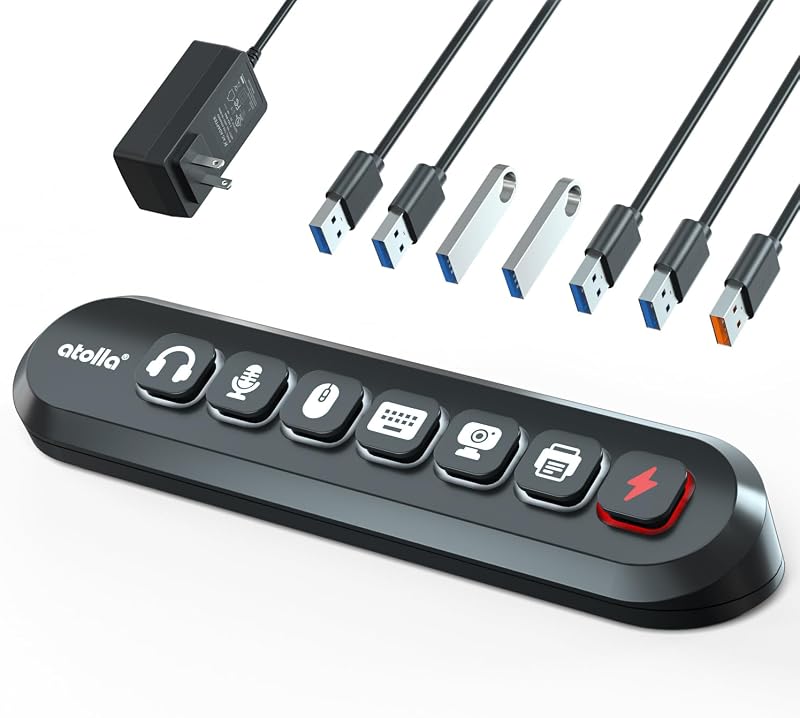
Inside the package, the manufacturer provides the hardware and power accessories necessary to configure a desktop workstation right out of the box. Designed specifically for users who manage multiple input devices and streaming peripherals, the inclusion of swappable switch caps allows you to tailor the unit to your exact workflow.
- atolla KR307 7-port powered USB 3.0 hub console
- 12V/3A dedicated AC power adapter for high-power device support
- Integrated USB 3.0 host connection cable
- Six pre-installed illuminated push-button icon switches
- Six spare swappable buttons with peripheral icons including mic, headphones, hard drive, keyboard, and mouse
- Two-year warranty coverage documentation
Key Specifications
| Specification | Detail |
|---|---|
| Brand | atolla |
| Model Number | THX-120300KU |
| Total USB Ports | 7 (6 Data Ports + 1 Fast Charging Port) |
| Hardware Interface | USB 3.0 (5 Gbps SuperSpeed) |
| Power Supply | 12V / 3A (36W External Power Adapter) |
| Fast Charging Output | Dedicated 18W Port |
| Enclosure Material | Plastic |
| Color | Black |
| Dimensions | 8.26 x 2.36 x 1.4 inches |
| Weight | 13.12 ounces |
| Operating System Compatibility | Windows 10, Windows 7, macOS, ChromeOS, Linux |
| Warranty | 2 Years |
Tactile Control and Workflow Management for Creators
Managing a complex creator workstation requires rapid, foolproof control over audio interfaces, studio capture cards, and video feeds. In a live broadcast environment, toggling hardware through software menus introduces friction, input lag, and the constant risk of accidental background broadcast. Using the atolla KR307 for streaming workflows eliminates this uncertainty by placing dedicated, physical toggle switches right beneath your monitor. With illuminated status icons, you receive unmistakable visual feedback regarding whether your microphone, condenser preamp, or capture rig is receiving power and actively communicating with your host operating system.
The swappable button caps are a defining element of the atolla KR307 workflow. The hub comes standard with illuminated icon switches representing essential studio tools such as microphones, headphones, external hard drives, keyboards, and mice, alongside six additional spare icon caps. Swapping these caps allows you to match the console to your actual hardware chain, creating an intuitive layout where muscle memory takes over during recordings. For creators who frequently pair desktop controllers with dedicated hardware like the acasis 10gbps magnetic docking station or secondary capture bays, having a tactile board dedicated to immediate on-off state selection streamlines production checks before you ever hit the record button.
Beyond production convenience, hardware-level cutoffs offer genuine privacy and security benefits. When a webcam or studio shotgun microphone is plugged into a conventional hub, it remains electrically active and accessible to background processes unless completely unplugged. With this powered usb hub with individual switches, pressing the illuminated icon cuts data and power lines at the hardware layer. This ensures external optical sensors and recording elements are completely dormant when your streaming session concludes, giving you total peace of mind without having to constantly crawl behind your desk to pull cables.
Power Distribution and Peripheral Stability
One of the most persistent frustrations with unpowered or underpowered USB hubs is peripheral brownout, which occurs when spinning hard drives, audio mixers, or RGB controllers exceed the host computer’s port output. Analyzing the atolla KR307 specs reveals why this unit avoids that limitation: it relies on an included 12V/3A external power adapter that delivers 36W of dedicated power. Instead of siphoning power exclusively from your desktop or laptop motherboard, the console independently distributes juice across its six USB 3.0 data ports and its standalone power rail, maintaining steady signal integrity even when multiple high-draw accessories are running simultaneously.
A standout functional feature is the dedicated 18W fast charging port, which functions independently of the six data transfer channels. This charging outlet is calibrated specifically to supply rapid power to smartphones, wireless lavalier battery cases, wireless mice, or tablet monitors without throttling the bandwidth of your connected peripherals. While traditional data hubs often deliver a sluggish trickle charge when all ports are populated, having an isolated 18W line ensures your secondary devices regain battery life quickly while you edit video or record podcasts.
Data performance across the six primary transfer ports adheres to the standard USB 3.0 specification, offering transfer ceilings up to 5 Gbps. In real-world creator workflows, this throughput is ideal for reading high-bitrate footage from external solid-state drives, streaming uncompressed audio through multi-channel interfaces, and handling continuous inputs from capture hardware. While users managing enterprise-grade NVMe scratch disks might look toward high-wattage docking hubs like the thinkpad universal usb-c dock (with 135w power adapter) for intensive multi-display pipelines, the KR307 provides ample, consistent bandwidth for standard external drives, memory card readers, and creator peripherals without frame drops or sudden disconnects.
Desk Organization and Tactile Console Aesthetics
Desktop ergonomics are just as crucial as internal bandwidth when building a clean workspace. Deploying a usb power console for desk setup arrangements allows you to transform a jumbled nest of rear-panel cables into an organized, accessible cockpit. Measuring 8.26 inches long, 2.36 inches wide, and 1.4 inches tall, the atolla KR307 occupies a slim, elongated footprint that slots neatly underneath a monitor riser, adjacent to an audio interface, or alongside a primary typing keyboard. At 13.12 ounces, the unit carries enough internal heft to remain planted on the desk during button presses, avoiding the annoying skittering common with lightweight travel dongles.
The illuminated icon design gives the hub a distinctive aesthetic that bridges the gap between utilitarian electronic gear and futuristic studio cockpits. Unlike standard utilitarian splitters that feature generic glowing pinholes, this illuminated icon usb hub uses clear, backlit glyphs that represent your actual gear. The soft glow makes finding the correct cutoff switch effortless in dimly lit editing bays or darkened streaming studios. Because the icons illuminate only when a port is powered on, a quick glance across your workspace gives you an instant status report of your peripheral array, reducing visual clutter while enhancing workspace ambiance.
While the chassis is constructed from black plastic rather than anodized aluminum, the enclosure feels rigid and well-assembled for daily desk duties. The push-button switches provide a definitive mechanical depression with clear tactile travel, giving you physical confirmation when a peripheral is toggled on or off. Desk builders who run expansive widescreen displays like the dell pro 32 plus p3225qe will appreciate how this compact console keeps essential USB connectivity front and center, bypassing awkward reaches around the back of massive monitor panels or desktop computer towers.
Operating System Compatibility and System Reliability
Compatibility hurdles can derail a productive creative session, making driverless hardware a mandatory baseline for modern studios. The atolla KR307 delivers universal plug-and-play support across a wide spectrum of operating systems, including Windows 10, Windows 7, macOS, ChromeOS, and Linux distributions. Because the unit relies on native USB mass storage and human interface device standards, it requires no proprietary background software, cloud accounts, or bloated vendor utilities to function. You simply plug the upstream cable into your computer, connect the 12V/3A adapter, and the system recognizes connected peripherals instantaneously.
This broad operating system support extends seamlessly to secondary hardware, including modern gaming consoles and specialized retro platforms like the x5 pro game system. When routing flight sticks, steering wheels, gamepads, or external storage drives into gaming rigs, the console maintains clean communication across all six USB 3.0 lines. For multi-OS creators who toggle between a PC tower for gaming and a Mac mini or Linux workstation for rendering and development, the hub transfers across environments without requiring re-pairing, configuration resets, or driver reinstalls.
Another critical aspect of system reliability is how operating systems react when devices are physically turned off and back on via the console’s switches. When you depress a button to deactivate an external hard drive, the operating system treats it as a physical disconnect, so proper drive dismounting in software is recommended prior to toggling to protect file system integrity. For input hardware like webcams, condenser microphones, and capture devices, the reconnect response is virtually instant: pressing the illuminated switch restores power, and Windows or macOS immediately re-enumerates the peripheral without requiring a system reboot or application restart.
Is the atolla KR307 Worth It
Determining whether the atolla KR307 is worth it comes down to how much value you place on instant, tactile control over your workstation peripherals. If you are a streamer, podcaster, or remote professional who routinely juggles webcams, studio microphones, lighting strips, and external backup disks, the ability to cut power at the hardware level with dedicated illuminated buttons transforms daily desk hygiene. The inclusion of an independent 18W fast charging port and a heavy-duty 12V/3A power brick elevates this unit far above generic passive splitters, ensuring stable voltages across high-power gear.
However, the console may not be the optimal fit for every desk configuration. Users who exclusively utilize high-throughput Thunderbolt or USB4 NVMe enclosures requiring 10 Gbps to 40 Gbps transfer speeds will find the 5 Gbps USB 3.0 data ceiling limiting for sustained multi-terabyte file transfers. Additionally, those who prefer an all-metal, weighted aluminum build to match high-end anodized laptop stands might find the plastic enclosure somewhat utilitarian.
For content creators, hobbyists, and everyday desktop users looking for an organized, illuminated control board that eliminates cable clutter and software toggling, the atolla KR307 offers exceptional utility and rock-solid execution. It handles demanding peripheral chains with ease, provides clear visual status cues, and delivers reliable power distribution without demanding software overhead. If your goal is to build an interactive, tactile cockpit for your desktop setup, this powered USB console delivers genuine workflow improvements.
FAQ
Can the atolla KR307 charge a phone while transferring data from hard drives?
Yes. The hub features a dedicated 18W fast charging port that operates independently of the six USB 3.0 data transfer ports. Powered by the external 12V/3A power adapter, it can deliver fast charging to smartphones or portable gear without interrupting or slowing down file transfers on connected external drives.
Do the illuminated switches remember their on or off state when the computer restarts?
Because the atolla KR307 uses physical push-button mechanical switches, each port remains in whichever physical position you leave it. If a button is clicked into the on position, it stays active and illuminated as long as the 12V/3A power adapter supplies power, ensuring your peripherals reconnect automatically when your workstation boots up.
Is it safe to toggle off an external hard drive using the switch while connected?
While the hardware switch safely cuts electrical power to the port, you should always safely eject or unmount storage drives in your operating system before turning off the switch. Cutting power during an active read or write operation can cause data corruption on external hard drives or flash storage.
Can the atolla KR307 operate without plugging in the external 12V power adapter?
The atolla KR307 is engineered as a powered USB hub and relies on the included 12V/3A power adapter to maintain stable operation across its seven ports. To ensure that high-power devices, backlighting, and the 18W charging port function correctly, the external power brick should always remain plugged in.
How do the swappable icon caps work on this console?
The console comes with six spare swappable button caps featuring different peripheral icons, such as a microphone, headphones, hard drive, keyboard, and mouse. You can gently pull off the existing button caps and snap the alternative icon caps into place, allowing you to visually match each switch to the specific hardware plugged into that port.