
As Amazon Associates, we earn from qualifying purchases. This means we may receive a small commission at no extra cost to you if you click through and make a purchase.
Searchers looking for an ergonomic mobile rig often struggle with bulky phone cages and unreliable third-party camera applications. The COMITOK MOCA aims to solve this dilemma by providing a physical shooting handle that interfaces straight with your smartphone hardware without requiring standalone utility software. If you are wondering whether this accessory is the right investment for your daily shooting workflow, the short answer is that it serves mobile creators who prioritize rapid physical controls and immediate deployment over convoluted screen menus. Built with a dedicated magnetic attachment profile and tailored specifically around the iPhone 17 form factor while supporting native iOS camera integration, this accessory delivers physical stability, an integrated tripod receiver, and direct control over basic camera functions. When moving quickly between locations, having immediate tactile leverage transforms how you track subjects and compose frames.
Choosing the right mobile handle involves balancing carrying convenience against physical functionality, especially if you plan to shoot video or capture stills for extended periods. In this comprehensive review, we examine the practical strengths, mechanical specifications, and everyday operating nuances of the comitok moca iphone camera grip. We will break down what comes packaged in the box, evaluate the physical silicone build and latching remote system, walk through the essential initial configuration steps, and inspect how well it mounts to field hardware. By looking closely at its native camera integration and mounting versatility, you will see exactly what to expect before adding it to your mobile production kit.
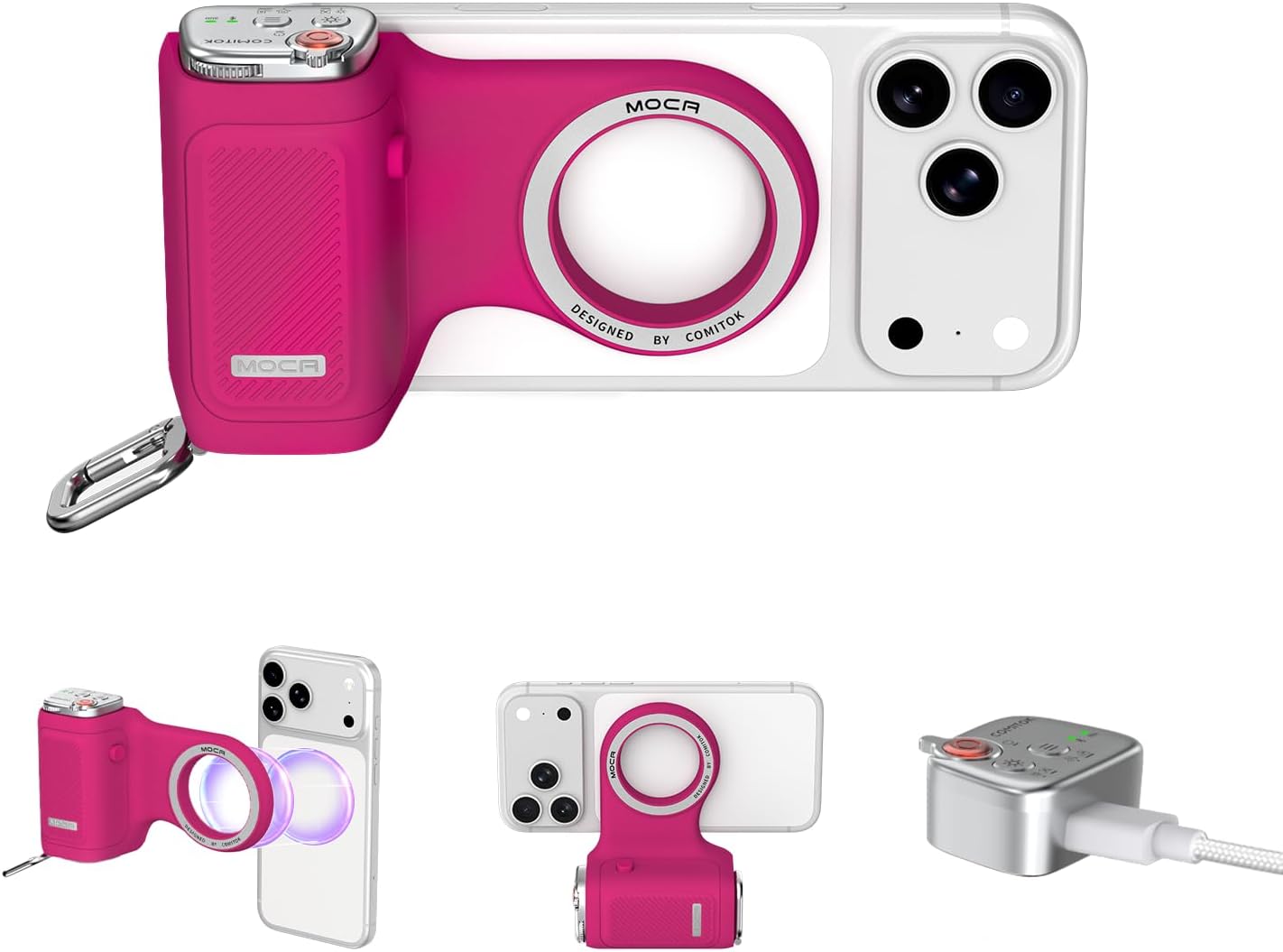
What You Get With the COMITOK MOCA

Opening the package reveals a complete set of physical rigging components and retention accessories intended to secure your smartphone during handheld or stationary shooting sessions. The manufacturer bundles both physical mounting hardware and safety lanyards so you can immediately rig the unit without purchasing secondary adapters.
- COMITOK MOCA primary magnetic camera grip body featuring an integrated 1/4-inch tripod screw thread and silicone exterior.
- Detachable multi-functional Bluetooth remote with dedicated mode switching, lens toggle, focus and exposure adjustment, and independent LED indicators.
- Magnetic plate adapter to facilitate secure magnetic attachment to compatible phone backs and cases.
- USB charging cable for recharging the detachable remote unit.
- Wrist strap designed to guard against accidental drops while navigating busy outdoor locations.
- Lanyard pad accessory to provide additional tethering and wearing options on gear bags or clothing.
- Integrated keychain hook mechanism built directly into the grip chassis for grab-and-go portability.
- Step-by-step handle instruction sticker detailing the required Accessibility configuration settings.
Key Specifications
| Specification | Manufacturer Detail |
|---|---|
| Brand | COMITOK |
| Model Name & Number | MOCA |
| Manufacturer | Shenzhen JX ROBOT Technology Co., Ltd |
| UPC | 795847169996 |
| Color Finish | Fuchsia |
| Primary Materials | Durable, easy-to-clean silicone chassis |
| Operating System Compatibility | Optimized for iOS 26, compatible with iOS 18 and iOS 17 |
| Tripod Interface | Standard 1/4-inch threaded mount |
| Wireless Remote Connection | Detachable Bluetooth camera remote with physical lock button |
| Warranty Coverage | 1 Year limited manufacturer warranty |
Everyday Ergonomics and Handling in the Field
Shooting video clips or tracking fast-moving subjects with a bare smartphone often leads to hand strain, awkward finger placement, and unintentional drops. The COMITOK MOCA addresses this by reshaping the slim profile of modern mobile hardware into an ergonomic form factor modeled after traditional photo gear. Its exterior is wrapped in a durable silicone compound that provides a tactile, non-slip texture without attracting foul odors over time. This makes extended handheld tracking far more comfortable, allowing you to shoot run-and-gun footage or stable vertical clips without having your fingers cramp across thin phone rails. When testing how mobile rigs fit broader phone setups, creators often compare handling ergonomics across various enclosures like an apple iphone 16 promax phone protective housing to see how securely magnetic grips seat on larger panels.
Portability remains a major requirement for travel creators who do not want to carry a bulky camera bag. The grip features a built-in keychain hook that allows you to clip the entire assembly directly to a backpack strap, belt loop, or sling bag when traveling light. Because the silicone housing is easy to wipe down after shooting in dusty, windy, or humid environments, maintenance requires little effort. The lightweight build ensures that keeping the handle attached to your device during a long day of touring does not create noticeable wrist fatigue or make your pocket feel excessively weighed down.
Safety during dynamic movement is reinforced through redundant physical safeguards. COMITOK incorporates an anti-drop remote design alongside an included wrist strap and lanyard pad, giving creators multiple mechanical tether points. When working in crowded festival spaces or leaning over scenic viewpoints, you can keep the wrist strap wrapped around your forearm while gripping the handle. This multi-layered retention system gives you the confidence to shoot aggressive low-angle tracking sweeps or high overhead crowd shots without worrying about dropping expensive mobile electronics onto hard pavement.
Setup and Operating System Requirements
Unlike standard Bluetooth camera shutters that rely on third-party companion apps filled with permissions, account logins, and proprietary interfaces, the COMITOK MOCA functions natively with the default iOS camera application. This design preserves user privacy and ensures that high-resolution computational photography features remain fully operational. However, achieving seamless functionality requires precise initial configuration. The listing specifies that before your initial shooting session, you must perform the comitok moca setup by adjusting your device’s native Accessibility options, following the physical instruction sticker placed directly on the handle body. Skipping this foundational setup will prevent the remote from properly communicating with the camera trigger controls.
Creators running advanced operating system versions need to be aware of specific software toggles detailed by the manufacturer. For users running iOS 26.1 and later revisions, if the handle fails to trigger the primary camera feed immediately, you must navigate manually to your phone Settings, open the Camera submenu, and ensure that the option labeled “Tap to Open Camera from Lock Screen” is switched to the ON position. The manufacturer notes that future builds like iOS 26.2 may provide alternative toggle states for this feature, making it essential to verify your settings if your phone updates. Understanding these system-level quirks guarantees consistent operation in fast-moving production environments.
Once you complete this initial accessibility pairing and lock screen toggle configuration, the hardware functions without additional software intervention. You do not have to wait for external software suites to load, verify cloud licenses, or sync photo rolls before capturing an unexpected spontaneous moment. Whether you routinely swap between recent mobile devices or inspect alternative hardware profiles like an iphone air new ecosystem unit, having an app-free bridge to the native camera simplifies the capture process and eliminates annoying lag when launching the viewfinder.
Detachable Remote Functions and Shutter Controls
The central feature of this iphone 17 pro native camera grip is its multi-functional detachable Bluetooth remote. Rather than limiting you to a single shutter-release trigger, the remote provides direct operational controls that mimic a standalone digital camera. Creators can wake the phone screen and launch the native camera viewfinder instantly with a single press. Once inside the camera app, the remote gives you the ability to cycle through shooting modes, switch between front-facing selfie lenses and rear focal lengths, and make active adjustments to focus and exposure levels. This level of physical control lets you frame and expose shots without smudging your touchscreen glass with oily fingerprints.
Physical retention of the remote module relies on a hybrid system combining magnetic attraction and a mechanical lock. High-strength internal magnets draw the remote into its designated handle recess, while an integrated lock button physically snaps the unit into place to prevent accidental displacement during rapid motion. To detach the remote for wireless operation, you simply press the release lock button and slide the remote free. This dual-action retention ensures that vigorous hand movement, jogging, or stowing the grip inside a packed sling bag will not shake the remote loose, addressing a common failure point seen on budget magnetic accessories.
Operating status is communicated through dedicated visual indicators built into the remote housing. Independent battery and Bluetooth status LEDs show your wireless pairing condition and remaining charge level at a glance, so you never head out into the field with a depleted battery. When working untethered, the detachable Bluetooth camera remote lets solo creators place their phone at a distance for wide-angle group portraits, environmental vlogging, or time-lapse captures while maintaining complete control over shutter activation and focal adjustments from several paces away.
Mounting Options for Tripod and Desktop Workflows
Content creators frequently need to transition between mobile handheld shooting and locked-off tripod framing. The COMITOK MOCA functions as a versatile magsafe camera grip with tripod mount thanks to its integrated 1/4-inch standard female screw thread located at the base of the grip. This industry-standard socket allows you to screw the grip directly onto travel tripods, tabletop mini-pods, monopod extension poles, or articulated articulating arms without needing to remove your phone from the magnetic mount or disassemble the rig. The ability to transition from handheld vlogging to static tripod recording in seconds is a massive operational advantage for solo documentary shooters.
When you are working without a tripod, the flat, weighted base geometry allows the handle to double as an everyday desktop phone stand. It accommodates both vertical portrait orientation for social live streaming, video calls, and short-form video creation, as well as horizontal landscape framing for long-form video monitoring or media playback. The magnetic plate provides enough clamping force to hold the phone securely in both orientations, ensuring your frame does not droop or shift unexpectedly during recording sessions. This dual-axis orientation capability makes it a practical desk accessory even when you are not actively filming content.
This structural adaptability makes the COMITOK MOCA an effective magnetic camera grip for iphone videographers who combine studio desk setups with outdoor field production. If you frequently inspect multi-platform production tools or examine how unconventional devices like a oneplus open foldable phone interact with modular video clamps, having standard 1/4-inch mounting interfaces provides long-term utility across all your mounting plates, quick-release receivers, and mobile filming stands.
Is the COMITOK MOCA Worth It
Deciding whether the COMITOK MOCA is worth it comes down to how you prefer to capture mobile content and how much you value tactile, app-free camera handling. For solo video creators, travel vloggers, and mobile photographers who routinely use the native iOS camera, this accessory offers exceptional utility. The inclusion of physical lens toggles, exposure adjustments, and native shutter controls directly on the grip eliminates the friction of touchscreen navigation. Furthermore, the hybrid magnetic lock prevents the remote from coming loose, while the built-in 1/4-inch tripod thread and desktop stand capabilities make it an all-in-one stabilization solution for field recording and studio desk use.
On the other hand, this accessory may not suit creators who rely exclusively on specialized third-party cinematography apps that map hardware controls to custom software wheels. Because the MOCA is engineered specifically to interface directly with the native iOS camera environment and requires specific accessibility setup steps, users who do not want to configure accessibility permissions or who prefer universal clamp-style grips that accommodate heavy exterior lenses might find its form factor restrictive. Additionally, the bold fuchsia colorway may not align with shooters seeking an understated, matte-black production aesthetic.
Ultimately, the COMITOK MOCA for vlogging and mobile capture delivers tremendous physical convenience for creators using compatible iPhone hardware. It successfully combines comfortable silicone ergonomics, secure remote retention, and standard tripod versatility into an exceptionally portable package. If your goal is to make mobile shooting feel more like operating an authentic dedicated camera without sacrificing the simplicity of the native iOS camera pipeline, this grip represents a smart, functional addition to your everyday gear kit.
FAQ
Does the COMITOK MOCA require a third-party app to operate?
No, the COMITOK MOCA does not require any third-party app or software subscription. It connects via Bluetooth and operates directly with the native iOS camera app on your phone, preserving your privacy and native computational image quality.
What initial setup is needed before using the grip?
You must configure your phone’s native Accessibility settings as outlined on the handle sticker. Additionally, for users on iOS 26.1 and later, you must navigate to Settings, select Camera, and ensure the “Tap to Open Camera from Lock Screen” feature is turned ON if the grip fails to wake the camera feed automatically.
Can the remote control be detached from the handle?
Yes, the remote control is completely detachable for wireless operation. It is secured into the handle using strong internal magnets and an integrated physical lock button, which must be pressed to release the remote for remote shooting.
What tripod mount size does the COMITOK MOCA feature?
The COMITOK MOCA features a standard 1/4-inch female threaded mount at the base of the grip, allowing direct attachment to standard photo tripods, monopods, desktop stands, and extension arms.
Does the grip support both vertical and horizontal phone orientations?
Yes, the magnetic interface supports both portrait orientation for short-form video creation and streaming, as well as landscape orientation for widescreen video recording, desktop media viewing, and tripod capture.
What accessories come included in the box?
The box includes the COMITOK MOCA grip body, the detachable multi-functional remote, a magnetic plate adapter, a USB charging cable, a safety wrist strap, a lanyard pad, and an instruction sticker detailing the initial accessibility setup.


